When I was young, I studied German, History and English at Essen University in Germany. I worked in computer support for several years at the time to help other computer users when they ran into issues.
Writing started out as a passion project, as I wanted to help more users and not just the ones that I handled in support.
This lead to the founding of Ghacks Technology News in 2005. First, as a side-project, but shortly thereafter as a full-time project as the site's popularity exploded.
I sold Ghacks to Softonic some years ago, but stayed on as Editor. You can still read my articles on the site. I do publish on Betanews as well. In recent years, I started to write and publish technology books, including my latest book "Windows 11 From Beginner to Advanced", which is available on Amazon.
I'm also a freelance writer for the German publisher Gamestar.
Chipp.in is my newest project. I want to use it to talk about my book projects, sell my books directly, and write about technology, as this is what interests me.
Another Chromium-based web browser? Samsung has just released the first stable version of its browser for Windows after it launched in Beta in January 2026. The new browser shares the engine with Google Chrome and other Chromium-based browsers, which means that you can expect a similar performance and compatibility.
Samsung’s main intention with the browser is to provide Galaxy-users with a seamless experience between their mobiles and desktop PCs that run Windows. This includes syncing data such as bookmarks or the browsing history between all linked devices, and integrating the password manager Samsung Pass.
It should not come as a surprise that these features need a Samsung account to function at all. However, at the time of writing, the features are limited to the company’s own Galaxy Books series of laptops. More precisely, Galaxy Books 3 to 6 are supported for now. This limits the reach severely.
Samsung has partnered up with Perplexity to drive AI features in the browser. You can expect the usual range, including natural language input for search and the browsing history, the summary of one or multiple webpages, and more.
The AI features are also limited, according to Samsung. Only users from the US and South Korea get the Perplexity-powered AI functions.
Other than that, you may enable an integrated content blocker and get some comfortable features, such as translating webpages.
Since Samsung Browser is Chromium-based, you may install compatible extensions, including from the Chrome Web Store. Installations work exactly as expected: click on the install button and accept the installation prompt to add an extension to Samsung Browser.
Who is Samsung Browser for then? The obvious answer is Samsung Galaxy customers who use one or multiple mobile devices from Samsung and also a Windows PC, preferably one of the Galaxy Books. Everyone else does not really get much out of this, as the main use case — accessing data everywhere — does not apply and because there is not really much in terms of standout features besides that.
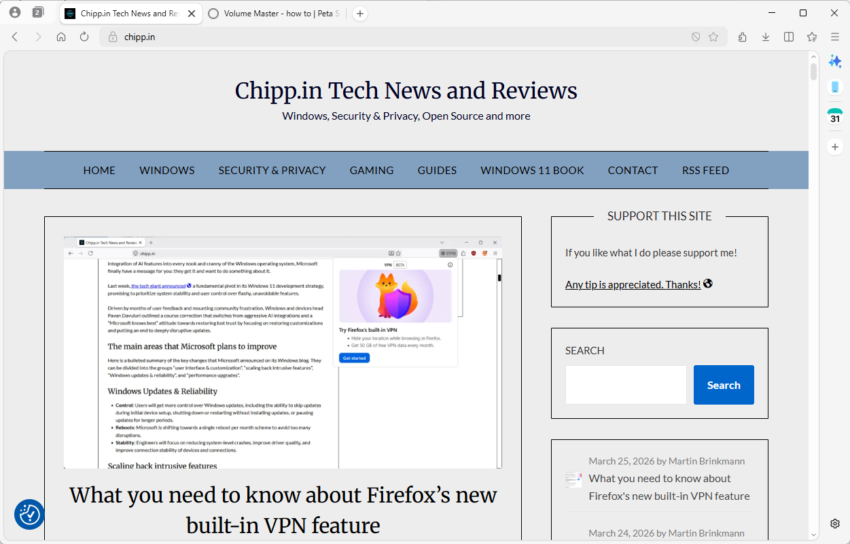
Mozilla published Firefox 149 to the stable channel this week and it comes with a bunch of new features and changes. Besides split-view, which allows users to display two webpages side-by-side in a single browser tab, Mozilla advertises a free built-in VPN as one of the main new features.
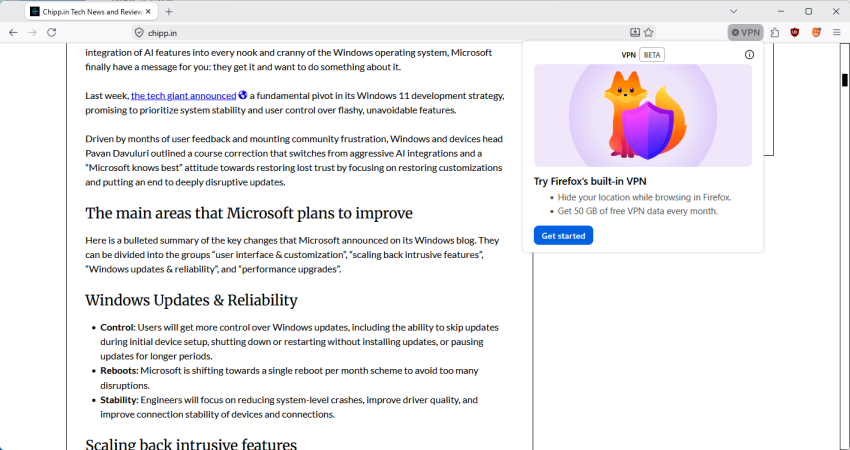
Firefox now offers a free built-in VPN. Whether you’re using public Wi-Fi while traveling, searching for sensitive health information, or shopping for something personal, this feature gives you a simple way to stay protected. Once you sign in and turn it on, you can hide your location and IP address by routing it through a secure proxy while you browse in Firefox. You will get 50 GB of protection every month, with the option to turn it on or off for specific websites. This feature is progressively rolling out in the US, UK, Germany and France starting today.
VPN is a built-in Firefox feature that adds privacy by routing your browser traffic through a secure proxy server and masking your IP address. The feature includes a monthly data limit of 50 GB. Firefox will notify you when you are approaching this limit with a prompt in the browser. It is available to a limited set of users during the initial rollout, starting with Firefox version 149.
The latter is accurate, as it confirms that the solution is actually a secure proxy and not a VPN. Mozilla has likely picked VPN as it is more popular. Microsoft, actually, did the same when it introduced the Secure Network feature in Edge.
The main difference between a secure proxy and a VPN solution is that the integrated proxy only protects data from a single application, in this case Firefox.
Once activated, Firefox will route all traffic through the proxy. This protects the device IP of the user and improves privacy and security.
Mozilla says that Firefox users get 50 gigabytes of free traffic per month. This is ten times the amount that Microsoft gives Edge Secure Network users for free each month.
Another difference between the two solutions is that Mozilla relies on its own partner network for the feature, whereas Microsoft partnered up with Cloudflare.
Mozilla says that it does not log visited websites or “the content of your communications”. It does “collect technical data”, which it says is “needed to provide, maintan, and ensure the performance and stability of the service”. It also collects interaction data to “understand usage of the feature and help guide improvements”.
The feature is rolling out to users in the US, UK, Germany, and France only at the moment. You see a VPN icon in the address bar once it is available. A click displays the option to start using it.
Note: You do need to sign in to a Mozilla account to use the proxy. Once that is out of the way, you can complete the onboarding process. Users who do not want to use it can right-click on the icon to remove it from the toolbar.
Toggle browser.ipprotection.enabled to TRUE on about:config to enable it immediately, or set it to FALSE to disable the feature.
Now You: do you use a proxy or VPN when you are on the Internet?
If you’ve ever cursed at your monitor as a forced reboot hijacked your workday or at the massive integration of AI features into every nook and cranny of the Windows operating system, Microsoft finally have a message for you: they get it and want to do something about it.
Last week, the tech giant announced a fundamental pivot in its Windows 11 development strategy, promising to prioritize system stability and user control over flashy, unavoidable features.
Driven by months of user feedback and mounting community frustration, Windows and devices head Pavan Davuluri outlined a course correction that switches from aggressive AI integrations and a “Microsoft knows best” attitude towards restoring lost trust by focusing on restoring customizations and putting an end to deeply disruptive updates.
The main areas that Microsoft plans to improve
Here is a bulleted summary of the key changes that Microsoft announced on its Windows blog. They can be divided into the groups “user interface & customization”, “scaling back intrusive features”, “Windows updates & reliability”, and “performance upgrades”.
Windows Updates & Reliability
Control: Users will get more control over Windows updates, including the ability to skip updates during initial device setup, shutting down or restarting without installing updates, or pausing updates for longer periods.
Reboots: Microsoft is shifting towards a single reboot per month scheme to avoid too many disruptions.
Stability: Engineers will focus on reducing system-level crashes, improve driver quality, and improve connection stability of devices and connections.
Scaling back intrusive features
AI: Microsoft is reducing Copilot entry points in apps and plans to focus on useful integrations only.
Widgets: Quieter defaults and simpler settings to minimize distractions.
Notifications: System notifications will be reduced.
User interface & customizations
Taskbar: Microsoft plans to restore moving the taskbar to the top and sides of the screen. The compact taskbar is also making a comeback.
Start Menu: The recommended section will be more relevant and get clear options to customize or turn off.
Setup: Microsoft promises quieter and more streamlined initial setups that have fewer pages and require less reboots.
Core performance updates
File Explorer: Microsoft plans to improve File Explorer performance significantly, enable faster copying/moving of large files, improve search, and reduce screen flicker.
Responsiveness: Core apps, including the Start menu, move to WinUI3 to improve latency. Performance will be “more consistent”.
Efficiency: Baseline memory footprint will be reduced.
Closing Words
Ultimate, Microsoft’s announcement reads like a long due apology, without actually apologizing. The true test will lie in the execution. Windows Insiders will be among the first to see some of the quality-of-life improvements that Microsoft promised to deliver, while everyday users may have to wait until the end of year or even longer before the changes land on their systems.
If Pavan Davuluri and his engineering team can truly deliver on a faster, cleaner, and less intrusive operating system over the coming year, Microsoft could regain some of the trust that it lost.
Amazon announced Prime Ultra, a new subscription plan yesterday. It is the new ad-free subscription service that replaces the current option to go ad-free on Prime Video.
To better understand the change, it is necessary to look back at the previous structure.
This meant that every subscriber started to see ads on Prime Video, unless they paid Amazon an extra $3 per month to retain the status quo (ad-free). Amazon removed some features in the ad-powered plan, namely support for Dolby Atmos and Dolby Vision.
What Amazon Prime Ultra changes
Amazon Prime Ultra is the replacement for the ad-free option. It should not come as a surprise therefore that it offers an ad-free experience as well.
For around $5 per month extra, customers get the following extras on top:
100 downloads for offline viewing.
Up to 5 simultaneous streams.
4K UHD.
Dolby Atmos.
As a consequence, Amazon is removing support for 4K and UHD streams from the regular Prime Video subscription. In other words, if you want 4K, you need to pay an extra $5 to retain that option.
Prime customers who pay yearly may also pay yearly for Prime Video Ultra. This costs roughly $46 then per year instead of $60.
Note that Amazon is improving the regular ad-powered Prime Video experience as well (except for removing 4K support). Subscribers get Dolby Vision, 50 downloads instead of 25, and 4 streams instead of 3 under the revised plans.
Closing Words
Amazon is increasing the cost of an ad-free Prime Video experience with the introduction of the Ultra option. To make it appeal more, it decided to move 4K support to the Ultra plan exclusively. Dolby Vision is moved to the regular Prime Video plan while Dolby Atmos remains an exclusive for the add-on.
Is it worth the $20 per month? Considering that other extras are included, including free shipping for many items, it may be worth it for some users, especially if they watch Prime Video regularly and dislike advertisement.
However, 4K video at streaming services is not all that great when you compare it to 4K discs or downloaded 4K video files. The reason is simple: video streaming services use compression heavily.
The new Ultra plan launches in the United States only. Whether it is coming to other regions remains to be seen, but there is a good chance that Amazon will introduce it globally eventually.
Microsoft confirmed a new Windows issue on March 12th, 2026 that prevents access to files on the main c: drive of the system and blocks certain applications from launching.
The issue affects certain Samsung devices that run Windows and have installed the February 2026 security updates or newer updates for Windows 11, version 24H2 or 25H2 systems.
Here are the details:
Affected Windows versions: Windows 11, version 24H2 and 25H2
Affected users may get the error message “C:\ is not accessible – Access denied” after installation of the update on affected devices. This prevents access to files on the drive and will also block some applications from launching. Microsoft mentions Outlook, Office apps, web browsers and system utilities specifically.
The problems do not require specific user actions. They occur during common actions, such as trying to access files, starting programs, or performing administrative tasks. Furthermore, users may also be blocked from elevating privileges, uninstalling, updates, or collecting logs due to permission failures.
Microsoft says that it is investigating the issue and that it suspects that the Samsung Share application is causing the issue. There is no workaround at the time of writing, but uninstalling the update — if possible — may resolve the issue. However, this leaves the system open for potential attacks, as it won’t have the February and March 2026 security issues patched anymore.
Affected users and administrators may want to keep an eye on the Windows 11 release information page. Microsoft will update the page when it has a workaround or a solution.
It is this time of the week again. Google has just released a security update for its Chrome web browser to patch two security issues with known attacks in the wild.
The update, which is available for Chrome on all desktop platforms and for Android, addresses two security issues. Google rates both with a severity rating of high.
The first issue is an out of bounds write in Skia, the specialized 2D graphics engine that is responsible for nearly everything that you see on the screen. It draws shapes, renders text, or displays images.
The second vulnerability is an inappropriate implementation in V8, another core component of all Chromium-based browsers. It is Google’s open source JavaScript and WebAssembly engine.
Google writes:
[N/A][491421267] High CVE-2026-3909: Out of bounds write in Skia. Reported by Google on 2026-03-10
[N/A][491410818] High CVE-2026-3910: Inappropriate implementation in V8. Reported by Google on 2026-03-10
Google is aware that exploits for both CVE-2026-3909 & CVE-2026-3910 exist in the wild.
Most unmanaged Chrome installations should receive the update automatically. You can speed it up by loading chrome://settings/help, if Chrome is open. Windows users may also run winget upgrade google.chrome.exe from the command line to upgrade the browser without opening it.
Expect upgrades for other Chromium-based browsers in the coming hours and days as well, as all use the very same components.
How much time do you spend browsing streaming services in search of content per year? The average American, apparently, spends about 110 hours per year doing that.
Five days per year to decide what to watch? Browsing streaming services can be a frustrating experience for a number of reasons. From bad design and distractions to duplicate listings and categorization that does not make much sense.
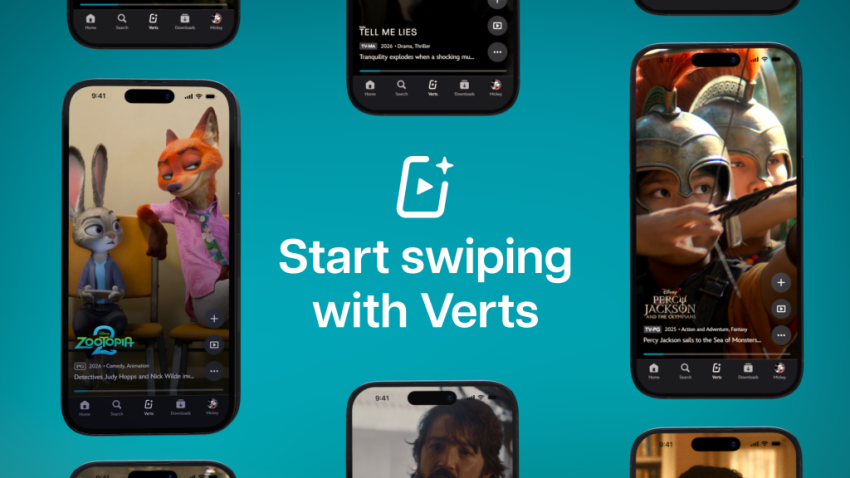
If you now thought the answer would be improving the design of the apps and website, you are sadly mistaken. Disney+ just launched Verts in the United States. It is a short-format vertical video feed designed for the TikTok and Tinder-age.
Watch a quick click and swipe to either dismiss the content, start watching right away, or add it to the list of favorites. Repeat the swiping until you found something to watch.
Instead of browsing a never-ending stream of TV show and movie thumbnails, Disney+ users may now use that format to find something to watch.
Disney writes:
With a tap of the new Verts icon in the navigation bar on mobile, users enter a vertical video feed and can swipe through a stream of scenes and moments from movies and shows on Disney+, and seamlessly add to their Watchlist or jump directly into playback.
This, according to Disney, is making it easier for subscribers to find new content to watch and explore the catalog of shows and movies in a different, modern, way.
Instead of browsing the endless stream of thumbnails, subscribers may now browse a never-ending stream of short clips instead. Whether that is really going to reduce the hours per year spend browsing catalogs remains to be seen. Might do it for the TikTok-generation more than any other. Probably only a matter of time before other content, including ads, are appearing in the feed as well.
No one has seen that development coming. After announcing the end of support for its Firefox web browser for Windows 7, 8 and 8.1 starting in February 2026, Mozilla seems to have had a change of heart.
Now, the organization says that it is extending support once again. The information has been published on its What Train Is It Now website, which lists the latest and upcoming Firefox releases.
There, Mozilla writes:
We have decided to extend support to ESR 115 only on Windows 7-8.1 and macOS 10.12-10.14 up to August 2026. We will re-evaluate this decision in July 2026 and announce any updates on ESR 115’s end-of-life then.
Support for Firefox on Windows 7, 8, 8.1 and the macOS versions 10.12, 10.13, and 10.14, is guaranteed until at least August 2026. At least? Yes, as Mozilla may extend support again. In either way, the organization will make an announcement in July 2026 regarding the web browser’s support on the older operating systems.
Firefox 115.x users on these operating systems should receive browser updates, only security fixes and critical bug fixes, as usually via the integrated updating system.
The extension gives users on these old systems access to one of the major browsers, as the other major browser makers, including Google and Microsoft, have stopped supporting the older operating systems for a long time already.
Security updates are guaranteed for another six months at the very least. Good move by Mozilla.
If February 2026 was the sprint, March is a marathon of essential infrastructure updates.
Microsoft’s third Patch Tuesday of 2026 has arrived, addressing 84 vulnerabilities in total. While the total count is typical, the release demands close attention: it contains two publicly disclosed zero-day vulnerabilities and eight critical flaws affecting a wide range of enterprise products, including SQL Server, Office, and Azure components.
Here is the breakdown of what you need to know, what to patch first, and what might break.
Key Action Item: Administrators must prioritize database and application servers due to the SQL Server elevation of privilege flaw and the .NET denial of service vulnerability. Simultaneously, ensure Office updates are deployed to workstations to prevent potential zero-click remote code execution via the Preview Pane.
Important Patches
CVE-2026-21262 — Microsoft SQL Server Elevation of Privilege Vulnerability
Security updates. Includes a GPU stability fix and Secure Boot updates.
Deep Dive: The Critical Vulnerabilities
Microsoft confirmed two publicly disclosed zero-day vulnerabilities are fixed this month. Furthermore, Microsoft fixed several critical remote code execution (RCE) and elevation of privilege (EoP) flaws.
Attackers may exploit the issues on systems that have not been patched to bypass protections, elevate privileges, or execute malicious payloads remotely.
Here is the critical overview:
CVE-2026-21262 (Microsoft SQL Server Elevation of Privilege)
This publicly disclosed zero-day allows an authorized attacker to elevate privileges over a network. Due to improper access control, a logged-in user can quietly elevate to become a full database administrator (sysadmin). With that level of control, they can read, modify, or delete data without user interaction.
CVE-2026-26127 (.NET Denial of Service)
The second publicly disclosed zero-day is an out-of-bounds read flaw in the .NET platform (versions 9.0 and 10.0). It allows an unauthenticated remote attacker to crash .NET applications over the network, resulting in a denial of service for any app running on the affected runtime libraries.
CVE-2026-21536 (Microsoft Devices Pricing Program Remote Code Execution)
Scoring a critical 9.8 out of 10 on the CVSS scale, this is the most severe flaw of the month. It allows remote attackers to execute arbitrary code over the network without privileges or user interaction. Notably, this flaw was discovered by an autonomous AI penetration testing agent. Microsoft notes that the vulnerability has been fully mitigated on their end, requiring no direct action from users.
These type confusion and untrusted pointer dereference flaws in Microsoft Office enable remote code execution when malicious files are processed. They are particularly dangerous because they can potentially allow zero-click exploitation if a user simply views a booby-trapped document in the Outlook Preview Pane.
CVE-2026-25187 (Windows Winlogon Elevation of Privilege)
Discovered by Google Project Zero, this vulnerability leverages improper link resolution in the Winlogon process. A locally authenticated attacker with low privileges could exploit a link-following condition to effortlessly escalate to SYSTEM privileges.
Significant Changes in the March 2026 updates
Sysmon is now built-in: Previously a manual download from Sysinternals, Sysmon is now included as a native component in Windows 11 for better security auditing and monitoring of malicious activity.
Quick Machine Recovery (QMR) expansion: QMR is now turned on automatically on more hardware. This feature allows administrators to revert endpoints to a working state if a disastrous third-party update takes down the system.
RSAT on Arm64: Remote Server Administration Tools are finally supported on Windows 11 Arm64 devices, allowing administrators to manage Windows Server environments directly from Arm-powered PCs.
First Steps: Your Patch Tuesday Strategy
Prioritize the zero-days: Map your exposure and prioritize the two zero-day vulnerabilities, focusing heavily on SQL Server environments and .NET application servers.
Update Office installations: Deploy Microsoft Office updates to all workstations immediately to mitigate the risk of zero-click remote code execution via the Preview Pane.
Prepare for Secure Boot changes: Ensure your enterprise environment allows the new Secure Boot allowed Key Exchange Key (KEK) updates to install properly to avoid boot issues in the coming months.
Secure Boot is a key security feature of PCs that is ensuring that only trusted, digitally signed software can load before the Windows operating starts. It uses a chain of trust using cryptographic certificates.
Microsoft issued the original Secure Boot certificates in 2011. Nearly every PC since 2012 has these certificates.
The problem: The certificates are set to expire in 2026. Some will expire in June 2026, others in October 2026.
The solution: To prevent Secure Boot disruptions, Microsoft is exchanging certificates.
What happens if the certificates are not exchanged?
Good news is that the PC won’s break or fail to boot when that happens. In fact, for most users, the PC will act and behave just like before. Windows will boot, apps will launch, and they can use their PC just like before.
The only limitation in that case is that Secure Boot can’t be updated anymore. This means that the official blocklist won’t update anymore to stop known malware or bootkits, can’t receive new features or fixes.
The expiring and new Secure Boot keys
Expiring 2011 Certificate
New 2023 Replacement
Purpose
Microsoft Corporation KEK CA 2011
Microsoft Corporation KEK 2K CA 2023
Gives Windows the authority to update the Signature Database (DB) and the blocklist (DBX).
Microsoft Windows Production PCA 2011
Windows UEFI CA 2023
Signs the actual Windows bootloader so the OS is allowed to start.
Microsoft Corporation UEFI CA 2011
Microsoft UEFI CA 2023
Signs third-party bootloaders (like Linux) and EFI applications.
Most Windows users on unmanaged PCs won’t have to do anything. The update is pushed via Windows Update and it will happen automatically in the background. A restart of the PC is required, but that is about it.
Microsoft begins with PCs that are “deemed highly compatible” first. This is the same distribution strategy that Microsoft uses for pushing out new feature or major updates to home and consumer PCs.
Here is how you can find out if the update is installed:
Open the Start menu.
Type Powershell.
Select “Run as administrator”.
Confirm the security prompt.
Type Confirm-SecureBootUEFI and press the Enter-key.
True means that Secure Boot is active.
False means that Secure Boot is turned off.
If True is returned, run the command ([System.Text.Encoding]::ASCII.GetString((Get-SecureBootUEFI db).bytes) -match ‘Windows UEFI CA 2023’).
True means that the update is fully installed.
False means that the update is not yet installed, the 2011 keys are still used.