Chipp.in Tech News and Reviews

Windows, Security & Privacy, Open Source and more

Menu
  • Home
  • Windows
  • Security & Privacy
  • Gaming
  • Guides
  • Windows 11 Book
  • Contact
  • RSS Feed
Menu

Category: Security & Privacy

Brave is getting Container support and the feature has made a big jump recently

Posted on April 14, 2026April 14, 2026 by Martin Brinkmann

Firefox fans have long heralded the browser’s Multi-Account Containers feature as an exclusive that users of Chromium-based browsers did not have. Soon, Brave Brower users may also make use of a Containers feature, ending Firefox’s exclusivity.

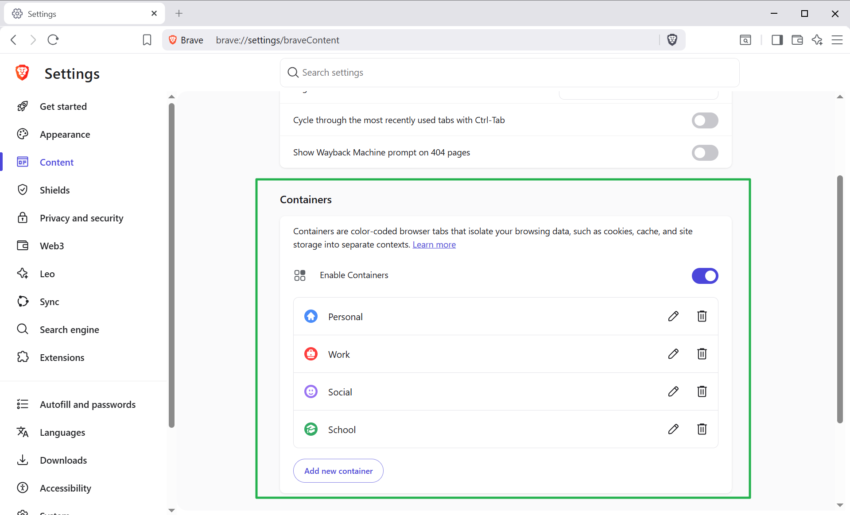
Brave has begun rolling out native Container support as an experimental flag in its desktop browser as of April 2026. It allows users of the browser to isolate web sessions better and even get options to open multiple accounts of the same site in a single browser window without using clunky workarounds or third-party extensions.

The Core Concept: Session Isolation

At its core, the Containers feature creates isolated islands within a single browser window. Each container acts as a separate, sandboxed environment. Data, including cookies, local storage, or cached files, can’t be seen or accessed by tabs in another container or by the default container-less environment.

Since data is sandboxed, it is possible to sign-in to the same site in different containers in the same browser window using a single profile, or to open a site with an account and without one at the same time. Furthermore, since data is separate, tracking becomes less effective as the trackers can only see what is going on in a single container and not the entire browser.

Containers works with tab groups and all core features of the browser, including browser extensions.

The feature is available in Brave Nightly only at the time. You need to load brave://flags, search for Enable Containers, and toggle the feature to Enabled to start using it. A restart of the browser is required as usual before it becomes available.

Since this feature is in Nightly, it may have bugs and may not be as polished as the stable version that Brave Software plans to ship in a later version of the browser.

WhatsApp is rolling out long-overdue username privacy feature

Posted on April 9, 2026April 9, 2026 by Martin Brinkmann

If you use the popular messaging service WhatsApp, you know that you can only add contacts to the service with a phone number. Don’t have the number registered to a WhatsApp account? Then you can’t add the contact to the app.

Clearly, having to share your phone number is not always a good idea. While you may not have any issues sharing it with close friends or family, giving it to others is another matter.

It is a privacy and security issue. Other messengers support usernames, which do not reveal critical information to a third-party.

WhatsApp started to work on usernames about three years ago, but the Meta-owned app is just about to start rolling the feature out to a first batch of users, reports WABetaInfo.

You can add a username in the settings. Once you do, you may share the username with others to get them to add you to the messenger. Good news is that you can further protect the username with a code, which others need to provide when they try to add you.

However, there are quite a few limitations regarding usernames. Here are noteworthy ones:

  • The username can be between 3 and 23 characters in length.
  • It needs to start with a letter, and can only contain letters, numbers, underscore, and a period.
  • It can’t be a domain name or start with www.
  • It can’t be taken, if someone on Instagram or Facebook picked it already. The user who picked it can get it on WhatsApp.

Support for usernames is a welcome addition. While some Internet users prefer to use other messaging clients, those who offer more privacy, WhatsApp’s users will certainly benefit from the feature.

No official ETA or confirmation by Meta at this point though. Might take months or even longer before the feature lands for most users.

Report: Windows has a new 0-day vulnerability called BlueHammer

Posted on April 7, 2026April 7, 2026 by Martin Brinkmann

The next Windows Patch Day is just a week away and it is unclear whether it will include a fix for a recently disclosed 0-day vulnerability.

The new security vulnerability has been disclosed on GitHub, including proof of concept code to exploit the issue. However, there is no explanation how the issue works.

Well-known security researcher Will Dormann commented on the issue and confirmed that it is working. He admitted that it “may not be 100%” reliable though. It seems that frustration with MSRC, the Microsoft Security Research Center, and how it operates, was the reason for the public disclosure of the vulnerability. Whether that is true or not can’t be verified though.

So, what do we know about the vulnerability so far?

  • What it is: “BlueHammer” is an unpatched zero-day Local Privilege Escalation (LPE) vulnerability affecting Microsoft Windows.
  • Impact: It allows a local attacker with limited, low-level user access to escalate their permissions to SYSTEM or elevated administrator rights. This effectively grants the attacker full control over the compromised machine.
  • Current Status: Microsoft has not yet released an official patch or mitigation, making it a true zero-day.

Security experts (such as Will Dormann) describe it as a flaw that combines a TOCTOU (Time-of-Check to Time-of-Use) vulnerability with path confusion. At a high level, it appears to weaponize Windows Defender-related interfaces (the leaked source code contains files like windefend.idl and windefend_c.c). By bypassing the system’s original validation, a local attacker can gain access to the Security Account Manager (SAM) database, which stores local account password hashes, ultimately allowing them to spawn SYSTEM-level shells.

Good news is that the flaw is a local privilege escalation, which means that attackers can’t exploit it to hack into Windows PCs remotely. However, if they were to gain access to a Windows system, they could use it to expand access or even take over a system completely.

Would you trust AI to handle your email inbox?

Posted on April 2, 2026April 2, 2026 by Martin Brinkmann

It was inevitable. Google is rolling out new AI functionality on its Gmail service to personal Google accounts. Called AI Inbox, it is designed to “help you manage a busy inbox”, says Google.

What that means? AI is scanning emails to identify the ones that require immediate attention. The feature has its own entry point on Gmail. When you activate AI Inbox, you get two different sections:

  • Suggested To-dos: Here, the AI lists incoming emails that need your immediate attention or action. High-priority tasks are identified and the AI explains to you in bold, what you need to do.
  • Catch-up Topics: This offers summaries of “important updates across projects and topics”, especially if they are scattered in different email threads or unrelated emails.

Google is limiting the feature currently to English-language users from the United States who are subscribed to Google AI Ultra, which costs 275 Euros per month currently (three month 50 percent introductory offer may be available).

You also need to enable smart features in Gmail to make use of it. Smart Features refers to a bundle of features, including translations, Smart Compose, or personalized search.

The Pros and Cons of letting AI handle your inbox

While there are certain pros to letting AI handle your email inbox, such as saving time, prioritization, or tone and grammar help, there are significant downsides.

Besides privacy and security concerns, there is the risk of missing important emails or of costly mistakes that the AI may make when it starts to hallucinate.

Privacy aside, the best way for users who want to make use of AI to tame their inbox is to use it as a helper, not the ultimate tool on autopilot. This is true for most AI solutions and services nowadays: you always have to verify that the AI did not miss something or introduced something that should not be there or that does not exist in the first place.

Would I use AI Inbox? I would not and the reason could not be simpler: I have no desire to give AI access to my emails because of privacy. Add a medium-sized inbox to that, and I do not have a need for any AI functionality at the time of writing.

I can see AI Inbox as a useful addition in certain cases, for instance, when so many emails arrive in an inbox that humans can’t keep anymore or when someone needs AI because of a packed day and little time to manage emails.

What is your take on this? Would you use AI features on Gmail or your email service? Or do you plant to stay away from them?

What you need to know about Firefox’s new built-in VPN feature

Posted on March 25, 2026 by Martin Brinkmann

Mozilla published Firefox 149 to the stable channel this week and it comes with a bunch of new features and changes. Besides split-view, which allows users to display two webpages side-by-side in a single browser tab, Mozilla advertises a free built-in VPN as one of the main new features.

Mozilla describes the feature in the following way:

Firefox now offers a free built-in VPN. Whether you’re using public Wi-Fi while traveling, searching for sensitive health information, or shopping for something personal, this feature gives you a simple way to stay protected. Once you sign in and turn it on, you can hide your location and IP address by routing it through a secure proxy while you browse in Firefox. You will get 50 GB of protection every month, with the option to turn it on or off for specific websites. This feature is progressively rolling out in the US, UK, Germany and France starting today.

The paragraph is different when you check out the linked support page:

VPN is a built-in Firefox feature that adds privacy by routing your browser traffic through a secure proxy server and masking your IP address. The feature includes a monthly data limit of 50 GB. Firefox will notify you when you are approaching this limit with a prompt in the browser. It is available to a limited set of users during the initial rollout, starting with Firefox version 149.

The latter is accurate, as it confirms that the solution is actually a secure proxy and not a VPN. Mozilla has likely picked VPN as it is more popular. Microsoft, actually, did the same when it introduced the Secure Network feature in Edge.

The main difference between a secure proxy and a VPN solution is that the integrated proxy only protects data from a single application, in this case Firefox.

Once activated, Firefox will route all traffic through the proxy. This protects the device IP of the user and improves privacy and security.

Mozilla says that Firefox users get 50 gigabytes of free traffic per month. This is ten times the amount that Microsoft gives Edge Secure Network users for free each month.

Another difference between the two solutions is that Mozilla relies on its own partner network for the feature, whereas Microsoft partnered up with Cloudflare.

Mozilla says that it does not log visited websites or “the content of your communications”. It does “collect technical data”, which it says is “needed to provide, maintan, and ensure the performance and stability of the service”. It also collects interaction data to “understand usage of the feature and help guide improvements”.

The feature is rolling out to users in the US, UK, Germany, and France only at the moment. You see a VPN icon in the address bar once it is available. A click displays the option to start using it.

Note: You do need to sign in to a Mozilla account to use the proxy. Once that is out of the way, you can complete the onboarding process. Users who do not want to use it can right-click on the icon to remove it from the toolbar.

Toggle browser.ipprotection.enabled to TRUE on about:config to enable it immediately, or set it to FALSE to disable the feature.

Now You: do you use a proxy or VPN when you are on the Internet?

Google Chrome 146: Security update fixes two vulnerabilities that are already exploited

Posted on March 13, 2026March 13, 2026 by Martin Brinkmann

It is this time of the week again. Google has just released a security update for its Chrome web browser to patch two security issues with known attacks in the wild.

The update, which is available for Chrome on all desktop platforms and for Android, addresses two security issues. Google rates both with a severity rating of high.

The first issue is an out of bounds write in Skia, the specialized 2D graphics engine that is responsible for nearly everything that you see on the screen. It draws shapes, renders text, or displays images.

The second vulnerability is an inappropriate implementation in V8, another core component of all Chromium-based browsers. It is Google’s open source JavaScript and WebAssembly engine.

Google writes:

[N/A][491421267] High CVE-2026-3909: Out of bounds write in Skia. Reported by Google on 2026-03-10

[N/A][491410818] High CVE-2026-3910: Inappropriate implementation in V8. Reported by Google on 2026-03-10

Google is aware that exploits for both CVE-2026-3909 & CVE-2026-3910 exist in the wild.

Most unmanaged Chrome installations should receive the update automatically. You can speed it up by loading chrome://settings/help, if Chrome is open. Windows users may also run winget upgrade google.chrome.exe from the command line to upgrade the browser without opening it.

Expect upgrades for other Chromium-based browsers in the coming hours and days as well, as all use the very same components.

KeePass 2.61 is out: here is what is new

Posted on March 5, 2026March 5, 2026 by Martin Brinkmann

You probably know that KeePass is still my favorite password manager and that I do not save passwords in a browser or cloud-based location. It is a free Windows-based local password manager that does not restrict passwords and can be extend easily thanks to its open system. Other developers have created apps for all kinds of operating systems.

KeePass 2.61 is the latest version that got released earlier today. The new version adds new features and improvements, including several that make the password manager more versatile or secure.

As always, while you can configure KeePass to inform you about updates, you do need to download the new version from the developer website manually, as it does not include automatic update functionality. The new version should upgrade without any issues.

The main improvements of KeePass 2.61

One of the main improvements is update-related. Checks for new updates are now performed before a database is opened. Furthermore, if the master key prompt is opened, it will now also indicate that an update is available with an icon. You can toggle the feature under Options > Advanced.

The built-in one-time password generation capabilities have received several changes:

  • White-space characters are now automatically removed when pasting shared secrets, if the encoding is Base16/Hex, Base32 or Base64.
  • New buttons in the one-time password generator to copy the passwords to the clipboard.
  • The settings dialog supports displaying history entries now.

Other than that, you get improved saving of active databases to local files, multi-location/file synchronization options, and multiple attempts at entering the master key when a database is exported. Previously, users had to re-open the option to try again if the master password was incorrect.

The changelog lists a solid number of improvements next to that, which are mostly minor changes. One of the main changes is that searches are now more tolerant by default in almost any location. You can check the full list on the linked at the top.

Ultimately, KeePass 2.61 doesn’t try to fix what isn’t broken; instead, it polishes the edges of a tool built for those who value total sovereignty over their digital keys.

The March 2026 Android Security update is here and you should install it asap (if you can)

Posted on March 4, 2026March 4, 2026 by Martin Brinkmann

Google released this month’s big security update for Android. It fixes a total of 129 vulnerabilities, including one that is actively exploited in the wild.

As is the case with these updates, they are not published immediately to all Android devices. Pixel devices do get them first, usually, before other manufacturers start pushing them out. Even then, your device may not receive them for weeks or even months, depending on how the manufacturer handles these updates.

Google describes the most severe of the patched issues in the following way:

The most severe of these issues is a critical security vulnerability in the System component that could lead to remote code execution with no additional execution privileges needed. User interaction is not needed for exploitation.

The vulnerability affects more than 200 different Qualcomm chips and has the identifier CVE-2026-21385.

Google does not reveal how the vulnerability is exploited in the wild, but it says that it is aware of “limited, targeted exploitation” of the issue. Users should exercise caution on devices without the March 2026 patch update.

You can check the full list of patches here. Check your manufacturer’s support website to find out when your device may be getting the update. Samsung users, for instance, find the full listing on the Samsung Mobile website.

Password

Research: It appears that AI is very bad at generating secure passwords

Posted on February 23, 2026February 23, 2026 by Martin Brinkmann

If you can’t come up with a secure password by yourself — and don’t use a password manager for that task (which most should) — then you may have come up with the idea of asking AI to give you a hand in generating secure passwords.

Cybersecurity firm Irregular published research on how that turned out for them during tests, and the result is anything but pretty.

When it asked large language models such as Claude, Gemini or GPT to generate secure passwords, it found “predictable patterns in password characters, repeated passwords, and passwords that are much weaker than they seem”.

While individual 16 character passwords looked strong, the researchers soon discovered that generating passwords multiple times would reveal the weaknesses of the approach.

Take Claude Opus 4.6 for example. When asked to generate 50 passwords, the researchers discovered several noticeable patterns:

  • Of the 50 passwords, only 30 were unique. One password was repeated 18 times.
  • All passwords started with a latter, usually uppercase G,, almost always followed by the digit 7.
  • Character choice was very uneven, with some appearing in nearly all passwords and others rarely.
  • No repeating passwords in any of the generated passwords.

ChatGPT did not fare much better. It created passwords with strong similarities. Most passwords started with the uppercase letter V, almost half continued with an uppercase Q.

Passwords generated by Gemini showed clear patterns as well. Almost half the passwords started with uppercase K or lowercase k,, usually followed by one of the characters #,, P or 9.

All AIs tested generated predictable passwords, which make it easier for attackers to brute force them. The researchers conclude that “people and coding agents shouild not rely on LLMs to generate passwords”.

Passwords generated through direct LLM output are fundamentally weak, and this is unfixable by prompting or temperature adjustments: LLMs are optimized to produce predictable, plausible outputs, which is incompatible with secure password generation.

Conclusion

Most computer users may want to stick to password managers as the go-to apps when it comes to generating strong passwords. There are free and paid solutions, local and cloud-based, something for every use case out there.

No Login? No Problem: 5 Google Maps Alternatives That Respect Your Privacy

Posted on February 19, 2026February 19, 2026 by Martin Brinkmann

If you have used Google Maps until now without a Google account, then you may have noticed that something is off in the past couple of days.

When I launched Google Maps today in Firefox, I immediately noticed that Google was limiting information. Listings did not include user reviews anymore among other things, and Google displayed a disheartening “You’re seeing a limited view of Google Maps” and “Get the most out of Google Maps. Sign In” message at the bottom of each listing I opened.

It appears that Google is limited access for anonymous users. While you can still look up listings, use route planning, and get ads, you won’t get what some what say is the most vital information on Google Maps: user reviews.

Read Also: Google Maps is getting a new feature that you either love or dislike

Five Google Maps Alternatives

While you could sign-in to a Google account to restore full access, some may prefer switching to a different service entirely.

Here are five good alternatives that you could try:

  • Organic Maps — Organic Maps is widely considered the “gold standard” for privacy-conscious users. It is a fork of the original Maps.me, created by the original developers who wanted to strip out all the trackers and bloatware.
  • Magic Earth — If you miss Google Maps’ real-time traffic alerts and lane guidance, Magic Earth is your best bet. It manages to offer advanced “smart” features while remaining strictly no-profile.
  • OsmAnd — OsmAnd is the most feature-dense mapping app available. It’s not just a map; it’s a professional-grade geographic tool.
  • Apple Maps — In mid-2024, Apple finally brought Apple Maps to the web (currently in beta). Unlike Google, Apple’s web version actually functions better without a login, as it currently doesn’t even support signing in to an Apple ID on the browser.
  • DuckDuckGo Maps — If you are looking for the most seamless “Google Maps-like” experience in a web browser without ever being asked to sign in, DuckDuckGo is the winner. It uses Apple Maps’ MapKit JS framework, giving you high-quality visuals without the data-tracking baggage.

There are also regional apps and maps that sometimes offer better information and services than Google Maps. Kakaomap, for example, is seen as the superior app in almost any area, if you are in Korea.

Now You: do you use a map app or service? Any app that you can recommend?

  • 1
  • 2
  • 3
  • 4
  • …
  • 13
  • Next

Support This Site

If you like what I do please support me!

Any tip is appreciated. Thanks!
  • April 16, 2026 by Martin Brinkmann Windows 11 Context Menu Manager: remove items with a click
  • April 15, 2026 by Martin Brinkmann One Exploited Zero-Day and Record Numbers: The April 2026 Windows Patch Tuesday Breakdown
  • April 14, 2026 by Martin Brinkmann Brave is getting Container support and the feature has made a big jump recently
  • April 13, 2026 by Martin Brinkmann A More User-Friendly Way to Pause Windows 11 Updates is Coming
  • April 11, 2026 by Martin Brinkmann Microsoft is Radically Changing the Windows Insider Program

About

We talk, write and dream about Technology 24/7 here at Chipp.in. The site, created by Martin Brinkmann in 2023, focuses on well-researched tech news, reviews, guides, help and more.

Legal Notice

Our commitment

Many websites write about tech, but chipp.in is special in several ways. All of our guides are unique, and we will never just rehash news that you find elsewhere.

Read the About page for additional information on the site and its founder and author.

Support Us

We don't run advertisement on this site that tracks users. If you see ads, they are static links. Ads, including affiliate links, never affect our writing on this site.

Here is a link to our privacy policy

©2026 Chipp.in Tech News and Reviews