If you use the official Weather app for Windows, you may have noticed that it is quite hungry when it comes to memory. The app uses between 500 and 600 megabytes right when you open it.
This goes down a bit when it is in the background and up again when you use it actively. Some features, like the weather radar, may shot up RAM usage to 1 gigabyte or more.
Still, even at idle, using hundreds of megabytes of RAM suggests that the app is anything but optimized.
Windows users who want a weather app but prefer one that does not use as much RAM, may want to look at third-party solutions that offer just that and often much more.
Here are a few suggestions:
Fluent Weather: uses less than 60 megabytes, is open source, has no ads or tracking, lacks some of the advanced features, such as the weather radar or adding locations to the favorites.
Skyline Weather: open source Windows store app, supports multiple locations, uses about 50 megabytes.
TrayWeather: open source app, displays weather information in the system tray, less than 30 megabytes of RAM usage.
WeatherWidget: another standalone open source app that displays weather information for up to five locations. Less than 30 megabytes of RAM usage.
While all lack some of the advanced features of the native Windows app, all use a fraction of the RAM of the official app.
If you run a recent version of Windows 11 on your PC you may have noticed — or not — that Microsoft installed a new application automatically on the device. Called OneDrive Photos, it brings OneDrive’s gallery view to the operating system. To make things worse, reports suggest that Microsoft is pushing the app to non-managed and managed devices.
As always, Microsoft has not confirmed any of that at the time. However, there are multiple reports on sites like Reddit that confirm the installation of the app on devices. Some Windows administrators have created scripts that remove the app from devices, which shows up as Beta for some.
To make matters even worse, it seems that the app installs itself again after it has been removed. Windows Latest suggests that it is linked to the synchronization of OneDrive, but this has not been confirmed yet.
You can check in Settings > Apps whether the extra OneDrive app is installed, or use other means, such as winget to find out. You could also check the following two locations for the actual app that Microsoft pushed to the system:
So what can you do about it? If you do not use OneDrive, you could remove the app entirely and be done with it. If you do, you might be able to replace it with a dummy file in the directory and write protect it. I did not test this, as I’m still running Windows 10 on my main PC.
Just when you thought that Microsoft might have finally understood what users want, it is falling back to old habits. Seems the company never really learns.
It took Microsoft five years to correct a course that it set when it released the Windows 11 operating system. Back then, Microsoft more or less crippled the taskbar functionality by limiting it to the bottom. Users who were used to displaying the taskbar at the sides or top were left with little options, other than relying on working but sometimes unstable third-party solutions.
This year, Microsoft revealed plans to do better. To focus on quality and to a degree what users of the operating system really want. Turns out, it is not really more AI, but a stable system that gives them the freedom to do whatever they please.
After launching taskbar improvements in the experimental Insider channel earlier this year, Microsoft has now moved the improvements to the beta channel.
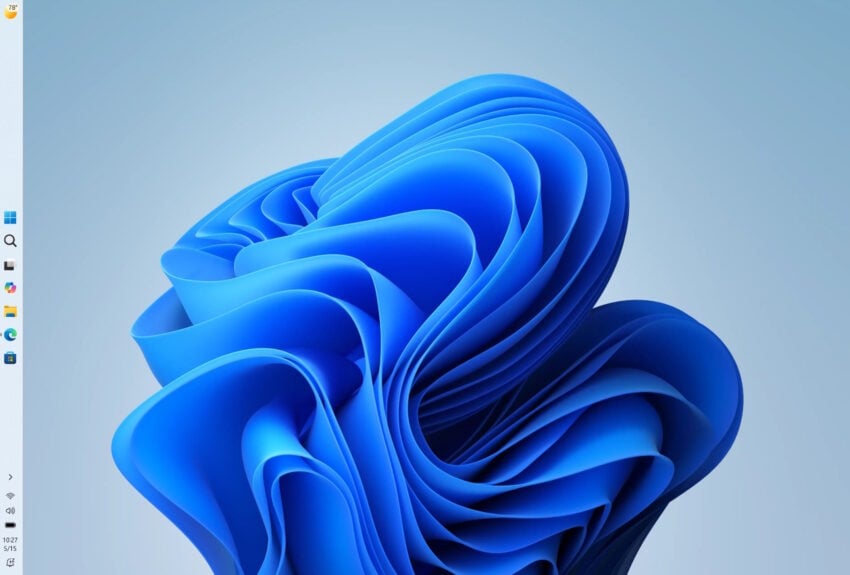
The changes allow Windows 11 users to move the taskbar to any edge of the screen, just like it was the case on Windows 10 and earlier versions of Windows. Furthermore, Microsoft is introducing an option to free up more space by changing the taskbar’s size to compact mode.
Microsoft writes:
You can now change the position of taskbar on your screen. In Settings > Personalization > Taskbar > Taskbar Behaviors, you can select the side of the screen you want your taskbar on: bottom, top, left, or right. In these other positions, tooltips, flyouts, and animations will still come from the taskbar, and most customization settings like never combine taskbar icons will work with all locations.
We’re introducing a smaller taskbar for users who want to maximize screen space, especially on smaller devices. While the default taskbar remains unchanged, this setting provides a more compact experience with smaller icons and a reduced taskbar height, giving you more room for your apps. Core elements like Start, Search, and the system tray scale appropriately to stay aligned and consistent.
While the move to Beta is the next step in a wider rollout to all users, Microsoft notes that some features are not finished yet.
Support for touch gestures, Search box, and Ask Copilot in alternate locations is in progress. Auto-hidden taskbar and touch optimized taskbar are not currently supported. Smaller taskbar is currently supported only for top and bottom positions.
It seems likely that these issues will get fixed before the final release. Once you have it, you find the new options under Settings > Personalization > Taskbar > Taskbar Behaviors.
How much RAM should a Windows 11 PC have? Microsoft set the bare minimum to 4 GB of RAM in the official system requirements. Clearly, that is far from ideal and specifically set for ultra-low cost devices.
When Microsoft launched the Copilot+ PC label, it set the minimum to 16 GB of RAM. Now, with exploding memory prices, Microsoft announced plans to optimize the Windows 11 operating system for PCs with 8 GB of RAM and above.
Windows head Pavan Davuluri published a new article on the Windows blog to reiterate Microsoft’s plan to improve Windows quality. Most of the post looks at what Microsoft achieved already, but the final part highlights upcoming changes to the operating system.
Here is the important bit:
Memory optimization for 8GB and above. Reducing Windows memory footprint to deliver a fast and responsive Windows experience across the PCs customers use every day.
Davuluri does not reveal directly how Microsoft plans to reduce the memory footprint of the operating system. However, here is what the company outlined elsewhere:
More Efficient Memory Allocator: Microsoft is updating the core OS memory allocator to lower administrative overhead and manage RAM allocation across system processes and applications more efficiently.
WinUI 3 Optimization & Migration: WinUI 3 (the modern user interface framework) is being tuned to consume less RAM by design. Additionally, Microsoft is rewriting more legacy/hybrid shell elements using WinUI 3—including the Widgets board, the Run dialog, and file/folder properties windows—to improve both RAM efficiency and UI latency.
WebView2 & Chromium Efficiency: Embedded web-based interfaces across Windows 11 rely on WebView2 (Chromium engine), which can be memory-heavy due to background process creation. Microsoft is directly targeting these components to reduce their process count and memory footprint.
Reducing Idle Baseline Consumption: The team is targeting how much RAM the OS claims at initial system startup before any third-party applications (like browsers or game launchers) are opened.
Microsoft has not published exact information about the RAM that it hopes to free up this way nor when the optimizations will find their way into stable versions of the operating system.
Earlier this month, I wrote about a new version of the Windows tweaker Win11Debloat and its new feature to block automatic driver companion app installations on Windows. I also listed native Windows options to remove the LG Monitor App and unwanted installations.
This came after LG was found to push its Monitor App via Microsoft’s cloud to Windows devices with LG monitors. The app gives users some control over monitor features and also popup ads.
The outcry must have been loud enough to reach the higher ups at Microsoft, as the company just posted an official announcement on X:
Thanks again for bringing this to our attention. We’ve connected with the team at LG and as an immediate next step, they have agreed to disable the McAfee pop-up from their app. We appreciate LG working with us toward a shared goal of a better experience for our mutual customers.…
According to the post of Microsoft Executive Vice President, Windows and Devices, Pavan Davuluri’s post, Microsoft has come to an agreement with LG regarding the matter. LG, according to Microsoft, will stop showing the popup ad on Windows devices.
While that is the right thing to do, considering that the app auto-installed and started to show the popup without users knowing what hit them, it does not address the elephant in the room: nothing is keeping LG or any other device maker from doing so again in the future.
At the very least, Microsoft should introduce new regulations that prevents a scenario like this from happening in the future. Should companies be allowed to display ads or popups in their apps? Certainly, but not when they have the power to auto-install software or updates on user devices.
Until that happens, it may be a good idea to block the automatic installation of manufacturer apps on your Windows devices to avoid these scenarios. You may still download and install (most) apps manually from the Microsoft Store or the manufacturer’s website.
Nothing lasts forever and this is especially true for software and products these days. Microsoft products and services are no exception, as several will reach end of servicing later this year.
This overview lists the major products that won’t receive any updates anymore once support ends.
Windows & Operating Systems
Windows 11, Version 24H2 (Home & Pro): Servicing ends October 13, 2026. (Users will need to update to version 25H2 or newer).
Windows 11, Version 23H2 (Enterprise, Education, & IoT Enterprise): Servicing ends November 10, 2026.
Windows 11 SE: Servicing ends October 1, 2026. Product retirement.
Windows 10 2016 LTSB / IoT Enterprise LTSB 2016: Extended Support ends October 13, 2026.
Windows Server 2012 / 2012 R2 (ESU Year 3): The final year of Extended Security Updates concludes on October 13, 2026.
Office & Productivity Suites
Office 2021 & Office LTSC 2021 (Windows & Mac): Support ends on October 13, 2026. This covers individual applications including Word, Excel, PowerPoint, Outlook, Access, OneNote, Visio, and Project 2021.
Microsoft Publisher: Completely retired and removed from Microsoft 365 subscriptions after October 2026.
Servers & Business Applications
SQL Server 2016: Extended Support ends July 14, 2026.
SharePoint Server 2016 & 2019: Extended Support ends July 14, 2026.
Project Server 2016 & 2019: Extended Support ends July 14, 2026.
Exchange Server & Skype for Business Server (ESU Period 2): Final ESU phase expires October 31, 2026.
Dynamics CRM 2016, NAV 2016, GP 2016, & C5 2016: Extended Support ended between January and April 2026.
Microsoft Configuration Manager (Version 2409): Servicing ended June 6, 2026.
Developer Frameworks & Tools
.NET 9 (Standard Term Support): End of servicing on May 12, 2026.
.NET 8 (LTS): End of servicing on November 10, 2026.
PowerShell 7.4 (LTS): End of servicing on November 10, 2026.
Visual Studio 2022 (LTSC 17.10 & 17.12): Servicing ends on January 13, 2026 (17.10) and July 14, 2026 (17.12).
Key Milestone Summary
Product / Service
Milestone Date
Status
Windows 11, v24H2 (Home/Pro)
October 13, 2026
End of Servicing
Windows 11, v23H2 (Enterprise)
November 10, 2026
End of Servicing
Windows Server 2012 / R2 (ESU)
October 13, 2026
Final ESU Year Expiration
Office LTSC 2021 / Office 2021
October 13, 2026
End of Support / Retirement
As always, most of the products will continue to work even after retirement or end of servicing. Microsoft won’t issue security patches or non-security fixes anymore, and will also end technical support. This increases the vulnerability risk.
Windows has this interesting feature that enables OEMs to push software to user devices. This installs the apps automatically on unmanaged devices and supposedly helps get the most out of certain devices, such as monitors or printers.
While that sounds useful in theory, this feature has been abused in the past. The most recent example is LG installing its Monitor App on Windows PCs and using it to display advertisement for McAfee products.
Since this is unwanted by the vast majority of users, it is fair to say that this falls into the misuse of power category.
You can use Win11Debloat, a popular Windows tweaker, to get rid of the app and block LG from installing it again. Or, you could do it manually.
Here are the steps:
Remove the existing LG Monitor App
Because this is packaged as a standard modern Windows app, it can be uninstalled normally without needing to scrub your registry:
Open Windows Settings (Win + I).
Navigate to Apps > Installed apps.
Search for LG Monitor App Installer (or just “LG”).
Click the three dots (…) next to it and select Uninstall.
Prevent Windows from Auto-Installing Device Apps
Windows automatically downloads these OEM companion apps using a feature called “Device Metadata Retrieval.” You can disable this natively in the GUI:
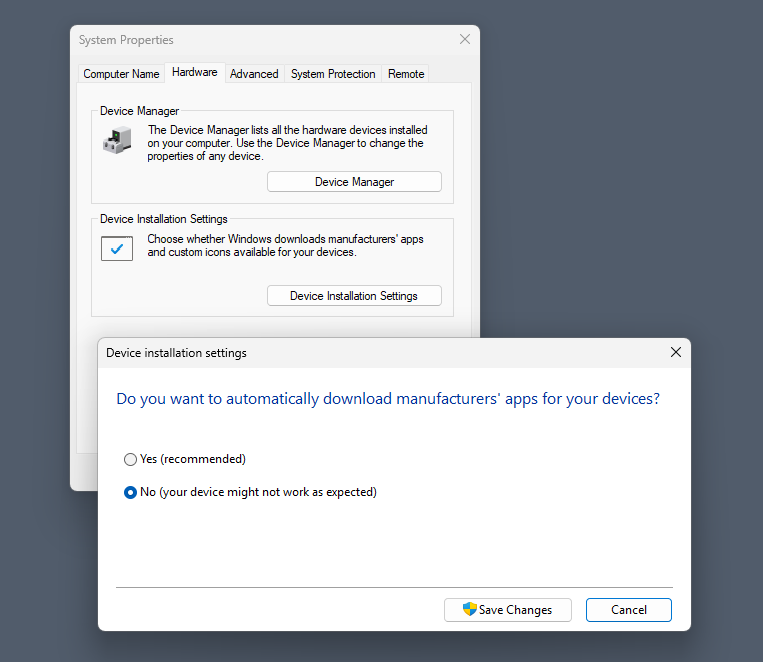
Open System Properties: Press Win + R, type sysdm.cpl, and press Enter.
Navigate to Device Installation Settings:Select the Hardware tab, then click the Device Installation Settings button.
Disable Automatic Downloads:This stops all manufacturer companion apps.Select “No” (your device might not work as expected).
Save Changes:Click Save Changes and restart your PC.
Note that you can also make the change in the Registry or using the Group Policy.
Registry:
Press Win + R, type regedit, and press Enter.
Go to HKEY_LOCAL_MACHINE\SOFTWARE\Microsoft\Windows\CurrentVersion\Device Metadata
Find the DWORD named PreventDeviceMetadataFromNetwork. If it’s missing, right-click an empty space > New > DWORD (32-bit) Value and name it exactly that.
Double-click the key and change its Value data from 0 to 1. Click OK and restart your computer.
Group Policy:
Press Win + R, type gpedit.msc, and press Enter.
Navigate to: Computer Configuration > Administrative Templates > System > Device Installation.
Double-click Prevent device metadata retrieval from the Internet (or Prevent automatic download of applications associated with metadata, depending on your exact Windows build).
Set it to Enabled, click Apply, and restart.
Here is the effect
By disabling this feature, you are shutting the door on all OEMs. This blocks automatic, silent installations of software from ASUS (Armoury Crate), Razer (Razer Synapse), Dell (Alienware Command Center), HP, Logitech, and others.
Importantly, this will not break your hardware. Windows will still automatically load the basic, essential drivers required to make the device function.
Disabling this setting only stops the automatic background installations triggered by Windows. You retain complete control to install whatever you want, whenever you want.
If you decide you actually need an OEM companion app—for example, to configure mouse macros, change RGB lighting, or update hardware firmware—you can easily bypass the restriction manually:
Download directly from the manufacturer: Go to the official support page for your specific hardware (e.g., LG or Razer’s website) and download the driver package or software suite yourself.
Install via the Microsoft Store: Many of these OEM control panels are hosted on the Microsoft Store. You can simply search for the app by name and click install.
Turning off automatic metadata retrieval is highly recommended for keeping a clean OS. It shifts control from Windows back to you, ensuring you only install the companion apps you actually plan to use.
ShutUp10 is one of my favorite tweakers for Windows 10 and 11. The base version is free, it does not need to be installed, and it is super-easy to use but also comes with a good amount of tweaks to turn off features that you don’t need on Windows PCs.
The last version, released yesterday by O&O Software, adds some mighty options to the application’s already impressive arsenal. The new options deal largely with recent Windows changes, like AI in Notepad or File Explorer, denying apps access to generative AI, and taming annoyances, like Windows Search with Bing, Settings app account notifications, or Start menu recommendations.
Here is the full list:
Disable Click to Do
Disable the Settings agent
Disable AI features in Notepad
Disable AI actions in File Explorer
Disable Find My Device
Disable Microsoft account cloud content search (
Disable work or school cloud content search
Disable device search history
Disable Start menu recommendations for tips, shortcuts and new apps
Disable Start menu account notifications
Disable Settings app account notifications
Disable extension of Windows search with Bing
Deny app access to generative AI
Deny app access to generative AI
Deny app access to presence sensing
Deny app access to presence sensing
Do not send device name in diagnostic data
Windows Insider Program conflict detection: when the PC is enrolled in the Windows Insider Program, a notice explains that certain diagnostic-data settings prevent participation, and a dialog offers to disable those settings
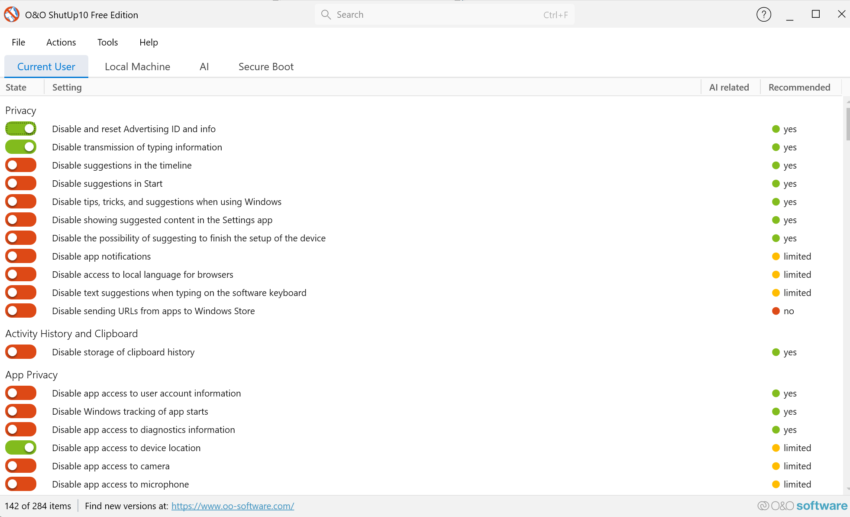
Using the app is straightforward. Just download the latest version from the developer website and run it on a Windows machine. The app loads immediately and displays its tweaks in the interface. O&O Software uses colors to distinguish between tweaks that are enabled already and those that aren’t. Furthermore, you gain recommendations for each tweak which range from “yes” to “no”. However, no does not necessarily mean that a tweak is bad, but users should read the description to find out about potential issues that may be experienced after applying it.
“Yes”-Tweaks should be save to apply, but it is always a good idea to read the description to make sure. You can speed things up by selecting Actions to apply all “recommended tweaks”, “recommended and somewhat recommended” or “all tweaks”. I would not recommend doing so unless you are certain that the selection does not cause any issues. If you have the time, it may be better to go through the tweaks one-by-one just to make sure nothing unwanted comes out of it.
The app has a couple of other sections of interest. You can switch to other tabs, e.g. AI, to get a bit of extra control over certain features, or “Secure Boot” to check the status and whether the latest certificates are already used on the system.
The lackluster Windows Search has been a hot topic ever since its introduction. One of the main points of criticism is the inclusion of web-based search results, which Microsoft started to introduced with the release of Windows 8.1.
Today, Windows Search continues to return local and web-based search results. What makes matters worse, at least to some users, is the inclusion of advertisement.
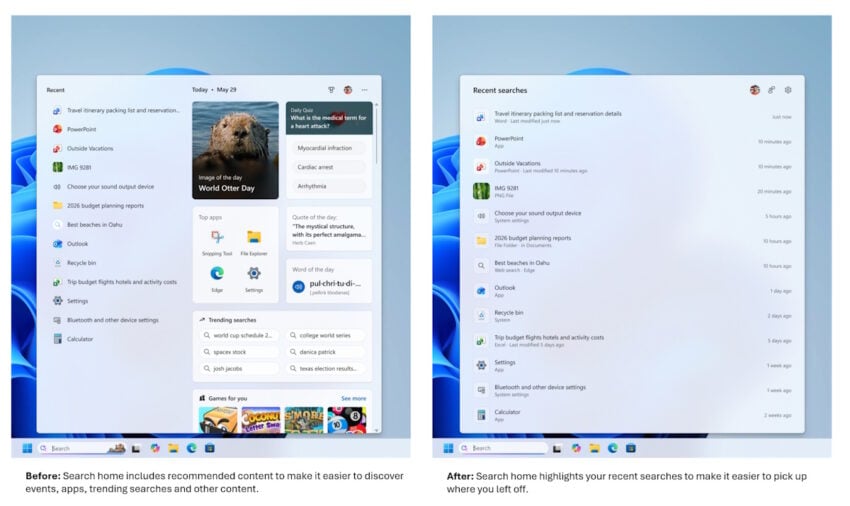
Microsoft published a blog post on the official Windows Insider blog today promising to improve the Windows Search box in the near future.
Here is what Microsoft plans to change:
Less visual clutter. Search will only display recent searches, not other content, such as “top apps”, image of the day, trending searches, or games for you.
Clearer results. Search results will make it clearer where a result comes from.
Removal of promotional content from web results.
New control to turn off web and Microsoft Store suggestions in Search.
Local results have priority when they are the stronger match.
Better app search to handle typos, dropped and extra letters, and partial words better.
Settings results are improving. More relevant settings should appear higher in the results.
Finding local files is improving and support for two-character file searches.
Improved search reliability.
The improvements are integrated in the latest Windows Insider builds of the experimental channel. Microsoft has yet to announce when the changes will land in stable builds of the operating system. One potential option is the coming feature update for Windows 11, which is expected in the coming months.
When things go wrong, Windows administrators have a few options at their disposal to fix problems. From built-in repair tools and restore options to backups and setting up the PC anew.
Nothing beats system backups in my opinion, but some problems can also be dealt with using built-in tools, such as the option to reset the PC.
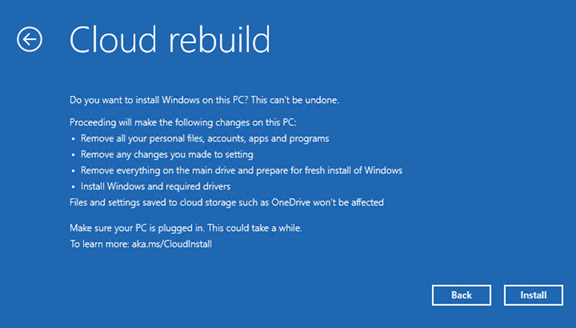
Cloud rebuild is a new feature that Microsoft announced in the most recent test build of the Windows operating system this week. It can be run from the Windows Recovery Environment and will download everything it needs from the cloud. That is a big difference to the “Reset this PC” option, as it will also download drivers and such from the cloud.
However, it is not the only difference. Another main difference is that Cloud rebuild erases pretty much everything on the main drive. You can’t keep apps, settings or personal files, which makes this more of a last resort kind of option or something that you would run if you have proper backups of apps and files. The only data that is not touched is data on other drives or cloud-based files, which do get synced to the PC again after Windows 11 starts booting again to the desktop.
Windows 11 boots directly into the out-of-box experience. For unmanaged PCs, this means going through the whole setup process as if this were a new PC. The operation requires a working network connection to function at all.
This leaves one main use case: users who need to start anew who have few or none apps installed or personal files on the main drive. Experienced users may want to stick to USB images that may include customizations, including OOBE bypasses and such.