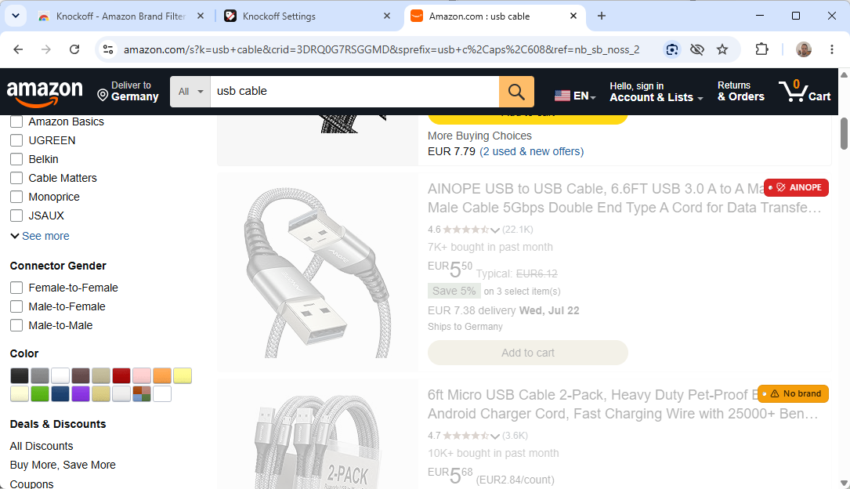
If you shop at Amazon, you may have noticed a rising number of sellers that sound like a very bad draw at Scrabble. Try searching for common items such as powerbanks, USB cables, or dog beds.
You find the usual assortment of known brands and also plenty of offers from sellers that you may have a hard time pronouncing.
Enter the Knockoff extension: it is designed to filter these sellers on Amazon. The developer of the open source extension explains its purpose in the following way:
Amazon is flooded with trademark-squat “brands” (SZHLUX, HORUSDY, LATTOOK, DOZAWA…): random strings registered at the USPTO purely to unlock Amazon Brand Registry, selling commodity goods with no company, no warranty, and no reputation behind them. Knockoff detects those listings and hides, dims, or labels them, right in the search results.
The extension runs locally in the browser. It comes with a seed list of “notorious pseudo-brands” and two other lists — “established Chinese-owned brands” and “established brands”, that you can enable or disable based on your preferences. It uses name heuristics on top of that and can also identify brand-less offers. You may also add companies to your own allowlist or blocklist.
The extension goes through all lists, starting with the allowlist and blocklist, to resolve each product listing on Amazon. Furthermore, you can set filter levels from relaxed to strict, which determine what is getting filtered:
| Level | Filters |
|---|---|
| Relaxed | Known pseudo-brands + your blocklist |
| Standard (default) | + suspect-looking names + unbranded listings |
| Strict | + anything not on a known-brands list (allowlist-only) |
The extension runs automatically on Amazon after it is installed in the browser. When you search for a product or browse Amazon, you will notice that certain results are dimmed by default. You can change that to hiding them entirely in the options. This won’t display more results on the page, but it will hide every product that matches the filters so that you can better focus on the remaining products on the page.
Tip: I recommend keeping the dimmed option enabled for a while, as you may notice brands being filtered out that you might not call “knockoff” or unknown. This gives you the time to add these brands to the allowlist.
You may also hide sponsored listings on Amazon as a bonus, but need to enable the feature manually in the preferences.
The extension should work on all regional Amazon sites. I tested it on the US and German sites and it worked as advertised.
My gosh, there is so much trash being sold on Amazon anymore; one can’t trust the reviews, the sellers, the products, anything. And this is more of a recent development; not many years ago I could purchase quality products at reasonable prices. Now I find myself sending 75% of what I ordered back to Amazon; or Amazon simply issues a refund and tells me to dispose of the item properly. An extension is great, but what is needed is Amazon vetting the sources and eliminating the pseudo-vendors before a listing appears.
ThIs extension is conceptually a great idea. I tried it and it does work as advertised with a very important caveat which I’d recommend that Martin edit his review to include: there are in fact many, many cases of real brands which are identified as suspect and therefore dimmed. I actually found three such brands in the very first minute I tried using the extension. An example is BELA Seafood which has been around since 1997 and sells high quality, canned Portuguese seafood (e.g., sardines, mackerel, codfish). Another is KINGSTONE, which Amazon actually tags as their number one selling brand of flatware serving sets. Many of these brands are clearly legitimate and have hundreds or even thousands of user reviews.
The extension does allow you to indicate that a brand is actually a true brand, and apparently will rely on crowd sourcing to both identify false positives and false negatives. Hopefully this will improve the accuracy of the results over time, so I am going to keep the extension active and see how things progress with it. However, if you use it, I’d strongly recommend keeping the results dimmed rather than hidden to keep these false negatives visible
And oh yes, being able to hide Amazon’s sponsored brands is a major plus.
Good point. I have added a tips paragraph to the article.
Martin, since you wrote your article and I wrote my review, Knockoff has issued a couple of updates. The first one was clearly an improvement, but the second one seems quite dangerous to me and I’m not going to take it. When you attempt to update the extension, you get a message from Mozilla saying that Knockoff requires a new data collection if you want to take the update. The collection “will collect: website content”
You may want to take a look at this. Mozilla provides a link to “Learn More” about the new permission being granted. Their definition of the term ‘website content’ takes a bit of work to find but it seems to be “covers anything visible on a website — such as text, images, videos, and links — and anything embedded, such as cookies, audio, page headers, and request and response information.”
This may or may not be okay. I’m not sure but I am certainly not taking the update until I have more clarity on the purpose of this new permission and what data the extension can and can not collect (e.g., my user name and password, email address, etc.)
One last comment here in case someone is still actually reading about Knockoff. I wrote a review panning the changes to the extension in the recent update, and pointing out the the fact that there was an inconsistency between the update’s new permission to “collect website content” and the app’s claim that “Everything runs locally in your browser. No accounts, no analytics, no tracking.”
The developer responded to my review and stated that I was correct and that he should have disclosed the change. He has since removed the claim that there is no tracking and has described the precise information that he says is now being collected. It actually does sounds quite helpful/harmless, but be aware that if you use the extension you are taking the developer’s word about the tracking.
Herman, thanks for the follow-up, really helpful!