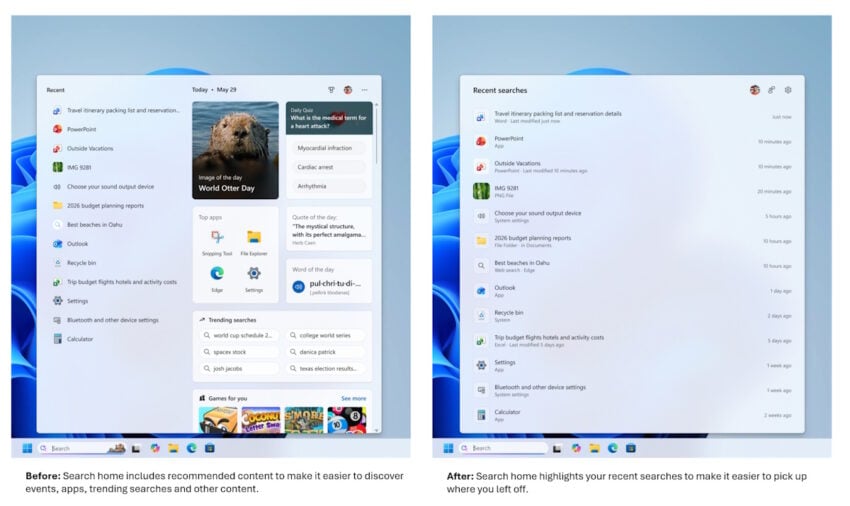
The lackluster Windows Search has been a hot topic ever since its introduction. One of the main points of criticism is the inclusion of web-based search results, which Microsoft started to introduced with the release of Windows 8.1.
Today, Windows Search continues to return local and web-based search results. What makes matters worse, at least to some users, is the inclusion of advertisement.
Microsoft published a blog post on the official Windows Insider blog today promising to improve the Windows Search box in the near future.
Here is what Microsoft plans to change:
- Less visual clutter. Search will only display recent searches, not other content, such as “top apps”, image of the day, trending searches, or games for you.
- Clearer results. Search results will make it clearer where a result comes from.
- Removal of promotional content from web results.
- New control to turn off web and Microsoft Store suggestions in Search.
- Local results have priority when they are the stronger match.
- Better app search to handle typos, dropped and extra letters, and partial words better.
- Settings results are improving. More relevant settings should appear higher in the results.
- Finding local files is improving and support for two-character file searches.
- Improved search reliability.
The improvements are integrated in the latest Windows Insider builds of the experimental channel. Microsoft has yet to announce when the changes will land in stable builds of the operating system. One potential option is the coming feature update for Windows 11, which is expected in the coming months.
You can remove “search” from windows, just like you “can” remove your hand with an axe. It is possible and you can keep using the pc afterwards. In a much quieter, more private space. You can still search for files in explorer, that’s a whole different process.
Don’t try this at home people unless you know exactly what the results will be. I mean, removing search, the other is obvious 😏
Many other things, that I for one never use anyways, stop working too and free up resources for the stuff I want to work faster.I was fine with it all for a long time but then, I wanted to start using the Emoji Panel and it’s one of the things that stops working when you remove search.
I learned quite a lot about windows security over the several hours it took to re-enable it all so I could send 😁’s.
So now it sits there in the background, and unwanted pest hiding in the corner, running processes and eating resources for things I want no part of, hidden from sight.
That’s were it’s going to stay. 😈