Chipp.in Tech News and Reviews

Windows, Security & Privacy, Open Source and more

Menu
  • Home
  • Windows
  • Security & Privacy
  • Gaming
  • Guides
  • Windows 11 Book
  • Contact
  • RSS Feed
Menu

Windows 11 is getting a fully cloud-based reinstallation option

Posted on July 7, 2026July 7, 2026 by Martin Brinkmann

When things go wrong, Windows administrators have a few options at their disposal to fix problems. From built-in repair tools and restore options to backups and setting up the PC anew.

Nothing beats system backups in my opinion, but some problems can also be dealt with using built-in tools, such as the option to reset the PC.

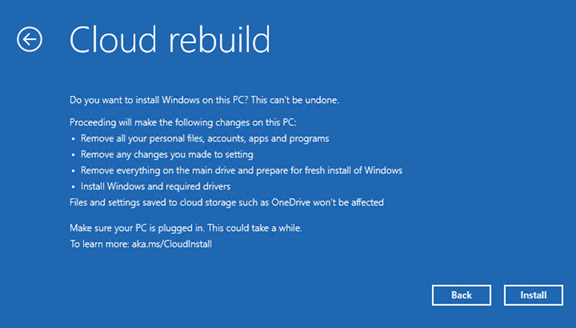
Cloud rebuild is a new feature that Microsoft announced in the most recent test build of the Windows operating system this week. It can be run from the Windows Recovery Environment and will download everything it needs from the cloud. That is a big difference to the “Reset this PC” option, as it will also download drivers and such from the cloud.

However, it is not the only difference. Another main difference is that Cloud rebuild erases pretty much everything on the main drive. You can’t keep apps, settings or personal files, which makes this more of a last resort kind of option or something that you would run if you have proper backups of apps and files. The only data that is not touched is data on other drives or cloud-based files, which do get synced to the PC again after Windows 11 starts booting again to the desktop.

Windows 11 boots directly into the out-of-box experience. For unmanaged PCs, this means going through the whole setup process as if this were a new PC. The operation requires a working network connection to function at all.

This leaves one main use case: users who need to start anew who have few or none apps installed or personal files on the main drive. Experienced users may want to stick to USB images that may include customizations, including OOBE bypasses and such.

Tags: windows 11
Category: Windows

Post navigation

← Opera Browser gets new security feature to protect the Clipboard

Leave a Reply Cancel reply

Your email address will not be published. Required fields are marked *

Support This Site

If you like what I do please support me!

Any tip is appreciated. Thanks!
  • July 7, 2026 by Martin Brinkmann Windows 11 is getting a fully cloud-based reinstallation option
  • July 6, 2026 by Martin Brinkmann Opera Browser gets new security feature to protect the Clipboard
  • July 4, 2026 by Martin Brinkmann You can now sign in to Microsoft Edge with a Google account
  • July 3, 2026 by Martin Brinkmann Brave 1.92 launches with support for Containers
  • July 2, 2026 by Martin Brinkmann The End of the Disc: Sony Gets Serious, Microsoft Apparently Plans to Follow Suit

About

We talk, write and dream about Technology 24/7 here at Chipp.in. The site, created by Martin Brinkmann in 2023, focuses on well-researched tech news, reviews, guides, help and more.

Legal Notice

Our commitment

Many websites write about tech, but chipp.in is special in several ways. All of our guides are unique, and we will never just rehash news that you find elsewhere.

Read the About page for additional information on the site and its founder and author.

Support Us

We don't run advertisement on this site that tracks users. If you see ads, they are static links. Ads, including affiliate links, never affect our writing on this site.

Here is a link to our privacy policy

©2026 Chipp.in Tech News and Reviews