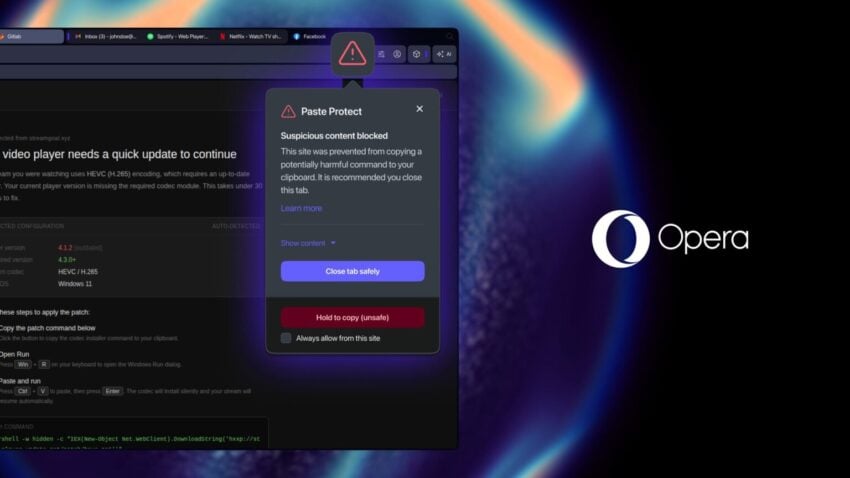
Opera Software announced a new feature for its Chromium-based Opera browser: Paste Protect is designed to block suspicious content from accessing the Clipboard of the operating system.
Introduced in Opera One as an experimental feature, Paste Protect is designed to protect against two specific attack types, notes Opera Software in an official blog post:
- It actively prevents the malicious code from being copied onto your clipboard.
- It lets you know that there was an attempt to copy something onto your clipboard that’s potentially harmful.
The main idea is to protect users from copying malicious code to the Clipboard. In the past, attackers have used this to get Internet users to execute malicious code or instructions on their computer systems.
The developers at Opera describe a common form of attack that exploits this on the blog as well:
- The website displays a Captcha and ticking a box to confirm that the user is human.
- A second verification prompt is displayed after the check. It copies data to the Clipboard of the system in the background.
- Instructions are displayed that ask the user to open the run box (Windows+R) and use the Ctrl-V shortcut to paste the content of the Clipboard. All that is required then is for the user to hit ok to run the instructions on the system.
Opera says that the new Paste Protect feature blocks this type of attack. The company explains how its security feature handles potential threats:
When there is something copied to your clipboard, the Opera browser checks the content for potential threats and harmful commands. If a potential threat is detected, Opera will automatically block the capability for the browser to copy something onto your clipboard from the malicious website and provide you with the option to close the site safely.
The browser displays a red warning icon to indicate that it has blocked a threat. It will recommend to close the tab the attack originated from.
Paste Protect is enabled by default, but only available in Opera One. It follows Hijack Protection, which Opera Software introduced in 2021 in the browser. The feature protected the clipboard from so-called hijacking attempts, such as replacing URLs in the clipboard or replacing a bank account number.
Really, “a common form of attack.” I’ve never seen it.
And, even my six-year-old isn’t naive enough to follow such instructions after a CAPTCHA prompt:
“Instructions are displayed that ask the user to open the run box (Windows+R) and use the Ctrl-V shortcut to paste the content of the Clipboard. All that is required then is for the user to hit ok to run the instructions on the system.”
Sounds more like a “notable” feature Mozilla would come up with to help bolster its image as “the most secure” browser.
Clipboard perfectly secure…. From everyone but opera. Selling security when extracting instead. So SICKENING!!
next safety feature, a keylogger to check for typing of malicious code