Back in May 2026, some users of Google’s Chrome web browser discovered a jump in used storage space on their devices. The culprit at the time was an AI model that the browser downloaded automatically to user devices for on-device artificial intelligence processing.
The main idea here is to allow some AI tasks to run locally only, meaning that no interaction with a Google server is needed to make use of the functionality. The whole download felt forced to some users, who had no say in the matter whatsoever.
Now, Google and also Microsoft have increased the local storage requirements for AI significantly. Instead of 4 gigabytes of free disk space, Google requires a whooping 20 gigabytes as the bare minimum.
Google says that the model is only downloaded if Chrome runs on a device with supported hardware capabilities, but fails to specify what that means.
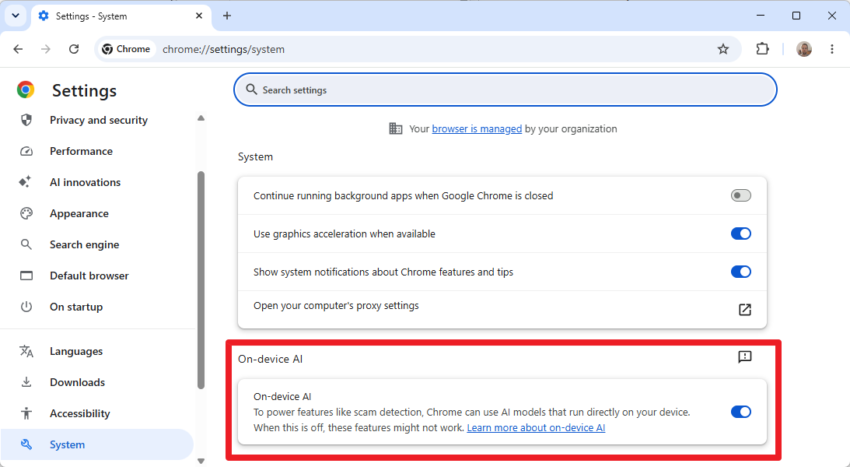
The best way to check whether your device is eligible is to load chrome://settings/system in the browser’s address bar and check the “On-device AI” setting there.
If it is turned on, the device has the requirements apparently and there is a good chance that a gigabyte-sized AI model has been downloaded to the system.
The model is downloaded to this folder: %LOCALAPPDATA%\Google\Chrome\User Data\OptGuideOnDeviceModel
The AI file is not downloaded in all cases, even with the On-device AI feature enabled. I checked on a test system that had the toggle set to on but no such file on the local hard drive.
You can turn off the functionality, which has three consequences according to Google:
- Any AI model downloaded automatically to the local system is removed.
- Chrome won’t download AI models.
- Features that rely on the functionality won’t work.
The main features that are not available when you turn off local AI are:
- Help with writing or rephrasing text
- Warn you about scams
- Summarize web pages
- Organize your tabs
While local AI processing is without a doubt beneficial to privacy, companies like Google should consider giving their customers a clear choice before they start downloading gigabyte-sized files to their devices.
There has to be more to it then that.
I’ve got a couple 12b LLM’s sitting here and they are under 8GB each and most peoples PC’s couldn’t even run those as they need a lot of VRAM. My 12GB RTX 4070 can just barely manage it.
I left the usage of Chrome for Edge; I wonder if CoPilot is doing similar. However, I often use Chrome on my Android phone w/ Brave set as default.