Chipp.in Tech News and Reviews

Windows, Security & Privacy, Open Source and more

Menu
  • Home
  • Windows
  • Security & Privacy
  • Gaming
  • Guides
  • Windows 11 Book
  • Contact
  • RSS Feed
Menu

Category: News

Did you know that Amazon sells Smart Beds? They did not work during the AWS outage

Posted on October 22, 2025October 22, 2025 by Martin Brinkmann

Companies plaster “smart” on everything these days. While that is a generalization, it is clearly a trend that is getting more traction as the years go by only to be overshadowed by the use of AI. From smart hairbrushes to AI-powered toasters, companies come up with incredible ideas to justify premium pricing for their products. Not always do the products benefit from smart functionality.

Amazon offers a range of smart devices. You probably think of Alexa-powered devices, like the Amazon Echo, first. Did you know that Amazon sells Smart Beds as well?

At $2000 and more, beds of Amazon’s Eight Sleep brand are not exactly cheap, but they can control the temperature of different regions individually, support elevation, and come with sound-functionality.

However, to function properly, Amazon’s Smart Beds require cloud connectivity. Without it, they apparently become non-functional, as in, dead weight. With no manual overrides available, users are up for a hellish-experience when connectivity breaks.

The AWS outage exemplified this, according to a post by Dextero. When AWS went down, owners of the bed lost connectivity and could not use the app anymore to control their bed. This left them stuck with the last setting that was active, according to the report.

Even worse, some beds overheated apparently while the cooling stopped in others entirely. One user reported that his bed locked itself at a temperature level that was nine degrees above room temperature, stating that it felt like “sleeping in a sauna”. Others claimed that the bed was stuck in a position that they could not change anymore.

No offline mode

Amazon’s Smart Beds have no offline mode at the moment, which is more than puzzling. Even if the company thought that an AWS outage was very unlikely, it must have considered the possibility of local Internet outages that would then also impact a user’s control?

Should not something like this, a manual override for core features, be at the forefront of one’s thoughts when designing a smart product?

Now You: do you own smart devices? If so, which and for what purpose?

Firefox

Firefox: how to delete files download in private browsing automatically

Posted on October 16, 2025October 16, 2025 by Martin Brinkmann

The private browsing mode of web browsers is quite useful, albeit not for the task that developers like Google or Mozilla advertise it for. While the companies make it sound like a good way to improve privacy, it is just that in one very specific use case: if someone else has access to the device, your user account and browser.

If that is not the case, it won’t really help you much, as most of the tracking happens online.

Still, it is great for accessing sites without having to worry about deleting it manually from history, accessing sites without being signed in to an account, or avoiding some tracking, as the private browsing data is separate from the regular browsing data.

Mozilla added a new option recently that deals with downloaded files. When you download files in private browsing modes, they land in the same download folder as regular downloads.

While that is wanted at times, some users might prefer the traces of downloads being deleted automatically. It is that option that is now available in the Firefox browser.

Here is how you configure it:

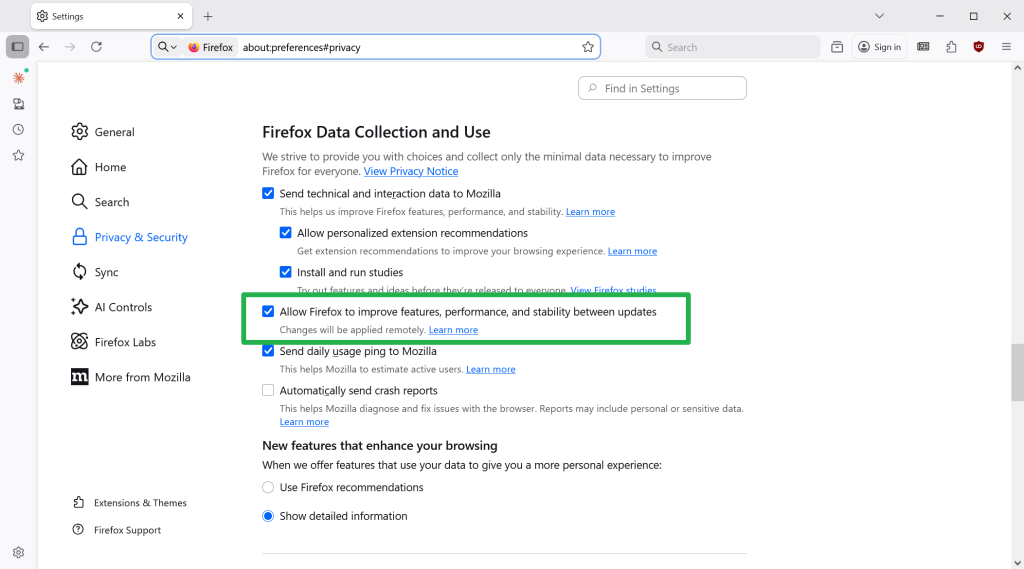
  1. Load about:preferences#general in the browser’s address bar.
  2. Scroll down to the Files and Applications section on the page.
  3. Check “Delete files downloaded in private browsing when all private windows are closed”.

This deletes downloaded files automatically once you close the last private browsing window.

Is it a useful feature? I do not know. It may help users who share accounts, as it removes any trace of a download from the system. Whether that makes sense depends on the use case. I’d say, it can also lead to confusion, as files get deleted automatically when the feature is enabled. That is probably the main reason why Mozilla decided to make it opt-in.

Firefox 143.0.4 fixes Google connection problems

Posted on October 5, 2025October 5, 2025 by Martin Brinkmann

If you use Firefox and have had issues connecting to some Google-owned properties and services, then you may have experienced an issue that Mozilla fixed in Firefox 143.0.4.

The fourth point update for Firefox 143 addresses a single issue. While it is not uncommon for Mozilla to release point updates — smaller updates that fix pressing matters or security issues — it is rarer to see a single issue release.

It has been less than a week that Mozilla released Firefox 143.0.3 to address bugs and security issues in the browser.

Mozilla notes that the release improves “Firefox’ connection fallback behavior to mitigate sporadic slow/failed loads on some Google sites”. The issue affected devices with Firefox with certain third-party software installed.

The release notes do not provide any details, but the bug report over at Bugzilla does.

According to it, users started to note the behavior on Google Drive. Tests with other browsers confirmed that the issue was Firefox-specific. The investigation revealed that HTTP/3 connections were blocked, which forced Firefox to fallback to HTTP/2, but a bug caused these connections to fail to be created.

The update fixes the issue. Firefox users who use the browser to connect to Google services and noticed issues connecting to them should install it right away to fix the issue. Everyone else shouldn’t feel any hurry to install it.

The new version is available already. You can force the installation by selecting Menu > Help > About Firefox in the main menu. This should trigger the download and upgrade.

The next major Firefox release is scheduled for October 14, 2025. It is the same day that Microsoft is ending support for Windows 10 on officially.

You can now try Perplexity’s Comet AI browser for free

Posted on October 3, 2025 by Martin Brinkmann

After launching its Comet AI web browser exclusively for paying subscribers, Perplexity has now made it downloadable for everyone. You can download the browser from the official website for testing, even if you do not have a Perplexity account.

However, Perplexity limits functionality of the browser in that case. First, Comet is a Chromium-based browser. That is good on the one hand, as it offers similar performance and compatibility as Google Chrome. It also means that you can install browser extensions that are compatible with Chrome in the desktop version.

You can import your last browsing session from most other browsers on first start, but can skip it as well. Afterwards, Perplexity displays a few options to you, which most users may want to disable. This includes autostarting the browser with the operating system, making it the default browser, or sending telemetry data to Perplexity.

The browser opens and it looks like Chrome for the most part. That is to be expected, as all Chromium-based browsers look pretty much the same. The new tab page displays a few widgets, like the time or Nvidia’s stock price. The star of the show is the text prompt at the top. You may use it to interact with Perplexity’s AI.

Comet Assistant displays a few suggestions when you activate the text field, such as “Find emails from the last 7 days that require replies and draft responses”, or “find top rated noise-cancelling headphones under $300 and open product pages from three major retailers with the lowest prices”.

So, it is basically an AI chat, but this AI has agentic capabilities. It is rather limited for free users, as pro searches and several other features are not available in that case.

The browser displays its results on Perplexity’s website. In fact, you may get similar results when you use the company’s website directly to interact with the AI.

You may also notice that you get constant requests to sign in, if you do not. Open a new tab page, get a request. Similarly, prompts may be displayed on the results page.

If you do not sign-in, you get access to base AI features only. You can’t, for example, change the AI model that the browser uses to process queries. There is also no option to upload files or photos for processing, or run deeper queries.

However, results looked fine in quick tests, even non-Pro searches. Whether the information is accurate is another topic. As is the case with all AI, you should verify important information before you act on it.

Perplexity is Chromium-based. Which is good. You can open chrome://flags to tinker with advanced preferences, and get most of the settings of the browser as well.

Now the big question that I still have regarding all these AI browsers is about the “why” and whether that why warrants paying a monthly subscription fee. Why should I use such a browser? I do not really see the killer-application for it right now. Yes, it can run deep research tasks for you or perform some tasks for you, but how useful is that really, especially if you prefer to stay in control the whole time?

Anyway, you can give Perplexity a try, if you want.

Search image with Google Lens

Firefox is getting visual search capabilities powered by Google Lens

Posted on September 28, 2025September 28, 2025 by Martin Brinkmann

Mozilla is rolling out a new feature in recent versions of the Firefox web browser that introduces visual search functionality. This allows users to run visual searches by right-clicking on images.

Mozilla lists several main applications for the new feature on its Connect website.

  • Find similar products, places, or objects.
  • Copy, translate, or search text from images.
  • Get inspiration for learning, travel, or shopping.

Right-click on any image displayed in the browser and select the new “Search Image with Google Lens” option to start a new search.

The feature is limited to Firefox on the desktop currently and it is rolling out worldwide. Most Firefox users won’t see it right away, but it can be enabled via about:config.

Here is how that is done:

  1. Load about:config in the browser’s address bar.
  2. Search for browser.search.visualSearch.featureGate.
  3. Click on the toggle icon to set the feature to True.
  4. Restart Firefox.

This enables the feature. You can test it by right-clicking on an image in Firefox and selecting the new Google Lens visual search option from the context menu.

Tip: you can turn off the feature at any time by setting the experimental flag to false in about:config. This removes the context menu entry in Firefox.

Here is what happens when you select the option: Firefox redirects the search request to the official Google Lens website. From there it is all Google and you should see similar images and information about the image among other things.

The feature addition will likely see mixed receptions. Some Firefox users may like the ability to run visual searches quicker through the browser’s context menu. Before that, they had to go save and upload the image to Google Lens manually or install a browser extension such as Search on Google Lens.

Others may dislike the additional entry in the context menu, for instance in fear or accidentally sending an image they view in the browser to Google Lens.

To be honest, it is unclear why Mozilla would introduce the feature natively in Firefox if an open source browser extension is already available

Now You: what is your take on this? Useful addition in Firefox or something that you have no use for?

Chrome

Ecosia latest to make an offer for Chrome, sort-of

Posted on August 22, 2025August 22, 2025 by Martin Brinkmann

Google is battling it out with the United States Department of Justice currently. If things go really bad for Google, the company could be forced to sell its web browser Google Chrome or make other changes to its business.

Plenty of companies announced interest in Google Chrome already. Perplexity made a bid, Yahoo is eying the acquisition, and now it is Ecosia that also made a suggestion, according to TechCrunch.

Ecosia is a non-profit organization that is probably best known for its search engine. It is free to use and will spend its earnings on planting trees.

Unlike Perplexity, which bid $34.5 billion in cash, Ecosia is suggesting that it is getting control of Google Chrome for free. Google would retain ownership and the rights to Chrome under the proposal. Google Search would remain the standard search engine and Google would keep all intellectual properties. Ecosia would gain operational control of Chrome and development of the browser in that time.

The non-profit suggests a revenue split furthermore, with 40% of the earnings going to Google. The remaining 60% would be spend on climate projects that align with Ecosia’s general mission.

While Ecosia’s proposal may be a long shot, it would ensure that Google retains all rights and gets constant revenue from the browser.

However, whether Google will indeed be forced to sell Chrome or split it in some way from the company remains to be seen. Until then, it seems highly unlikely that Google will react to any of the offers made or comment on the offers publicly.

AOL discontinues Dial-Up Internet and software

Posted on August 12, 2025August 12, 2025 by Martin Brinkmann

AOL announced the discontinuation of its dial-up Internet plan, AOL Dialer software and AOL Shield browser, in a brief support page on its help website.

There, AOL writes:

AOL routinely evaluates its products and services and has decided to discontinue Dial-up Internet. This service will no longer be available in AOL plans. As a result, on September 30, 2025 this service and the associated software, the AOL Dialer software and AOL Shield browser, which are optimized for older operating systems and dial-up internet connections, will be discontinued.

From September 30, 2025 onward, AOL customers may no longer use dial-up Internet provided by the company. AOL is also discontinuing the accompanying applications, AOL Dialer and AOL Shield.

AOL says that the change does not impact any other benefits that users may have in their AOL plan, including AOL email. The company does not reveal the number of customers that are affected by the change.

Estimates suggest that about 150,000 US-Americans still use dial-up in 2025. Not all of them rely on AOL for Internet though, but those who do need to find a different dial-up Internet provider or different connection option, such as cable, fiber optic, wireless Internet, DSL, or Internet via satellite.

As for dial-up Internet, Microsoft still seems to offer dial-up access to the Internet. For about $180 per year, subscribers may sign up for MSN Dial-Up Internet access according to this page on the Microsoft website:

Subscribe to MSN Dial-up Internet Access and get Internet access and MSN Internet Software which includes: computer wide security software, advanced phishing filter technology, pop-up guard and multiple e-mail accounts.

Can you imagine using a connection that has a speed between 56 kbit/s and 128 kbit/s?

Microsoft is killing off a highly rated mobile app, wants users to use the Microsoft 365 Copilot app instead

Posted on August 9, 2025August 9, 2025 by Martin Brinkmann

Microsoft maintains a massive list of apps for the mobile operating systems Android and iOS. Microsoft Lens, one of the company’s highest-rated apps, is being discontinued. Microsoft announced the change in a message center note this week.

Microsoft Lens may be used to scan whiteboards and documents, including notes, receipts and more. It makes these readable digitally in PDF, Word, or Excel format, and supports printed and handwritten text.

The Android version has a rating of 4.8 out of 5.0 and more than 50 million downloads. The Apple version has also a 4.8 out of 5.0 rating, but less downloads and reviews.

The scanned data can be saved locally or uploaded to OneNote or OneDrive.

The timeline of the Microsoft Lens discontinuation:

  • Mid-September 2025: New installs on Google Play or the Apple App Store are no longer permitted.
  • Mid-November 2025: Microsoft will remove the apps from the respective stores.
  • Mid-December 2025: New scans can no longer be created.

Microsoft notes that existing scans will remain available in the MyScans folder that the application creates during installation.

The company recommends switching to the Microsoft 365 Copilot app, saying that it offers similar functionality. However, Microsoft Lens was free to use and without any ads. The Microsoft 365 Copilot app on the other hand may show ads, as revealed on the mobile stores.

Bleeping Computer reports that Microsoft plans to add some of the missing functionality to the Copilot app.

Would you pay $20 per month to use a browser, or more?

Posted on August 8, 2025August 8, 2025 by Martin Brinkmann

When the Browser Company launched its Arc web browser, it was heralded by part of the media as the evolution that browsers needed. Then, the Browser Company announced that it would discontinue its browser to focus on another. This new browser, called Dia, would be an AI-browser first and foremost.

It was not really clear why, but the recent announcement of a Pro subscription plan could shed some light into the plans.

Dia, which is available in early testing for certain Mac devices only, is free to use. The AI parts have limits, however, and the newly announced Pro subscription unlocks unlimited access to the AI.

For $20 per month, users gain unlimited access. The first commercial subscription plan is just the beginning, as The Browser company plans to introduce additional plans that may cost between $5 and several hundred Dollars per month.

The price of a Pro subscription is just shy of the price of a ChatGPT Plus or Google AI Pro subscription. Granted, Dia appears to offer tighter integration in a browser.

Dia offers integration of a chatbot, but one feature that sets it apart from competing browsers currently is skills. These are shortcuts for repetitive tasks. It also supports cross-tab analysis and content synthesis. Is that enough to warrant a subscription? Only time will tell, but my initial take is that it will be very difficult for the company to turn a profit, unless it bakes something into the browser that is truly useful.

Now You: would you pay for a browser? What is your take on the $20 per month price of a subscription? Feel free to leave a comment down below.

Google will keep some goo.gl links alive, after all – but it is messy

Posted on August 2, 2025August 2, 2025 by Martin Brinkmann

Google announced the deprecation of its link shortening service goo.gl almost seven years ago. Created in 2009, millions of Internet users have used the service to create shorter versions of links for sharing and archiving.

Back in 2018, Google disabled the option to create new links using the service, but did not touch existing links. Google revealed last year that it would delete all existing redirects by August 25th, 2025.

These plans have changed to a degree. Google announced that some links will continue to live on while other redirects will still be removed.

The company writes in an update on its The Keyword website:

While we previously announced discontinuing support for all goo.gl URLs after August 25, 2025, we’ve adjusted our approach in order to preserve actively used links.

We understand these links are embedded in countless documents, videos, posts and more, and we appreciate the input received.

Google realized, after six years (!) that some of the links were still used actively and that users who click on these links would not be very happy, if they suddenly stopped working.

The bad news is that Google won’t preserve all links. According to the post, links that show “This link will no longer work in the near future” when activated will stop working on August 25th. However, links that do not show the message will continue to work normally.

While that may make sense from Google’s point of view, it does not really help users or link creators much. You can only find out about a link when you click on it. If you do so right now, you either get the announcement about the links future or you won’t. Come August 25th, some links will stop working while others will continue to work.

To sum it up. The good news is that some links will continue to work after August 25, 2025. The bad news is that you do not really know which, especially after August 25. So, goo.gl links could still work when you click on them or they could return a not found error instead.

If you have used the link shortening service in the past, then you may want to modify these links, if you still have access to the site you posted the link on.

  • Previous
  • 1
  • 2
  • 3
  • 4
  • 5
  • 6
  • 7
  • …
  • 17
  • Next

Support This Site

If you like what I do please support me!

Any tip is appreciated. Thanks!
  • July 16, 2026 by Martin Brinkmann Windows Tweaker ShutUp10 updated with new options to disable AI and other potentially unwanted content
  • July 14, 2026 by Martin Brinkmann Microsoft promises improved Windows Search Box and the removal of ads
  • July 13, 2026 by Martin Brinkmann Mozilla moves Firefox to a 2-week release cycle in September
  • July 11, 2026 by Martin Brinkmann Browser extension filters pseudo-brands on Amazon
  • July 10, 2026 by Martin Brinkmann The Tables Have Turned: Why Sony’s All-Digital Future Could Be Microsoft’s Perfect Revenge

About

We talk, write and dream about Technology 24/7 here at Chipp.in. The site, created by Martin Brinkmann in 2023, focuses on well-researched tech news, reviews, guides, help and more.

Legal Notice

Our commitment

Many websites write about tech, but chipp.in is special in several ways. All of our guides are unique, and we will never just rehash news that you find elsewhere.

Read the About page for additional information on the site and its founder and author.

Support Us

We don't run advertisement on this site that tracks users. If you see ads, they are static links. Ads, including affiliate links, never affect our writing on this site.

Here is a link to our privacy policy

©2026 Chipp.in Tech News and Reviews