Chipp.in Tech News and Reviews

Windows, Security & Privacy, Open Source and more

Menu
  • Home
  • Windows
  • Security & Privacy
  • Gaming
  • Guides
  • Windows 11 Book
  • Contact
  • RSS Feed
Menu

Category: News

Microsoft Edge

Microsoft is moving features into Copilot to extract more money from its customers

Posted on December 6, 2025December 6, 2025 by Martin Brinkmann

Customers all over the world are used to frequent price increases of subscriptions by now. Many online services that require a subscription increase prices regularly, often once per year or every second year.

That is bad enough, especially if the service does not get any better because of it. While services argue that inflation and rising costs force them to increase the price of their product, it is getting harder and harder for them to convince customers to accept the price increase and continue their payments.

If only there would be something that would make it clearer for customers to pay more. Microsoft may have found a way, or so it believes: how about removing features from products to move them into another product, that costs extra?

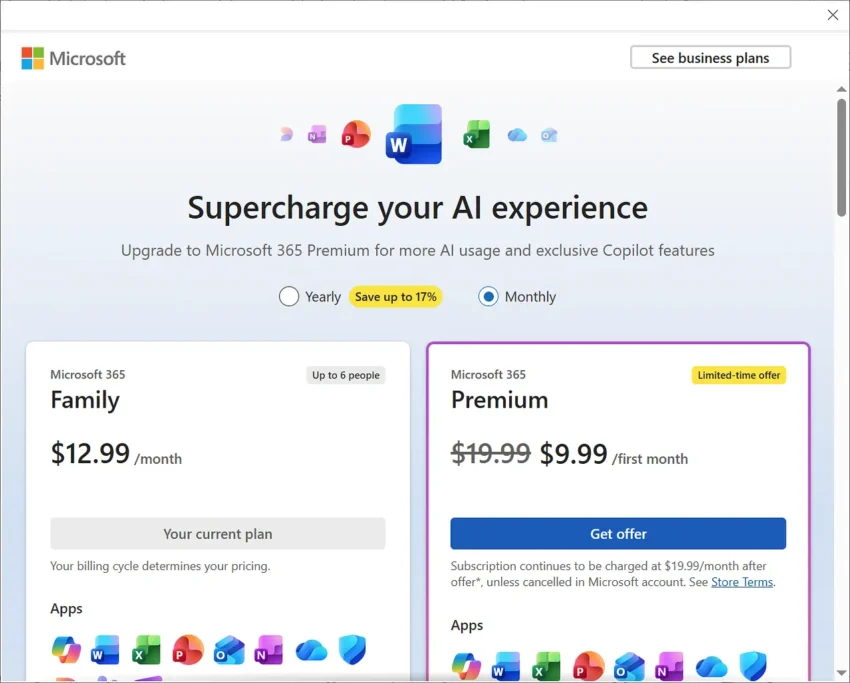
As a Microsoft 365 subscriber, you pay Microsoft a monthly or yearly sum for access to the most recent version of Microsoft Office. You may also get some other features on top of that, including cloud storage space or access to Copilot, Microsoft’s AI.

However, some Copilot features are only for subscribers of plans that are more expensive. Home users, for instance, need a Premium subscription to gain access to otherwise restricted Copilot features.

Microsoft changed the tactic for business customers. Instead of limiting Copilot to a specific plan, Microsoft integrated Copilot AI features into the business plans and announced a price increase arguing that customers would get more out of their subscriptions because of that. Most plans increase by up to three Dollars per month because of that from 2026 onward.

To make Copilot look more valuable, Microsoft started to remove features from Office programs.

Martin Geuß, from the Geman website Dr. Windows, highlighted two recent examples on the site recently:

  • PowerPoint: The option to reuse slides is going to be removed from the presentation software. Users may ask Copilot to do that for them.
  • Excel: The function to extract data from images is being removed. Starting in July 2026, this option won’t be offered anymore. Microsoft says that it is working on a better function that will then be powered by Copilot.

There you have it. You just have to be inventive to justify price increases.

Amazon

Amazon may send you ads via WhatsApp: here is how to turn that off

Posted on November 26, 2025November 26, 2025 by Martin Brinkmann

WhatsApp is one of the most popular messaging apps out there. One reason why more and more businesses try to establish channels on WhatsApp. Most to reach customers and sell them something.

Amazon is no exception to that. Maybe you have noticed already that you are getting ads from Amazon in WhatsApp.

Even if not, you may want to make sure that you won’t in the future. Good news is that there is an option to turn that off. It appears, however, that the feature is turned on by default. I can’t remember allowing Amazon to use WhatsApp for communication.

Here is what you need to do:

  1. Load the Notifications website on the Amazon website of your choosing: https://www.amazon.com/preferences/cpc/homepage
  2. Check the “Turn on WhatsApp” or “Turn off WhatsApp” button on the page.
  3. Select “Turn off WhatsApp” to disable communication.

Note that the page may look different depending on your locale. In Germany, it was called Communication Preferences Center and it looked different from the page opened on Amazon.com.

There, you an entire section dedicated to WhatsApp Preferences.

As you can see on the screenshot. the account was set up to receive WhatsApp notifications.

To change that here, you have to uncheck one or both of the options listed on the page:

  • Key order updates, shipments, payments, and other account updates.
  • Deals and offers, recommendations, promotional events, and more.

The second option sends ads to your WhatsApp account, while the first seems to be limited to Amazon notifications about orders and such. However, if you disable both, you can check “Do not send me any notifications on WhatsApp.

Don’t forget to hit the update button to save the change.

Now You: did you see the WhatsApp preferences when checking your Amazon account? Were the settings enabled? Feel free to leave a comment down below.

Cloudflare Down

Cloudflare is down, and so are lots of websites

Posted on November 18, 2025November 18, 2025 by Martin Brinkmann

If your favorite website is not responding right now, it might be because of a major Cloudflare outage. Plenty of sites use Cloudflare, for instance as a CDN or a security layer to prevent attacks or fake traffic.

As it stands right now, Cloudflare states on its Status website that it continues to work on restoring its service for its customers.

The issue started at around 11:48 UTC today when Cloudflare added the first bit of information to the status page revealing that it was experiencing issues. Two hours later, the issue is ongoing.

You can check the link above to find out when the issue is resolved. Or, you can try visiting the affected websites at a later point to find out if it is resolved.

Most websites affected by the issue should show “Internal server error” with error code 500. The image should highlight that the browser and the host is working, but that Cloudflare is having an error.

Hosting a web server on a disposable vape, which makes it a disposable web server of sorts

Posted on November 15, 2025 by Martin Brinkmann

Reportedly, someone managed to get a tiny web server running on one of those disposable vapes, electronic cigarettes that you see more and more people consuming, at least where I live.

Unlike regular cigarettes, which consist of non-electronic components, a filter, some paper and tobacco for the most part, vapes contain electronic components.

Our ingenious engineer dissected vapes that he received from friends and family for some time and discovered something peculiar in vapes from a specific brand.

He noticed that they included a micro processor, probably the cheapest micro-controller in existence. Further inspection revealed that it had the following characteristics:

  • 24 MHz Coretext M0+ processor.
  • 24 KiB of Flash Storage.
  • 3 KiB of Static Ram.

He realized that he could use it to run a web server, and that is exactly what he set out to do. You can check out the blog post to find out more about the process. In the end, he managed to get the web server, with a single page, running on the vape.

The post has a link to the website, but I could not get it to run. Not sure if it has been taken down, if it is overloaded, or caused by another issue.

It is a remarkable feat of engineering, very similar to getting Doom running on any device with a display and some form of micro-computer inside.

Google Chrome Split View

Google is rolling out Split View for Chrome Tabs and is late to the party

Posted on November 4, 2025November 4, 2025 by Martin Brinkmann

Google released Chrome 142 to the stable channel recently with just a few changes that it revealed publicly. Noteworthy is a new permission that regulates access to local resources. Basically, users will see a prompt going forward, if a website or application attempts to access a resource on the local network.

It turns out that Google is also rolling out a new tab feature gradually to all users. Split View allows users to display two websites or apps in Chrome side by side in the same browser window.

All you need to do for that is to right-click on the first tab and select the option “move tab into split view”. If you want, you can also select to move it to the left or right location in split view directly.

Google Chrome Split View

Google Chrome then displays the list of other tabs open in the browser, so that you can pick one for the other half.

Tip: You can enable the feature right away in Chrome, if you like. Just load chrome://flags/#side-by-side in the Chrome address bar and change the status of the feature to Enabled. Restart Chrome, and the new context menu option becomes available when you right-click on tabs.

Split View: pros and cons

So what is the advantage of Split View compared to using two browser windows? The main advantage is that both websites are displayed in a single browser. You can display, move, hide, or close them at once, while you would have to juggle with two windows if you’d display the two websites in two Chrome instances. You can be sure also that both windows are always visible, when the browser window is active.

However, there are also some disadvantages. You can only see one of the URLs at the same time in the Chrome window. It changes when you activate the website in the inactive half, but it is still worth considering that you don’t see the address all the time.

Google is late to the party

Split View is not a particularly new feature. Vivaldi, for instance, has supported it for years and even gives users multiple layout options that go beyond displaying two sites side-by-side or split horizontally.

Even Microsoft tested the Split View feature in Edge in 2023 already. Mozilla is also working on integrating a split view feature in its Firefox web browser.

Now You: do you use split view already or do you have no use for the feature? Feel free to leave a comment down below.

Chrome error prompt on non-HTTPS sites

Google makes HTTPS the default in Chrome from next year on

Posted on October 29, 2025October 29, 2025 by Martin Brinkmann

Most web browsers display warning messages when you attempt to load a website that does not use HTTPS, the secure version of the HTTP protocol, or when a site has misconfigured HTTPS.

Starting in October 2026, Chrome will make HTTPS the default for all connections in the browser. Means, whenever you visit a site that does not use it or has configuration issues, you will get a prompt.

“This site doesn’t support a secure connection” is displayed in that case. The prompt includes quite a bit of text explaining why that is bad. However, Chrome displays two options to the user in that case.

The first, “go back” returns to the previous site or the new tab page, depending where you started your request. The second, “continue to site” still allows you to visit the site in question.

The planned change makes the optional feature “always use secure connections” mandatory once it lands next year. Since the feature is available already, albeit as an optional preference, it is possible to enable it right away to see what it does. Ideal for testing purposes.

Here is how you enable it (or disable it again):

The always use secure connection preference in Google Chrome
  1. Load chrome://settings/security in the browser’s address bar. You can also select Menu > Settings > Privacy and Security manually, if you prefer that.
  2. Scroll down to the Secure connections section.
  3. Toggle “Always use secure connections” here to enable or disable the feature.

When you enforce HTTPS, you will receive security prompts whenever something is loaded in Chrome that does not use HTTPS.

Google says that non-HTTPS traffic has dropped significantly, but that HTTPS has plateaued at about 95% of all sites. The main driver for insecure traffic, according to Google, is navigations to private sites that are insecure. While less risky than navigations to insecure public sites, attackers may exploit them either way.

Google predicts that the actual warning volume in Chrome will get lower once it lands the change in the browser and sites start moving towards HTTPS even more than before.

It will certainly make it more difficult for users to access sites that do not use HTTPS and do not plan on migrating, for whatever reason.

Now You: have you visited sites that do not use HTTPS in the recent past, or have all of your sites that you visit switched to HTTPS already? Feel free to leave a comment down below.

Microsoft plans to give Outlook an AI infusion, make AI the user’s body double

Posted on October 26, 2025October 26, 2025 by Martin Brinkmann

I have to admit that I never really used Outlook as my main email driver. While I do have an Outlook account and used it sporadically, mostly for testing purposes, I stuck to the likes of Eudora and Thunderbird.

Recently, Microsoft has given Outlook an overhaul that was not received too well by many of its users. Basically, Microsoft turned Outlook from a classic desktop app into a web-based version that is pretty much just a wrapper. In some years, Microsoft plans to replace the Office-included version of Outlook with that new version.

According to Tom Warren at The Verge, Microsoft has shuffled leadership around and Outlook’s team appears to be under new leadership now to lead it into the AI era.

The new leader is Gaurav Sareen, corporate vice president of global experiences and platform at Microsoft. In a memo to the team, Sareen shared his vision for the future of Outlook. It should not come as a surprise that AI is at the forefront of everything.

Think of Outlook as your body double, there for you, so work feels less overwhelming and more doable because you are not facing it alone. With Copilot, this body double becomes even more powerful. Copilot turns Outlook from a set of tools into a partner that acts.

In other words, Outlook will introduce AI that reads your emails, helps you organize them, writes email drafts for you, and, Microsoft hopes, will help users spend less time doing tasks that they dislike or think are a waste of time.

The big question is, does the majority of Outlook users want this? Will they use the AI features in Outlook? It probably depends to a large degree on how well they are integrated and how useful they are. Privacy is another topic, which Microsoft fails to address regularly to a degree that answers all the main questions sufficiently:

  • What data may the AI access.
  • How and where does it process the data?
  • Who can access the data?
  • Is the data used for anything other than the user’s personal AI tasks?
  • Can the AI report data to Microsoft?

Microsoft won’t convince most privacy-conscious users to give it a try even, but most probably do not use Outlook to begin with unless required to.

Now you: would you start using AI features in your email client, if it supported them? Which would you like to see, if any?

Did you know that Amazon sells Smart Beds? They did not work during the AWS outage

Posted on October 22, 2025October 22, 2025 by Martin Brinkmann

Companies plaster “smart” on everything these days. While that is a generalization, it is clearly a trend that is getting more traction as the years go by only to be overshadowed by the use of AI. From smart hairbrushes to AI-powered toasters, companies come up with incredible ideas to justify premium pricing for their products. Not always do the products benefit from smart functionality.

Amazon offers a range of smart devices. You probably think of Alexa-powered devices, like the Amazon Echo, first. Did you know that Amazon sells Smart Beds as well?

At $2000 and more, beds of Amazon’s Eight Sleep brand are not exactly cheap, but they can control the temperature of different regions individually, support elevation, and come with sound-functionality.

However, to function properly, Amazon’s Smart Beds require cloud connectivity. Without it, they apparently become non-functional, as in, dead weight. With no manual overrides available, users are up for a hellish-experience when connectivity breaks.

The AWS outage exemplified this, according to a post by Dextero. When AWS went down, owners of the bed lost connectivity and could not use the app anymore to control their bed. This left them stuck with the last setting that was active, according to the report.

Even worse, some beds overheated apparently while the cooling stopped in others entirely. One user reported that his bed locked itself at a temperature level that was nine degrees above room temperature, stating that it felt like “sleeping in a sauna”. Others claimed that the bed was stuck in a position that they could not change anymore.

No offline mode

Amazon’s Smart Beds have no offline mode at the moment, which is more than puzzling. Even if the company thought that an AWS outage was very unlikely, it must have considered the possibility of local Internet outages that would then also impact a user’s control?

Should not something like this, a manual override for core features, be at the forefront of one’s thoughts when designing a smart product?

Now You: do you own smart devices? If so, which and for what purpose?

Firefox

Firefox: how to delete files download in private browsing automatically

Posted on October 16, 2025October 16, 2025 by Martin Brinkmann

The private browsing mode of web browsers is quite useful, albeit not for the task that developers like Google or Mozilla advertise it for. While the companies make it sound like a good way to improve privacy, it is just that in one very specific use case: if someone else has access to the device, your user account and browser.

If that is not the case, it won’t really help you much, as most of the tracking happens online.

Still, it is great for accessing sites without having to worry about deleting it manually from history, accessing sites without being signed in to an account, or avoiding some tracking, as the private browsing data is separate from the regular browsing data.

Mozilla added a new option recently that deals with downloaded files. When you download files in private browsing modes, they land in the same download folder as regular downloads.

While that is wanted at times, some users might prefer the traces of downloads being deleted automatically. It is that option that is now available in the Firefox browser.

Here is how you configure it:

  1. Load about:preferences#general in the browser’s address bar.
  2. Scroll down to the Files and Applications section on the page.
  3. Check “Delete files downloaded in private browsing when all private windows are closed”.

This deletes downloaded files automatically once you close the last private browsing window.

Is it a useful feature? I do not know. It may help users who share accounts, as it removes any trace of a download from the system. Whether that makes sense depends on the use case. I’d say, it can also lead to confusion, as files get deleted automatically when the feature is enabled. That is probably the main reason why Mozilla decided to make it opt-in.

Firefox 143.0.4 fixes Google connection problems

Posted on October 5, 2025October 5, 2025 by Martin Brinkmann

If you use Firefox and have had issues connecting to some Google-owned properties and services, then you may have experienced an issue that Mozilla fixed in Firefox 143.0.4.

The fourth point update for Firefox 143 addresses a single issue. While it is not uncommon for Mozilla to release point updates — smaller updates that fix pressing matters or security issues — it is rarer to see a single issue release.

It has been less than a week that Mozilla released Firefox 143.0.3 to address bugs and security issues in the browser.

Mozilla notes that the release improves “Firefox’ connection fallback behavior to mitigate sporadic slow/failed loads on some Google sites”. The issue affected devices with Firefox with certain third-party software installed.

The release notes do not provide any details, but the bug report over at Bugzilla does.

According to it, users started to note the behavior on Google Drive. Tests with other browsers confirmed that the issue was Firefox-specific. The investigation revealed that HTTP/3 connections were blocked, which forced Firefox to fallback to HTTP/2, but a bug caused these connections to fail to be created.

The update fixes the issue. Firefox users who use the browser to connect to Google services and noticed issues connecting to them should install it right away to fix the issue. Everyone else shouldn’t feel any hurry to install it.

The new version is available already. You can force the installation by selecting Menu > Help > About Firefox in the main menu. This should trigger the download and upgrade.

The next major Firefox release is scheduled for October 14, 2025. It is the same day that Microsoft is ending support for Windows 10 on officially.

  • Previous
  • 1
  • 2
  • 3
  • 4
  • 5
  • …
  • 16
  • Next

Support This Site

If you like what I do please support me!

Any tip is appreciated. Thanks!
  • April 16, 2026 by Martin Brinkmann Windows 11 Context Menu Manager: remove items with a click
  • April 15, 2026 by Martin Brinkmann One Exploited Zero-Day and Record Numbers: The April 2026 Windows Patch Tuesday Breakdown
  • April 14, 2026 by Martin Brinkmann Brave is getting Container support and the feature has made a big jump recently
  • April 13, 2026 by Martin Brinkmann A More User-Friendly Way to Pause Windows 11 Updates is Coming
  • April 11, 2026 by Martin Brinkmann Microsoft is Radically Changing the Windows Insider Program

About

We talk, write and dream about Technology 24/7 here at Chipp.in. The site, created by Martin Brinkmann in 2023, focuses on well-researched tech news, reviews, guides, help and more.

Legal Notice

Our commitment

Many websites write about tech, but chipp.in is special in several ways. All of our guides are unique, and we will never just rehash news that you find elsewhere.

Read the About page for additional information on the site and its founder and author.

Support Us

We don't run advertisement on this site that tracks users. If you see ads, they are static links. Ads, including affiliate links, never affect our writing on this site.

Here is a link to our privacy policy

©2026 Chipp.in Tech News and Reviews