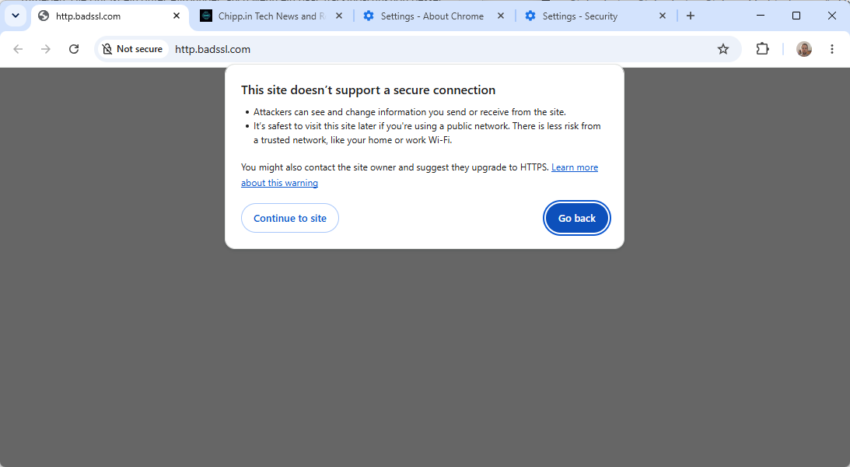
Last year, Google announced that it would change the behavior of its Chrome browser regarding HTTP websites. The company said that it would enable “always use secure connections” in Chrome 154.
The browser is out now, but the change has not come yet on my test devices. It is likely that Google is using rollouts for this to monitor feedback.
What it does: When Google Chrome encounters a public site that uses HTTP, it displays the warning “This site doesn’t support a secure connection” instead of connecting to the site as it did previously.
The prompt displays an option to go back or to continue to site. Going back cancels the navigation request, the continue option attempts to load the HTTP site.
It is noteworthy that the feature impacts redirects as well, even if the actual target website uses HTTPS. Something that webmasters may want to keep in mind as well and address.
Chrome remembers the choice to visit the site and won’t display the security prompt for the next 15 days. Any visit in that time refreshes the period, so that the browser won’t terrorize you with security prompts when you visit a HTTP website often.
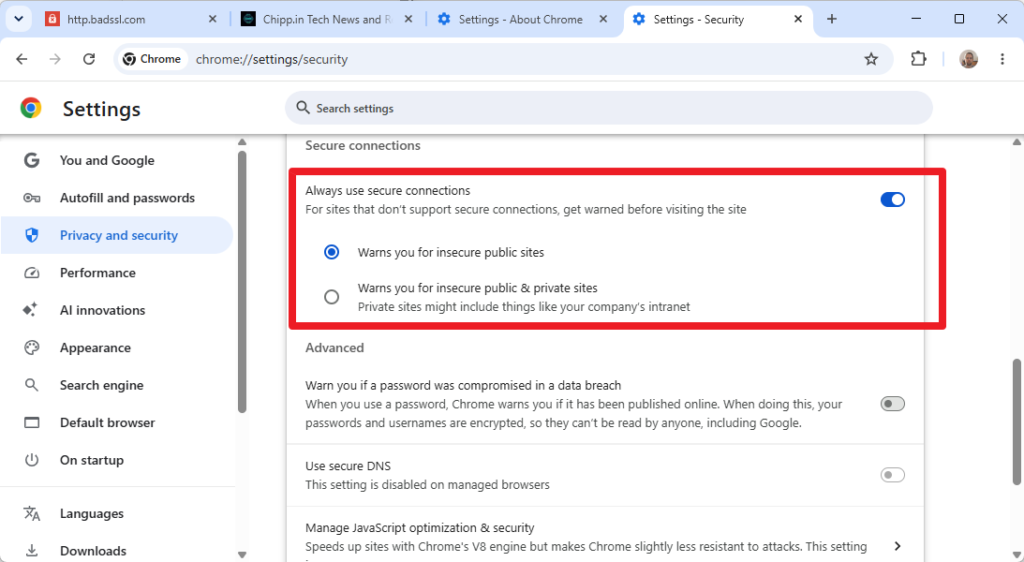
Private sites are exempt by default. There is an option under chrome://settings/security to enable the warning for private sites, e.g. Intranet sites or a router’s administrative frontend, as well.
An option to disable the warning altogether exists right now, but it is unclear for how long it remains available to users.