Chipp.in Tech News and Reviews

Windows, Security & Privacy, Open Source and more

Menu
  • Home
  • Windows
  • Security & Privacy
  • Gaming
  • Guides
  • Windows 11 Book
  • Contact
  • RSS Feed
Menu

Category: News

About “The ActiveX content in this file is blocked” messages in Microsoft Office

Posted on April 16, 2025April 16, 2025 by Martin Brinkmann

Microsoft is changing how Microsoft 365 and Office 2024 handle documents with ActiveX content. Currently, Office displays a prompt that informs users that ActiveX content found in the document is disabled and that they may enable it.

Going forward, Office simply shows “The ActiveX content in this file is blocked” instead, with no option to enable it from the prompt directly. The notification includes a link that opens this support page.

Here are the highlights:

  • ActiveX controls are disabled by default going forward.
  • Users may not interact with existing elements or create new ones by default.
  • This change applies to Word, Excel, PowerPoint, and Visio.
  • Users may still enable ActiveX controls.

Microsoft recommends that Office users answer the three questions before they consider enabling ActiveX controls again:

  • Were you expecting to receive a file with ActiveX?
  • Are you being encouraged to change your ActiveX settings by someone you do not know?
  • Are you being encouraged to change your ActiveX settings by a pop-up message?

How to enable ActiveX Controls in Office again

Here are the required steps to enable the controls again. Please note that the change applies to all affected Office applications and all documents that you open in them. In other words, you cannot just enable ActiveX controls for a single document.

The workaround in this case would be to enable the controls and disable them again once you are done with the document in question.

To enable ActiveX Controls:

  • Select File in Office and then Options.
  • Switch to Trust Center.
  • Select the Trust Center Settings button.
  • Activate the ActiveX Settings option on the page.
  • Make sure “Prompt me before enabling all controls with minimal restrictions” is set on the page.
  • Select OK.
  • Select OK again.

Tip: if you never access documents with ActiveX Controls, set the preference to “Disable all controls without notification” instead.

Firefox Link Previews

Firefox’s Link Preview feature is quite good – here is why

Posted on April 15, 2025April 15, 2025 by Martin Brinkmann

Mozilla has officially launched a preview of the upcoming Link Preview feature of its open source Firefox web browser. Unlike traditional link preview extensions, Firefox’s implementation offers a modern take by incorporating AI for summarizing key points.

The AI runs locally on the device, which is excellent for privacy. The tradeoff is that computing will usually take longer, especially on older or slower systems.

Enabling Link Previews in Firefox

The feature is available as a preview currently in Firefox Beta and Nightly. You need to enable it before it becomes available.

  • Load about:config in the Firefox address bar.
  • Confirm the security prompt to continue.
  • Search for browser.ml.linkPreview.enabled.
  • Toggle the state to True to enable it.
  • Restart Firefox.

Tip: the preference browser.ml.linkPreview.outputSentences defines the number of A_generated keypoints. The default is three. The preference browser.ml.linkPreview.allowedLanguages defines the supported languages, which is English at the time.

Using Link Previews in Firefox

Hold down the Shift and Alt keys on the keyboard before hovering over a link. Firefox displays an overlay that lists key information, including a preview thumbnail, full title, reading time, and a meta description.

Below that is a list of keypoints, generated by AI, that summarize key elements of the linked webpage.

Note: Generation of the keypoints takes longer on first use of the feature. It was relatively speedy on my fairly potent HP laptop, but took quite some time on an older system. This is a one-time process.

Keypoint generation is not instant, but it took a few seconds usually after the initial setup. The processing is relatively quick, even on longer articles, e.g., those on Wikipedia.

The quality of the keypoints is quite good. You should realize that this is not a summary of the article, but three key arguments or points made in the article. It is often good enough for a quick overview of the content, which is the main purpose of the preview feature.

To sum it up:

  • AI runs locally, which is great for privacy, but adds to the processing time.
  • Keypoints give good overviews usually.

Closing Words

Link Previews is a useful feature that bakes privacy-friendly AI into Firefox. While it remains to be seen how popular the feature will be once it launches, it is definitely a welcome addition in the browser.

An option to change the keyboard shortcut from Shift-Alt would be welcome, as it may improve usability.

Now You: do you use link previews? What is your take on the feature that Mozilla added to Firefox?

Thunderbird for iOS: first alpha coming this year

Posted on April 14, 2025April 14, 2025 by Martin Brinkmann

The Thunderbird open source email project is making huge strides. After readying the first mobile version of Thunderbird for Android, the team has set its sight on the second big mobile operation system Apple iOS.

The details:

  • The repository of Thunderbird for iOS is not publicly available on GitHub.
  • The developers aim for an alpha release of the mobile client in late 2025.

Philipp Kewisch, mobile engineer at MLZA Technologies, the organization behind Thunderbird, revealed the good news officially in a message.

The project is just at the beginning and the developers are not openly looking for code contributors at this stage.

Kewisch explains the next steps that are going to happen:

What is next? We’re simultaneously working on some of the iOS essentials and architecture prep. These are all the basics of what types of objects and interfaces do we need, how do they play together, what does the database look like, etc. We’ll start sharing some preliminary details on this soon and give you the opportunity to share your feedback.

This means that it will take a while before iOS users can get their hands on a public prototype of the email app for their mobile operating system.

The greater picture is interesting though. One of Thunderbird’s main weaknesses up until now was lack of support for mobile apps. Mobile users had to use a different email client or access web-based email instead to access emails on mobile.

The release of the Android client and the future release of the iOS client closes that gap.

To make this a true contender for Gmail or Outlook, Thunderbird’s team is also working on a web email service.

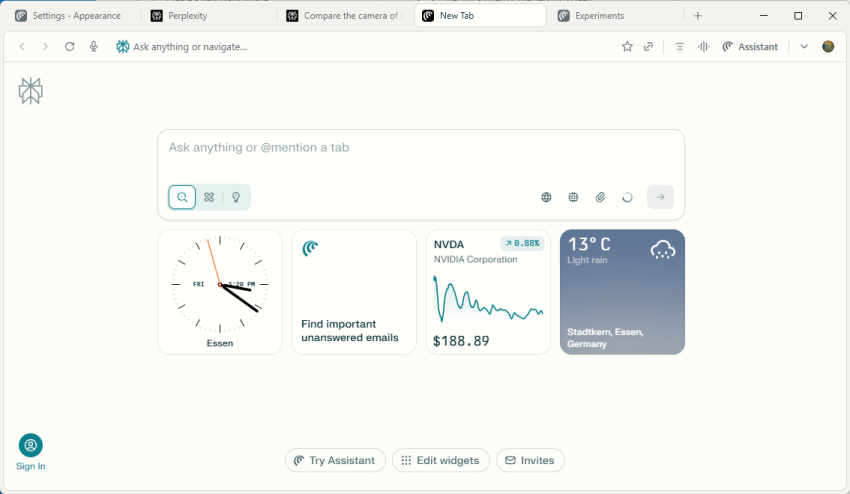
Arc Browser: and then there was Dia

Posted on April 8, 2025April 8, 2025 by Martin Brinkmann

I have to admit that I’m not a huge fan of Arc Browser, a Chromium-based browser by the Browser Company that has been making some waves lately in the influencer-sphere. While I like some features, I disliked others like the forced registration on start or the lack of customization options.

Some time ago, the makers of Arc announced that they started to work on yet another browser. This one less focused on experienced or professional browser users but on artificial intelligence.

Called Dia, it is currently only available with an invite. The Browser Company did publish a short video on YouTube that provides a quick tour of the browser though.

Here it is:

The main feature that the company highlights is the integrated AI. Search, for example, combines answers from the web using large language models and open browser tabs. While you can still search the web normally, you can also direct your questions to the baked in AI to get an answer generated.

This works similarly to how all other AI tools work today. You write something, the AI responds, and you may follow-up. The most interesting feature from my perspective is the ability to use the AI to interact with open tabs in the browser.

So, you could open up tabs during research that list different products. You could use the integrated AI to find out more about these exclusively.

There is also an “ask” button available on all webpages that you may activate to ask the AI questions about the current webpage.

The main question is whether this is enough to convince users to give it a try or even switch to it. My initial guess is that this is not sufficient for that. While Arc may convince some users to give it a try or even stick to Dia, it seems to lack the same features as Arc.

To be fair, Dia is still in active development and it may take a while before the browser is published publicly.

Now you: what is your opinion on baking AI into browsers? Good thing that is useful or rather something that you don’t want at all?

France and Germany launch Docs, an open source alternative for Google Docs

France and Germany launch Docs, an open source alternative for Google Docs

Posted on March 22, 2025March 22, 2025 by Ashwin

France and Germany have announced an open source collaboration tool called Docs. Its description says that Docs was designed to be a secure alternative to Notion, Outline or Confluence.

Well, that definitely applies to Microsoft 365, and Google Docs, because they are the big players on the field.

Docs was developed as a joint initiative by France’s Interministerial Digital Directorate (DINUM), and Germany’s Center for Digital Sovereignty (ZenDiS). Open source tools like Docs will allow users, and businesses to move away from paid services. This may just be the start of many such services. The EuroStack report highlighted the importance of building an independent digital ecosystem for Europe, to address dependencies on foreign technologies and fostering innovation.

Now, you may wonder, what’s with the generic name? Docs, surely they could have done better there. Well, that’s because Docs isn’t just a product, it is a collaborative text editor which is part of a suite which is called “La suite numérique”, you can check the website here to learn more about it. It also has its own GitHub page with repositories for each tool.

Docs will allow users to edit documents and export them into various formats including DOC, ODT, and PDF. It supports markdown, various block types, slash commands, etc. Editors can collaborate on a document in real time. The best part is that you can keep editing the document when you are offline, and your edits will be synced when you’re back online. You can also share documents that you have created using the platform.

And like many modern programs, Docs also has some AI-powered features, these are called AI Actions and allow you to generate content, sum up, correct or translate text.

Docs is built on top of Django Rest Framework, Next.js, BlockNote.js, HocusPocus and Yjs. As a matter of fact, they are also the sponsors of BlockNote and Yjs. The tool uses the MIT license.

You can sign in to Docs using your FranceConnect account. There is a demo page that you can test by signing in using your web browser. Just head over to the official GitHub, scroll down to the getting started section, and you will find the credentials you need to test the app. It has a fairly simple interface, and is quite user-friendly. You can also see the documents that were created by other users in this test environment.

While it is designed as an online collaboration tool, you can download Docs and self-host it if you want to, but keep in mind it’s still a work-in-progress. But, if an offline office suite is what you want, there is a better option, LibreOffice. It is also free, open source, and supports Windows, macOS and Linux.

Did you know that it is also used by Governments? As noted by HowToGeek, Schleswig-Holstein, a state in Germany, switched from Microsoft Office to LibreOffice last year. And they also migrated over 30,000 PCs from Windows to Linux. A lot of people will be doing that later this year, when Windows 10 reaches its end-of-life support date.

Migrating from Skype to Microsoft Teams

Posted on March 8, 2025March 8, 2025 by Martin Brinkmann

Microsoft plans to retire the communication software Skype in May 2025 and recommends that users switch to Microsoft Teams for all their communication needs.

You may ask yourself now how that works. How do you get data like your contacts migrated to Microsoft Teams? This guide walks describes what Microsoft has in store for you and how to export your Skype data manually as well.

First, the information that Microsoft provided so far:

  • Skype users will be able to sign into Teams using their credentials.
  • Chat and contacts will automatically appear, according to Microsoft.
  • During a transition period, calls between Teams and Skype users will be supported.

This makes the migration to Microsoft Teams quite convenient, provided that you want to migrate to the new application.

Note that it may take days before you are able to sign in to Microsoft Teams with your Skype credentials. Microsoft says that this will happen “over the coming days”, but does not provide additional details.

Skype users may export their data. This can be useful if Microsoft Teams is not an option, or if you prefer to switch to a different communication platform altogether.

Important: Skype remains available until May 5, 2025. It is advised to export the Skype data before the date to avoid disruptions or issues.

Export Data from Skype

Here is how you export your Skype data manually:

  1. Sign-in on the web-based version of Skype.
  2. Locate settings and preferences on the page that opens.
  3. Click on “export contacts (.csv)” to export all contacts.
  4. Click on “export files and chat history” to save it to the local system.
  5. Click on “export caller ID numbers” to save the data locally.

Not all third-party communication services may support Skype imports, but you can also open the files manually to access the information whenever you require it.

Now it is your turn. Did you use Skype in the past or are you using it still? What is your take on Teams? Is it a good replacement? Let us know in the comments below.

Opera’s AI Browser Operator: AI in the browser acts now in your name

Posted on March 3, 2025March 3, 2025 by Martin Brinkmann

Most interactions with AI follow a chat-like system. You write or say something, and the AI responds. This may go back and forth, for instance when you have follow-up questions or need corrections.

Opera Software unveiled AI Browser Operator today. The integrated AI agent is more capable than traditional AI, as it is designed to act on your behalf.. You could, for instance, ask the Browser Operator in Opera to find and buy something for you on the Internet.

So, if you forgot to buy your significant other an anniversary gift, you could let the AI do all the heavy lifting. What could possibly go wrong.

While you could argue that other AIs can also point you at products on the Internet, Opera’s implementation is not done at that point. It supports you from start to finish according to Opera Software

Here is how Opera Software describes the functionality:

So how does it work? Browser Operator understands your written instructions in natural language using your browser client’s local resources, and our AI Composer Engine processes this information to complete tasks in the browser. Browser Operator will pause and ask you to take action whenever it needs you to fill in a form, confirm an order, or perform some other sensitive task. In this entire process, you are in control and can take over at any moment from Browser Operator, while you can also review all the steps it took to perform the task you requested.

Opera Software says that Browser Operator has been designed with security and privacy in mind. The AI agent does not use screenshots or video captures of the browsing session, and it is not running in the cloud either according to Opera Software.

Browser Operator “runs natively inside your browser” according to the blog post on Opera’s website. It “uses a textual representation of the webpage” for its activity.

Browser Operator is available as a preview at this stage. I checked several Opera installations, including the latest development builds, and did not find it in the sidebar or when using the command line.

Here is the demo video:

Closing Words

The example that Opera Software provided, the buying of socks, is probably not the best when it comes to the capabilities of AI agents. While some Internet users may appreciate that mundane tasks are taken over by AI agents, human interaction is still required throughout the process.

You need to confirm that you want to buy the product the AI found for you, sign in or create an account, enter payment details, and more.

AI agents may shine when it comes to tasks that do not require user confirmation or input after the task has been given. You can let your imagination run wild at this stage. It is fairly certain that agentic AI will play a large role in the coming months and years.

What is your take on this? Would you use an AI agent in the future for certain tasks? Feel free to leave a comment down below.

Firefox

Mozilla updated its Terms of Use again to address concerns

Posted on March 1, 2025March 1, 2025 by Martin Brinkmann

Wow, this week has to be one of the worst for the people over at Mozilla. There has been tremendous backlash to the organization’s updated Terms of Use.

Maybe not has big of a deal to Mozilla’s Mr. Robot blunder or the announcement to drop Firefox’s custom extensions system for that of Chromium, but still.

To recap: Mozilla announced terms of use and an updated privacy notice for Firefox on Wednesday. These were worded in lawyer-speak and included the following sentence:

When you upload or input information through Firefox, you hereby grant us a nonexclusive, royalty-free, worldwide license to use that information to help you navigate, experience, and interact with online content as you indicate with your use of Firefox.

Tech sites wrote about it and users were up in arms over the wording. Mozilla tried to calm users in an update, stating that the new terms did not give it ownership over user data or the right to use it for anything, even things not mentioned in the privacy notice.

It appears to have helped little. Mozilla published a new statement yesterday saying that it has updated the wording in the new terms of use to make things clearer for users.

The new wording includes the following paragraph now:

You give Mozilla the rights necessary to operate Firefox. This includes processing your data as we describe in the Firefox Privacy Notice. It also includes a nonexclusive, royalty-free, worldwide license for the purpose of doing as you request with the content you input in Firefox. This does not give Mozilla any ownership in that content. 

Mozilla says it has also removed the “reference to the Acceptable Use Policy” because it seemed “to be causing more confusion than clarity”.

The Privacy FAQ was updated as well to better provide information on terms like “sells” according to the update.

This is a fairly common statement. Google, for example, has a big section of its terms of service dedicated to the worldwide, non-exclusive, royalty-free license that users give it.

If you check the terms of other browsers, you probably encounter something similar.

Was it an overreaction? Even with all the explaining, it seems likely that Mozilla won’t convince everyone that it was.

What is your take on this? Do you use Firefox currently? Let everyone know in the comment section below.

Microsoft is shutting down Skype: wants you to use this software instead

Posted on February 28, 2025February 28, 2025 by Martin Brinkmann

The writing has been on the wall for a long time: Microsoft plans to shut down the communication software Skype in May 2025.

While Microsoft has yet to formally announce the end of the once-popular communication software, a notification about the end of Skype was found in the latest preview of the software.

The discovered string says: “Starting in May, Skype will no longer be available. Continue your calls and chats in Teams.”.

Microsoft wants to move customers to Teams, the video conferencing, calling, and meetings software that it favors now.

Skype has been around for quite some time. It was launched in 2003, but Microsoft did not acquire it until 2011. Paid a pretty sum for it, $8.5 billion at the time.

Microsoft discontinued Windows Live Messenger a few years later and tried to make Skype its next billion users product by integrating it in the-then new version of Windows, Windows 10.

This did not work out too well and the launch of Microsoft Teams in 2017 put Skype on the backburner soon thereafter.

As Microsoft has not confirmed the end of Skype yet, there is a theoretical chance that Skype could once more jumping off a scaffold. Microsoft has a few months left to make an announcement either way.

Even if Skype is put to rest, there is a good chance that it could stay around for a while to make sure most users and businesses migrate to Teams in an orderly fashion.

On a personal note, I never warmed up to Skype and have not used it much, even though I had an account for what seems forever.

Now it is your turn. Do you use Skype or have you used it in the past? Feel free to leave a comment down below about that.

Google Translate may get an AI infusion soon: here is what it does

Posted on February 27, 2025February 27, 2025 by Martin Brinkmann

Millions of Internet users use Google Translate as their daily driver for translations. Google has integrated the service into its Chrome browser and it is also available as an application for Android.

Soon, Google may introduce new AI functionality in Google Translate. Here is what you need to know about that.

The details:

  • The new functionality was discovered during a code analysis of the Android Google Translate APK by Android Authority.
  • It is not available yet.

Good to known: Google Translate is a cloud-based service. Means, you need an active Internet connection to use the service. This means as well that Google is informed about your translations. If you want a privacy-friendly option, check out the Firefox Translate feature instead, as it runs locally.

Main AI feature: Ask a follow-up question

At the center of the new AI functionality is the ask a follow-up option. This enables users to interact with AI to use a range of different options.

These include the following:

  • Get information about the translation. Google Translate informs you about translation nuances for instance, according to Android Authority.
  • Ability to get the translation modified, e.g., to take regional variations into account or changing the tone or style.
  • Listen to the translated text with a click on the sound icon.
  • Ability to provide feedback using thumbs-up and thumbs-down icons.
  • Additional insights, e.g., cultural notes or grammar explanations.

Some of these features could be interesting to some users, provided that features like support for regional variants truly work. With AI, it could be difficult to tell whether there is an error in the regional variant or not.

Android Authority found the functionality in Google Translate 9.3.78.731229477.7 for Android. While included, it appears that it has not started to roll out yet or only to some users.

Closing Words

Some users of Google Translate will certainly like the new functionality. The ability to ask follow-up questions could give users a better understanding of the translation, especially if some things are unclear.

Google has not announced the new feature yet officially.

  • Previous
  • 1
  • …
  • 3
  • 4
  • 5
  • 6
  • 7
  • 8
  • 9
  • …
  • 16
  • Next

Support This Site

If you like what I do please support me!

Any tip is appreciated. Thanks!
  • April 16, 2026 by Martin Brinkmann Windows 11 Context Menu Manager: remove items with a click
  • April 15, 2026 by Martin Brinkmann One Exploited Zero-Day and Record Numbers: The April 2026 Windows Patch Tuesday Breakdown
  • April 14, 2026 by Martin Brinkmann Brave is getting Container support and the feature has made a big jump recently
  • April 13, 2026 by Martin Brinkmann A More User-Friendly Way to Pause Windows 11 Updates is Coming
  • April 11, 2026 by Martin Brinkmann Microsoft is Radically Changing the Windows Insider Program

About

We talk, write and dream about Technology 24/7 here at Chipp.in. The site, created by Martin Brinkmann in 2023, focuses on well-researched tech news, reviews, guides, help and more.

Legal Notice

Our commitment

Many websites write about tech, but chipp.in is special in several ways. All of our guides are unique, and we will never just rehash news that you find elsewhere.

Read the About page for additional information on the site and its founder and author.

Support Us

We don't run advertisement on this site that tracks users. If you see ads, they are static links. Ads, including affiliate links, never affect our writing on this site.

Here is a link to our privacy policy

©2026 Chipp.in Tech News and Reviews