Google added a useful new feature to its Gemini AI recently: the ability to create Microsoft Office documents directly using prompts.
While Gemini could create tables and such already, you had to copy the information manually up until now into a Microsoft Office file, if Microsoft Office is your Office suite of choice.
This changes with the most recent update. Now, you can ask Gemini to create Microsoft Office documents directly and the process could not be simpler.
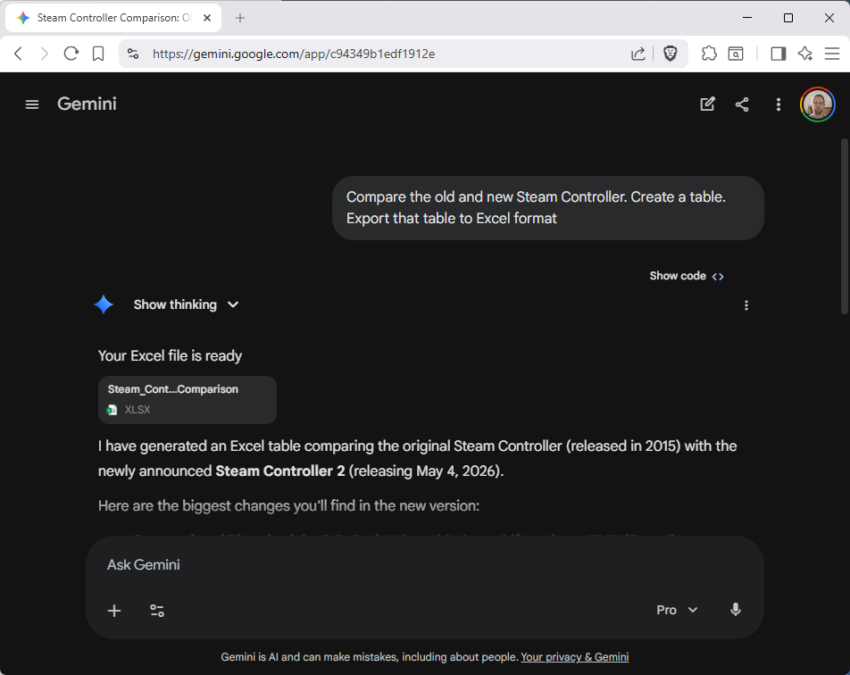
Just add “export the table to Excel format” or “export the text to Word format” to your prompt to do so. Gemini will then show an attachment at the top that is in the right format and contains the information that you requested.
For instance, I used the following prompt to get Gemini to compare the classic Steam Controller to the new gamepad that Valve plans to release in a few days:
Compare the old and new Steam Controller. Create a table. Export that table to Excel format
Gemini displayed the Excel spreadsheet at the top and below that it listed the information that I requested.
All you need to do is click on the attached file to display it right away. This opens options to print it or save it to the local system.
Interestingly enough, the information that Gemini presents to you directly may be different from the information that you requested to be put into the Office document. I guess you can use the instructions to make them identical though, which would be useful to make sure that the Office document has the right information.
“the information Gemini presents to you directly may be different from the information that you requested”
Yep. Gemini is google, SEO an all.
Yes, interesting experience w/ Copilot the other day; I was asking Copilot for quite a bit of finance information and tax code laws, and it was creating table after table that could only be copied as .csv.
I then asked Copilot if it could make a combined table and format it into a Word document; it said, “No problem,” and presented a document that I could download. Somehow the “chatting” resulted in Copilot asking if I would like a .pdf file of the entire chat up to a certain point, a well-formatted table with shading headers, borders, etc. I said, “Yes, please.”
It took some time, but Copilot produced an amazing table in .pdf format. Fortunately, I downloaded and saved all the tables and documents. We then went on with the chat, extensive lengthy, tax rules, financial scenarios, etc. It was time for a break, so I asked Copilot if the session would be saved; it said it most certainly would be whenever I wanted to come back.
The next day I wanted to review the entire session–Whoa! Most of the “chat” completely gone! I asked Copilot if we could reconstruct the “chat.” It said it wasn’t a problem; however, it explicitly said it could not generate any .docx documents or any .pdf documents. It could produce “code,” but not documents. I was puzzled.
We tried recreating some information; Copilot then gave instructions on how I could copy the information, insert text as table, blah, blah, blah; none of it worked.
Instead, I started asking Copilot to regenerate the information which I then copied and pasted into Gemini. Oh my! Gemini started asking me how I wanted the information presented, did I want a .pdf file for the tables or a Word file, etc. I thought Copilot generated some nice tables; Gemini generated tables that far surpassed the elementary tables of Copilot–they even included colored headers.
The question I have and had at the time was why Copilot was producing some amazing tables and finding and following my line of questioning and reasoning so well one day and on the second day, it completely shut down. Obviously, there is some monitoring going on, and the monitors didn’t like what Copilot was doing.
Gemini–thank you for the brilliant work!