If you use the official Weather app for Windows, you may have noticed that it is quite hungry when it comes to memory. The app uses between 500 and 600 megabytes right when you open it.
This goes down a bit when it is in the background and up again when you use it actively. Some features, like the weather radar, may shot up RAM usage to 1 gigabyte or more.
Still, even at idle, using hundreds of megabytes of RAM suggests that the app is anything but optimized.
Windows users who want a weather app but prefer one that does not use as much RAM, may want to look at third-party solutions that offer just that and often much more.
Here are a few suggestions:
Fluent Weather: uses less than 60 megabytes, is open source, has no ads or tracking, lacks some of the advanced features, such as the weather radar or adding locations to the favorites.
Skyline Weather: open source Windows store app, supports multiple locations, uses about 50 megabytes.
TrayWeather: open source app, displays weather information in the system tray, less than 30 megabytes of RAM usage.
WeatherWidget: another standalone open source app that displays weather information for up to five locations. Less than 30 megabytes of RAM usage.
While all lack some of the advanced features of the native Windows app, all use a fraction of the RAM of the official app.
Earlier this month, I wrote about a new version of the Windows tweaker Win11Debloat and its new feature to block automatic driver companion app installations on Windows. I also listed native Windows options to remove the LG Monitor App and unwanted installations.
This came after LG was found to push its Monitor App via Microsoft’s cloud to Windows devices with LG monitors. The app gives users some control over monitor features and also popup ads.
The outcry must have been loud enough to reach the higher ups at Microsoft, as the company just posted an official announcement on X:
Thanks again for bringing this to our attention. We’ve connected with the team at LG and as an immediate next step, they have agreed to disable the McAfee pop-up from their app. We appreciate LG working with us toward a shared goal of a better experience for our mutual customers.…
According to the post of Microsoft Executive Vice President, Windows and Devices, Pavan Davuluri’s post, Microsoft has come to an agreement with LG regarding the matter. LG, according to Microsoft, will stop showing the popup ad on Windows devices.
While that is the right thing to do, considering that the app auto-installed and started to show the popup without users knowing what hit them, it does not address the elephant in the room: nothing is keeping LG or any other device maker from doing so again in the future.
At the very least, Microsoft should introduce new regulations that prevents a scenario like this from happening in the future. Should companies be allowed to display ads or popups in their apps? Certainly, but not when they have the power to auto-install software or updates on user devices.
Until that happens, it may be a good idea to block the automatic installation of manufacturer apps on your Windows devices to avoid these scenarios. You may still download and install (most) apps manually from the Microsoft Store or the manufacturer’s website.
Nothing lasts forever and this is especially true for software and products these days. Microsoft products and services are no exception, as several will reach end of servicing later this year.
This overview lists the major products that won’t receive any updates anymore once support ends.
Windows & Operating Systems
Windows 11, Version 24H2 (Home & Pro): Servicing ends October 13, 2026. (Users will need to update to version 25H2 or newer).
Windows 11, Version 23H2 (Enterprise, Education, & IoT Enterprise): Servicing ends November 10, 2026.
Windows 11 SE: Servicing ends October 1, 2026. Product retirement.
Windows 10 2016 LTSB / IoT Enterprise LTSB 2016: Extended Support ends October 13, 2026.
Windows Server 2012 / 2012 R2 (ESU Year 3): The final year of Extended Security Updates concludes on October 13, 2026.
Office & Productivity Suites
Office 2021 & Office LTSC 2021 (Windows & Mac): Support ends on October 13, 2026. This covers individual applications including Word, Excel, PowerPoint, Outlook, Access, OneNote, Visio, and Project 2021.
Microsoft Publisher: Completely retired and removed from Microsoft 365 subscriptions after October 2026.
Servers & Business Applications
SQL Server 2016: Extended Support ends July 14, 2026.
SharePoint Server 2016 & 2019: Extended Support ends July 14, 2026.
Project Server 2016 & 2019: Extended Support ends July 14, 2026.
Exchange Server & Skype for Business Server (ESU Period 2): Final ESU phase expires October 31, 2026.
Dynamics CRM 2016, NAV 2016, GP 2016, & C5 2016: Extended Support ended between January and April 2026.
Microsoft Configuration Manager (Version 2409): Servicing ended June 6, 2026.
Developer Frameworks & Tools
.NET 9 (Standard Term Support): End of servicing on May 12, 2026.
.NET 8 (LTS): End of servicing on November 10, 2026.
PowerShell 7.4 (LTS): End of servicing on November 10, 2026.
Visual Studio 2022 (LTSC 17.10 & 17.12): Servicing ends on January 13, 2026 (17.10) and July 14, 2026 (17.12).
Key Milestone Summary
Product / Service
Milestone Date
Status
Windows 11, v24H2 (Home/Pro)
October 13, 2026
End of Servicing
Windows 11, v23H2 (Enterprise)
November 10, 2026
End of Servicing
Windows Server 2012 / R2 (ESU)
October 13, 2026
Final ESU Year Expiration
Office LTSC 2021 / Office 2021
October 13, 2026
End of Support / Retirement
As always, most of the products will continue to work even after retirement or end of servicing. Microsoft won’t issue security patches or non-security fixes anymore, and will also end technical support. This increases the vulnerability risk.
Windows has this interesting feature that enables OEMs to push software to user devices. This installs the apps automatically on unmanaged devices and supposedly helps get the most out of certain devices, such as monitors or printers.
While that sounds useful in theory, this feature has been abused in the past. The most recent example is LG installing its Monitor App on Windows PCs and using it to display advertisement for McAfee products.
Since this is unwanted by the vast majority of users, it is fair to say that this falls into the misuse of power category.
You can use Win11Debloat, a popular Windows tweaker, to get rid of the app and block LG from installing it again. Or, you could do it manually.
Here are the steps:
Remove the existing LG Monitor App
Because this is packaged as a standard modern Windows app, it can be uninstalled normally without needing to scrub your registry:
Open Windows Settings (Win + I).
Navigate to Apps > Installed apps.
Search for LG Monitor App Installer (or just “LG”).
Click the three dots (…) next to it and select Uninstall.
Prevent Windows from Auto-Installing Device Apps
Windows automatically downloads these OEM companion apps using a feature called “Device Metadata Retrieval.” You can disable this natively in the GUI:
Open System Properties: Press Win + R, type sysdm.cpl, and press Enter.
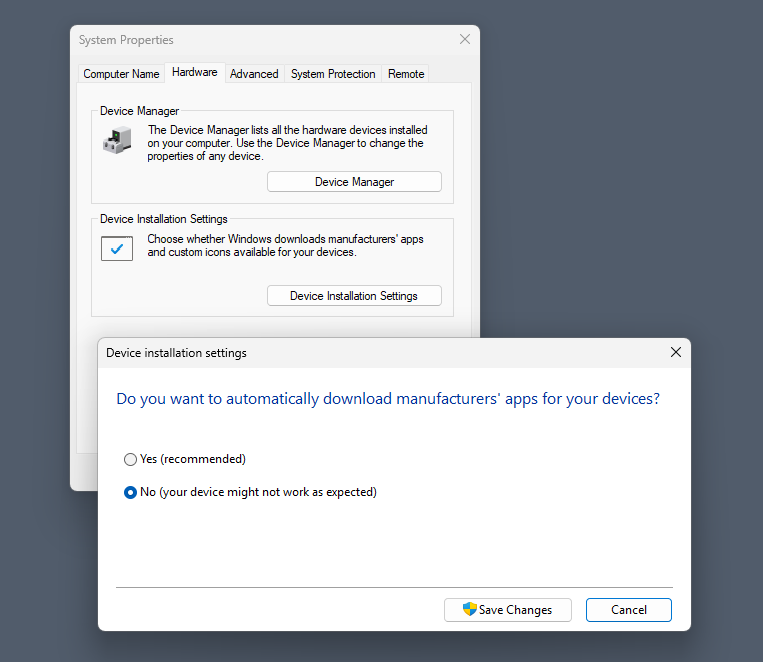
Navigate to Device Installation Settings:Select the Hardware tab, then click the Device Installation Settings button.
Disable Automatic Downloads:This stops all manufacturer companion apps.Select “No” (your device might not work as expected).
Save Changes:Click Save Changes and restart your PC.
Note that you can also make the change in the Registry or using the Group Policy.
Registry:
Press Win + R, type regedit, and press Enter.
Go to HKEY_LOCAL_MACHINE\SOFTWARE\Microsoft\Windows\CurrentVersion\Device Metadata
Find the DWORD named PreventDeviceMetadataFromNetwork. If it’s missing, right-click an empty space > New > DWORD (32-bit) Value and name it exactly that.
Double-click the key and change its Value data from 0 to 1. Click OK and restart your computer.
Group Policy:
Press Win + R, type gpedit.msc, and press Enter.
Navigate to: Computer Configuration > Administrative Templates > System > Device Installation.
Double-click Prevent device metadata retrieval from the Internet (or Prevent automatic download of applications associated with metadata, depending on your exact Windows build).
Set it to Enabled, click Apply, and restart.
Here is the effect
By disabling this feature, you are shutting the door on all OEMs. This blocks automatic, silent installations of software from ASUS (Armoury Crate), Razer (Razer Synapse), Dell (Alienware Command Center), HP, Logitech, and others.
Importantly, this will not break your hardware. Windows will still automatically load the basic, essential drivers required to make the device function.
Disabling this setting only stops the automatic background installations triggered by Windows. You retain complete control to install whatever you want, whenever you want.
If you decide you actually need an OEM companion app—for example, to configure mouse macros, change RGB lighting, or update hardware firmware—you can easily bypass the restriction manually:
Download directly from the manufacturer: Go to the official support page for your specific hardware (e.g., LG or Razer’s website) and download the driver package or software suite yourself.
Install via the Microsoft Store: Many of these OEM control panels are hosted on the Microsoft Store. You can simply search for the app by name and click install.
Turning off automatic metadata retrieval is highly recommended for keeping a clean OS. It shifts control from Windows back to you, ensuring you only install the companion apps you actually plan to use.
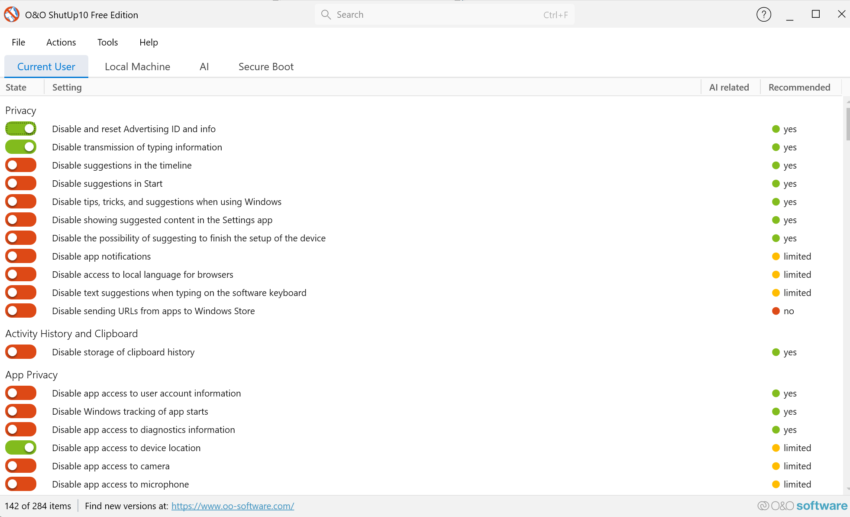
ShutUp10 is one of my favorite tweakers for Windows 10 and 11. The base version is free, it does not need to be installed, and it is super-easy to use but also comes with a good amount of tweaks to turn off features that you don’t need on Windows PCs.
The last version, released yesterday by O&O Software, adds some mighty options to the application’s already impressive arsenal. The new options deal largely with recent Windows changes, like AI in Notepad or File Explorer, denying apps access to generative AI, and taming annoyances, like Windows Search with Bing, Settings app account notifications, or Start menu recommendations.
Here is the full list:
Disable Click to Do
Disable the Settings agent
Disable AI features in Notepad
Disable AI actions in File Explorer
Disable Find My Device
Disable Microsoft account cloud content search (
Disable work or school cloud content search
Disable device search history
Disable Start menu recommendations for tips, shortcuts and new apps
Disable Start menu account notifications
Disable Settings app account notifications
Disable extension of Windows search with Bing
Deny app access to generative AI
Deny app access to generative AI
Deny app access to presence sensing
Deny app access to presence sensing
Do not send device name in diagnostic data
Windows Insider Program conflict detection: when the PC is enrolled in the Windows Insider Program, a notice explains that certain diagnostic-data settings prevent participation, and a dialog offers to disable those settings
Using the app is straightforward. Just download the latest version from the developer website and run it on a Windows machine. The app loads immediately and displays its tweaks in the interface. O&O Software uses colors to distinguish between tweaks that are enabled already and those that aren’t. Furthermore, you gain recommendations for each tweak which range from “yes” to “no”. However, no does not necessarily mean that a tweak is bad, but users should read the description to find out about potential issues that may be experienced after applying it.
“Yes”-Tweaks should be save to apply, but it is always a good idea to read the description to make sure. You can speed things up by selecting Actions to apply all “recommended tweaks”, “recommended and somewhat recommended” or “all tweaks”. I would not recommend doing so unless you are certain that the selection does not cause any issues. If you have the time, it may be better to go through the tweaks one-by-one just to make sure nothing unwanted comes out of it.
The app has a couple of other sections of interest. You can switch to other tabs, e.g. AI, to get a bit of extra control over certain features, or “Secure Boot” to check the status and whether the latest certificates are already used on the system.
If you are a home user running Windows 10 on a PC, you may know that support for the operating system is coming to an official end. While Microsoft ended support back in October 2025 officially, it introduced an Extended Security Updates (ESU) program for home users for the first time.
Once joined, Windows 10 would get another year of security updates until October 2026. Now, with the deadline looming over the heads of millions, Microsoft announced an extension of support.
In short: Windows 10 machines that joined ESU will receive security updates until October 2027 now. That is valid for Home and Pro editions only, as Enterprise customers get other, mostly paid, options to extend support by up to three years.
If the Windows 10 PC receives security updates via ESU already, then it will continue to receive updates after October 2026.
Microsoft confirmed the extension on the official Windows blog. It updated the original article about Windows 10’s future with the information:
This post has been updated to reflect that the Windows 10 Extended Security Updates (ESU) program for personal use devices is being provided for an additional year, with coverage now available through Oct. 12, 2027. This extension provides customers with more time to transition to a new Windows 11 PC while continuing to receive critical security updates.
The decision makes sense on several levels. While Microsoft claims that this is done to give Windows 10 customers more time to migrate, which it does, it is likely that other reasons have played a role.
For one, Microsoft has received some regulatory pressure to extend support for Windows 10, as millions of customers continue to use the operating system. Some, millions as well, can’t upgrade to Windows 11, which leaves them stranded on the older version of Windows.
While Microsoft hopes that these users will buy new PCs or components, the reality is that some won’t. They may continue to use Windows 10, even at the risk of running a system that has known security issues, or make the switch to Linux to continue using the PC and its components, which in many cases work just fine.
There are not many good reasons for being first when it comes to installing new updates for the Windows operating system. In fact, being second has the potential of avoiding the usual assortment of bugs that happen to be confirmed regularly after releases.
Take the June 2026 security updates as an example. Microsoft confirmed a new bug just days after releasing the update. It affects Windows 10 and Windows 11 systems that use custom folder icons or localized folder names that are defined by desktop.ini.
After installing a Windows security update released on or after June 9, 2026, you might notice one or both of the following behaviors for some folders:
A custom folder icon defined by desktop.ini no longer appears.
A localized folder display name defined by desktop.ini no longer appears, and the folder shows its original name instead.
This behavior might occur even when the user has not changed an application or folder configuration.
Microsoft notes that this behavior is expected, as it introduced a security hardening change that affects desktop.ini.
This new behavior is expected. Starting with the Windows security updates released on June 9, 2026, a security hardening change is introduced to desktop.ini handling. When Windows cannot establish that the source of a desktop.ini file is trusted, Windows ignores that file and treats it as if it is not present. However, desktop.ini files from trusted sources continue to work normally.
Microsoft did not first mention this change in the release notes, but has since then added the information.
When is desktop.ini not trusted? When it is downloaded from the Internet and carries the Mark-of-the-Web, copied from “certain” remote locations, or when “files on network paths are not classified as intranet or trusted by zone policy”.
Microsoft has a few workarounds for affected users.
Option 1: Add the source to Trusted Sites (Recommended)
If the affected content is stored on a known internal or managed source, add that source to the Trusted Sites list. Once the source is treated as trusted, Windows processes desktop.ini from that source normally. This keeps the protection in place for other locations and is the lower-risk option.
Option 2: Use policy to restore previous behavior
Organizations that need broader compatibility can enable the policy Allow the use of remote paths in file shortcut icons.Enabling this policy restores the pre-June 2026 behavior for affected remote or untrusted scenarios.
IMPORTANT Using a broad opt-out reduces protection against malicious remote folder-customization content. If you use a workaround, Microsoft recommends trusting only controlled internal sources and keeping trust settings as narrow as possible.
Option 3: Check for and remove the Mark of the Web (MotW)
If the desktop.ini file has a Mark of the Web (MotW), Windows may treat it as coming from an untrusted source and block customization. Verify whether MotW is present and, if appropriate, remove it from the desktop.ini file. This can restore expected behavior, but should only be done for trusted content, as it removes the associated security protection.
To remove the MotW tag, open PowerShell and run one of the following commands:
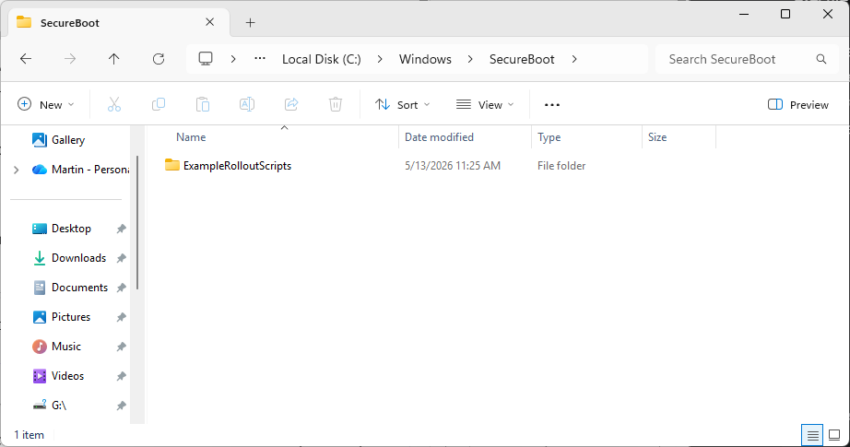
If you’ve noticed a mysterious new SecureBoot folder sitting in your C:/Windows directory following the May 2026 Patch Tuesday, you are not alone.
The folder, which has a subfolder named ExampleRolloutScripts that contains several PowerShell scripts, is a harmless administrative helper introduced in the latest security updates for Windows 10 and Windows 11.
According to official Microsoft guidance, these scripts are designed primarily for enterprise IT administrators to monitor the status of the upcoming UEFI CA 2023 Secure Boot certificate updates and to safely automate their deployment across Active Directory environments.
While essential for corporate networks preparing for this critical security transition, average users can safely ignore this tiny 450 KB folder for now.
The transition to the new UEFI CA 2023 Secure Boot certificates mark a critical security change for the Windows ecosystem. It is made necessary by the impending expiration of current certificates that were issued a long time ago.
Secure Boot acts as the fundamental gatekeeper against bootkits and rootkits by ensuring that only trusted, digitally signed firmware and operating system loaders can execute during startup.
Microsoft is employing a highly controlled, phased rollout strategy—which is exactly why administrative validation tools and scripts are currently being deployed.
Why Microsoft is rolling out the folder to anyone is anyone’s guess. It seems that the folder is pushed to all devices running Windows 11, even unmanaged Windows 11 Home systems.
If April 2026 was an avalanche of patches, May brings a welcome breather from zero-days but keeps the critical severity count high.
Microsoft’s fifth Patch Tuesday of 2026 has arrived, addressing 120 vulnerabilities in total. While it breaks a long-standing streak by featuring zero publicly disclosed or actively exploited zero-day flaws, the sheer volume of severe remote code execution (RCE) bugs demands attention.
The update contains 17 critical flaws affecting a wide range of enterprise products, including Windows Netlogon, DNS Client, Azure DevOps, and Microsoft Word.
Here is the breakdown of what you need to know, what to patch first, and what might break.
You can download an Excel spreadsheet with information about the patches that Microsoft released:
Key Action Item: Administrators must prioritize patching network-exposed infrastructure, specifically domain controllers affected by the Netlogon vulnerability (CVE-2026-41089) and systems running the Windows DNS Client. Simultaneously, Microsoft Office installations need immediate updates to mitigate several highly critical Remote Code Execution vulnerabilities that can be triggered simply via the Windows Preview Pane.
Important Patches
CVE-2026-41089 — Windows Netlogon Remote Code Execution Vulnerability
CVE-2026-41096 — Windows DNS Client Remote Code Execution Vulnerability
CVE-2026-42826 — Azure DevOps Information Disclosure Vulnerability
CVE-2026-40364 — Microsoft Office Word Remote Code Execution Vulnerability
CVE-2026-40402 — Windows Hyper-V Elevation of Privilege Vulnerability
Security updates addressing OS-level RCEs in Netlogon, DNS Client, and Windows Graphics components (Win32k). Also resolves various Elevation of Privilege flaws across the Windows Kernel.
Deep Dive: The Critical Vulnerabilities
Microsoft confirmed that it patched zero 0-day vulnerabilities this Patch Day, but addressed a heavy enterprise focus of critical remote code execution and information disclosure flaws.
A critical stack-based buffer overflow flaw (CVSS 9.8) affecting Windows Netlogon. A remote, unauthenticated attacker could exploit this by sending a crafted network request to a Windows server running as a domain controller. If successful, this causes the Netlogon service to improperly handle the request, allowing the attacker to execute malicious code without requiring any prior access or credentials.
CVE-2026-41096 (Windows DNS Client Remote Code Execution Vulnerability)
This critical heap-based buffer overflow vulnerability (CVSS 9.8) affects the Windows DNS service. It allows remote code execution over the network and can be exploited by sending a malicious DNS response, triggering memory corruption within the Windows DNS client. Depending on the configuration, an unauthenticated attacker can achieve full RCE.
CVE-2026-42826 (Azure DevOps Information Disclosure Vulnerability)
This is the highest-rated flaw this month, boasting a perfect CVSS score of 10.0. While Microsoft withheld specific exploitation details, a perfect severity score indicates that unauthenticated attackers could potentially access highly sensitive enterprise data, credentials, and source code stored or handled in Azure DevOps.
A cluster of critical vulnerabilities in Microsoft Word (CVSS 8.4) that allow an unauthorized attacker to execute code locally. Notably, these flaws can be triggered through the Windows Preview Pane, meaning a user only needs to preview a specially crafted document to be compromised, without ever fully opening the file.
CVE-2026-40402 (Windows Hyper-V Elevation of Privilege Vulnerability)
A severe flaw (CVSS 9.3) allowing for a guest-to-host escape in Windows Hyper-V. By targeting certain hardware device registers, an attacker operating from within a guest virtual machine can escape the isolated environment and gain SYSTEM privileges on the underlying host system.
First Steps: Your Patch Tuesday Strategy
Prioritize Domain Controllers (Netlogon) and DNS Client services
Another one? That could be the reaction of veteran Windows users who read the headline. Microsoft confirmed another BitLocker related issue in Windows 11. This one may be caused by installing the most recent cumulative update for the operating system.
In the Known issues section of the update, Microsoft confirms that devices might boot into the BitLocker Recovery screen and not the desktop.
According to the description, the issue is caused by an “unrecommended BitLocker Group Policy configuration”. Only a “limited number of systems” are affected according to Microsoft. The company says that the issue affects only systems for which all of the following conditions are true:
BitLocker is enabled on the OS drive.
The Group Policy “Configure TPM platform validation profile for native UEFI firmware configurations” is configured, and PCR7 is included in the validation profile (or the equivalent registry key is set manually).
System Information (msinfo32.exe) reports Secure Boot State PCR7 Binding as “Not Possible”.
The Windows UEFI CA 2023 certificate is present in the device’s Secure Boot Signature Database (DB), making the device eligible for the 2023‑signed Windows Boot Manager to be made the default.
The device is not already running the 2023-signed Windows Boot Manager.
Devices that meet the conditions may boot into recovery mode after installing the KB508376 for Windows 11, versions 24H2 or 25H2.
A workaround is available to remove the Group Policy configuration before installing the update.
Open Group Policy Editor (gpedit.msc) or your Group Policy Management Console.
Navigate to: Computer Configuration > Administrative Templates > Windows Components > BitLocker Drive Encryption > Operating System Drives.
Set “Configure TPM platform validation profile for native UEFI firmware configurations” to “Not Configured“.
Run the following command on affected devices to propagate the policy change: gpupdate /force
Run the following command to suspend BitLocker (where BitLocker is enabled on the C: drive): manage-bde -protectors -disable C:
Run the following command to resume BitLocker (where BitLocker is enabled on the C: drive): manage-bde -protectors -enable C:
This updates the BitLocker bindings to use the Windows-selected default PCR profile.
Microsoft plans to release a permanent fix in the future to address this. Windows users who use a Microsoft Account can look up the recovery key for BitLocker online.