Microsoft has just released another, “out-of-band” series of updates—including KB5078127 and KB5078132—to address a critical system issue currently impacting Windows 11 (versions 25H2, 24H2, and 23H2) and Windows 10 (22H2) users worldwide.
The issue occurred after installing the January 2026 cumulative updates for client and server versions of Windows.
Microsoft admits that users of Outlook were especially affected by the issue, provided that the Outlook PST files were stored in the cloud and not on the local machine.
Outlook users might notice hangs or issues when reopening Outlook. Other issues that users might experience included noticing that sent items were missing or that previously downloaded emails were downloaded again.
Windows users who use Outlook and store the PST files in the cloud should install the update immediately. Microsoft does not mention any other changes in the update, which means that users of unaffected systems can ignore it for now. It will be included in the February 2026 cumulative update.
How to check your Windows Version
To find your version, press Win + R, type winver, and hit Enter. Once you know your version, look for the corresponding update in Settings > Windows Update.
Windows Version
Update ID (KB)
New OS Build
Windows 11, version 25H2
KB5078127
26200.7628
Windows 11, version 24H2
KB5078127
26200.7628
Windows 11, version 23H2
KB5078132
22631.6495
Windows 10, version 22H2
KB5078137
19045.6812
While these frequent “out-of-band” patches can feel like a game of digital whack-a-mole, they serve as a reminder that updates do not only fix issues but may also introduce them.
As such, it is highly recommended to take necessary precautions, such as backing up the system partition before installing updates.
In a move that confirms privacy advocates’ long-held fears, Microsoft has reportedly handed over BitLocker encryption keys to the FBI, allowing federal agents to unlock the laptops of suspects in a fraud investigation without their consent.
The disclosure reveals a critical issue in how modern Windows devices handle security: convenience often comes at the cost of privacy. While BitLocker is designed to make your data unreadable to third-parties, the default settings on millions of Windows 11 PCs automatically upload the recovery key to Microsoft’s servers—creating a lawful “loophole” when served with a valid warrant.
For the suspects, this meant their encrypted hard drives were an open book. But for the average user, it serves as a grim reminder: if your recovery key lives in the cloud, Microsoft holds the master key to your digital life. Anyone else who may gain access, think malicious hackers, may also.
The good news? You can revoke their access today—if you know where to look.
Checking the status
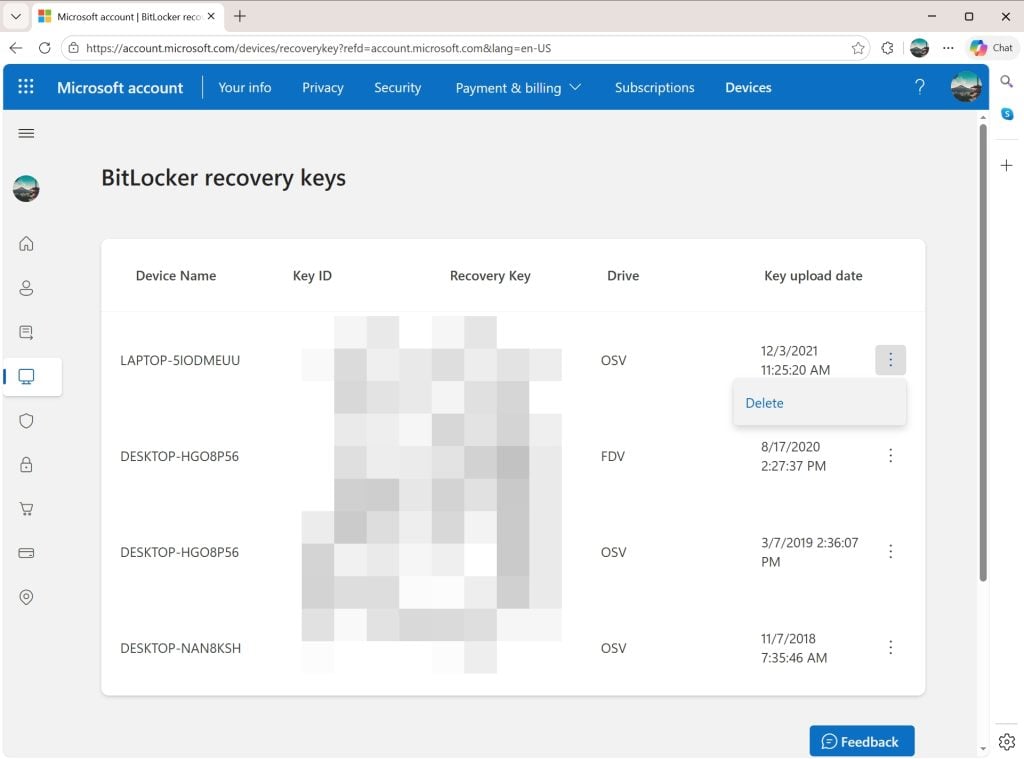
The Microsoft online website lists all BitLocker recovery keys uploaded to the cloud, even for devices that you may not use anymore.
If you do use computers with Windows 11 and a Microsoft account, chance is that BitLocker is used on the device and that the encryption keys are synced to the connected cloud storage.
The best way to find out if that is the case already is the following:
Open a web browser on your computer.
Navigate to https://account.microsoft.com/devices/recoverykey.
Sign-in to your Microsoft account (the same that you use to sign-in to Windows)
The page that opens displays all connected devices, dates, and the Bitlocker recovery key. These keys can be used to decrypt hard drives encrypted by BitLocker.
Tip: You can delete any instance here with a click on the menu icon next to an item and the selection of delete.
You can also check the status of the active computer in the following way:
Open Start.
Type CMD.
Select “run as administrator” while Command Prompt is selected.
Paste or write manage-bde -status and press the Enter-key.
Check the conversion status to find out if a drive of the computer is encrypted.
Prevent the upload of recovery keys
The Control Panel applet reveals the status of BitLocker on each drive.
The easiest option, by far, is to rely solely on local accounts on Windows 11. Since local accounts are not linked to a Microsoft account, they do not sync data to the cloud. However, it is necessary to make sure that the local account is created during the initial setup.
Another option is to avoid BitLocker altogether and use a third-party — trusted — encryption software, such as VeraCrypt instead.
For that, you have to disable BitLocker on each Windows machine. Here is how you disable it on the active machine.
Notes:
Turning off will take some time. Windows begins decrypting the selected hard drive. It can take minutes to hours, depending on the size of the drive / partition and the speed of the PC.
You can keep using the computer. While Windows decrypts the drive in the background, you can keep on using it. It may be a bit slower than usual though.
Keep the PC turned on during the entire process. Ideally, you keep the PC on until the decryption of the drive completes. Keep the Control Panel open or check the notification area for status updates.
If “turn off” is not available, you are either not logged in as an administrator or there is a policy in place that prevents you from making changes.
Method 1:
Open the Start menu and click on the Settings icon.
Select Privacy & security in the Settings app.
Look for Device encryption.
If you do not see the option, skip the process and check method 2 below.
Click on Device Encryption.
Toggle the feature to Off.
Confirm the choice by selecting turn off again.
Method 2:
Press the Start button.
Type Manage BitLocker and select the result.
Check all drives listed on the Control Panel page that opens.
If you see “BitLocker Off” next to a drive, the encryption is disabled.
Select “Turn off BitLocker” for each drive with “BitLocker on”.
Confirm your choice by selecting “Turn off BitLocker” again.
Method 3: The Pro-method
Right-click on the Start menu, select Terminal (Admin).
Type the command manage-bde -off C: and press the Enter-key.
Note: replace C: with the drive letter that you want to disable BitLocker for
Imagine this: You’ve just finished a critical document or a long email, you hit “Save,” and suddenly—nothing. Your screen freezes, the cursor spins endlessly, and your application enters the dreaded state of “Not Responding.”
If this sounds like your week, you aren’t alone. A frustrating new bug in the latest Windows 11 update is causing freezes for users relying on cloud storage.
Enterprise: Windows 10 LTSC 2021, Windows 10 LTSC 2019
Server: Windows Server 2019, Windows Server 2022, Windows Server 23H2, Windows Server 2025
Microsoft admits that the bug affects file operations, such as load or save, when cloud-storage is involved. Attempts to save files to OneDrive, Dropbox or other cloud storage services may trigger the issue. Similarly, opening files from cloud locations may also cause the freezes.
Microsoft writes:
For example, in some configurations of Outlook that store PST files on OneDrive, Outlook might become unresponsive and fail to reopen unless its process is terminated in Task Manager, or the system is restarted. In addition, sent emails might not appear in the Sent Items folder, and previously downloaded might be downloaded again.
The company says that it is working on a resolution. It does not have a universal workaround for affected users at the time of writing. While it has published a workaround for users who load Outlook PST files from cloud storage, it simply states that users should contact the application developer to learn about other access options.
I will update this article once there is a fix or a universal workaround. Keep you posted.
Just days after Microsoft released the first security updates for Windows, it is rushing out an out-of-bounds update to fix sign-in failures during Remote Desktop connections
It wouldn’t be a true Patch Tuesday if something didn’t break immediately after. If you spend the last days trying to figure out why Remote Desktop connection suddenly refuse to authenticate, you may be glad to hear that Microsoft acknowledged the issue yesterday.
Even better, the company released an out-of-bounds update on Saturday that addresses the issue.
Essential information
The issue: Microsoft notes that some Windows users “experienced sign-in failures during Remote Desktop connections”. The issue affected several Remote Desktop apps, including the Windows app.
Affected systems: Microsoft released updates for Windows 10 (KB5077796) and Windows 11, versions 24H2 and 25H2 (KB5077744)
Availability: Microsoft releases the update via Windows Update, Microsoft Update, and the Microsoft Update Catalog.
Administrators need to install the out-of-bounds update to fix the issue.
AI component updates included
While the main purpose of the update is to restore Remote Desktop connectivity, Microsoft has added several updated AI components to the update.
This affects the Windows 11 update only, as Windows 10 support is limited. Here is the list of components that are also updated when the patch is installed on a Windows 11 machine.
AI Component
Version
Image Search
1.2511.1224.0
Content Extraction
1.2511.1224.0
Semantic Analysis
1.2511.1224.0
Settings Model
1.2511.1224.0
Closing Words
The RDP issue is not the only one that Microsoft confirmed after the release of the January 2026 updates. Some Enterprise systems running Windows 11, version 23H2 were plagued by a shutdown bug that prevented the systems from shutting down properly.
Microsoft published a workaround — running the shutdown command from run or a command prompt — but no final fix for the issue at the time of writing.
If you were hoping for a quiet start to the new year, Microsoft has other plans.
The January 2026 Patch Tuesday is here, and it marks a heavy start to the year for system administrators. Microsoft has addressed a massive 114 vulnerabilities across its ecosystem, including eight critical flaws and a zero-day that require immediate attention.
While Microsoft released a large number of patches for its operating systems and services, it is CVE-2026-20805 that requires immediate attention. It is an actively exploited zero-day vulnerability in the Desktop Windows Manager (DWM) that is being used by threat actors to bypass security controls.
Add to that a “no-click” remote code execution flaw in Microsoft Office that is triggered by using the preview pane, it is clear that administrators have their hands full in the coming days to address these and others.
Beyond the security fixes, this month also brings some significant housekeeping: Microsoft is officially purging legacy Agere modem drivers from Windows images, marking the end of the road for decades-old hardware dependencies.
Key Action Item: Administrators should prioritize patching CVE-2026-20805 (DWM) immediately, as it is being used in the wild to bypass security controls.
Important Patches
CVE-2026-20805 — Desktop Window Manager Information Disclosure Vulnerability
Security updates and non-security changes. Removes old modem drivers (Agere).
Deep Dive: The Critical Vulnerabilities
While the total count of vulnerabilities is high, administrators may want to focus their attention on three specific issues: a zero-day vulnerability that is exploited in the wild, “no-click” Microsoft Office exploits, and a major issue affecting in Secure Boot.
The Zero-Day: CVE-2026-20805 (actively exploited)
CVE-2026-20805 is an Information Disclosure vulnerability that allows a threat actor to read specific memory addresses from remote ALPC ports. While this does not allow the actors to run malicious code directly, attackers may exploit the vulnerability to bypass Address Space Layout Randomization (ASLR).
This may enable them to create other remote code execution exploits that target system components directly.
The “No-Click” Microsoft Office issue
CVE-2026-20952 and CVE-2026-20953 are use-after-free vulnerabilities that allow remote code execution. The danger comes from the fact that they do not require user interaction for execution.
They rely on preview panes, either in File Explorer or Outlook, to trigger exploits. An attacker would have to get a specially crafted Office document on the user’s computer. When a user views the file in a preview area, for example by selecting it in File Explorer, the exploit triggers.
The Secure Boot bypass
CVE-2026-21265 describes a Secure Boot issue. It is not a bug in code that can be exploited, but a cryptographic expiration issue. Secure Boot certificates issued in 2011 are set to expire later this year.
Installation of this update rotates the certificates ensuring that devices will continue to boot and won’t fail to boot once the old certificates expire.
Significant changes
Microsoft removes drivers for legacy Agere modems from Windows with this update. The modems have not been manufactured for a long time and the main reason for removal is a vulnerability CVE-2023-31096. Instead of patching the driver, Microsoft decided to remove the driver from Windows instead.
The removal affects Enterprise and industrial users for the most part. It can affect point-of-sale terminals or legacy fax servers that rely on Agere modem chipsets. These will no longer work when the update is applied.
A quick check of the Device Manager should reveal whether “Agere Systems” or “LSI” models are used.
WDS Hardening enters first phase
This is only relevant if Windows Deployyment Services (WDS) is used. Microsoft is hardening WDS. The company introduces new event logging and Registry controls to block unauthenticated deployment requests.
Starting this month, logging is enabled. Administrators may enforce the block, but it is not enabled by default. From April 2026 onward, Microsoft plans to enable “block by default”.
Companies that rely on unauthenticated imaging have until April 2026 to switch to authenticated deployment. There is also a new AllowHandsFreeFunctionality Registry key, which enables the old status quo.
First Steps: Your Patch Tuesday Strategy
Patch the Zero-Day issue that is exploited in the wild immediately.
Deploy updates to mitigate the “no-click” vulnerability in Microsoft Office.
Make sure legacy modem hardware is not in use anymore.
Ensure that boot loaders are updated before certificates expire.
Windows 11, version 22H2 support ended just a few months ago for business customers and version 23H2 support ended for consumers as well. Additionally, Microsoft Office 2016 and 2019 reached end of support.
Looking forward, 2026 will be another interesting year. Consumers who run Windows 10 PCs with ESU will no longer get updates from Microsoft after the one-year extension has run its course.
But that is not the only change. Windows 11, version 24H2 reaches end of support as well. Business customers have to upgrade Windows 11, version 23H2 to ensure that their devices remain supported with updates.
Here is the list of products that reach end of support or life in 2026. Note that this may not be complete, as Microsoft does not provide an easily accessible list for all of its products.
Inspiration was taken from the list over at Deskmodder, but I have fine-tuned it somewhat.
Microsoft Windows
Windows 10 2016 LTSB / IoT Enterprise LTSB 2016 reach end of ESU on October 13th, 2026
Windows 11, version 23H2 Enterprise/Education/IoT Enterprise editions reach end of support on November 10th, 2026.
Windows 11, version 24H2 Home/Pro editions reach end of support on October 13th, 2026.
Windows 11 SE, reaches end of support in October 2026.
Windows Server 2012 and 2012 R2 reaches end of ESU on October 13th, 2026.
Windows Server 2022 reaches end of mainstream support on October 14th, 2026. ESU available.
Microsoft Office
Microsoft Office 2021 reaches end of support on October 13th, 2026.
Office LTSC 2021 and Office LTSC 2021 for Mac reach end of mainstream support on October 13th, 2026.
Other Microsoft products
Microsoft .NET 8 (LTS) reaches end of support on November 10th, 2026.
Microsoft .NET 9 reaches end of support on November 10th, 2026
PowerShell 7.4 (LTS) reaches end of support on November 10th, 2026.
SQL Server 2016 reaches end of extended support on July 14th, 2026.
Generally speaking, Microsoft is supporting Windows 11 Home and Pro editions for two years, while business and Enterprise editions get three years of support.
Now You: Do you use a product or service that is reaching end of support this year? What are your plans dealing with this? Feel free to leave a comment down below.
Microsoft’s Windows operating system comes with several features that enables users to restore the system. While the functionality helps at times, it falls short at other times.
That’s why third-party backup software remains important. The main advantage is that it can be fully independent of the operating system, provided that it supports backup media that you can boot from.
This allows you to run the software and restore the system, even if Windows refuses to boot or load, or when Windows recovery features fail.
There are numerous good and free apps out there that support all of this. My favorite for the past several years has been Paragon’s Backup & Recovery Community Edition.
It is free and supports full system backups as well as scheduled backups. While it lacks some advanced features, such as direct disc cloning or advanced partition tools. However, for the purpose of creating a full system backup, Paragon’s free solution is just fine.
What you need
Here is what you require:
Download the latest version of the free backup software from Paragon’s website. Install the software on the Windows PC.
An external hard drive or large USB stick. How large depends on the size of the system drive. I suggest several Terabytes, as you may want to store multiple backups on the drive. Otherwise, you’d have to delete old backups to make room.
A recordable disc or USB thumb drive for the recovery media.
Launch the backup software after installation and connecting the external drive. You should see the following screen:
Follow these steps to create your very first backup:
Click on “Backup source”. You get the option to backup up the entire computer, disk/volumes, or files/folders.
Select Disk/Volumes. All connected drives are displayed.
Pick the main drive that Windows is installed on. Look for “Local Disk (C:)” when i doubt. Make sure the entire drive is selected and not just a volume by clicking on its name. Confirm with OK.
Click on “Destination” next.
Select the letter of the external drive that you connected. You may alternatively create a folder on it for the backups. Confirm with OK.
Switch to Options once back in the main interface. Here, you have several options that you may want to configure:
Password Protection: This blocks access to the backup file unless the password is provided.
Backup compression: Set to normal by default. If you pick “Best”, the backup file size may be smaller, but the operation will take longer. If you have enough space, you could also pick “none” or “fast” for quicker backups.
Check backup integrity after creation: This verifies that the backup has been created successfully. Will take longer to complete.
Go back to “backup strategy”.
Select “is not scheduled” to schedule backups. This can be used to create automatic backups, but the external drive needs to be plugged in.
Select “full backups only” to change that. The two other options, “chain of full and incremental backups” and “chain of full and differential backups” reduce the storage requirements, but it takes longer to restore. Here you can also select the retention, which is set to “forever” by default. You could change it to “until storage is full”.
Activate the “back up now” button to start the process.
Once done with the first backup, launch the Settings of the app and activate the “Recovery Media Builder”. Use it to create media to boot when you need to recover a system backup.
The easier option is to pick “Use this Windows image” under creation mode. Note that you need an USB thumb drive or burn the recovery media to disc. This, along with the external drive are required to initiate a recovery process from outside of the Windows operating system.
Now You: do you use a backup software and create backups regularly? If so, which application do you use and how do you store your backups?
Microsoft has accumulated a wealth of downloads over the last four decades or so. From tools and drivers to Windows versions and standalone applications. While some may not be useful anymore at this day and age, other than for a nostalgic look back at how things were back in the good old days, others are still useful.
However, Microsoft is pruning its archives regularly. Means, downloads may be removed and it is becoming increasingly difficult to find them. While third-party sites may offer them, some may add a pinch of malware on top of the downloads, which is a problem especially for inexperienced users or users in a hurry.
Enter the Microsoft Download Center Archive. It is a free site that offers legacy downloads for Microsoft products. You find downloads between the years 2012 and 2025 in the archive, which Microsoft deleted from its own archives.
Here is a glimpse of what you can expect:
PowerToys and Fun Packs for Windows XP.
Office Viewers like Word Viewer 2003 or Visio Viewer 2016.
Old .NET Framework versions.
Microsoft Visual C++ and Visual Basic Redistributables.
Windows Help.
Microsoft Report Viewer.
And much more.
While the focus is on downloads for older versions of Windows, at least some of the downloads are also compatible with Windows 10 or Windows 11. Furthermore, since Windows 10 is near the end of its support, it is possible that Microsoft is going to remove downloads for Windows 10 in the near future.
These will also be added to the archive then, making it a great resource for users who plan to stick to Windows 10.
The site offers a search and a list of common downloads. You can type the name of an operating system to get all downloads for it, or search for the name of a software or tool instead.
Downloads are hosted at the Internet Archive. They start instantly and do not require an account.
Closing Words
The unofficial Microsoft Download Center Archive is a useful website for Windows users who want to download software that Microsoft removed from its official websites.
Clarke revealed several information during the company’s latest earnings call. One of them being that Dell believes that there are 500 million Windows 10 PCs out there in the world that can’t be upgraded to Windows 11 officially. While most could be upgraded by bypassing Microsoft’s artificially introduced system requirements, only a small fraction will because of the technical process that is involved and the consequences.
Another 500 million PCs that run Windows 10 can be upgraded, but have not yet. That leaves about 500 million PCs that run Windows 11 already, according to Dell.
However, this is not the only bombshell that Clarke dropped during the call. He also revealed that the transition from Windows 10 to Windows 11 is much slower than the transition from Windows 8 to Windows 10.
The transition is lagging behind, which affects Dell’s growth in the sector. Dell reported a revenue of $12.1 billion for its Client Solutions Group, which bundles commercial client and consumer PC sales. Here, Dell reported a slight uptick in commercial client revenue to $10.1 billion and a declining revenue of $2 billion in consumer PCs.
The Infrastructure Solutions Group made more than up for that though. Its revenue was $14.1 billion, which is a 24 percent increase compared to the last year and the sevenths consecutive quarter with double-digit growth. AI is the main driver of the revenue increase of this group.
To sum it up: Windows 10 users seem to hold on to their PCs, even if they could upgrade them to Windows 10. For now, PCs remain supported with security updates if ESU is enabled for the device.
Now You: Windows 10 or Windows 11, what is your preference? Or something else? Maybe you made the switch to Linux already?
Windows users who use BitLocker to encrypt their data either willingly or unknowingly may have run into a BitLocker related issue several times in the past.
It is unclear when it all started, but the essence of the bug was always the same: affected Windows PCs would boot into BitLocker Recovery Mode after installation of an update that caused the issue.
The problem here is that to get out of the mode, users needed the recovery key, which many probably did not really know. While it is easy to look it up online, at least when a user uses a Microsoft account to sign in, it still was a hassle in the best case.
Microsoft confirmed another BitLocker Recovery issue on the Microsoft 365 admin center, but not yet as a known issue for regular users who do not have access to the admin portal.
The issue affects the following Windows versions:
Windows 10, version 22H2
Windows 11, version 24H2
Windows 11, version 25H2
The systems are affected, if the October 2025 security updates are installed on the machines.
Microsoft says that the issue affects Windows PCs with Intel processors and Modern Standby mostly. Still, other systems may also be affected.
As usually, Windows users may resolve the issue by entering the BitLocker recovery key when prompted for it.
Closing Words
Microsoft seems to have a hard time fixing the BitLocker bug for good, as it reappeared several times, including in May of 2025 when Microsoft issued another warning about the problem.