Chipp.in Tech News and Reviews

Windows, Security & Privacy, Open Source and more

Menu
  • Home
  • Windows
  • Security & Privacy
  • Gaming
  • Guides
  • Windows 11 Book
  • Contact
  • RSS Feed
Menu

Category: Entertainment

New YouTube Premium Rates: US Prices Rise to $15.99

Posted on April 10, 2026April 10, 2026 by Martin Brinkmann

Like clockwork subscription prices are increasing. Last month, it was Netflix that announced a price hike in the United States. Customers have to pay between $1 and $2 extra per month to continue streaming Netflix-content to their devices.

Just a few weeks later, it is Google that is quietly raising prices for YouTube Premium subscriptions in the United States.

Here is what is changing:

  • Individual Plan: Increased from $13.99 to $15.99 per month
  • Family Plan: Increased from $22.99 to $26.99 per month
  • Annual Plan: Increased from $139.99 to $159.99 per year
  • Premium Lite: Increased from $7.99 to $8.99 per month

So, users pay between $1 to $4 more per month, or $20 when they pay yearly. The change affects Apple users as well. Users who subscribe through the Apple App Store or an iOS device pay a premium, and this remains. The individual plan costs $20.99 per month when subscribed this way.

That is why it is advised to subscribe using a web browser to get the lower rate.

The new price is already shown to users who open the official YouTube Premium subscription page on the website. Google, however, has not announced the price increase officially on any of its official blogs.

Premium subscribers may stream videos without ads on YouTube. They do get access to YouTube Music and some other — mostly artificially limited — features, including background play or continue watching.

YouTube Lite subscribers pay less, but they get limited features. They get ads on some video formats and types, and the ability to play in background or download videos is also limited.

Good content blockers continue to work in browsers and apps like NewPipe or SmartTube continue to work on Android TVs as well, albeit with frequent interruptions caused by changes on YouTube.

Sony announced a massive PlayStation 5 price increase

Posted on March 28, 2026March 28, 2026 by Martin Brinkmann

If you plan to buy a Sony PlayStation 5 console this year, you better hurry, as prices will go up on April 2, 2026.

Sony announced the price increase on the official blog after increasing the price in the United States in 2025 already. There, the company explains that “pressures in the global economic landscape” forced its hand. Without going into specifics, Sony is likely referring to the skyrocketing prices of RAM and storage due to the explosion of AI-focused services.

All PlayStation consoles and the PlayStation Portal handheld get a price increase. In the United States, prices of the console increase between $100 and $150, depending on the system.

Without further ado, here is an overview of the old and new price for each Sony PlayStation 5 console in all mentioned regions:

RegionProductOld PriceNew PricePrice Increase
U.S.PS5$549.99$649.99+$100.00
PS5 Digital Edition$499.99$599.99+$100.00
PS5 Pro$749.99$899.99+$150.00
PlayStation Portal$199.99$249.99+$50.00
U.K.PS5£479.99£569.99+£90.00
PS5 Digital Edition£429.99£519.99+£90.00
PS5 Pro£699.99£789.99+£90.00
PlayStation Portal£199.99£219.99+£20.00
EuropePS5€549.99€649.99+€100.00
PS5 Digital Edition€499.99€599.99+€100.00
PS5 Pro€799.99€899.99+€100.00
PlayStation Portal€219.99€249.99+€30.00
JapanPS5¥79,980¥97,980+¥18,000
PS5 Digital Edition¥72,980¥89,980+¥17,000
PS5 Pro¥119,980¥137,980+¥18,000
PlayStation Portal¥34,980¥39,980+¥5,000

Sony suggests that customers should check pricing with local retailers or the PlayStation website, if they live in a region not mentioned explicitly.

This console generation is the first in gaming history where console prices have trended upward. Nintendo (Switch 1) and Microsoft have also raised prices, and there is a good chance that both companies may announce another round of price increases this year.

Historically, components used in consoles got cheaper as the years progressed. This allowed companies to reduce prices or introduce new models at lower price points.

However, this generation is facing unprecedented global economic factors. Besides the boom around AI, which drives RAM and components to higher price points, companies face inflation, tariffs, and conflicts around the world.

So what should gamers do? There are a couple of options:

  • Stick to the last generation of consoles or even older ones. They are cheaper and have a huge catalog of -often- cheaper games to play.
  • Consider PC gaming. While PCs are also affected by the rising prices of components, they offer more flexibility. You could consider a PC gaming handheld or upgrade an existing PC with a better video card or processor for more gaming power.
  • Sit it out. Things may calm down again in the coming years. AI is still a wildcard, and a crash might cause components to drop in price sharply. Also, the second-hand market may be flooded with cheap RAM and other components in that case.

Another year, another Netflix price increase

Posted on March 27, 2026March 27, 2026 by Martin Brinkmann

Feels like yesterday that streaming giant Netflix increased pricing in the United States and in select other regions. Netflix is increasing the subscription price again in the United States, after last year’s increase.

Customers in the United States pay between $1 and $2 more per month starting March 2026. The cheapest option, Standard with ads, is now $8.99 instead of $7.99. Both plans that are ad-free increase by $2, with Premium costing $26.99 now in the United States.

Furthermore, the options to add extra members jump by $1 as well, regardless of whether it is with or without ads.

Last year, Netflix pushed prices between $1 and $2.50 in the United States and it seems that it continues to test the waters. Like clockwork, Netflix and other streaming services are raising prices. These come without any meaningful extras for customers usually — other than the promise that the money goes towards creating more shows and movies.

My take has not changed in the past couple of years. I have no subscription to any of the streaming services currently. If you do, I highly suggest subscribing for a month only to watch what you want to watch before hopping to the next streaming service, unless you like pretty much anything that comes out on a particular platform.

This way, you end up enjoying content from all the services that you like without paying one of them a ludicrous amount of money for — likely — less and less content that is of interest to you.

I do not really mind watching the latest hot show or movie a year or years after it has been released, or never, as more and more turn out to be content that I’m not interested in. Last show I liked was HBO’s Knight of the Seven Kingdoms, but it was over quickly and the next season won’t air until next year.

Amazon

Everything you need to know about Amazon Prime Ultra

Posted on March 15, 2026 by Martin Brinkmann

Amazon announced Prime Ultra, a new subscription plan yesterday. It is the new ad-free subscription service that replaces the current option to go ad-free on Prime Video.

To better understand the change, it is necessary to look back at the previous structure.

Amazon Prime is available for about $15 per month in the United States. A subscription gives subscribers several features, including access to Prime Video. Amazon, some time ago, decided to turn the then-ad-free Prime Video into an ad-powered streaming service.

This meant that every subscriber started to see ads on Prime Video, unless they paid Amazon an extra $3 per month to retain the status quo (ad-free). Amazon removed some features in the ad-powered plan, namely support for Dolby Atmos and Dolby Vision.

What Amazon Prime Ultra changes

Amazon Prime Ultra is the replacement for the ad-free option. It should not come as a surprise therefore that it offers an ad-free experience as well.

For around $5 per month extra, customers get the following extras on top:

  • 100 downloads for offline viewing.
  • Up to 5 simultaneous streams.
  • 4K UHD.
  • Dolby Atmos.

As a consequence, Amazon is removing support for 4K and UHD streams from the regular Prime Video subscription. In other words, if you want 4K, you need to pay an extra $5 to retain that option.

Prime customers who pay yearly may also pay yearly for Prime Video Ultra. This costs roughly $46 then per year instead of $60.

Note that Amazon is improving the regular ad-powered Prime Video experience as well (except for removing 4K support). Subscribers get Dolby Vision, 50 downloads instead of 25, and 4 streams instead of 3 under the revised plans.

Closing Words

Amazon is increasing the cost of an ad-free Prime Video experience with the introduction of the Ultra option. To make it appeal more, it decided to move 4K support to the Ultra plan exclusively. Dolby Vision is moved to the regular Prime Video plan while Dolby Atmos remains an exclusive for the add-on.

Is it worth the $20 per month? Considering that other extras are included, including free shipping for many items, it may be worth it for some users, especially if they watch Prime Video regularly and dislike advertisement.

However, 4K video at streaming services is not all that great when you compare it to 4K discs or downloaded 4K video files. The reason is simple: video streaming services use compression heavily.

The new Ultra plan launches in the United States only. Whether it is coming to other regions remains to be seen, but there is a good chance that Amazon will introduce it globally eventually.


Disney+launches Verts, a Tinder-TikTok-like vertical video feed for content discovery

Posted on March 12, 2026March 12, 2026 by Martin Brinkmann

How much time do you spend browsing streaming services in search of content per year? The average American, apparently, spends about 110 hours per year doing that.

Five days per year to decide what to watch? Browsing streaming services can be a frustrating experience for a number of reasons. From bad design and distractions to duplicate listings and categorization that does not make much sense.

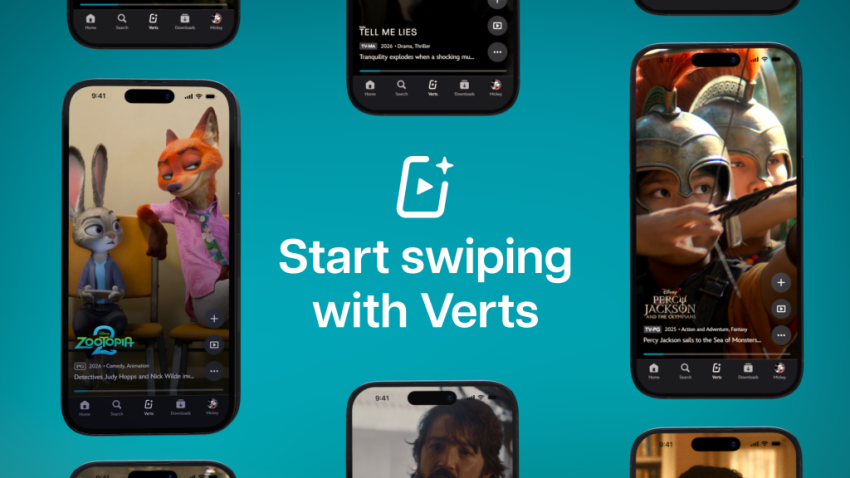
If you now thought the answer would be improving the design of the apps and website, you are sadly mistaken. Disney+ just launched Verts in the United States. It is a short-format vertical video feed designed for the TikTok and Tinder-age.

Watch a quick click and swipe to either dismiss the content, start watching right away, or add it to the list of favorites. Repeat the swiping until you found something to watch.

Instead of browsing a never-ending stream of TV show and movie thumbnails, Disney+ users may now use that format to find something to watch.

Disney writes:

With a tap of the new Verts icon in the navigation bar on mobile, users enter a vertical video feed and can swipe through a stream of scenes and moments from movies and shows on Disney+, and seamlessly add to their Watchlist or jump directly into playback.

This, according to Disney, is making it easier for subscribers to find new content to watch and explore the catalog of shows and movies in a different, modern, way.

Instead of browsing the endless stream of thumbnails, subscribers may now browse a never-ending stream of short clips instead. Whether that is really going to reduce the hours per year spend browsing catalogs remains to be seen. Might do it for the TikTok-generation more than any other. Probably only a matter of time before other content, including ads, are appearing in the feed as well.

No word on a rollout in other regions yet.

YouTube Premium Lite subscribers get background playback and downloads with a big “but”

Posted on February 25, 2026February 25, 2026 by Martin Brinkmann

If you want to watch content on YouTube without ads, then you have just one official option: a subscription for YouTube Premium. For a price of about $14 per month, subscribers get an ad-free experience and some other benefits, including access to YouTube Music, background playback on mobile devices and also downloads.

Google introduced YouTube Premium Lite as a cheaper option in some regions. It is not entirely ad-free though, and up until now, did not support any of the extras that come with a Premium subscription.

This meant no options to download videos for offline playback or to play videos in the background on mobile.

Google tried to block third-party solutions that allowed background play recently, but as usually, it did not work out too well.

This is changing though. Google announced today that downloads and background play are rolling out to Lite subscribers, for the most part. There is this little asterisk behind the feature that informs you that this is not unlocked for all videos.

Here are the details:

  • Advertisement: Still shows up on music content, Shorts, when searching or browsing.
  • Background play: Not available for Shorts or music content, or user-generated content that includes content from music partners.
  • Downloads: Not available for Shorts or music content, or user-generated content that includes content from music partners.

In other words, if you want to download regular videos or play these videos in the background on mobile, you are fine as a YouTube Lite subscriber. However, if you want to play music in the background or download your favorite songs, then you still can’t do it.

Not that great for many users. I would assume that many use background playback for music, but I could be wrong.

YouTube is reportedly hiding video descriptions and comments for some adblock users

Posted on February 16, 2026February 16, 2026 by Martin Brinkmann

Ah, the never ending battle between YouTube and adblock users. If you lost the round-count then you are not alone. This time, users report that Google is hiding comments and video descriptions on YouTube, if a content blocker is used.

One such report comes from Reddit. The user writes that YouTube is not showing descriptions and comments anymore, if an adblocker is turned on.

It would be a new strategy, as Google focused on disabling video streaming entirely for users with content blockers in the past.

While many users might not miss the comments that much, it is another story for the video description, as it may include vital information or links. If you, for example, watch a cooking video, you may find the recipe in the description.

Tests on my own systems using different browsers returned no such blocking. It seems likely that Google is once again testing the waters or rolling out the change over time.

Some users affected by the change noted that reloading the webpage restored access to the description and the comment section. It is probably only a matter of time before filter lists will be updated to reflect the changes.

For now, it is recommended to refresh the page. If that does not work, I suggest using a different browser and / or content blocker. If all of that fails, try playing videos on third-party sites such as Bing Video.

I ran tests with Brave and uBlock Origin in several browsers, and did not run into any of the described issues.

Rent, Pay, Return: The OMEN Laptop Subscription Math That HP Hopes You Won’t Do

Posted on February 14, 2026February 14, 2026 by Martin Brinkmann

If you thought holding your cyan ink cartridge hostage was the absolute peak of HP’s audacity, think again—they have finally found a way to bring that same “subscribe or suffer” energy to your actual PC.

This month, the tech giant launched its new gaming laptop subscription, a “hardware-as-a-service” pilot program that invites US gamers to lease gaming laptops for a monthly fee rather than buying the devices outright.

But before you get seduced by the low upfront cost, you need to see the numbers HP left off the slide deck: a pricing structure where you pay nearly the full retail price, carry the liability, and ultimately return the laptop with absolutely zero equity to show for it.

“Gaming as a Service”: The program at a glance

Let’s take a look at what subscribers get when they subscribe.

  • HP offers several gaming laptop tiers to choose from, starting with entry level laptops like the Victus 15 for about $50 per month and going up to the top tier Omen brand for about $130 per month.
  • To justify the cost, HP is offering the following services: 24/7 support, next-day replacements, full guarantee throughout the subscription period.
  • Upgrades are allowed after 12 consecutive months of payments for a laptop. In other words, subscribers can upgrade to other models each year.

HP pitches this as a cure for “upgrade anxiety”, claiming that gamers will never again have to worry about their computers becoming obsolete.

The financial reality: the math behind the offer

HP’s marking slides look great, because they compare small monthly numbers against the full retail price for the laptops. For just $130, gamers can start playing the latest and greatest games on a laptop with an Nvidia RTX 5080 video card.

However, if you run the math over the mandatory subscription period, which is 12 months, or beyond, you will notice that HP is the only beneficiary here.

The “Subscriber” vs. The “Owner” comparison

TimeSubscription ($130/mo)Purchase ($2500)Remark
Day 1$130$2500
Year 1$1560$2500
Year 2$3120$2500Break-even in the second year.
Year 3$4680$2500Overpaying.

The trap: The subscription premium kicks in around month 19 and it gets worse from then on. It is also worth noting that owning a device also means resell rights. While you won’t get the paid $2500 for the gaming laptop, you might get $1000 or even more for it after two years.

Total costs are even more in favor of buying over subscribing because of that. If that would not all be bad-deal-worthy enough, there are cancellation fees.

The “Gotcha” Clause: Cancellation Fees

It might actually make sense to subscribe for a month or two, maybe to continue gaming while your main PC or laptop is being repaired or to bridge a short period of months.

However, the subscription does not allow short term rentals. You can only cancel for free in the first 30 days. Afterwards, you pay hefty fines if you want to get out early. Starting with day 31, you pay a termination fee.

How much? As much as you would have paid anyway for the entire year. That is a more than $1400 for the premium gaming laptop, if you decide to cancel in the second month. Cancelling is only free after the initial year. If a subscriber would have that much money lying around, it would even make less sense to rent and not buy a laptop outright.

Conclusion

HP’s OMEN Gaming Subscription is a fascinating experiment in the “Netflix-ification” of hardware, but for the vast majority of gamers, the math simply refuses to behave. It solves a problem—upfront cost—that traditional 0 percent financing already solved years ago, but it does so by stripping you of the only thing that makes a $3,000 purchase palatable: ownership.

When you subscribe to Spotify, you accept that you own no music because the library is infinite. When you subscribe to an HP laptop, the library is one single machine that sits on your desk, depreciating while you pay full price for it every two years.

The allure of an annual upgrade is undeniable. Who doesn’t want the newest RTX card the moment it launches? But HP is banking on you valuing that convenience at a 100 percent markup. They are betting that you will look at the monthly payment, ignore the long-term total, and sign away your right to resell, modify, or keep your hardware.

My advice: Don’t do it, unless you need the services that HP is offering, especially the next-day replacement deal. If you need a gaming rig but can’t afford one outright, consider buying used or looking for a system in a more suitable price range.

Don’t let your gaming rig become another monthly bill that you pay forever but never own.

Lost in Translation: YouTube doubles-down on AI dubbing – what you can do about it

Posted on February 5, 2026February 5, 2026 by Martin Brinkmann

It usually happens in the first five seconds: you click on a video expecting the familiar, expressive voice of your favorite creator, only to be greeted by the flat, sterile drone of a synthetic narrator. That Japanese video game trailer? Has a voice over that sounds like a bored car salesmen from the Midwest.

If you watch YouTube content in different languages, there is a good chance that you encountered the video hosting site’s auto-dubbing feature before.

The idea is simple: To make content available to a wider audience, YouTube is giving creators access to tools that translate speech into other languages. This, according to YouTube, makes videos more accessible.

However, if you speak multiple languages or prefer to watch videos in the original language, you may have run into the problem that YouTube picked an AI-powered translation for you regardless.

YouTube announced an extension of AI dubbing on the platform recently. The feature is now available to creators worldwide and in eight languages. Expect this to increase further in the coming years.

What you can do about it

Google has implemented two options for YouTube users. One works for individual videos and requires no account, the other for all videos, but requires an account.

Third-party solutions, in the form of extensions, are also available.

The Quick Fix (Per Video)

YouTube shows the original language and all dubbed languages when you open the Audio Track setting. (Image Source: vidlQ / YouTube)

If you are watching a video and hear an AI voice, you can switch back to the original voice immediately.

  • Pro: Works without account.
  • Con: Needs to be done for each video, preferences are not saved.

Here are the steps:

  1. Click/Tap the Gear Icon (Settings) on the video player.
  2. Select Audio Track.
  3. Choose the option labeled Original (e.g., “English (Original)” or “Japanese (Original)”).

The Permanent Fix (Account Settings)

If you are signed in, add languages that you never want YouTube to dub using AI.

A new YouTube setting enables you to set all languages that you understand (or do not want dubbed).

  • Pros: Works for all videos.
  • Cons: Not a true “never” option. Requires a YouTube account and using it all the time.

Here are the steps:

  • Go to the YouTube Settings.
  • Select Playback and performance.
  • Look for “Preferred languages“ or “Add or edit languages“.
  • Select all the languages you speak/understand/don’t want dubbed.

The browser extensions

Extensions offer best of both worlds: they do not require an account and they work for any video that you encounter. Set once and forget.

Here is a short selection of extensions that you may want to try:

  • YouTube Anti Translate (Chrome / Firefox) – The extension disables the automatic translation of YouTube titles, audio, or descriptions using AI. Works automatically, open source extension.
  • YouTube Audio Selector (Chrome) — Set preferred languages for YouTube to make sure that they are never AI-translated.

What about you? Did you encounter AI dubbed videos on YouTube before?

No More Free Background Play: Google Patches one of YouTube’s Biggest Mobile Loophole

Posted on February 3, 2026February 3, 2026 by Martin Brinkmann

Google is tightening its grip on one of YouTube Premium’s most coveted feature, officially patching a long-standing loophole that allowed Android users to enjoy background playback through third-party browsers without a subscription.

By implementing new technical restrictions, the search giant tries to neutralize workarounds in popular browsers like Brave and Vivaldi that previously bypassed the paywall by tricking the site into playing audio while the screen was off or the app minimized.

This latest crackdown draws a firm line in the sand: if you want to keep the music playing while you multitask on mobile, Google expects you to pay for the privilege. After trying to hinder content-blockers for years and blocking vital extensions in Chrome for Android, the company seems to have found another target for its thumbscrew tactics.

Google made several features exclusive to paying YouTube Premium subscribers when it launched the plan. Premium subscribers get several benefits, including an ad-free experience on the site. Another benefit is background playback on Android.

Google tries to block background play workarounds

Give it a try. Open YouTube in Chrome for Android, play any video, and switch to another app or turn off the screen. The effect? Video playback stops. Not great, considering that many devices turn off the display automatically after a short period of inactivity. Listening to a video while napping? Forget it.

That is where third-party browsers and other tools came into play. Fire up Brave, Vivaldi or several other browsers, and you will notice that video playback continued, even while the YouTube tab was in the background.

This loophole is reportedly being closed. I tested several browsers and found some to be working — Brave — and others not at the time — Vivaldi — but that does not mean that you will experience the same.

Google, clearly, is after Premium subscribers only. If your favorite way of listening to YouTube videos no longer works, you might buy Premium after all to regain the function. Some users might try and find other workarounds, like downloading videos first to play them locally. This works, but it requires more steps before a video can be played.

Google seems to have confirmed the change to various news outlets, including Android Authority. This is the statement from a Google spokesperson according to the site:

Background playback is a feature intended to be exclusive for YouTube Premium members. While some non-Premium users may have previously been able to access this through mobile web browsers in certain scenarios, we have updated the experience to ensure consistency across all our platforms.

There you go. If you can’t play YouTube videos in the background anymore on Android, it is Google that you need to blame. There is a good chance that this is the start of yet another cat-and-mouse game. Browsers and tools might find ways around this, which are then closed or torpedoed by Google again.

  • 1
  • 2
  • 3
  • 4
  • …
  • 8
  • Next

Support This Site

If you like what I do please support me!

Any tip is appreciated. Thanks!
  • April 16, 2026 by Martin Brinkmann Windows 11 Context Menu Manager: remove items with a click
  • April 15, 2026 by Martin Brinkmann One Exploited Zero-Day and Record Numbers: The April 2026 Windows Patch Tuesday Breakdown
  • April 14, 2026 by Martin Brinkmann Brave is getting Container support and the feature has made a big jump recently
  • April 13, 2026 by Martin Brinkmann A More User-Friendly Way to Pause Windows 11 Updates is Coming
  • April 11, 2026 by Martin Brinkmann Microsoft is Radically Changing the Windows Insider Program

About

We talk, write and dream about Technology 24/7 here at Chipp.in. The site, created by Martin Brinkmann in 2023, focuses on well-researched tech news, reviews, guides, help and more.

Legal Notice

Our commitment

Many websites write about tech, but chipp.in is special in several ways. All of our guides are unique, and we will never just rehash news that you find elsewhere.

Read the About page for additional information on the site and its founder and author.

Support Us

We don't run advertisement on this site that tracks users. If you see ads, they are static links. Ads, including affiliate links, never affect our writing on this site.

Here is a link to our privacy policy

©2026 Chipp.in Tech News and Reviews