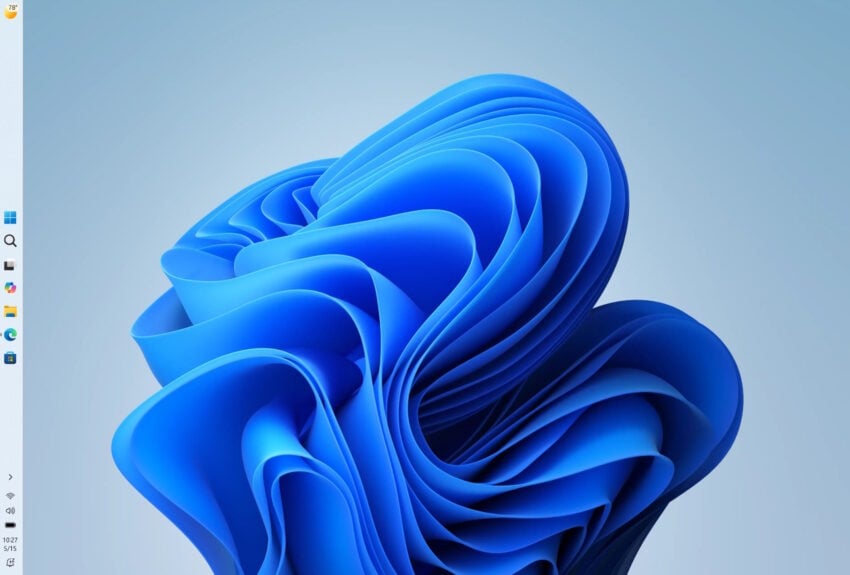
It took Microsoft five years to correct a course that it set when it released the Windows 11 operating system. Back then, Microsoft more or less crippled the taskbar functionality by limiting it to the bottom. Users who were used to displaying the taskbar at the sides or top were left with little options, other than relying on working but sometimes unstable third-party solutions.
This year, Microsoft revealed plans to do better. To focus on quality and to a degree what users of the operating system really want. Turns out, it is not really more AI, but a stable system that gives them the freedom to do whatever they please.
After launching taskbar improvements in the experimental Insider channel earlier this year, Microsoft has now moved the improvements to the beta channel.
The changes allow Windows 11 users to move the taskbar to any edge of the screen, just like it was the case on Windows 10 and earlier versions of Windows. Furthermore, Microsoft is introducing an option to free up more space by changing the taskbar’s size to compact mode.
Microsoft writes:
You can now change the position of taskbar on your screen. In Settings > Personalization > Taskbar > Taskbar Behaviors, you can select the side of the screen you want your taskbar on: bottom, top, left, or right. In these other positions, tooltips, flyouts, and animations will still come from the taskbar, and most customization settings like never combine taskbar icons will work with all locations.
We’re introducing a smaller taskbar for users who want to maximize screen space, especially on smaller devices. While the default taskbar remains unchanged, this setting provides a more compact experience with smaller icons and a reduced taskbar height, giving you more room for your apps. Core elements like Start, Search, and the system tray scale appropriately to stay aligned and consistent.
While the move to Beta is the next step in a wider rollout to all users, Microsoft notes that some features are not finished yet.
Support for touch gestures, Search box, and Ask Copilot in alternate locations is in progress. Auto-hidden taskbar and touch optimized taskbar are not currently supported. Smaller taskbar is currently supported only for top and bottom positions.
It seems likely that these issues will get fixed before the final release. Once you have it, you find the new options under Settings > Personalization > Taskbar > Taskbar Behaviors.
I’ve been using the Open Shell start menu for years. It is a third party but it has been extremely stable for a long time, and it give me a Windows 7 type taskbar which is exactly what I want. Combining that with the excellent Explorer Patcher to fix the taskbar and it’s context menus has meant that I have never even seen any of the nonsense Microsoft is now slowly but still not completely removing. I certainly see no reason to revert back to Microsoft’s taskbar arrangement even if it now will be somewhat improved.
It is true that future Windows 11 feature updates might create issues for these third party utilities but it shouldn’t be an issue for me as I wait at least a year to take those updates and by then Open Shell and Explorer Patcher should be stable again.
The use of StartAllBack elimianated all the Windows Start Menu/Taskbar issues for me. Taskbar at the top or side? I prefer to keep it auto-hide if anything. Hard to believe users have waited five years for a MS solution–that’s the beauty of third party software.
Funny how Microslop are in full panic mode after a few YouTubers said that Windows is sh*t and Linux kicks ass. Now we get all kinds of things and quickly. Too little, too late.. The YouTube generation won’t get fooled. But it sure is entertaining to watch this desperate damage control-operation from the user-hating bullies in Redmond.