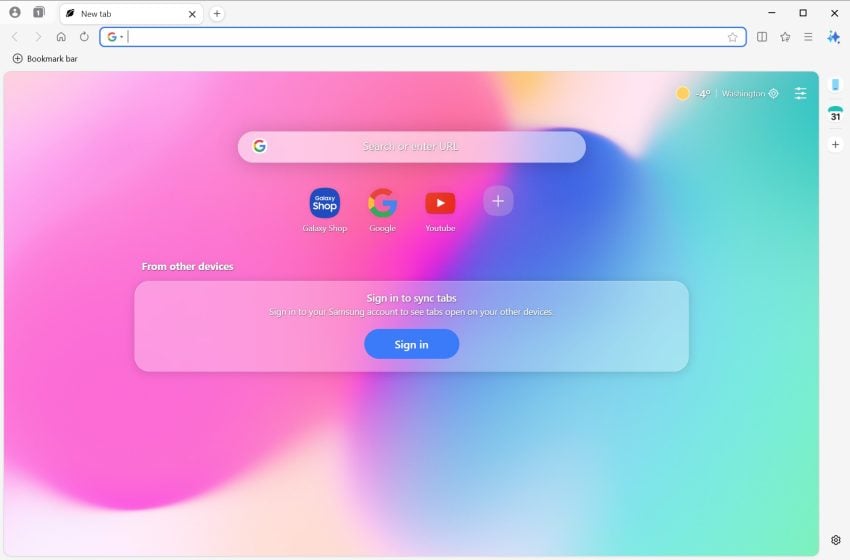
Samsung Internet for Windows is now available without regional restrictions. Here is an overview of the browser and my personal take on it.
Samsung Internet is a long-standing mobile browser that is installed by default on Samsung mobile devices. Samsung announced some time ago that it would expand the browser to the Windows operating system. First launched as a limited beta, it can now be downloaded by anyone.
What is Samsung Internet? The desktop version for Windows is a Chromium-based browser. This means that it shares the foundation with Google Chrome, Microsoft Edge, and many other browsers.
For Samsung, it is an attempt to bridge the gap between Samsung Galaxy mobile devices and Windows PCs. Without support for Windows, Galaxy users had to find another browser to sync data, such as passwords, between their mobile devices and desktop systems.
Since it is based on Chromium, it shares many traits with Google Chrome. It offers similar performance levels and web compatibility, and supports the installation of Chrome extensions from the official web store.
Samsung Internet: unique and noteworthy features
Here is an overview of the browser’s standout features. It should not come as a surprise that most are Samsung-specific.
- Integrated ad-blocker and smart anti-tracking functionality.
- Samsung account integration, including Samsung Pass. This syncs important data, such as passwords or biometric login data, between devices.
- Galaxy AI feature support. The two main features that Samsung Internet for Windows supports right now are the creation of summaries and translations.
- A design that mimics the One UI design of the Galaxy phones and tablets.
Is it your next browser (aka, who is it for?)
Samsung Internet offers better out-of-the-box privacy protections than Google Chrome. Users can enable ad-blocking and privacy protections right on start, which gives the browser an edge. Chrome users have to install a content blocker extension to get a similar level of protection.
The explanation for this is simple: Google is an advertising company primarily. It depends on advertising revenue and shipping Chrome with an integrated content blocker would torpedo its business significantly. This is the main reason why Chrome for mobile does not support extensions.
Samsung is a hardware company primarily. It makes money from devices and components that it sells and its focus is to keep users in its ecosystem. Users who are satisfied with the products are more likely to remain customers, that is why Samsung is using privacy as a premium feature in its browser.
Who is it for? Samsung Internet for Windows is designed for Samsung users. Users who already use the mobile version of the browser and work on Windows PCs as well. They benefit from the integration, as they may sync data directly to their Windows devices with the browser without relying on third-party browsers or software.
The browser is a hard sell for anyone else. While it does come with content blocking advantages over Chrome or Edge, it is easy enough to install a content blocker. it is also noteworthy that other browsers, including Vivaldi, Brave and Opera, do come with native content blockers as well.