Chipp.in Tech News and Reviews

Windows, Security & Privacy, Open Source and more

Menu
  • Home
  • Windows
  • Security & Privacy
  • Gaming
  • Guides
  • Windows 11 Book
  • Contact
  • RSS Feed
Menu

Category: Security & Privacy

New Year, New Zero-Day: The January 2026 Windows Patch Tuesday Breakdown

Posted on January 14, 2026January 15, 2026 by Martin Brinkmann

If you were hoping for a quiet start to the new year, Microsoft has other plans.

The January 2026 Patch Tuesday is here, and it marks a heavy start to the year for system administrators. Microsoft has addressed a massive 114 vulnerabilities across its ecosystem, including eight critical flaws and a zero-day that require immediate attention.

While Microsoft released a large number of patches for its operating systems and services, it is CVE-2026-20805 that requires immediate attention. It is an actively exploited zero-day vulnerability in the Desktop Windows Manager (DWM) that is being used by threat actors to bypass security controls.

Add to that a “no-click” remote code execution flaw in Microsoft Office that is triggered by using the preview pane, it is clear that administrators have their hands full in the coming days to address these and others.

Beyond the security fixes, this month also brings some significant housekeeping: Microsoft is officially purging legacy Agere modem drivers from Windows images, marking the end of the road for decades-old hardware dependencies.

The January 2026 Patch Day overview

Executive Summary

  • Release Date: January 13, 2026
  • Total Vulnerabilities: 114
  • Critical Vulnerabilities: 8
  • Zero-Days (Actively Exploited): 1 (Desktop Window Manager)
  • Key Action Item: Administrators should prioritize patching CVE-2026-20805 (DWM) immediately, as it is being used in the wild to bypass security controls.

Important Patches

  • CVE-2026-20805 — Desktop Window Manager Information Disclosure Vulnerability
  • CVE-2026-21265 — Secure Boot Certificate Expiration Security Feature Bypass Vulnerability
  • CVE-2026-20952 — Microsoft Office Remote Code Execution Vulnerability
  • CVE-2026-20953 — Microsoft Office Remote Code Execution Vulnerability
  • CVE-2023-31096 — MITRE: CVE-2023-31096 Windows Agere Soft Modem Driver Elevation of Privilege Vulnerability

Cumulative Updates

Product, VersionKB ArticleNotes
Windows 10, Version 22H2KB5073724ESU Only. Security updates. Removes old modem drivers (Agere).
Windows 11, Version 24H2KB5074109Security updates and non-security changes. Removes old modem drivers (Agere).
Windows 11, Version 25H2KB5074109Security updates and non-security changes. Removes old modem drivers (Agere).

Deep Dive: The Critical Vulnerabilities

While the total count of vulnerabilities is high, administrators may want to focus their attention on three specific issues: a zero-day vulnerability that is exploited in the wild, “no-click” Microsoft Office exploits, and a major issue affecting in Secure Boot.

The Zero-Day: CVE-2026-20805 (actively exploited)

CVE-2026-20805 is an Information Disclosure vulnerability that allows a threat actor to read specific memory addresses from remote ALPC ports. While this does not allow the actors to run malicious code directly, attackers may exploit the vulnerability to bypass Address Space Layout Randomization (ASLR).

This may enable them to create other remote code execution exploits that target system components directly.

The “No-Click” Microsoft Office issue

CVE-2026-20952 and CVE-2026-20953 are use-after-free vulnerabilities that allow remote code execution. The danger comes from the fact that they do not require user interaction for execution.

They rely on preview panes, either in File Explorer or Outlook, to trigger exploits. An attacker would have to get a specially crafted Office document on the user’s computer. When a user views the file in a preview area, for example by selecting it in File Explorer, the exploit triggers.

The Secure Boot bypass

CVE-2026-21265 describes a Secure Boot issue. It is not a bug in code that can be exploited, but a cryptographic expiration issue. Secure Boot certificates issued in 2011 are set to expire later this year.

Installation of this update rotates the certificates ensuring that devices will continue to boot and won’t fail to boot once the old certificates expire.

Significant changes

Microsoft removes drivers for legacy Agere modems from Windows with this update. The modems have not been manufactured for a long time and the main reason for removal is a vulnerability CVE-2023-31096. Instead of patching the driver, Microsoft decided to remove the driver from Windows instead.

The removal affects Enterprise and industrial users for the most part. It can affect point-of-sale terminals or legacy fax servers that rely on Agere modem chipsets. These will no longer work when the update is applied.

A quick check of the Device Manager should reveal whether “Agere Systems” or “LSI” models are used.

WDS Hardening enters first phase

This is only relevant if Windows Deployyment Services (WDS) is used. Microsoft is hardening WDS. The company introduces new event logging and Registry controls to block unauthenticated deployment requests.

Starting this month, logging is enabled. Administrators may enforce the block, but it is not enabled by default. From April 2026 onward, Microsoft plans to enable “block by default”.

Companies that rely on unauthenticated imaging have until April 2026 to switch to authenticated deployment. There is also a new AllowHandsFreeFunctionality Registry key, which enables the old status quo.

First Steps: Your Patch Tuesday Strategy

  1. Patch the Zero-Day issue that is exploited in the wild immediately.
  2. Deploy updates to mitigate the “no-click” vulnerability in Microsoft Office.
  3. Make sure legacy modem hardware is not in use anymore.
  4. Ensure that boot loaders are updated before certificates expire.

Gmail is getting a full dose of Gemini AI

Posted on January 8, 2026January 8, 2026 by Martin Brinkmann

Google started to add AI features to its popular email service Gmail last year. These focused on productivity and included options to summarize long emails, optimize drafts, or improve search.

These features were limited to Google AI Pro or Ultra subscribers, and also available as part of a Google Workspace subscription.

Tip: looking for emails on Gmail? They may have been pushed to the updates category.

Google announced today that Gmail has entered the Gemini era. It does not come as a surprise that more AI is being added to Gmail.

Here is an overview of the new features that Google announced today on its The Keyword blog.

AI Overviews

AI Overviews, which are already available when you search using Google Search, is coming to Gmail. Google expands the feature somewhat, as Gmail will display summaries of emails to display key points to Gmail users.

The feature comes into play as well when you type a question in the inbox. Gemini will display the answer as a simple AI Overview” in that case.

Google says that this enables new and better interactions with the content. Gmail users may search for “Who was the plumber that gave me a quote for the bathroom renovation last year?” to quickly get the answer they are looking for, according to Google.

The AI Overview feature is being rolled out starting today to all Gmail users while Google AI Pro and Ultra subscribers get the option to ask inbox questions.

Help me Write

Another new feature is Help me Write. Google describes it as a way to use AI to draft emails from scratch or improve them.

The already available Smart Replies feature is upgraded to Suggested Replies, which is now using the context of the conversation to offer more relevant responses.

Last but not least, a new proofread feature makes “advanced grammar, tone and style checks”.

Help me Write and Suggested Replies are rolling out to all Gmail users. The advanced proofreader is only available for Google AI Pro and Ultra subscribers.

AI Inbox

Gmail users will also see a new AI Inbox entry above the regular inbox on Gmail going forward. Google says that this new feature is designed to remove clutter from the inbox so that users “can focus on what’s most important”.

The company compares it to a personalized briefing that is helping Gmail users catch up quickly.

It helps you prioritize, identifying your VIPs based on signals like people you email frequently, those in your contacts list and relationships it can infer from message content. Crucially, this analysis happens securely with the privacy protections you expect from Google, keeping your data under your control. This lets high-stakes items — like a bill due tomorrow or a dentist reminder — rise to the top

This feature is only available to “trusted testers” at the time but rolled out broadly in the coming months.

Closing Words

All three features roll out to Gmail users in the United States who are Google AI Pro or Ultra subscribers first.

Google has little to say about privacy, but it should be clear that the AI needs access to the emails for its functionality. Google did not reveal if there will be options to turn off the AI features in Gmail.

Now You: do you use AI features in your email client or on a website already? What is your take on these new features?

If you have a Samsung phone, look out for the next security update, it is massive

Posted on January 7, 2026January 7, 2026 by Martin Brinkmann

Android phone and tablet owners know the drill. Google releases monthly security updates for Android and pushes them to supported Pixel devices quickly. Other manufacturers, Samsung, Xiaomi or Sony, to name a few, create patches for their devices and push them to these devices as well.

Depending on how much you paid for the device and its status in the support lifecycle, your devices may also receive monthly security updates. Some devices receive delayed updates, which makes them vulnerable to potential attacks.

Samsung has just posted information about the January 2026 Patch Day, and it is a massive one. The company has corrected a total of 55 security issues.

Here are the highlights:

  • The update includes a fix for a critical vulnerability, and 28 vulnerabilities rated high.
  • 23 of the included patches are provided by Google (with two not applying to Samsung devices).
  • The remaining 34 vulnerabilities come from Samsung Semiconductors (4) and Samsung Mobile (30).

Select Settings > About Phone > Software Update to check manually for the update. Samsung delivers updates on a monthly, quarterly, or biannual schedule.

Samsung’s security model

Samsung releases monthly security updates for Flagship- and Enterprise-devices only. You find Galaxy Fold and Galaxy S supported here mostly. In fact, the only non-Enterprise A-series model is the Galaxy A 56 5G device.

Most non-Flagship devices receive quarterly updates only. This is a problem from a security point of view, as Samsung collects security updates for these devices to release them once every quarter. If you have any A-series device other than the latest A5x, your devices will receive quarterly updates only, unless it is an Enterprise-device.

While Samsung has extended updates support in recent time, only its Flagship devices offer a monthly update frequency.

Brave slashes memory use of its ad-blocker by at least 45 megabytes on all platforms

Posted on January 6, 2026January 6, 2026 by Martin Brinkmann

Brave Browser is one of the few major web browsers that supports native content blocking on all supported platforms that is enabled by default. It should not come as a surprise that the browser is on an upwards trajectory when it comes to users and popularity.

While Brave is not without controversy, it is clear that Brave Software has made several meaningful strategic decisions in the past that has benefitted the business immensely.

Quick Tip: do this, if websites do not react anymore in Brave on first load.

Content blocker improvements

Brave announced today that it has improved the memory usage of its internal content blocker significantly. The company claims that it has reduce memory usage by about 75 percent, which equates to a reduction of about 45 megabytes on all supported platforms.

Brave says that users who have enabled additional filters will see an even larger reduction in memory usage going forward.

How it managed to do that? Brave explains:

..we achieved this major memory milestone by iteratively refactoring the adblock-rust engine to use FlatBuffers, a compact and efficient storage format. This architectural transition allowed us to move the roughly 100,000 adblock filters shipped by default from standard, heap-allocated Rust data structures (such as Vecs, HashMaps, and structs) into a specialized, zero-copy binary format.

Brave notes that it has implemented several optimizations in addition). These are:

  • Memory management: Used stack-allocated vectors to reduce memory allocations by 19% and improved building time by ~15%.
  • Matching speed: Improved filter matching performance by 13% by tokenizing common regex patterns.
  • Sharing resources: Resources are shared between instantiations of adblock engines, saving ~2 MB of memory on desktop.
  • Storage efficiency: Optimized internal resource storage memory by 30%.

The main memory reduction and optimizations landed in Brave 1.85 while additional optimizations will be included in the next release of the browser.

It will be interesting to see how users who have enabled additional filters in Brave benefit from the change.

Adding extra filters in Brave

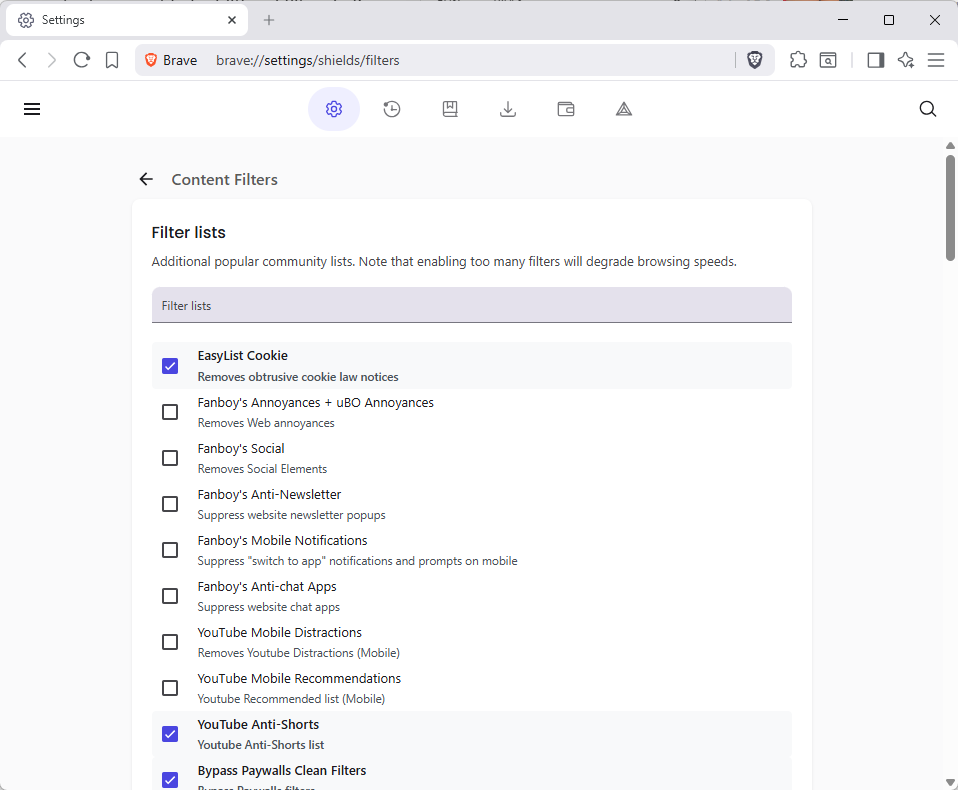
It is quite easy to add more filters to Brave to extend the content blocking functionality.

Note: Each list that Brave supports natively offers a short description of what it does. Fanboy’s Anti-Newsletter list, for instance, blocks newsletter popups on websites.

  1. Select Menu > Settings, or load brave://settings/ directly in the address bar.
  2. Go to Shields > Content filtering.
  3. Click on “show full list” to display all included filter lists.
  4. Check the lists that you want to enable in Brave.

Note that adding lists will increase the memory usage of the content blocker and thus Brave. It is recommended to keep the list as short as possible.

As for recommendations, it depends largely on your Internet browsing and which annoyances you encounter regularly. YouTuber regulars, for instance, could enable filters for mobile distractions and recommendations, if they use Brave on their mobile devices.

There are also language-specific block lists, which are useful if you visit websites regularly in a specific language.

Featured Chrome extension with millions of users caught harvesting AI interactions

Posted on December 21, 2025December 21, 2025 by Martin Brinkmann

Several Chrome and Microsoft Edge extensions, designed to protect users online, were discovered to include AI harvesting code that captured, among other things, every AI prompt and response made in the browser it was installed in.

This is the second major discovery by security researchers at KOI. In July, the company discovered 18 malicious Chrome extensions with millions of installations that ran malicious tasks in the background.

Security researchers at KOI discovered Urban VPN Proxy by chance. The Chrome extension had over 6 million users, a 4.7 star rating at the Chrome web store, and a featured badge by Google.

Featured meant that Google reviewed the extension manually to ensure that it follows “technical best practices” and meets “a high standard of user experience and design”.

The makers of the extension, which was also installed by over 1.3 million Microsoft Edge users via Microsoft’s own extensions store, promised unhindered access to any website and the unblocking of content.

According to KOI, the extension did not always have AI harvesting functionality baked into it. This started on July 9, 2025 with the release of version 5.5.0. It shipped with AI harvesting enabled by default.

This meant that AI interactions of any user who updated the extension to the new version or installed it anew were collected.

KOI says the following gets captured:

  • Every prompt you send to the AI
  • Every response you receive
  • Conversation identifiers and timestamps
  • Session metadata
  • The specific AI platform and model used

The extension supports ten major AI platforms, including ChatGPT, Gemini, Claude, Microsoft Copilot, Grok, Meta AI, Perplexity, and DeepSeek, according to KOI.

It injects scripts into the AI platform’s website whenever a supported site is loaded in the browser. From there, it manipulates browser functions to route all network requests through itself. These requests get parsed and then exfiltrated by a background service worker.

A quick search for extensions that use the same code revealed three additional extensions, available on both the Chrome and the Microsoft Edge web store.

These are 1ClickVPNProxy, Urban Browser Guard, and Urban Ad Blocker. All eight extensions have an accumulated user count of over 8 million.

How could this have been prevented?

Unlike Mozilla, which reviews the updates of featured extensions for Firefox as well, neither Google nor Microsoft seem to do that. This is a loophole that gets exploited over and over again: create or buy a harmless extension that is useful, get the feature badge by passing the manual review, and release an update with malware code later on, as (some?) updates seem to be accepted automatically.

So, if you use extensions, Firefox is the safer bet, but only for featured extensions. This has downsides of its own, including that it takes longer before updates become available.

Mozilla reassures Firefox users that AI will be completely optional and include a kill-switch feature

Posted on December 20, 2025December 21, 2025 by Martin Brinkmann

Many makers of web browsers are evolving the browsers that they develop into AI-based browsers. How and to what degree depends much on the company or organization that is involved. From integrating options to chat with AI and basic AI features, such as getting a summary of a webpage, to agentic browsers, like Perplexity, that are designed to act on the user’s behalf.

Mozilla’s new CEO Anthony Enzor-DeMeo published his vision for the organization and its main software, Firefox, about a week ago. While much of what Enzor-DeMeo wrote resonated well with large parts of the community — turning Mozilla into the most trusted software company — it was a single pargraph that stood out and incurred the ire of parts of the community.

Firefox will grow from a browser into a broader ecosystem of trusted software. Firefox will remain our anchor. It will evolve into a modern AI browser and support a portfolio of new and trusted software additions.

While Enzor-DeMeo did state that “AI should always be a choice” and that it should be something that “people can easily turn off”, Firefox users expressed their concern over the AI-focus that the new Mozilla head described in the post.

The official Firefox for Web Developers account on Mastadon published several clarifications to address user concerns. The posts are attributed to Jake Archibald, who is Mozilla’s Web Developer Relations lead.

The main takeaways are the following two statements regarding AI:

  • All Firefox AI features will be opt-in.
  • Firefox will get a “kill-switch” for all AI features, which disables them completely.

Mozilla would introduce AI features in Firefox in a way that I would like all browsers to follow: make them opt-in, instead of opt-out. There are certainly users out there that use AI and will use AI features in browsers. Heck, some might even spring on the agentic-bandwagon and let AI buy stuff for them or to other things.

As long as this is optional, and not enabled by default, I would not mind much, especially if other features do not get pushed down the priority letter in favor of AI features.

How many browser users want AI in their browsers, or would start using the features once they land without knowing about them prior? I find that number hard to estimate. AI is a trend at the moment, and while companies have created some useful features powered by AI, it has not been proven yet that AI is a feature that can sustain itself once the hype ebbs down.

Now it is your turn. Have you tried AI features in browsers or elsewhere already? Is there anything that you liked in particular, or did not like? Feel free to leave a comment down below.

Brace yourself, OpenAI to introduce ads into its apps

Posted on December 1, 2025December 2, 2025 by Martin Brinkmann

The free AI ride is as good as over. Free meaning no ads in this case. The writing was on the wall: AI processing, infrastructure and upkeep are expensive and companies can only burn through a specific amount of money before investors demand a return on their investment or they run into payment issues.

ChatGPT is probably the most used AI out there. You can use it in apps or on the official website, and it is also found in many third-party apps.

Soon, ChatGPT may introduce advertisement into its Android application, reports Tibor Blaho on X. Hhe user found references to ads in the last Android beta.

Strings, such as AdTarget, SearchAd, or ApiSearchAd were discovered in the beta. While version 1.2025.329 of ChatGPT did not include any ads during tests, the existence of the strings suggests that ads are coming.

It is likely that OpenAI will limit ads to free users, which make the bulk of users right now. Turning on ads could boost the company into the upper-elite of advertising, rivaling the likes of Meta (not Google, for obvious reasons).

It is unclear how ads will look like and if they will be easily distinguishable from the AI’s output to the user’s request.

The question is, what will users do when they encounter ads in ChatGPT? Will they keep on using the software or switch to another, one that does not have ads yet? It will be interesting to see.

Ads may also lead to a credibility problem, especially if the ad highlights a product that the AI also recommended in the answer to the user.

Now You: Do you use an AI right now? If so, which and how is your experience so far? If not, why not? Feel free to leave a comment down below.

Gemini in Gmail may have been enabled by default, and turning it off takes other features with it

Posted on November 22, 2025November 23, 2025 by Martin Brinkmann

If you are using Google’s Gmail email service, you may have stumbled upon Smart Features already, especially if you are using the web-version of the service. Up until recently, Smart Features did not include AI, but this changed in 2025.

Now, Google has baked its AI Gemini into the Smart Features of Gmail. Depending on where you live, Smart Features are enabled by default. Note that while Google claims that Smart Features are not turned on for user in the European Union (Japan, UK and Switzerland are the three other regions), they were in fact enabled in one of my accounts.

So, what do you get with Smart Features?

  • Automatic email filtering and categorisation.
  • Smart Compose.
  • Smart Reply.
  • Nudges (suggests emails to reply to or follow-up on)
  • Summary cards above emails.
  • Grammar, spelling, and auto-correction.

Some of these features are powered by AI nowadays and Gemini, Google’s AI, needs access to your data for the features to work. Google claims that personal data is not used for training and that everything is kept within the boundaries of the account.

However, if you prefer that Gemini does not access your emails at all, your only option is to turn of the Smart Features in Gmail.

Here is how that is done:

  1. Load https://mail.google.com/mail/u/0/#settings/general in a web browser.
  2. Scroll down to Smart Features in Settings under General.
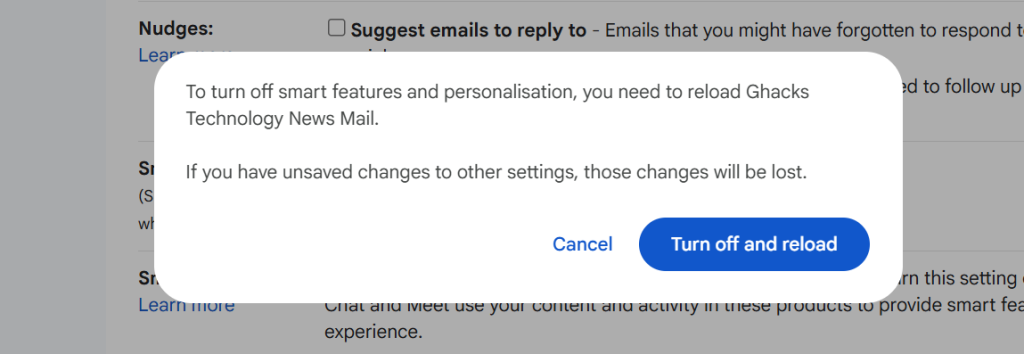
  3. Remove the checkmark of the Smart Features box.
  4. Confirm the removal.
  5. Gmail restarts.

Smart Features should be turned off now.

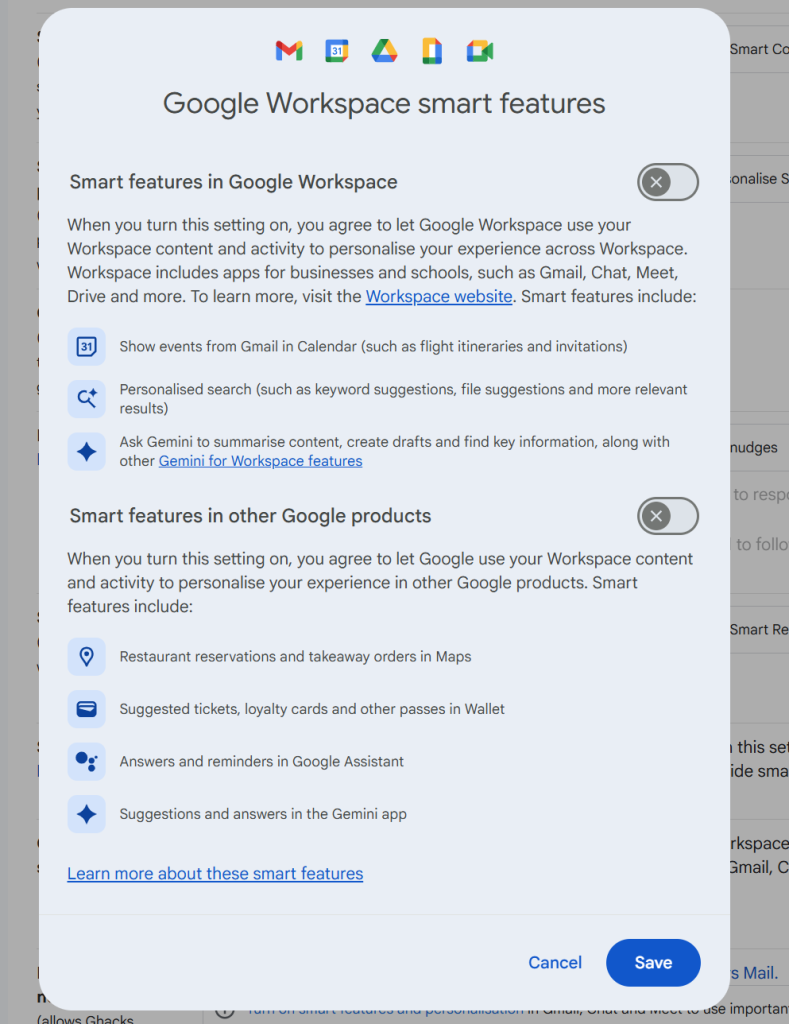
Note that you may also need to click on “Manage Workspace smart feature settings”, if the account is a Google Workspace account and not just a single Gmail account.

There you can turn off Smart Features for Gmail and other Google products.

Again, when you enable the feature you do not get any auto-corrections anymore as well. That is a trade-off for some, others may use the functionality that their browser provides for that anyway.

Now You: do you use Gmail as your mail provider or another service? Black Friday might be a good option to make a switch, as plenty of deals are live already or will be offered in the coming weeks.

Google Search

Google is starting to show ads in AI Mode

Posted on November 21, 2025November 21, 2025 by Martin Brinkmann

The number one advertisin company on the Internet seems to have found another place to show you ads. Reports are coming in that more and more users are starting to see ads in AI Mode.

AI Mode? It is a new option in Google Search that you may use to ask Google’s Gemini AI questions and get answers. The mode supports deep search functionality, which Google says is its “most advanced research tool in Google Search”.

Anyway, if you select the mode, you may now also get a good chunk of advertisement according to Bleeping Computer and several other sites and Internet users.

Earlier this year, Google started to show ads in AI Overviews. Unlike AI Mode, which users need to select actively, AI Overviews are attached to regular search results pages on Google Search.

Not all AI chats and modes show advertisement right now. However, there is a very good chance that many will in the not so distant future. These businesses can’t run on love alone and there does not seem to be enough money in selling paid memberships.

So, in the future, you will pay with your data and your eyes on ads when you use the majority of AI chats that will be still around in a year or two.

Speaking of which, if you are subscribed to a Gemini plan, you are still going to see ads in AI Mode and AI Overviews (of course), unless you use a content blocker.

Phishing: Don’t let your eyes deceive you

Posted on October 19, 2025October 19, 2025 by Martin Brinkmann

Phishing is a constant battle and problem on today’s Internet. While it is easy to spot most phishing attacks, if you are experienced, many Internet users fall for these attacks.

The use of AI in attacks helps attackers, even though AI is also used by the developers of security solutions. It is an arms race that has been going on for a long time.

I stumbled upon a new phishing post on LinkedIN recently. It showed a phishing email that looked like it came from noreply@microsoft.com. Upon closer inspection, it came from noreply@rnicrosoft.com.

You may spot the difference easily, but depending on the mail client that you are using, it may not be as easy to figure out that the phishing email does not come from the microsoft.com domain, as the m has been replaced by the two letters r and n.

It is simple, but very effective, especially in an age where everyone seems to be in a hurry.

This goes to show that threat actors do not always have to come up with new sophisticated schemes for their attacks. Sometimes, it is enough to register lookalike-domains by replacing just one or two characters in a domain name.

This goes hand in hand with registering domain names that look like the real deal, but are not, like microsoft-support.com.

What is the best line of defense in those cases? Never, ever, click on links in emails. Also, do not call, text, or interact with anything else in emails. Instead, verify, if you are unsure.

For instance, if you do get a password reset email, but did not request a password reset, it is very likely that this is fake. You could visit the website directly and sign-in to your account to find out, or contact support, if there is any.

Have another tip regarding the threat of phishing? Feel free to leave a comment down below.

  • Previous
  • 1
  • 2
  • 3
  • 4
  • 5
  • 6
  • 7
  • 8
  • …
  • 14
  • Next

Support This Site

If you like what I do please support me!

Any tip is appreciated. Thanks!
  • August 29, 2026 by Martin Brinkmann Another Windows Issue: Microsoft Defender Antivirus is turned off notification, but it is actually enabled
  • August 28, 2026 by Martin Brinkmann Brave Accounts and Email Aliases launch
  • August 25, 2026 by Martin Brinkmann Microsoft confirms: Latest .NET updates may cause printing issues
  • August 24, 2026 by Martin Brinkmann The Chrome Web Store has a fake VPN extensions problem
  • August 23, 2026 by Martin Brinkmann Microsoft is worsening classic Media Player to get users to upgrade

About

We talk, write and dream about Technology 24/7 here at Chipp.in. The site, created by Martin Brinkmann in 2023, focuses on well-researched tech news, reviews, guides, help and more.

Legal Notice

Our commitment

Many websites write about tech, but chipp.in is special in several ways. All of our guides are unique, and we will never just rehash news that you find elsewhere.

Read the About page for additional information on the site and its founder and author.

Support Us

We don't run advertisement on this site that tracks users. If you see ads, they are static links. Ads, including affiliate links, never affect our writing on this site.

Here is a link to our privacy policy

©2026 Chipp.in Tech News and Reviews