Chipp.in Tech News and Reviews

Windows, Security & Privacy, Open Source and more

Menu
  • Home
  • Windows
  • Security & Privacy
  • Gaming
  • Guides
  • Windows 11 Book
  • Contact
  • RSS Feed
Menu

Category: Entertainment

Don’t buy Amazon’s latest Fire TV Stick

Posted on October 1, 2026October 1, 2026 by Martin Brinkmann

Amazon announced the availability of the latest Fire TV stick yesterday. The Fire TV Stick 4K comes with a new remote that Amazon says is optimized and VegaOS instead of Fire OS.

The latter is what tweakers will find problematic. With Fire TV sticks using Fire OS, which is based on Android, sideloading was possible. You could install Android apps such as Smart Tube on the stick to gain access to features that apps in the official Amazon Store don’t offer.

With VegaOS, that bridge is burned. No more sideloading, which means that you are stuck with the apps that Amazon hosts officially on its store.

You find the usual assortment of official streaming apps and other apps there, but the store lacks apps like Smart Tube that you might want to install on your devices, for example to watch YouTube without ads and unpleasantries.

Anyway, if it has to be Amazon, stick with the previous Fire-OS-based sticks like the 4K Max, which is currently discounted in many regions as well.

Disney plans to squeeze even more money out of Disney+ and Hulu subscribers

Posted on September 28, 2026September 28, 2026 by Martin Brinkmann

If there is one sad truth regarding streaming services, it is that the price of a subscription increases regularly. This time, it is Disney again. Just a year and a couple of days after the last price increase in the United States, Disney is once again increasing the price of Disney+ Premium and Hulu Premium subscriptions, report various news outlets, including Variety.

Existing and new subscribers will have to pay $21.49 per month now for the Disney+ and Hulu premium plans. That’s an increase of $2.50 per month from the current price of $18.99 per month for the plans without ads.

The bundle, which includes Disney+ and Hulu Premium, is also going up to $21.99 per month. Interestingly, that is just $0.50 more than each of the two streaming plans cost individually.

Non-premium customers get price hikes as well. Ad-supported Disney+ and Hulu plans go up to $12.49 per month (from $11.99) while the Disney+ and Hulu bundle with ads remains at $12.99 for now.

New customers will need to pay the higher price immediately while existing customers will see the price increase on their next monthly bill.

To put this into perspective: Disney increased the price of its Disney+ offering each year for the past three years, which bumped the price from $13.99 in 2024 to now $21.49. For Hulu, Disney increased the price in the last four years three times. From $13.99 in 2023 to now $21.49,

Netflix pricing has also increased three times in the past four years. From $19.99 for its premium offering to now $26.99.

It does not take a prophet to predict that the next price hikes are just around the corner, likely next year already.

The only defense that users of these services have is to cancel their subscriptions. You could still subscribe for a month or two each year, if that option remains available to watch all the content of the past 12 months.

I for one do not have any streaming media subscription and have no intention of subscribing to any of the services. Saves a lot of money and I don’t miss out on that many good shows or movies anyway.

Amazon ends sideloading on new Fire TV sticks

Posted on April 26, 2026April 26, 2026 by Martin Brinkmann

Amazon Fire TV sticks are one option for users who want to use a streaming device instead of the “smart” capabilities of the television itself. Up until now, Amazon supported installing apps from its official store and also as APK files from the Internet, since it was based on Android.

This meant that you could install a third-party YouTube client or any other app on the device and use it as if you’d be using it on a mobile or tablet.

This changed recently with the release of the newest Fire TV Stick HD and Fire TV 4K Select, which do not support sideloading anymore.

Amazon confirms this on the product page. When you ask the AI whether the new Fire TV stick supports sideloading, it repllies:

For enhanced security, Fire TV Stick HD prevents sideloading or installing apps from unknown sources. Only apps from the Amazon Appstore are available for download.

Means, if an app is not listed on the Amazon Appstore, then you can’t install it. Amazon claims that the change is all about security. This may sound logical on first glance: sideloaded apps are not vetted and they may introduce malware or other unwanted behavior.

However, this is also removing choice from customers. Even if you know what you are doing, you can’t install apps anymore that are not offered at the official Amazon Store. This removes choice and makes the coming Fire TV sticks a bad deal for anyone who’d even consider sideloading apps.

Amazon Fire TV alternatives

If sideloading third-party apps, custom launchers, or ad-free YouTube clients is a dealbreaker for you, you need to migrate to a device running Google TV or Android TV. These operating systems are still open, allow you to enable “Developer Options,” and let you install whatever you want.

Here are options that still work:

  • Google TV Streamer 4K
  • NVIDIA Shield TV Pro
  • Xiaomi Mi TV Stick 4K or MECOOL

Other popular brands, including Apple or Roku, do not support sideloading.

New YouTube Premium Rates: US Prices Rise to $15.99

Posted on April 10, 2026April 10, 2026 by Martin Brinkmann

Like clockwork subscription prices are increasing. Last month, it was Netflix that announced a price hike in the United States. Customers have to pay between $1 and $2 extra per month to continue streaming Netflix-content to their devices.

Just a few weeks later, it is Google that is quietly raising prices for YouTube Premium subscriptions in the United States.

Here is what is changing:

  • Individual Plan: Increased from $13.99 to $15.99 per month
  • Family Plan: Increased from $22.99 to $26.99 per month
  • Annual Plan: Increased from $139.99 to $159.99 per year
  • Premium Lite: Increased from $7.99 to $8.99 per month

So, users pay between $1 to $4 more per month, or $20 when they pay yearly. The change affects Apple users as well. Users who subscribe through the Apple App Store or an iOS device pay a premium, and this remains. The individual plan costs $20.99 per month when subscribed this way.

That is why it is advised to subscribe using a web browser to get the lower rate.

The new price is already shown to users who open the official YouTube Premium subscription page on the website. Google, however, has not announced the price increase officially on any of its official blogs.

Premium subscribers may stream videos without ads on YouTube. They do get access to YouTube Music and some other — mostly artificially limited — features, including background play or continue watching.

YouTube Lite subscribers pay less, but they get limited features. They get ads on some video formats and types, and the ability to play in background or download videos is also limited.

Good content blockers continue to work in browsers and apps like NewPipe or SmartTube continue to work on Android TVs as well, albeit with frequent interruptions caused by changes on YouTube.

Sony announced a massive PlayStation 5 price increase

Posted on March 28, 2026March 28, 2026 by Martin Brinkmann

If you plan to buy a Sony PlayStation 5 console this year, you better hurry, as prices will go up on April 2, 2026.

Sony announced the price increase on the official blog after increasing the price in the United States in 2025 already. There, the company explains that “pressures in the global economic landscape” forced its hand. Without going into specifics, Sony is likely referring to the skyrocketing prices of RAM and storage due to the explosion of AI-focused services.

All PlayStation consoles and the PlayStation Portal handheld get a price increase. In the United States, prices of the console increase between $100 and $150, depending on the system.

Without further ado, here is an overview of the old and new price for each Sony PlayStation 5 console in all mentioned regions:

RegionProductOld PriceNew PricePrice Increase
U.S.PS5$549.99$649.99+$100.00
PS5 Digital Edition$499.99$599.99+$100.00
PS5 Pro$749.99$899.99+$150.00
PlayStation Portal$199.99$249.99+$50.00
U.K.PS5£479.99£569.99+£90.00
PS5 Digital Edition£429.99£519.99+£90.00
PS5 Pro£699.99£789.99+£90.00
PlayStation Portal£199.99£219.99+£20.00
EuropePS5€549.99€649.99+€100.00
PS5 Digital Edition€499.99€599.99+€100.00
PS5 Pro€799.99€899.99+€100.00
PlayStation Portal€219.99€249.99+€30.00
JapanPS5¥79,980¥97,980+¥18,000
PS5 Digital Edition¥72,980¥89,980+¥17,000
PS5 Pro¥119,980¥137,980+¥18,000
PlayStation Portal¥34,980¥39,980+¥5,000

Sony suggests that customers should check pricing with local retailers or the PlayStation website, if they live in a region not mentioned explicitly.

This console generation is the first in gaming history where console prices have trended upward. Nintendo (Switch 1) and Microsoft have also raised prices, and there is a good chance that both companies may announce another round of price increases this year.

Historically, components used in consoles got cheaper as the years progressed. This allowed companies to reduce prices or introduce new models at lower price points.

However, this generation is facing unprecedented global economic factors. Besides the boom around AI, which drives RAM and components to higher price points, companies face inflation, tariffs, and conflicts around the world.

So what should gamers do? There are a couple of options:

  • Stick to the last generation of consoles or even older ones. They are cheaper and have a huge catalog of -often- cheaper games to play.
  • Consider PC gaming. While PCs are also affected by the rising prices of components, they offer more flexibility. You could consider a PC gaming handheld or upgrade an existing PC with a better video card or processor for more gaming power.
  • Sit it out. Things may calm down again in the coming years. AI is still a wildcard, and a crash might cause components to drop in price sharply. Also, the second-hand market may be flooded with cheap RAM and other components in that case.

Another year, another Netflix price increase

Posted on March 27, 2026March 27, 2026 by Martin Brinkmann

Feels like yesterday that streaming giant Netflix increased pricing in the United States and in select other regions. Netflix is increasing the subscription price again in the United States, after last year’s increase.

Customers in the United States pay between $1 and $2 more per month starting March 2026. The cheapest option, Standard with ads, is now $8.99 instead of $7.99. Both plans that are ad-free increase by $2, with Premium costing $26.99 now in the United States.

Furthermore, the options to add extra members jump by $1 as well, regardless of whether it is with or without ads.

Last year, Netflix pushed prices between $1 and $2.50 in the United States and it seems that it continues to test the waters. Like clockwork, Netflix and other streaming services are raising prices. These come without any meaningful extras for customers usually — other than the promise that the money goes towards creating more shows and movies.

My take has not changed in the past couple of years. I have no subscription to any of the streaming services currently. If you do, I highly suggest subscribing for a month only to watch what you want to watch before hopping to the next streaming service, unless you like pretty much anything that comes out on a particular platform.

This way, you end up enjoying content from all the services that you like without paying one of them a ludicrous amount of money for — likely — less and less content that is of interest to you.

I do not really mind watching the latest hot show or movie a year or years after it has been released, or never, as more and more turn out to be content that I’m not interested in. Last show I liked was HBO’s Knight of the Seven Kingdoms, but it was over quickly and the next season won’t air until next year.

Amazon

Everything you need to know about Amazon Prime Ultra

Posted on March 15, 2026 by Martin Brinkmann

Amazon announced Prime Ultra, a new subscription plan yesterday. It is the new ad-free subscription service that replaces the current option to go ad-free on Prime Video.

To better understand the change, it is necessary to look back at the previous structure.

Amazon Prime is available for about $15 per month in the United States. A subscription gives subscribers several features, including access to Prime Video. Amazon, some time ago, decided to turn the then-ad-free Prime Video into an ad-powered streaming service.

This meant that every subscriber started to see ads on Prime Video, unless they paid Amazon an extra $3 per month to retain the status quo (ad-free). Amazon removed some features in the ad-powered plan, namely support for Dolby Atmos and Dolby Vision.

What Amazon Prime Ultra changes

Amazon Prime Ultra is the replacement for the ad-free option. It should not come as a surprise therefore that it offers an ad-free experience as well.

For around $5 per month extra, customers get the following extras on top:

  • 100 downloads for offline viewing.
  • Up to 5 simultaneous streams.
  • 4K UHD.
  • Dolby Atmos.

As a consequence, Amazon is removing support for 4K and UHD streams from the regular Prime Video subscription. In other words, if you want 4K, you need to pay an extra $5 to retain that option.

Prime customers who pay yearly may also pay yearly for Prime Video Ultra. This costs roughly $46 then per year instead of $60.

Note that Amazon is improving the regular ad-powered Prime Video experience as well (except for removing 4K support). Subscribers get Dolby Vision, 50 downloads instead of 25, and 4 streams instead of 3 under the revised plans.

Closing Words

Amazon is increasing the cost of an ad-free Prime Video experience with the introduction of the Ultra option. To make it appeal more, it decided to move 4K support to the Ultra plan exclusively. Dolby Vision is moved to the regular Prime Video plan while Dolby Atmos remains an exclusive for the add-on.

Is it worth the $20 per month? Considering that other extras are included, including free shipping for many items, it may be worth it for some users, especially if they watch Prime Video regularly and dislike advertisement.

However, 4K video at streaming services is not all that great when you compare it to 4K discs or downloaded 4K video files. The reason is simple: video streaming services use compression heavily.

The new Ultra plan launches in the United States only. Whether it is coming to other regions remains to be seen, but there is a good chance that Amazon will introduce it globally eventually.


Disney+launches Verts, a Tinder-TikTok-like vertical video feed for content discovery

Posted on March 12, 2026March 12, 2026 by Martin Brinkmann

How much time do you spend browsing streaming services in search of content per year? The average American, apparently, spends about 110 hours per year doing that.

Five days per year to decide what to watch? Browsing streaming services can be a frustrating experience for a number of reasons. From bad design and distractions to duplicate listings and categorization that does not make much sense.

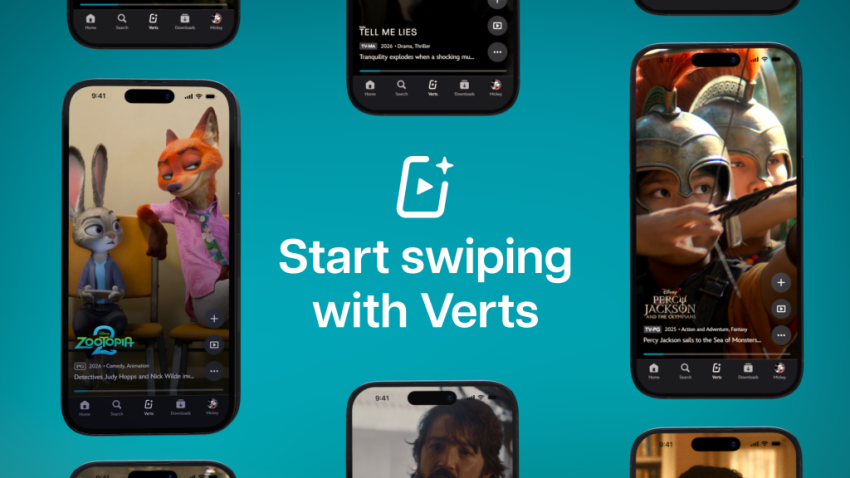
If you now thought the answer would be improving the design of the apps and website, you are sadly mistaken. Disney+ just launched Verts in the United States. It is a short-format vertical video feed designed for the TikTok and Tinder-age.

Watch a quick click and swipe to either dismiss the content, start watching right away, or add it to the list of favorites. Repeat the swiping until you found something to watch.

Instead of browsing a never-ending stream of TV show and movie thumbnails, Disney+ users may now use that format to find something to watch.

Disney writes:

With a tap of the new Verts icon in the navigation bar on mobile, users enter a vertical video feed and can swipe through a stream of scenes and moments from movies and shows on Disney+, and seamlessly add to their Watchlist or jump directly into playback.

This, according to Disney, is making it easier for subscribers to find new content to watch and explore the catalog of shows and movies in a different, modern, way.

Instead of browsing the endless stream of thumbnails, subscribers may now browse a never-ending stream of short clips instead. Whether that is really going to reduce the hours per year spend browsing catalogs remains to be seen. Might do it for the TikTok-generation more than any other. Probably only a matter of time before other content, including ads, are appearing in the feed as well.

No word on a rollout in other regions yet.

YouTube Premium Lite subscribers get background playback and downloads with a big “but”

Posted on February 25, 2026February 25, 2026 by Martin Brinkmann

If you want to watch content on YouTube without ads, then you have just one official option: a subscription for YouTube Premium. For a price of about $14 per month, subscribers get an ad-free experience and some other benefits, including access to YouTube Music, background playback on mobile devices and also downloads.

Google introduced YouTube Premium Lite as a cheaper option in some regions. It is not entirely ad-free though, and up until now, did not support any of the extras that come with a Premium subscription.

This meant no options to download videos for offline playback or to play videos in the background on mobile.

Google tried to block third-party solutions that allowed background play recently, but as usually, it did not work out too well.

This is changing though. Google announced today that downloads and background play are rolling out to Lite subscribers, for the most part. There is this little asterisk behind the feature that informs you that this is not unlocked for all videos.

Here are the details:

  • Advertisement: Still shows up on music content, Shorts, when searching or browsing.
  • Background play: Not available for Shorts or music content, or user-generated content that includes content from music partners.
  • Downloads: Not available for Shorts or music content, or user-generated content that includes content from music partners.

In other words, if you want to download regular videos or play these videos in the background on mobile, you are fine as a YouTube Lite subscriber. However, if you want to play music in the background or download your favorite songs, then you still can’t do it.

Not that great for many users. I would assume that many use background playback for music, but I could be wrong.

YouTube is reportedly hiding video descriptions and comments for some adblock users

Posted on February 16, 2026February 16, 2026 by Martin Brinkmann

Ah, the never ending battle between YouTube and adblock users. If you lost the round-count then you are not alone. This time, users report that Google is hiding comments and video descriptions on YouTube, if a content blocker is used.

One such report comes from Reddit. The user writes that YouTube is not showing descriptions and comments anymore, if an adblocker is turned on.

It would be a new strategy, as Google focused on disabling video streaming entirely for users with content blockers in the past.

While many users might not miss the comments that much, it is another story for the video description, as it may include vital information or links. If you, for example, watch a cooking video, you may find the recipe in the description.

Tests on my own systems using different browsers returned no such blocking. It seems likely that Google is once again testing the waters or rolling out the change over time.

Some users affected by the change noted that reloading the webpage restored access to the description and the comment section. It is probably only a matter of time before filter lists will be updated to reflect the changes.

For now, it is recommended to refresh the page. If that does not work, I suggest using a different browser and / or content blocker. If all of that fails, try playing videos on third-party sites such as Bing Video.

I ran tests with Brave and uBlock Origin in several browsers, and did not run into any of the described issues.

  • 1
  • 2
  • 3
  • 4
  • …
  • 8
  • Next

Support This Site

If you like what I do please support me!

Any tip is appreciated. Thanks!
  • October 13, 2026 by Martin Brinkmann Mozilla launches Firefox Enterprise and Thunderbird Enterprise
  • October 12, 2026 by Martin Brinkmann Brave Debloater: Remove potentially unwanted features of Brave Browser
  • October 9, 2026 by Martin Brinkmann Microsoft 365 changes: Family and Premium plan storage cuts and new Pro plan
  • October 8, 2026 by Martin Brinkmann Microsoft Trials a Faster, Streamlined Windows Search for Insiders
  • October 7, 2026 by Martin Brinkmann About Chrome's error "This site doesn't support a secure connection"

About

We talk, write and dream about Technology 24/7 here at Chipp.in. The site, created by Martin Brinkmann in 2023, focuses on well-researched tech news, reviews, guides, help and more.

Legal Notice

Our commitment

Many websites write about tech, but chipp.in is special in several ways. All of our guides are unique, and we will never just rehash news that you find elsewhere.

Read the About page for additional information on the site and its founder and author.

Support Us

We don't run advertisement on this site that tracks users. If you see ads, they are static links. Ads, including affiliate links, never affect our writing on this site.

Here is a link to our privacy policy

©2026 Chipp.in Tech News and Reviews