Chipp.in Tech News and Reviews

Windows, Security & Privacy, Open Source and more

Menu
  • Home
  • Windows
  • Security & Privacy
  • Gaming
  • Guides
  • Windows 11 Book
  • Contact
  • RSS Feed
Menu

Author: Martin Brinkmann

When I was young, I studied German, History and English at Essen University in Germany. I worked in computer support for several years at the time to help other computer users when they ran into issues. Writing started out as a passion project, as I wanted to help more users and not just the ones that I handled in support. This lead to the founding of Ghacks Technology News in 2005. First, as a side-project, but shortly thereafter as a full-time project as the site's popularity exploded. I sold Ghacks to Softonic some years ago, but stayed on as Editor. You can still read my articles on the site. I do publish on Betanews as well. In recent years, I started to write and publish technology books, including my latest book "Windows 11 From Beginner to Advanced", which is available on Amazon. I'm also a freelance writer for the German publisher Gamestar. Chipp.in is my newest project. I want to use it to talk about my book projects, sell my books directly, and write about technology, as this is what interests me.

Google will keep some goo.gl links alive, after all – but it is messy

Posted on August 2, 2025August 2, 2025 by Martin Brinkmann

Google announced the deprecation of its link shortening service goo.gl almost seven years ago. Created in 2009, millions of Internet users have used the service to create shorter versions of links for sharing and archiving.

Back in 2018, Google disabled the option to create new links using the service, but did not touch existing links. Google revealed last year that it would delete all existing redirects by August 25th, 2025.

These plans have changed to a degree. Google announced that some links will continue to live on while other redirects will still be removed.

The company writes in an update on its The Keyword website:

While we previously announced discontinuing support for all goo.gl URLs after August 25, 2025, we’ve adjusted our approach in order to preserve actively used links.

We understand these links are embedded in countless documents, videos, posts and more, and we appreciate the input received.

Google realized, after six years (!) that some of the links were still used actively and that users who click on these links would not be very happy, if they suddenly stopped working.

The bad news is that Google won’t preserve all links. According to the post, links that show “This link will no longer work in the near future” when activated will stop working on August 25th. However, links that do not show the message will continue to work normally.

While that may make sense from Google’s point of view, it does not really help users or link creators much. You can only find out about a link when you click on it. If you do so right now, you either get the announcement about the links future or you won’t. Come August 25th, some links will stop working while others will continue to work.

To sum it up. The good news is that some links will continue to work after August 25, 2025. The bad news is that you do not really know which, especially after August 25. So, goo.gl links could still work when you click on them or they could return a not found error instead.

If you have used the link shortening service in the past, then you may want to modify these links, if you still have access to the site you posted the link on.

Google is testing floating ads on YouTube that overshadow part of the video

Posted on July 30, 2025July 30, 2025 by Martin Brinkmann

If you thought that the current state of the Internet and advertisement in general is at a threshold already, then you may be surprised that companies like Google, Meta, Netflix, or Amazon don’t really think so.

Google seems to be one of the main driving forces behind ads. The advertising company that also operates a search engine, browser, and the YouTube website, announced last month that YouTube Premium Lite users would soon start seeing more ads.

The brunt of ads, however, is reserved for users who do not pay Google to see less or no ads. A report on Tech Issues suggests that Google is pushing it again on YouTube.

The site mentions two reports by YouTube users. The first is about the missing skip button on YouTube, which Google started to hide as early as October 2024. Google displayed a skip button when ads played in the past, but this appears to have changed for some users. No skip button means that you have to sit through the entire ad or ads before you can start watching the video.

The second new type of ad may even be more annoying. Since users only accept a number of ads on the site, Google thought it a good idea to add floating ads to videos.

The example given by a user on Reddit shows a small banner overlay on the video screen that promotes a seemingly unrelated channel on the site. To make matters worse, there does not appear to be an easy way to close that banner. Apparently, you need to click on the three-dots first before you can hide it again.

So, if you do use a content blocker, then there is a good chance that a rules update will hide this new form of advertisement on YouTube. However, depending on how you access YouTube, you may not be able to run a content blocker. For instance, if you use the official YouTube app, you can’t block ads that it displays easily. You can check out my guide on blocking most ads on Android for starters.

Now You: how do you handle ads on sites like YouTube? Do you block them? Feel free to leave a comment down below.

Windows 11 is removing an option to bypass Microsoft account and internet during setup

Windows 11, version 23H2: Support ends this year as well

Posted on July 28, 2025July 28, 2025 by Martin Brinkmann

While Windows 10’s official end of support later this year is the big Windows-topic of 2025, an earlier version of Windows 11 is also put to rest by Microsoft on the same day.

Windows 11, version 23H2, released almost two years ago, will reach end of support in November 2025 shortly after Windows 10 reaches its end of support.

To be clear, the end of support affects the Home and Pro editions of the operating systems only. Microsoft supports Home and Pro editions of Windows 11 for two years (24 months), while Enterprise and Education editions get an extra year of support.

So, if you have not upgraded a Windows 11, version 23H2 Home or Pro device to version 24H2 yet, you may want to consider doing so to keep it supported.

Systems that meet the official system requirements should get the upgrade offer in Settings > Windows Update > Check for updates. Potential upgrade blockers could prevent the upgrade offer via Windows Update, but only a few confirmed issues remain.

If the upgrade to version 24H2 is not offered, you could try Microsoft’s official Installation Assistant. It can start the upgrade, even if it is not offered via Windows Update.

If that fails as well, your best bet is to use third-party tools like Rufus or FlyOobe (formerly known as Flyby11), which can also be used to bypass most of the system requirements of Windows 11.

Here is the list of Windows versions and editions, and their upcoming end of support later this year.

  • Windows 10, version 22H2 (latest) — Home and Pro : October 14, 2025.
  • Windows 11, version 22H2 — Enterprise and Education: October 14, 2025
  • Windows 11, version 23H3 — Home and Pro: November 11, 2025

Now You: do you run any of these? Let us know in the comments below.

Windows-11-Upgrader Flyby11 renamed to FlyOobe: new features in the pipeline

Posted on July 26, 2025July 26, 2025 by Martin Brinkmann

He has done it again. The developer of several useful open source tools, Belim, has changed the name of another of his applications. The useful open source Windows-11-Upgrader Flyby11 is now known as FlyOobe.

The program itself makes it easier to upgrade Windows 10 systems to Windows 11, especially if the computer does not meet major system requirements of Windows 11. While you can bypass most requirements manually, using FlyOobe simplifies the process significantly as it requires just a few clicks to start the upgrade.

The new name reflects the nature of the program better, according to the developer. Thankfully, that is not all that is new. The latest version includes a few changes already, like improved upgrade logic or automatic compatibility checks before selection of the ISO.

Here is the full changelog:

Improved upgrade logic for bypassing Windows 11 requirements
Automatic compatibility checks before ISO selection
New hybrid UI with dark main window and a light sidebar. Drop a comment: full dark, back to light, or keep the hybrid look?
More intelligent handling of setups with and without Internet
Hundreds of fixes, cleanups, and refinements under the hood
Clippy was killed. Again.
The old FAQ was removed (a new one will appear in the repo soon)
Localizations are currently offline because they no longer fit with the core features. I still need to figure out how to move forward with this

More interesting than that is what is coming next. The developer is working in integrating ISO preparations and bypass patching directly from ISO images into the application.

Means, it is future proofing the program to make sure that it continues to work, even when Microsoft decides to disable the existing bypass options.

With Windows 10 going out of support in two months, it will be interesting to see if the downloads of tools like this will explode. While users may be able to sign up for extended security updates, this is delaying the death by just a year. Enough time for some, but there will be millions of perfectly working Windows 10 PCs in October 2026 that could be used for years or even decades, if their owners would get some help migrating to Windows 11 or Linux, or another option.

Chrome PlayReady DRM

Google Chrome is getting PlayReady DRM support in Windows 11

Posted on July 24, 2025July 24, 2025 by Martin Brinkmann

Most web browsers support some form of digital rights management (DRM), which is used to play DRM-protected content on the Internet. Services like Netflix, Disney+, and most paid ones use DRM,

The functionality provided by a service may depend on the DRM technology that is supported by the browser. Microsoft’s PlayReady DRM, for example, supports 4K playback at Netflix and other popular streaming services.

Google’s PlayReady DRM, on the other hand, does not. That’s probably the main reason why Google is working on adding support for PlayReady DRM to its Chrome web browser. With it, Chrome users can play up to 4K video streams at services such as Netflix or Disney+.

It may be a welcome addition for users who watch streaming services in the browser, use Windows 11 and have the device connected to a display that supports the higher resolution.

Good news is that you may enable the new feature already, provided that you run the latest stable version of the browser, Chrome 138.

Here is how you do it:

  • Load chrome://flags/#enable-hardware-secure-decryption in the Chrome address bar.
  • Set the flag to Enabled.
  • Restart Google Chrome.

The feature should be supported after the restart. Note that this is still in testing and that you may run into issues after enabling the feature. If you do, try disabling the flag again to resolve those issues. You could also disable it manually, if you do not want to make use of it.

This seems to be coming to Chromium-based browsers in general. If you use a different flavor of Chromium, you may also be getting this new feature, provided that the change is introduced.

Backup App: Here is what you need to know about the transfer to a new PC option

Posted on July 22, 2025July 23, 2025 by Martin Brinkmann

Microsoft has updated the official Backup app of the Windows operating system recently with PC transfer functionality. It is designed to move files and data from an older PC, e.g., a Windows 10 device, to a newer PC.

The new option addresses a common issue that users face when they buy or a build a new PC: how do you get your files, data and settings from the old system to the new?

Microsoft’s transfer option sounds like a good option, as it is baked into the operating system. While it can be useful indeed, it is important to understand that it has limitations.

What is transferred? Microsoft says that you can use the option to transfer “all files”, settings and preferences from one PC to another.

What is excluded? System and operating system files, OneDrive files, installed applications, saved passwords and credentials, encrypted drives with BitLocker.

Are there other limitations? There are three. First, you need a Microsoft account and use it to sign in to both PCs. Second, while you can run the Backup app on Windows 10 and 11 devices, you can only use it to transfer data to a PC with Windows 11, version 24H2 or newer. Also, ARM-based PCs are not supported currently. Third, both PCs need to be connected to the same network.

In other words, you can use it to move files, such as documents or photos, from the older PC to the new system. You may also use it to move settings and preferences, such as your wallpapers, to the new system, provided that it runs the latest version of Windows 11 and is not ARM-based.

Installed applications are not transferred, which is probably the biggest shortcoming. This means, that you will have to install your favorite apps manually and configure them manually as well, unless they offer imports of settings from another device or do so via the cloud.

Some Windows users may find the tool useful, despite its obvious limitations. You can check out a detailed tutorial on how to use the tool on the Microsoft Support website.

Now You: how do you handle migrations from one system to another? Do you use tools for that or a manual approach?

Microsoft pulls another section from the Microsoft Store, ends Movies and TV show purchases

Posted on July 19, 2025 by Martin Brinkmann

Microsoft’s big plans for its Microsoft Store are slowly coming to an end. The company launched the Store with some fanfare as a place to get games, apps, music, TV shows, and movies. Music, along with the streaming-app Groove Music, was pulled by Microsoft back in 2017 already.

Now, Microsoft is adding movies and TV shows to the ever-growing Microsoft Graveyard. The official Microsoft Store app and website do not list options to browse, rent, or purchase movies or TV shows anymore already.

Microsoft published a support page that answers some of the pressing questions that the few customers of the Store may have.

Here is a quick overview:

  • Customers can access their purchased content on Windows and Xbox devices using the Microsoft Movies & TV app.
  • No refunds. Microsoft states that “per the Microsoft Store Terms of Sale, Movies and TV shows are ineligible for refunds”.
  • Movies or TV shows can no longer be rented or purchased via the Microsoft Store.

So, if you bought (which means purchased a right to watch the content, with the “seller” having the right to remove your right at any time) movies or TV shows on the Microsoft Store in the past, you will continue to have access to that content. You are stuck using the Microsoft Movies & TV app to watch that content though, which may mean juggling between multiple services, if you plan to switch to another app to make future purchases.

While digital purchases certainly have their appeal, as you get immediate access to the content and can watch it on any modern electronic device more or less, there is always the danger that the company that sold you the content is terminating your access to it. This case, as well as several others, highlight that some of the largest organizations in the world may do that to you.

So what is the alternative? Assuming that you want to fully own a movie or TV show, buying physical media. If you do not want to own it, waiting until the movie or TV show is available on a streaming service that you use.

Netflix plans to double ad-revenue in 2025

Posted on July 18, 2025July 19, 2025 by Martin Brinkmann

Netflix published a new shareholder letter that covers the second quarter of the year. Revenue continues to grow and Netflix is optimistic that the trend continues.

The letter covers monetization on the platform, which may also be of interest to Netflix subscribers.

In short:

  • Netflix plans to double ad-revenue in 2025.
  • Netflix plans to refine its plans and pricing “to improve monetization”.

It does not take a genius to understand how this is going to affect subscribers. Expect another round of price increases, at least in select markets, and more ads on the platform.

While the doubling of ad-revenue will also come from the creation of the company’s ad platform and its development, it is quite probable that Netflix may increase the time ads play per hour for users who are subscribed to the ad-powered plan on the site.

It is interesting to note that Netflix has not seen any negative effects regarding its recent price hikes, introduction of advertisement, increase of ad views, and changes made to the service. Growth continues and most customers seem to stick with Netflix, regardless of what the service does.

Netflix is not the only streaming service that is betting big on ads to fuel growth. Amazon revealed recently that it plans to double ad minutes on Prime Video.

My strategy regarding streaming services remains unchanged. Subscribe selectively for a short period, e.g., a month, or grab a very cheap promotional offer, watch the few shows or movies that are worth watching, and then cancel. For the past decade or so, I have found fewer and fewer reasons for subscribing to Netflix and other streaming services. Main reason? I do not find the shows and movies that they put out appealing or interesting.

What about you? Do you have a subscription to a streaming service? If so, what do you like to watch?

Need another reason why (most) subscriptions are bad for you?

Posted on July 17, 2025July 17, 2025 by Martin Brinkmann

In the past decade, many services and products have switched from a pay-once model to a subscription-based model. Sometimes, you get a choice, say between the pay-once version of Microsoft Office and Microsoft 365. Even then, companies usually tweak the deals to raise the attractiveness of the subscription-based product. Microsoft, for example, does not add new features to the pay-once version of Microsoft Office after release.

Many companies favor subscription-based services. They generate a steady-stream of income, bind the customer to the service, and make it easier to raise the price or change the deal favoring their side. Amazon did the latter when it introduced ads for all Prime Video subscribers and recently announced that more ads are coming.

Some companies raise the product of their services almost every year. Google, for example, just announced another round of price increases for Nest Aware.

Google Next devices are smart home products, think thermostats, smoke detectors, smart doorbells or speakers, designed to give home owners more control over their homes, even when they are not at home.

A subscription is required to take full advantage of Next devices. Nest Hub Max, for instance, offers basic motion detection only, if you have no subscription. If you want an upgrade to that, which also includes seen and face alerts, smoke and CO alarm and glass break sound detection, and more, you need a subscription.

Google informs subscribers currently that the price of a subscription is going up again this August. The two products, Nest Aware and Nest Aware Plus, will cost $10 and $20 per month respectively, up from $8 and $15, which customers pay right now.

The last price hike happened in September 2023, when Google raised the price from then $6 and $12 per month to the price that it charges currently.

So, the price went up from $6 to $10 and from $12 to $20 per month in about two years. Is it the last increase? Very unlikely.

With hardware products, it is more challenging to switch, as you invested into the hardware already. While you can cancel a Netflix or Microsoft 365 subscription at any time and without much issues, with Nest and other hardware products, you’d either end up with some dumb bricks or hardware that is less efficient or useful.

The only options that we have is to vote with our wallets. Either do not buy the product in first place or end the subscription, if it gets out of hand. Yes, that could mean ending up with products you bought that will be of little use to you in the future.

Now You: do you have subscriptions currently? If so, which and why? Feel free to leave a comment down below.
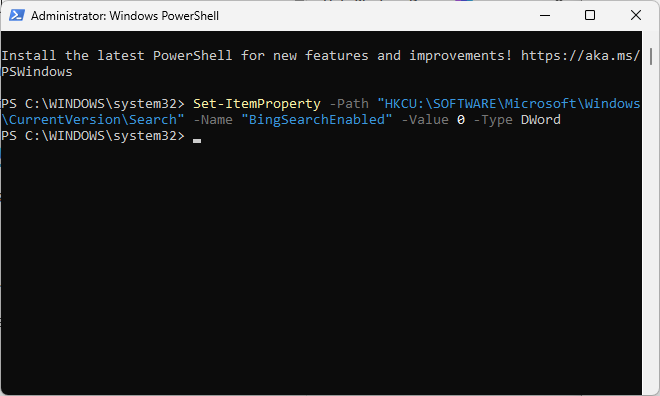
Microsoft trials Adaptive Energy Saver, to enable saving mode on devices with plenty of battery left

Posted on July 15, 2025July 14, 2025 by Martin Brinkmann

Mobile devices like Windows 11 laptops use batteries for power. Keeping an eye on the remaining battery is essential to avoid unexpected system shutdowns due to a lack of power.

Modern mobile devices support battery saving modes. These are designed to save battery while the device is idle or in use. Common tweaks include reducing the screen brightness, powering down devices, or limiting background activity.

Up until now, Windows’ energy saver mode was either turned on or off. Microsoft has started a trial to change that.

What is the adaptive energy saver? It is a new, opt-in mode, for Windows 11 devices that have a battery. The feature enables energy saving automatically to conserve energy, even while the battery is not particularly low.

This happens without changing the brightness of the screen and is based “on the power state of the device and the current system load”. So, I assume this means that if the load is light, Windows 11 might turn on energy saving mode for a bit to save energy. Once more resources are required, it may turn off energy saving mode again.

How this actually works remains to be seen. Since this feature is introduced in test builds. expect some tweaking and testing to find out how well it works.

The feature is disabled by default and in testing in the latest insider builds of Windows 11 only (where it may be enabled for some for testing). You find it under Settings > System > Power & battery. There, under Energy saver, set “always use energy saver” to adaptive to use it.

Both Android and iOS support adaptive power or battery options. Some Android devices support adaptive power saving, which dynamically adjusts power-settings like the screen brightness based on user behavior. Apple introduced adaptive power in iOS 26, which makes slight performance adjustments to extend battery life.

  • Previous
  • 1
  • …
  • 21
  • 22
  • 23
  • 24
  • 25
  • 26
  • 27
  • …
  • 78
  • Next

Support This Site

If you like what I do please support me!

Any tip is appreciated. Thanks!
  • July 17, 2026 by Martin Brinkmann Brave Search features a Google Maps alternative now
  • July 16, 2026 by Martin Brinkmann Windows Tweaker ShutUp10 updated with new options to disable AI and other potentially unwanted content
  • July 14, 2026 by Martin Brinkmann Microsoft promises improved Windows Search Box and the removal of ads
  • July 13, 2026 by Martin Brinkmann Mozilla moves Firefox to a 2-week release cycle in September
  • July 11, 2026 by Martin Brinkmann Browser extension filters pseudo-brands on Amazon

About

We talk, write and dream about Technology 24/7 here at Chipp.in. The site, created by Martin Brinkmann in 2023, focuses on well-researched tech news, reviews, guides, help and more.

Legal Notice

Our commitment

Many websites write about tech, but chipp.in is special in several ways. All of our guides are unique, and we will never just rehash news that you find elsewhere.

Read the About page for additional information on the site and its founder and author.

Support Us

We don't run advertisement on this site that tracks users. If you see ads, they are static links. Ads, including affiliate links, never affect our writing on this site.

Here is a link to our privacy policy

©2026 Chipp.in Tech News and Reviews