
The integration of Microsoft Bing, or any other online search tool for that matter, in Windows Search is an abomination. The main idea is to run a search online if Windows can’t find anything locally or at least give you the option to run the search.
I’d argue that the vast majority of Windows users does not want this. When you run a search locally, you expect local results. Also, a web browser is just a click away and the more appropriate vessel for running searches online.
Recently I noticed that if you are too fast when the system boots, your searches may end up opening Bing in Microsoft Edge, even if there is a local match. It happens only when you open Start right after the system has booted, start typing and press the Enter-key.
Anyway, it is highly recommended to block Bing entirely in Windows Search, unless you are one of the few users who finds this useful actually (I have yet to meet a single user who does though, let me know..).
Here is how you can end Bing in Windows Search in a matter of seconds (thanks Henk):
- Open the Start menu on the Windows machine.
- Type Powershell.
- Select “run as administrator” to open an elevated PowerShell window.
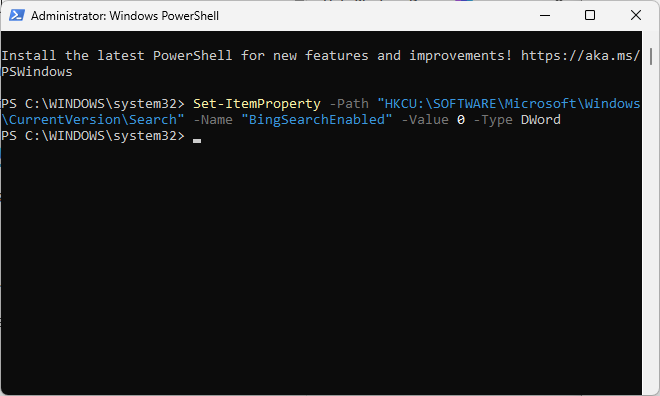
- Paste the following code: Set-ItemProperty -Path “HKCU:\SOFTWARE\Microsoft\Windows\CurrentVersion\Search” -Name “BingSearchEnabled” -Value 0 -Type DWord
- Press the Enter-key to run it.
That is all there is to it. In case you wonder, this adds the Dword BingSearchEnabled to the Registry. Note that you can add the information manually as well using the Registry Editor, or create a Registry file if you prefer that way.
You can undo the change at any time by setting the value to 1 or deleting the key. I doubt anyone would, but it may happen that Microsoft accidentally resets this. You will notice right away though, as searches may include online content in that case again.
Now You: Do you use the online search feature of Windows Search? Or do you disable it / ignore it instead? Feel free to leave a comment down below.
I never use Windows Search. For local files I use Everything (search) together with Startpage and/or Qwant on Firefox for everything else.
Also, the following registry settings were added on 7-5-2024:
HKEY_CURRENT_USER\Software\Policies\Microsoft\Windows\Explorer
Key: DWORD (32-bit) DisableSearchBoxSuggestions
Value: 1
HKEY_CURRENT_USER\SOFTWARE\Microsoft\Windows\CurrentVersion\Search
Key: DWORD (32-bit) BingSearchEnabled
Value: 0
I thought both of those came from you actually Martin, but I could be wrong.
I’ve disabled ‘windows search’ so this is not an issue for me.
I can right click on the start button and then left click on search in the menu that comes up and nothing happens 😉
Also, I don’t see the search box anywhere because, I don’t want to.
Always disable Windows search for Web. I personally prefer programs called MasterSeeker for local searches.