Chipp.in Tech News and Reviews

Windows, Security & Privacy, Open Source and more

Menu
  • Home
  • Windows
  • Security & Privacy
  • Gaming
  • Guides
  • Windows 11 Book
  • Contact
  • RSS Feed
Menu

Tag: windows 11

Windows 11 Quick Machine Recovery

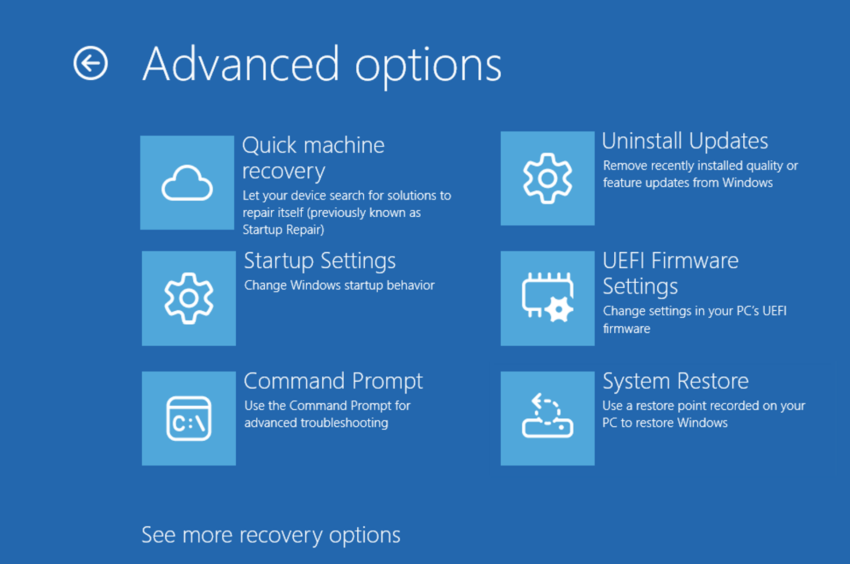
Quick Machine Recovery: automatic Windows 11 device repairs

Posted on July 14, 2025July 14, 2025 by Martin Brinkmann

Quick Machine Recovery is a relatively new feature of Windows 11 that promises speedier troubleshooting of system failures. Announced earlier this year, the feature has now landed in a recent Windows Insider test build of the Canary channel.

What is Quick Machine Recovery? Microsoft describes it as an automated recovery feature that is designed to detect and fix “widespread issues” on devices running Windows 11. Think of it as an automatic repair option baked into the operating system that, Microsoft claims, is fixing issues faster than you.

How does it work? Microsoft says that Quick Machine Recovery kicks in automatically “if a device experiences a widespread boot issue”. It will enter “WinRE”, the Windows Recovery Environment, and connect to the Internet so that “Microsoft can deliver a targeted fix through Windows Update”.

A blog post on the Tech Community website offers deeper insight on how the feature works:

  • Device enters recovery mode: If a Windows 11, version 24H2 device encounters a critical failure preventing normal boot, it enters Windows RE.
  • Network connection established: Windows RE connects to the network using ethernet or Wi-Fi protected access (WPA), ensuring the device can communicate with Microsoft’s recovery services. Future updates will introduce additional networking configurations for broader support.
  • Incident analysis: Microsoft analyzes crash data from affected devices to identify patterns and pinpoint the root cause. If a widespread outage is detected, an internal response team is activated to develop, validate, and prepare a targeted remediation.
  • Remediation rollout: In this initial release, Microsoft will deliver the remediation via Windows Update, adhering to the update policies configured on the device. Microsoft will safely rollout the remediation.

Microsoft claims that the feature is reducing downtime and the need to fix issues manually. According to the initial announcement, Quick Machine Recovery will be enabled automatically on Windows 11 Home devices, once they install the update that introduces the feature.

System administrators may enable the recovery feature on all other editions of Windows 11, including Windows 11 Pro, Education, and Enterprise. Local admins find the setting under System > Recovery > Quick Machine Recovery.

The feature will send crash data to Microsoft when it triggers, which is certainly something to consider before enabling the feature.

Now You: what is your take on this? Useful feature to get Windows 11 devices faster back on track? Feel free to leave a comment down below.

How to sort files in Windows using two parameters, e.g. type and size

Posted on May 28, 2025May 28, 2025 by Martin Brinkmann

It is easy to sort files in Windows’ File Explorer. Just activate one of the displayed column headers, e.g., type or size, and Windows will sort all files using the selected value.

Select size and files will be displayed from largest to smallest. Click again, and the sort order is reversed.

Did you know that you can add a second sort parameter to this without breaking the first sort order? This can be useful, for instance by sorting all files by type and by size.

This keeps files grouped by typed, e.g., PDF documents, images, videos, while still sorting each individual group by size.

To do so, simply sort files like you always do. Click on a column header to sort by type. Hold down the Shift-key then and click on another header, e.g., size.

You will notice that files get sorted again without breaking the first sort order.

This can be quite useful, for instance when you want to check the largest files of multiple file types.

Now You: have another tip that is a time-saver on Windows or other devices that you use? Feel free to leave a comment down below to share it with everyone.

Windows Search will return Store apps soon

Posted on May 7, 2025May 7, 2025 by Martin Brinkmann

When you use the built-in search in Windows, you may get a variety of resuts, depending on how search is configured. By default, Windows Search runs the search on the Internet as well to return Internet results and local results, including cloud content results.

You can turn this off, if you want local-only results. Depending on where you live, it may be as easy as flipping a switch, or complicated. Users from the European Union, for instance, may remove the web search app in Windows 11 to disable web-based search results.

Windows Search finds Microsoft Store apps

Soon, Windows Search may also return Windows Store apps and let users install them directly from the search results. The idea is not particularly new, but it took Microsoft some time to implement it.

Giorgio Sardo published a screenshot of the new functionality on X.

Coming Soon: Microsoft Store integration with Windows Search! 🔎Quickly find and install apps right from your Start menu or Taskbar! Rolling out soon – let us know what you think! 💻#Windows #MicrosoftStore pic.twitter.com/ma9iB8EvrR

— Giorgio Sardo (@gisardo) May 6, 2025

The new feature will improve the discoverability of applications on the Microsoft Store and it might also increase installations of Store apps in general.

Microsoft’s built-in store suffered from a low application count and support from developers from the very first day onward. Microsoft never managed to turn it into a Google Play or Apple App Store like store for Windows apps.

Up to this day, you find only few Windows apps listed and it seems unlikely that this is changing anytime soon.

Could the feature help push the Store and increase its attractiveness for developers and users alike? It is possible, but it seems unlikely.

Microsoft has not revealed if there will be an option to turn off the functionality. It would make search quite the unpleasant experience if you won’t be able to turn it off.

What is your take on this? Good move by Microsoft or nothing that you care about? Feel free to leave a comment down below.

Crapfixer for Windows review

Posted on May 4, 2025May 4, 2025 by Martin Brinkmann

Crapfixer is the latest open source Windows tweaker by serial developer Belim. He calls it “the tool Microsoft would build, if they hated bloatware as much as we do”. I have reviewed several of his tools in the past, including the tweaker TidyOS, the app remover NoBloatBox and the tweaker ThisIsNot11.

The main idea behind Crapfixer is to create a simple tool that gives users control over popular tweaks. These tweaks improve privacy, remove features, or even applications that come preinstalled with the operating system.

With Crapfixer, it is as easy as it gets. Run the program with elevated rights after you have downloaded its 150 kilobyte executable. Windows may throw a SmartScreen warning, which is displayed because the app is new and relatively unknown, not because it is malicious.

The app displays all available tweaks in a sidebar on the left. Hit the analyze button to check if tweaks are already applied. You can uncheck some of the tweaks so that they are not checked by the tool.

Recommended tweaks are marked in red and you may apply them all at once with a click on the CFixer button. It is recommended that you check them first to avoid that a feature is changed or removed that you require.

As far as tweaks are concerned, you find the usual assortment of tweaks supported by the application. From disabling the “First run experience” over “showing full context menus in Windows 11” to disabling Power Throttling and Game DVR.

While the tweaker does not support as many tweaks as WinAero Tweaker, which many consider the richest when it comes to tweaking Windows, it does support major tweaks that you come to expect from an app of its kind. Even new AI tweaks, such as turning off Recall in Windows 11, are supported.

The application is easy to use and the description displayed for each tweak is sufficient in most cases. You can press F1 after selecting a tweak, or right-click and select Help, to display more information. This is usually just a sentence though and may not be enough sometimes to determine its use or usefulness.

CrapFixer features a restore button, which restores functionality. All in all, it is a good tweaker for Windows, but not that special when compared to Belim’s other tools or popular tweakers by other developers. If you have not used a tweaker yet, this could be it. Anyone else may not find much use anymore in that tool.

TidyOS: little Windows System Tweaker for debloating

Posted on April 20, 2025April 20, 2025 by Martin Brinkmann

Tweaking apps offer a user-friendly option to customize the Windows operating system. Most focus on the removal of apps, disabling certain features, or improving privacy.

While it is possible to apply any tweak manually, it is probably safe to say that the majority of Windows users prefers apps for the job.

TidyOS is an open source tweaker for Windows by Belim, the creator of too-many-apps to count (including ThisIsNot11). It is a well-designed application that is compatible with Windows 11.

Just run the 300 kilobytes app to get started. Windows may throw in a SmartScreen warning, but this is not something to be worried about.

The interface is streamlined. You find the three main groups customizing, debloating, and scripting there. Here is what they do:

  • Customizing is the bread and butter group. It includes dozens of tweaks to disable ads, improve privacy, or disable features that you may not need.
  • Debloating may be used to remove apps from the system, including many built-in apps that you may not require.
  • Scripting gives you advanced options, which are powered by scripts. You can use it to remove AI, create a System Restore point, or remove old Windows versions to free up space.

While the provided tweaks are not as extensive as that of WinAero Tweaker, they do cover major tweaks to deal with annoyance and remove apps or features that are unwanted by part of the userbase.

On the plus side, it is a tad easier to work with thanks to its streamlined interface. Most tweaks are self-explanatory, but you can toggle “feature insights” in the interface to switch to longer descriptions for each tweak that provide additional details.

The changes under customizing take effect immediately, e.g., when you select to remove Copilot or Search from the taskbar, that is done right away.

This is different under debloating and scripting. Here you need to become active, e.g., hit the “remove selected” button under debloating to remove the selected apps from the system.

TidyOS does not require elevation on start, but it may request elevation when you select an action that requires it.

Verdict

TidyOS is a well-designed tweaker for Windows 11 that is not as powerful as some of the others, but you may find easier to use because of that. All in all, it is a good app for users who do not require the massive level of tweaks that other tweakers offer.

Now You: do you use a tweaker for Windows? If so, which is your favorite and why? Feel free to leave a comment down below to join the discussion.

Windows updates

Microsoft releases out-of-band Windows updates, but you likely don’t need them

Posted on April 12, 2025April 12, 2025 by Martin Brinkmann

Microsoft has released out-of-band updates for Windows shortly after it released the cumulative security updates for Windows earlier this week.

These new updates are available for Windows 11, version 23H2 and 22H2, as well as several Enterprise and server versions of Windows.

Good to know: out-of-band updates are usually released to fix pressing issues. Most need to be downloaded and installed manually, as the issue may not affect all installations.

The updates affect a logon auditing issue in Windows. Since logon auditing is usually not configured on home systems or unmanaged systems, it is an issue that affects Enterprise devices mostly.

Here is Microsoft’s description of the issue:

It addresses a known issue where Audit Logon/Logoff events in the local policy of the Active Directory Group Policy might not show as enabled on the device even if they are enabled and working as expected. This can be observed in the Local Group Policy Editor or Local Security Policy, where local audit policies show the “Audit logon events” policy with Security Setting of “No auditing”.

To sum it up: this is a reporting issue only that does not impact functionality.

The patch can be installed on affected systems to resolve the issue. The vast majority of home users does not need the patch.

Here are the links to the support articles:

  • Windows 10, version 23H2 and 22H2: KB5058919
  • Windows Server 2022: KB5058920
  • Windows 10, version 20H2, and Windows Server, version 20H2: KB505892
  • Windows 10, version 1809 and Windows Server, version 1909: KB5058922

Click on the link to the Microsoft Update Catalog website on the linked support websites to download the patch. It needs to be installed manually after download. This is usually done by double-clicking on the downloaded patch file and following the instructions that appear on screen.

Pause Windows Updates

Pause Windows Updates with a tiny script

Posted on April 6, 2025April 6, 2025 by Martin Brinkmann

While it is generally recommended to install Windows security updates, there are situations that make you want to postpone the installation. Maybe it is because of another faulty update that Microsoft released, a bug that you already experienced after an update was installed on your system, or just the desire to keep the PC running for a long period without forced update reboots.

Quite a few solutions exist that let you toggle the functionality using applications or scripts. Sordum’s Windows Update Blocker is just one program that you may use for the purpose.

And now there is also Pause Windows Updates. It is a tiny open source script that you may run on your Windows PC to pause updates.

Here is how it works: run the script after you have downloaded it and accept the security prompt to get a simple interface. There you may press keys on the keyboard to run corresponding actions. There are:

  • (1) Disable Updates
  • (2) Enable Updates
  • (3) Disable Microsoft Telemetry
  • (4) Remove Update Files
  • (5) Manage Update Service

Press the h-key to get information about each of the actions. When you select the disable option, all update downloading and installing is halted. This includes updates that are in the process of being downloaded to the system.

Any update that has not been installed fully at this point needs to be downloaded in its entirety again once you enable updates on the system.

Since it is a script, you may review it before you run it on your system. Just load it in a plain text editor like Notepad to do so.

Closing Words

Pause Windows Update is an easy to use option to block updates on Windows machines temporarily. Most users probably won’t need the script or similar apps ever, but there are situations where it may come in handy.

Now You: how do you handle updates on your Windows PCs? Do you let them install automatically or prefer manual control over updates? Any tools you use? Feel free to leave a comment down below. (via Deskmodder)

Windows 11: you can soon turn off one of the biggest Start menu annoyances

Posted on April 4, 2025April 4, 2025 by Martin Brinkmann

If you’d ask me to name the most annoying feature of Windows 11’s Start menu, I’d probably pick the Recommended section. Here specifically the inability to remove it from the Start menu.

While you can configure Windows to stop giving recommendations, you cannot remove the then-blank section from the Start menu. That is, until now.

The Sherlock Holmes of Windows, Phantom of Earth, discovered that Microsoft has had a change of heart in the latest Windows 11 Insider build.

The hidden feature introduces major changes to the operating system’s start menu, including the ability to remove the recommended section.

Here is his post on X that highlights the change.

Hidden in today's Dev/Beta CUs: a major update to the Windows 11 Start menu! It has a new, larger layout with everything on one scrollable page, with the "All" list below recommendations – which can FINALLY be turned off! Pinned list is now limited to 2 rows, but can be expanded. pic.twitter.com/JkP3V2I5g6

— phantomofearth 🌳 (@phantomofearth) April 3, 2025

Here is how this works:

  1. Open the Settings on the system.
  2. Switch to the Start category.
  3. Disable “Show recently added apps”.

Disabling the option will remove the entire Recommended section of the Start menu, including the header that could not be removed previously.

Show recently used apps is going to remove Recommended in the Start menu. Source: Phantom of Earth

Here is why this is important. Up until now, Recommended would take up space in the Start menu, even if you did not use it. You could not use the space to display more pinned apps, which some users might prefer.

Phantom of Earth notes that there is another feature available now that complements the change. You may now choose to display “all pins by default”. You had to click on the All button up until now to display them all. The change places these icons in the area of the recommended section.

Closing Words

It is rare these days that I applaud Microsoft for the changes that it makes to the Windows operating system, but this one, albeit years too late, is a welcome addition.

Considering that it is currently only available in Insider builds, it may take a while before it lands in Stable. And yes, there is always the chance that a feature gets pulled again. Let us hope that this is not one of those cases.

Now You: do you use the Windows start menu or do you prefer to use a replacement?

A big MSEdgeRedirect update has just been released

Posted on April 2, 2025April 2, 2025 by Martin Brinkmann

When Microsoft launched its Edge web browser, it used Windows to quickly push the usage share of the browser. One of Microsoft’s ways of doing so was to create artificial protocols in Windows that would open only in Edge.

Clicks on web searches in Start or news would always open in Edge, even if the browser was not the default browser on Windows.

The small tool MSEdgeRedirect was created to address this. The main idea was to redirect requests that Windows would push towards Edge to another browser.

There have not been any updates for over a year, but a new update just hit. Good news for users of the project, as it is improving the redirector in several ways.

Note: The open source program is still a beta officially. While it works well, you may run into bugs or issues using it. Also, Microsoft may change things and that may break functionality.

So, here is what is new in MSEdgeRedirect 0.8.0.0:

  • The minimum supported system is now Windows 10. Windows 8 is no longer supported.
  • Fixed Windows Spotlight, PDF file handling, some UWP apps no longer working in Service Mode.
  • New AI-less Google Search results option.
  • Improved news handler.
  • Adds support for –from-ie-to-edge and bing.com/WS/redirect.
  • Adds passthroughs for –user-data-dir and –win-session-start.

The update is a bug fix update for the most part that fixes some existing issues. If you use the tool already, you should upgrade to the latest version. That is, unless you still run Windows 8.1, as this is no longer supported. Oh, and Europe mode is still a thing, why not give it a try.

All in all, it is good to see that the project has not been discontinued.

Now You: do you use MSEdgeRedirect or have used the app in the past?

Windows: Quick Machine Recovery feature explained

Posted on March 31, 2025March 31, 2025 by Martin Brinkmann

If you have used Windows long enough, you have probably come into contact with Startup Repair at one point. The feature aims to resolve issues that prevent the operating system from starting up. It is a hit and miss kind of feature for many users though, as it relies solely on local files. All in all, it is not overly reliable.

Quick Machine Recovery extends the functionality to the cloud and Windows Update. The main idea is to improve recovery of Windows systems when boot issues are encountered. Designed primarily for administrators who manage multiple devices, Quick Machine Recovery adds cloud files and data to the recovery process.

The new feature uses a Windows Recovery Environment to “scan Windows Update for remediation options” according to Microsoft. The company says that this “allows devices to be recovered without requiring manual intervention”.

Quick Machine Recovery supports two recovery options:

  • Cloud remediation.
  • Auto remediation.

Cloud remediation

The feature uses Windows Update to fix issues experienced on the device. It requires an Internet connection and may download data from Windows Update to correct issues. If the feature is not enabled, Windows will use the local-only Startup Repair feature instead to attempt to fix the problem.

Auto remediation

This automates the problem solving. Windows will connect to Windows Update automatically to try and fix the issue. It will retry to correct the issue several times automatically.

The Quick Machine Recovery process

The five steps of the Quick Machine Recovery process. Image source: Microsoft.

Five steps make up the remediation process:

  1. Device crashes or fails to boot.
  2. Boot into recovery to start the Quick Machine Recovery process.
  3. Establish a network connection to scan Windows Update for fixes.
  4. Remediation, which attempts to apply fixes found by downloading data from Windows Update.
  5. Reboot to either boot into Windows, if a fix was applied successfully, or to restart the process from step 2.

Default configuration

The default configuration depends on the Windows edition:

  • Windows Home: cloud remediation is enabled by default, auto remediation is disabled by default.
  • Windows Pro, Enterprise: both remediations are disabled by default.

Administrators find instructions on Microsoft’s Learn website that explain how to enable or disable the feature.

Closing Words

Tests will show how well the cloud-based recovery feature will perform. For now, it is only available in test versions of Windows 11.

Now You: what is your take on this new recovery feature? Do you think it will work better than the local-only Startup Repair?

  • Previous
  • 1
  • …
  • 3
  • 4
  • 5
  • 6
  • 7
  • 8
  • 9
  • …
  • 19
  • Next

Support This Site

If you like what I do please support me!

Any tip is appreciated. Thanks!
  • April 2, 2026 by Martin Brinkmann Would you trust AI to handle your email inbox?
  • April 1, 2026 by Martin Brinkmann Google Chrome update patches another 0-day vulnerability
  • March 31, 2026 by Martin Brinkmann A new Windows team promises to bring native apps to the operating system
  • March 30, 2026 by Martin Brinkmann Google outlines the new flow for sideloading Android apps
  • March 29, 2026 by Martin Brinkmann Microsoft pauses update KB5079391 for Windows 11 to investigate an issue

About

We talk, write and dream about Technology 24/7 here at Chipp.in. The site, created by Martin Brinkmann in 2023, focuses on well-researched tech news, reviews, guides, help and more.

Legal Notice

Our commitment

Many websites write about tech, but chipp.in is special in several ways. All of our guides are unique, and we will never just rehash news that you find elsewhere.

Read the About page for additional information on the site and its founder and author.

Support Us

We don't run advertisement on this site that tracks users. If you see ads, they are static links. Ads, including affiliate links, never affect our writing on this site.

Here is a link to our privacy policy

©2026 Chipp.in Tech News and Reviews