Chipp.in Tech News and Reviews

Windows, Security & Privacy, Open Source and more

Menu
  • Home
  • Windows
  • Security & Privacy
  • Gaming
  • Guides
  • Windows 11 Book
  • Contact
  • RSS Feed
Menu

Tag: microsoft

The Road to Recovery: How Microsoft Plans to Make You Love Windows Again

Posted on January 30, 2026January 30, 2026 by Martin Brinkmann

For years, Windows has felt less like a trusted tool and more like a construction site that never quite cleared the rubble. Whether it’s the lingering inconsistency of the UI, the intrusion of unwanted ads, the performance hiccups, or that many users now expect to experience issues when Microsoft releases an update for the operating system.

Microsoft’s flagship OS has faced a widening trust gap with its most loyal users. Now, in a strategic pivot aimed at 2026, the tech giant is launching an internal “swarming” initiative to prioritize stability and refinement over flashy new AI features.

Swarming, in this context, refers to engineering teams working on core reliability issues, including performance lags, to address major pain points of Windows users.

This year you will see us focus on addressing pain points we hear consistently from customers: improving system performance, reliability, and the overall experience of Windows.

The quote comes from the president of Windows and devices at Microsoft, and it was published by Tom Warren at The Verge on January 29, 2026.

A bad start of the year for Windows users

If anyone needed a refresher of the challenges that Microsoft is facing, they do not need to look far. When Microsoft released the first update for Windows in 2026, it probably did not expect it to cause a considerable number of issues on user computers: from broken Remote Desktop Connections over a shutdown bug to a severe bug affecting Outlook that needed an out-of-band update for fixing.

While it is bad enough that users and organizations feel issues hitting them left and right at times, it is the image of Windows that seems to be starting to worry Microsoft. Up until now, Microsoft pushed what it thought served it best onto Windows. Ads, AI, limited user control, features that barely anyone asked for. Yes, there was the occasional feature that users liked, but most changes were met with a good portion of skepticism at best.

While Microsoft received criticism, most users did not seem to mind as long as the operating system worked. Most features could be turned off or disabled. Yes, some had the nasty habit of being turned on again at times, which was annoying.

Now it appears that Windows is at a critical junction, one that even Microsoft can’t ignore going forward.

The foundation needs to be stabilized before Microsoft can continue to use Windows as a vehicle for selling subscriptions and other products.

It remains to be seen how dedicated Microsoft will be and whether it manages to make a U-turn regarding stability of its operating system. With Linux gaining essential support for PC games, there is not really much that Windows has to offer that is not also possible on Linux.

Microsoft Edge

Microsoft is moving features into Copilot to extract more money from its customers

Posted on December 6, 2025December 6, 2025 by Martin Brinkmann

Customers all over the world are used to frequent price increases of subscriptions by now. Many online services that require a subscription increase prices regularly, often once per year or every second year.

That is bad enough, especially if the service does not get any better because of it. While services argue that inflation and rising costs force them to increase the price of their product, it is getting harder and harder for them to convince customers to accept the price increase and continue their payments.

If only there would be something that would make it clearer for customers to pay more. Microsoft may have found a way, or so it believes: how about removing features from products to move them into another product, that costs extra?

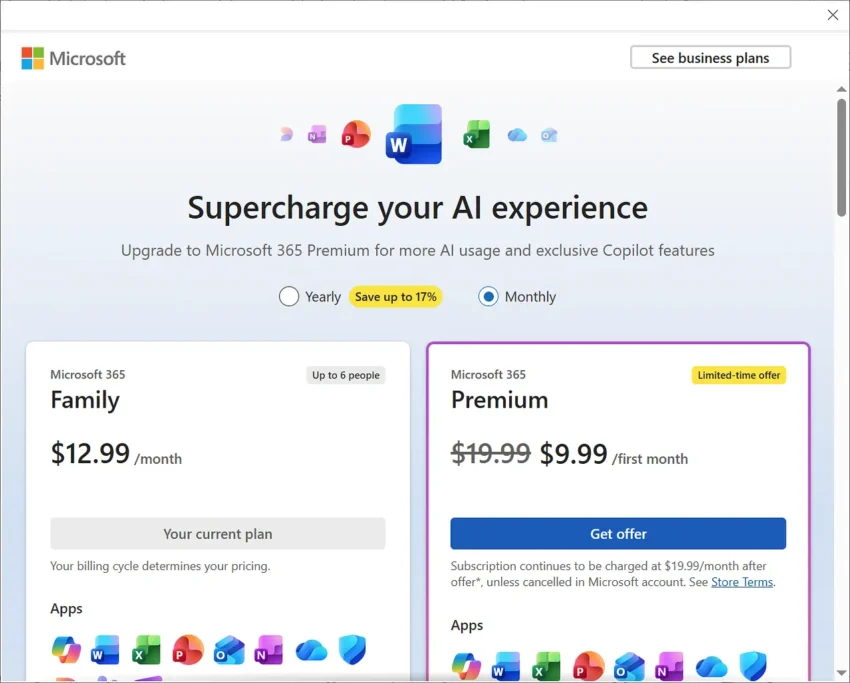
As a Microsoft 365 subscriber, you pay Microsoft a monthly or yearly sum for access to the most recent version of Microsoft Office. You may also get some other features on top of that, including cloud storage space or access to Copilot, Microsoft’s AI.

However, some Copilot features are only for subscribers of plans that are more expensive. Home users, for instance, need a Premium subscription to gain access to otherwise restricted Copilot features.

Microsoft changed the tactic for business customers. Instead of limiting Copilot to a specific plan, Microsoft integrated Copilot AI features into the business plans and announced a price increase arguing that customers would get more out of their subscriptions because of that. Most plans increase by up to three Dollars per month because of that from 2026 onward.

To make Copilot look more valuable, Microsoft started to remove features from Office programs.

Martin Geuß, from the Geman website Dr. Windows, highlighted two recent examples on the site recently:

  • PowerPoint: The option to reuse slides is going to be removed from the presentation software. Users may ask Copilot to do that for them.
  • Excel: The function to extract data from images is being removed. Starting in July 2026, this option won’t be offered anymore. Microsoft says that it is working on a better function that will then be powered by Copilot.

There you have it. You just have to be inventive to justify price increases.

Microsoft is shutting down Skype: wants you to use this software instead

Posted on February 28, 2025February 28, 2025 by Martin Brinkmann

The writing has been on the wall for a long time: Microsoft plans to shut down the communication software Skype in May 2025.

While Microsoft has yet to formally announce the end of the once-popular communication software, a notification about the end of Skype was found in the latest preview of the software.

The discovered string says: “Starting in May, Skype will no longer be available. Continue your calls and chats in Teams.”.

Microsoft wants to move customers to Teams, the video conferencing, calling, and meetings software that it favors now.

Skype has been around for quite some time. It was launched in 2003, but Microsoft did not acquire it until 2011. Paid a pretty sum for it, $8.5 billion at the time.

Microsoft discontinued Windows Live Messenger a few years later and tried to make Skype its next billion users product by integrating it in the-then new version of Windows, Windows 10.

This did not work out too well and the launch of Microsoft Teams in 2017 put Skype on the backburner soon thereafter.

As Microsoft has not confirmed the end of Skype yet, there is a theoretical chance that Skype could once more jumping off a scaffold. Microsoft has a few months left to make an announcement either way.

Even if Skype is put to rest, there is a good chance that it could stay around for a while to make sure most users and businesses migrate to Teams in an orderly fashion.

On a personal note, I never warmed up to Skype and have not used it much, even though I had an account for what seems forever.

Now it is your turn. Do you use Skype or have you used it in the past? Feel free to leave a comment down below about that.

Windows 10

Microsoft cancels a Defender feature that gave subscribers a free VPN

Posted on February 1, 2025February 1, 2025 by Martin Brinkmann

Microsoft introduced a new feature that it called Privacy Protection less than two years ago to Microsoft 365 Home and Family plans. The feature gave subscribers access to a VPN service along with 50 gigabytes of traffic per month.

Microsoft limited the feature to the Microsoft Defender app, subscribers, and users from a handful of countries only.

At this moment, Microsoft is sending out emails to users of the VPN that it is being cancelled.

The details:

  • The service will be pulled on February 28, 2025.
  • It affects Home and Family subscribers only.

About Privacy Protection: reason for its removal

I reviewed Privacy Protection back in 2024 on Ghacks. While bare bones, it was still miles ahead of Google’s offering, which I called the most basic VPN one could get. Interestingly enough, Google did shut down its Google One VPN in mid 2024 for many customers.

Microsoft explains on a support page that its goal is to ensure that subscribers “remain safer online” and that it decided to pull the feature after evaluation of its usage and effectiveness.

The company says that Windows, iOS, and macOS users do not need to take any action. Android users, who have used the feature, need to remove its VPN profile manually from their device.

These are the steps according to Microsoft:

  1. Go to your phone’s Settings app.
  2. Search for ‘VPN’ in the settings.
  3. If you’ve onboarded to privacy protection, you should see a ‘Microsoft Defender’ VPN profile in the list of VPN profiles.
  4. Use the info icon to tap on it and remove it.

Microsoft Edge Secure Network, a browser VPN integrated into Edge by Microsoft, does not appear to be affected by the change.

Closing Words

VPN solutions, like Microsoft’s Privacy Protection or Google’s One VPN feature, offered basic functionality when compared to dedicated VPN solutions. Heck, Google did not even support options like selecting a server to connect to.

Major features, like dual-hop connections, selecting different protocols, using obfuscation techniques, or kill switch functionality, were never supported.

This does not mean that the basic VPN solutions were useless. Users could still use the VPNs to protect their Internet traffic, especially in public places.

Now it is your turn. Do you use a VPN service sometimes or regularly? If so, which one is your favorite and why?

Microsoft reportedly showing ads in Microsoft 365 app for Android

Posted on December 3, 2024December 3, 2024 by Martin Brinkmann

Is it an experiment, rolling out to everyone, or a bug? Reports are coming in that users are starting to see ads in the Microsoft 365 application for Android when they open PDF documents in the app.

The ad shows up at the top of the screen underneath the title of the document. It features a close button, but that closes it just for the current PDF document and has no effect on future documents that users view in the app.

User Longhorn describes the experience on an independent Mastadon server:

The PDF reader in the Office app on Android has built-in ads.

Even if you have an @Microsoft 365 subscription, ads do sometimes show up.

That’s utterly insane. That particular ad I got was powered by Taboola under the hood.

Another user chimed in and said that ads are also showing up for other documents opened in the application.

I tried to replicate this by opening several PDF documents and Office documents in the app, but they did not show up. It is possible that they do get blocked by the privacy-focused DNS service that I use, as it blocks most ads on Android devices.

Microsoft has been experimenting with advertisement in its products before and still is. Various sections and apps by Microsoft on Windows show ads. While some might argue that a recommendation for another Microsoft product is not an ad, I’d beg to differ.

Third-party apps are also a thing. The Copilot feature that is integrated into Windows may show third-party ads.

Ads in the Microsoft 365 app are not out of the question therefore. It would be a serious blow to subscribers, if Microsoft intents to show ads to them as well.

If Microsoft is rolling this out, we are likely going to see more and more comments about it on various places on the Internet.

What is your take on ads in apps? Do you mind, if they are free? What about paid apps? Feel free to leave a comment down below.

Skype

Skype is getting the Anti-Windows treatment: Microsoft removes all ads

Posted on July 30, 2024July 30, 2024 by Martin Brinkmann

Is anyone still using Skype? Microsoft has just released a new development version of Skype and it comes fully loaded with new features and improvements.

Probably the biggest one is that Microsoft is removing all ads from Skype. The company announced the new Skype release on its Answers website.

There, Microsoft bids farewell to “ads in Skype channels and beyond”. It confirms that Skype is going ad-free, which means that users will no longer see ads in channels, in chats, or elsewhere.

We’re excited to announce that Skype is now ad-free! Our latest update removes all ads from Skype channels and the entire Skype platform, ensuring a smoother, decluttered and more enjoyable user experience.

Note: The change has not yet landed in stable versions of Skype. Microsoft has not revealed when it plans to make that version of Skype ad-free.

The new beta version of Skype includes other improvements, some of which are definitely noteworthy:

  • OneAuth for Skype supports Android and iOS now. The system unifies sign-ins. In other words, if you are signed into a Microsoft app, you will automatically be logged into Skype as well.
  • Revamped AI Image Creation. Now accessible via the chat window or the top bar. Microsoft says it does offer an enhanced user interface and better navigation as well.

Closing Words

I have to admit that I have not used Skype in a long time and I do not know how popular the solution still is. It is probably miles away from its prime, but it could still be the go-to tool for millions of users.

These will benefit from the removal of ads. While it is unclear when the change lands in the stable version of Skype, it cannot be too far away.

What about you? Do you still use Skype or do you prefer a different platform for chat and calls? Feel free to leave a comment down below.

Support This Site

If you like what I do please support me!

Any tip is appreciated. Thanks!
  • April 16, 2026 by Martin Brinkmann Windows 11 Context Menu Manager: remove items with a click
  • April 15, 2026 by Martin Brinkmann One Exploited Zero-Day and Record Numbers: The April 2026 Windows Patch Tuesday Breakdown
  • April 14, 2026 by Martin Brinkmann Brave is getting Container support and the feature has made a big jump recently
  • April 13, 2026 by Martin Brinkmann A More User-Friendly Way to Pause Windows 11 Updates is Coming
  • April 11, 2026 by Martin Brinkmann Microsoft is Radically Changing the Windows Insider Program

About

We talk, write and dream about Technology 24/7 here at Chipp.in. The site, created by Martin Brinkmann in 2023, focuses on well-researched tech news, reviews, guides, help and more.

Legal Notice

Our commitment

Many websites write about tech, but chipp.in is special in several ways. All of our guides are unique, and we will never just rehash news that you find elsewhere.

Read the About page for additional information on the site and its founder and author.

Support Us

We don't run advertisement on this site that tracks users. If you see ads, they are static links. Ads, including affiliate links, never affect our writing on this site.

Here is a link to our privacy policy

©2026 Chipp.in Tech News and Reviews