Chipp.in Tech News and Reviews

Windows, Security & Privacy, Open Source and more

Menu
  • Home
  • Windows
  • Security & Privacy
  • Gaming
  • Guides
  • Windows 11 Book
  • Contact
  • RSS Feed
Menu

Tag: amazon

Don’t buy Amazon’s latest Fire TV Stick

Posted on October 1, 2026October 1, 2026 by Martin Brinkmann

Amazon announced the availability of the latest Fire TV stick yesterday. The Fire TV Stick 4K comes with a new remote that Amazon says is optimized and VegaOS instead of Fire OS.

The latter is what tweakers will find problematic. With Fire TV sticks using Fire OS, which is based on Android, sideloading was possible. You could install Android apps such as Smart Tube on the stick to gain access to features that apps in the official Amazon Store don’t offer.

With VegaOS, that bridge is burned. No more sideloading, which means that you are stuck with the apps that Amazon hosts officially on its store.

You find the usual assortment of official streaming apps and other apps there, but the store lacks apps like Smart Tube that you might want to install on your devices, for example to watch YouTube without ads and unpleasantries.

Anyway, if it has to be Amazon, stick with the previous Fire-OS-based sticks like the 4K Max, which is currently discounted in many regions as well.

Browser extension filters pseudo-brands on Amazon

Posted on July 11, 2026July 12, 2026 by Martin Brinkmann

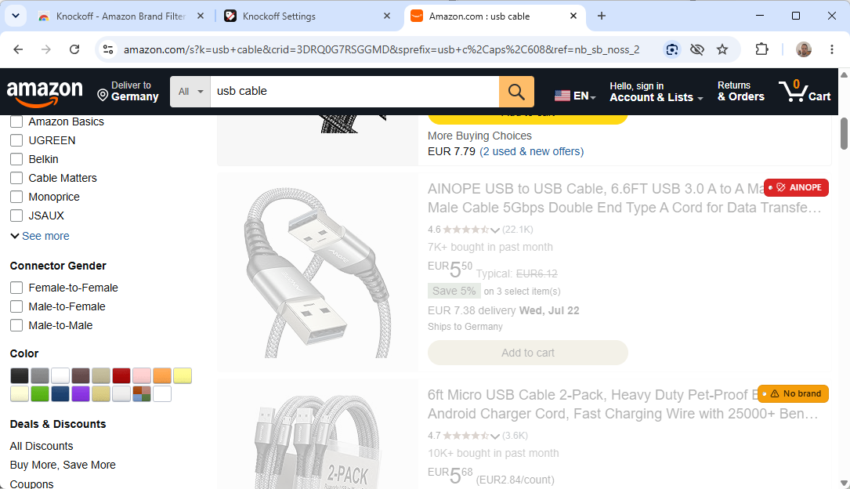
If you shop at Amazon, you may have noticed a rising number of sellers that sound like a very bad draw at Scrabble. Try searching for common items such as powerbanks, USB cables, or dog beds.

You find the usual assortment of known brands and also plenty of offers from sellers that you may have a hard time pronouncing.

Enter the Knockoff extension: it is designed to filter these sellers on Amazon. The developer of the open source extension explains its purpose in the following way:

Amazon is flooded with trademark-squat “brands” (SZHLUX, HORUSDY, LATTOOK, DOZAWA…): random strings registered at the USPTO purely to unlock Amazon Brand Registry, selling commodity goods with no company, no warranty, and no reputation behind them. Knockoff detects those listings and hides, dims, or labels them, right in the search results.

The extension runs locally in the browser. It comes with a seed list of “notorious pseudo-brands” and two other lists — “established Chinese-owned brands” and “established brands”, that you can enable or disable based on your preferences. It uses name heuristics on top of that and can also identify brand-less offers. You may also add companies to your own allowlist or blocklist.

The extension goes through all lists, starting with the allowlist and blocklist, to resolve each product listing on Amazon. Furthermore, you can set filter levels from relaxed to strict, which determine what is getting filtered:

LevelFilters
RelaxedKnown pseudo-brands + your blocklist
Standard (default)+ suspect-looking names + unbranded listings
Strict+ anything not on a known-brands list (allowlist-only)

The extension runs automatically on Amazon after it is installed in the browser. When you search for a product or browse Amazon, you will notice that certain results are dimmed by default. You can change that to hiding them entirely in the options. This won’t display more results on the page, but it will hide every product that matches the filters so that you can better focus on the remaining products on the page.

Tip: I recommend keeping the dimmed option enabled for a while, as you may notice brands being filtered out that you might not call “knockoff” or unknown. This gives you the time to add these brands to the allowlist.

You may also hide sponsored listings on Amazon as a bonus, but need to enable the feature manually in the preferences.

The extension should work on all regional Amazon sites. I tested it on the US and German sites and it worked as advertised.

Amazon ends sideloading on new Fire TV sticks

Posted on April 26, 2026April 26, 2026 by Martin Brinkmann

Amazon Fire TV sticks are one option for users who want to use a streaming device instead of the “smart” capabilities of the television itself. Up until now, Amazon supported installing apps from its official store and also as APK files from the Internet, since it was based on Android.

This meant that you could install a third-party YouTube client or any other app on the device and use it as if you’d be using it on a mobile or tablet.

This changed recently with the release of the newest Fire TV Stick HD and Fire TV 4K Select, which do not support sideloading anymore.

Amazon confirms this on the product page. When you ask the AI whether the new Fire TV stick supports sideloading, it repllies:

For enhanced security, Fire TV Stick HD prevents sideloading or installing apps from unknown sources. Only apps from the Amazon Appstore are available for download.

Means, if an app is not listed on the Amazon Appstore, then you can’t install it. Amazon claims that the change is all about security. This may sound logical on first glance: sideloaded apps are not vetted and they may introduce malware or other unwanted behavior.

However, this is also removing choice from customers. Even if you know what you are doing, you can’t install apps anymore that are not offered at the official Amazon Store. This removes choice and makes the coming Fire TV sticks a bad deal for anyone who’d even consider sideloading apps.

Amazon Fire TV alternatives

If sideloading third-party apps, custom launchers, or ad-free YouTube clients is a dealbreaker for you, you need to migrate to a device running Google TV or Android TV. These operating systems are still open, allow you to enable “Developer Options,” and let you install whatever you want.

Here are options that still work:

  • Google TV Streamer 4K
  • NVIDIA Shield TV Pro
  • Xiaomi Mi TV Stick 4K or MECOOL

Other popular brands, including Apple or Roku, do not support sideloading.

Amazon

Everything you need to know about Amazon Prime Ultra

Posted on March 15, 2026 by Martin Brinkmann

Amazon announced Prime Ultra, a new subscription plan yesterday. It is the new ad-free subscription service that replaces the current option to go ad-free on Prime Video.

To better understand the change, it is necessary to look back at the previous structure.

Amazon Prime is available for about $15 per month in the United States. A subscription gives subscribers several features, including access to Prime Video. Amazon, some time ago, decided to turn the then-ad-free Prime Video into an ad-powered streaming service.

This meant that every subscriber started to see ads on Prime Video, unless they paid Amazon an extra $3 per month to retain the status quo (ad-free). Amazon removed some features in the ad-powered plan, namely support for Dolby Atmos and Dolby Vision.

What Amazon Prime Ultra changes

Amazon Prime Ultra is the replacement for the ad-free option. It should not come as a surprise therefore that it offers an ad-free experience as well.

For around $5 per month extra, customers get the following extras on top:

  • 100 downloads for offline viewing.
  • Up to 5 simultaneous streams.
  • 4K UHD.
  • Dolby Atmos.

As a consequence, Amazon is removing support for 4K and UHD streams from the regular Prime Video subscription. In other words, if you want 4K, you need to pay an extra $5 to retain that option.

Prime customers who pay yearly may also pay yearly for Prime Video Ultra. This costs roughly $46 then per year instead of $60.

Note that Amazon is improving the regular ad-powered Prime Video experience as well (except for removing 4K support). Subscribers get Dolby Vision, 50 downloads instead of 25, and 4 streams instead of 3 under the revised plans.

Closing Words

Amazon is increasing the cost of an ad-free Prime Video experience with the introduction of the Ultra option. To make it appeal more, it decided to move 4K support to the Ultra plan exclusively. Dolby Vision is moved to the regular Prime Video plan while Dolby Atmos remains an exclusive for the add-on.

Is it worth the $20 per month? Considering that other extras are included, including free shipping for many items, it may be worth it for some users, especially if they watch Prime Video regularly and dislike advertisement.

However, 4K video at streaming services is not all that great when you compare it to 4K discs or downloaded 4K video files. The reason is simple: video streaming services use compression heavily.

The new Ultra plan launches in the United States only. Whether it is coming to other regions remains to be seen, but there is a good chance that Amazon will introduce it globally eventually.

Warning! That laptop on Amazon? It comes with temporary storage

Posted on February 27, 2026February 27, 2026 by Martin Brinkmann

I do not think that Amazon is the best place to shop for computer parts, laptops or full PC systems. The main reason for that is price, but there are other factors that should make you pause before you hit the “add to cart” button on the shopping site.

A new issue that has been uncovered by Neowin is that some sellers on Amazon inflate the storage of the devices that they sell. A laptop with 1.1 TB of storage? What an odd number. While it is possible that such a laptop exists, for instance one with a 128 GB solid state drive and a 1 TB platter-based drive, in this case, something different is being sold.

See, these particular sellers add a one year subscription to OneDrive to the laptop, and they add the 1 TB of cloud storage to the total of the laptop’s storage. So, instead of getting a laptop with 1.1 TB of storage, buyers get a laptop with 128 GB of storage and 1 TB of cloud storage.

This should not be a problem for users who know what OneDrive is, as physical and cloud storage is clearly separated in the title and Microsoft’s cloud service is mentioned by name. The system configuration is also displayed correctly, but it can still be problematic for users who hit the buy button too quickly or do not know the difference.

At the very least, it can be very confusing. If you open such a result on Amazon, say this HP 14″ laptop, you find the following title on Amazon:

HP 14″ Natural Silver Ultrabook Laptop, Intel 4-Core CPU, 4GB RAM, 1.1TB Storage (1TB OneDrive and 128GB SSD), HD Display, Windows 11, Microsoft 365 Web Apps

The title says 1.1 TB of storage first before the seller highlights how much of that is physical and how much is cloud-based.

This laptop comes in three configurations: the base model comes with 4 GB of RAM and 128 GB of storage, the most expensive model with 16 GB of RAM and 256 GB of storage. Here, the seller has not added the 1 TB to the laptop’s total.

However, when you scroll to the specs right below, you see 1.1 or 1.2 TB as the hard disk size. The “about this item” section again differentiates the storage between local and cloud storage.

Ultimately, it is a new selling strategy on Amazon that you may want to look out for, if you do buy laptops or PCs there. It is quite possible that Amazon is not the only marketplace where the strategy is used.

Amazon is disabling apps on Fire TVs now

Posted on December 2, 2025December 2, 2025 by Martin Brinkmann

If you use a Fire TV device by Amazon, then you know that you may install third-party Android apps on the device that are not provided via Amazon’s official App Store. This is an excellent option to install apps that you may want to use, like streaming apps or YouTube frontend clients that get rid of all the annoyances.

However, Amazon announced this year that it is going to disable certain apps on the Fire TV devices of customers without giving customers any say in the matter.

Amazon claims that it only disables apps “that are identified as using or providing access to unlicensed content”. In other words, Amazon targets apps that provide users with free access to streaming content that is restricted in some way or another.

A prime example are apps that give you access to sports streams that are not available for free. Amazon has a FAQ-website up that answers some questions that customers may have. It covers topics such as refunds (not really) to exceptions (none).

Put simple, Amazon will disable any application that it has on its list, which it keeps private. Customers should receive warnings next time they try to load an app that is on the list. The only options at this point are to close the app or to uninstall it.

Will this also affect frontends for services that get rid of advertisement? It is too early to say and even if that is not the case right now, the infrastructure is in place to add any app to the block list at any time.

Now You: do you use a streaming device or stick, like the Fire TV sticks? If so, did you install third-party apps on the device that are not offered via the official store?

Amazon

Amazon may send you ads via WhatsApp: here is how to turn that off

Posted on November 26, 2025November 26, 2025 by Martin Brinkmann

WhatsApp is one of the most popular messaging apps out there. One reason why more and more businesses try to establish channels on WhatsApp. Most to reach customers and sell them something.

Amazon is no exception to that. Maybe you have noticed already that you are getting ads from Amazon in WhatsApp.

Even if not, you may want to make sure that you won’t in the future. Good news is that there is an option to turn that off. It appears, however, that the feature is turned on by default. I can’t remember allowing Amazon to use WhatsApp for communication.

Here is what you need to do:

  1. Load the Notifications website on the Amazon website of your choosing: https://www.amazon.com/preferences/cpc/homepage
  2. Check the “Turn on WhatsApp” or “Turn off WhatsApp” button on the page.
  3. Select “Turn off WhatsApp” to disable communication.

Note that the page may look different depending on your locale. In Germany, it was called Communication Preferences Center and it looked different from the page opened on Amazon.com.

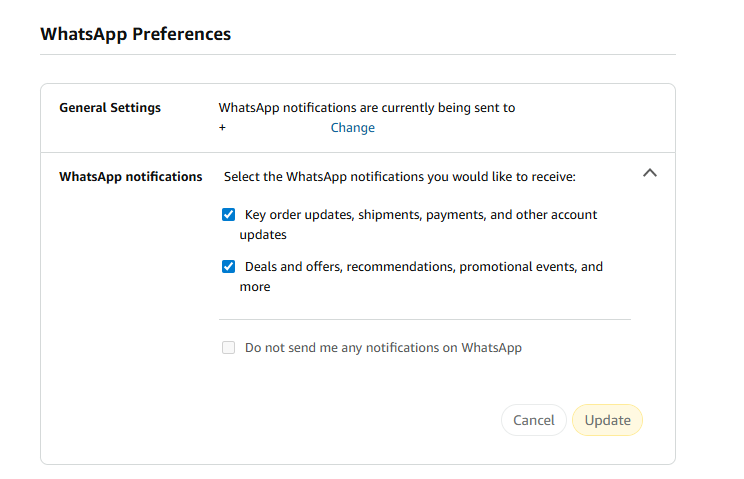
There, you an entire section dedicated to WhatsApp Preferences.

As you can see on the screenshot. the account was set up to receive WhatsApp notifications.

To change that here, you have to uncheck one or both of the options listed on the page:

  • Key order updates, shipments, payments, and other account updates.
  • Deals and offers, recommendations, promotional events, and more.

The second option sends ads to your WhatsApp account, while the first seems to be limited to Amazon notifications about orders and such. However, if you disable both, you can check “Do not send me any notifications on WhatsApp.

Don’t forget to hit the update button to save the change.

Now You: did you see the WhatsApp preferences when checking your Amazon account? Were the settings enabled? Feel free to leave a comment down below.

Amazon Prime Video Recaps

Users of streaming services dislike ads, but subscriptions continue to grow

Posted on November 17, 2025November 17, 2025 by Martin Brinkmann

When asked about their preference regarding streaming media, with or without ads, most users would like pick the latter. I would go even so far to claim that many dislike ads with a passion. However, when you add a monetary component to the question, things get interesting.

Get the cheaper, but ad-powered streaming option, or pay more, but save up on time and get rid of the ads?

It appears that the strategy of companies like Disney, Amazon, or Netflix is paying them huge dividends already. Ad-powered streaming subscriptions are pushing to new highs every financial quarter, it appears, and there does not seem to be any slowing down either.

Introduced just a few years ago, ad-supported plans make up a sizeable portion of total subscribers for major streaming platforms.

  • Netflix: last figure is 190 million users who use an ad-powered plan, but uses new metric.
  • Disney: about 164 million, does include Disney+, Hulu, and ESPN+ however.
  • Amazon: 315 million

Netflix introduced a new metric for its ad-powered plan recently. Previously, the company counted subscriptions only, which, according to the last report for which the company used the metric, was 94 million. The new report looks at household numbers as well.

Regardless, about a third of Netflix subscriptions seem to be ad-powered. For Amazon, it is even more. The reason is simple: Amazon decided to make all Prime Video subscriptions ad-powered. If you do not want ads, you have to pay Amazon a few extra bucks to avoid them. Most users apparently don’t.

Even more interesting, Amazon boasted in its last earnings call that it managed to boost subscribers from 200 million in 2024 to the-now 315 million.

Four out of ten Netflix subscribers pick the ad-powered plan, according to Netflix. Disney is likely seeing signups in a similar range.

Why are ad-powered plans growing? The most likely, and simple, answer is: because they are cheaper. Much cheaper in fact. The Standard with Ads plan of Netflix USA costs subscribers around $8 per month. The cheapest ad-free plan costs more than double at around $18 per month. If you want 4K, it is thrice as much at around $25 per month.

While subscribers of the Premium plan get some benefits that the other two plans do not support, notably 4K, Spatial Audio and HDR support, the only differentiating factor that matters between Standard with Ads and Standard is the advertisement.

Disney pricing is very similar in this regard, albeit considerably below the twice as expensive mark. The Disney+, Hulu Bundle, both with ads, costs around $13 per month. Without ads, the price rises to around $20.

While the “with ads” plans will likely become more expensive as time passes, there does not seem to be an end to their growth yet.

Now You: Are you subscribed to an ad-powered plan? Or do you prefer plans without ads, or no plans at all? Feel free to leave a comment down below.

Did you know that Amazon sells Smart Beds? They did not work during the AWS outage

Posted on October 22, 2025October 22, 2025 by Martin Brinkmann

Companies plaster “smart” on everything these days. While that is a generalization, it is clearly a trend that is getting more traction as the years go by only to be overshadowed by the use of AI. From smart hairbrushes to AI-powered toasters, companies come up with incredible ideas to justify premium pricing for their products. Not always do the products benefit from smart functionality.

Amazon offers a range of smart devices. You probably think of Alexa-powered devices, like the Amazon Echo, first. Did you know that Amazon sells Smart Beds as well?

At $2000 and more, beds of Amazon’s Eight Sleep brand are not exactly cheap, but they can control the temperature of different regions individually, support elevation, and come with sound-functionality.

However, to function properly, Amazon’s Smart Beds require cloud connectivity. Without it, they apparently become non-functional, as in, dead weight. With no manual overrides available, users are up for a hellish-experience when connectivity breaks.

The AWS outage exemplified this, according to a post by Dextero. When AWS went down, owners of the bed lost connectivity and could not use the app anymore to control their bed. This left them stuck with the last setting that was active, according to the report.

Even worse, some beds overheated apparently while the cooling stopped in others entirely. One user reported that his bed locked itself at a temperature level that was nine degrees above room temperature, stating that it felt like “sleeping in a sauna”. Others claimed that the bed was stuck in a position that they could not change anymore.

No offline mode

Amazon’s Smart Beds have no offline mode at the moment, which is more than puzzling. Even if the company thought that an AWS outage was very unlikely, it must have considered the possibility of local Internet outages that would then also impact a user’s control?

Should not something like this, a manual override for core features, be at the forefront of one’s thoughts when designing a smart product?

Now You: do you own smart devices? If so, which and for what purpose?

Amazon Prime Video Ad Free

Amazon kills Freevee, because it moved ads to Prime Video

Posted on July 3, 2025July 3, 2025 by Martin Brinkmann

The writing was on the wall. Some time ago, Amazon pulled a fast one on Prime subscribers by introducing ads for everyone. Subscribers who did not want the new experience could pay Amazon a few bucks extra to get rid of the advertisement again. To hammer that home even more, Amazon recently started to show more ads to users per hour.

Questions about the fate of Amazon’s then ad-powered streaming service Freevee came up at the same time. It did not really make sense to have Freevee as an option if all of the streams on Prime Video would also show advertisement to users.

Amazon kept Freevee around for the time being. CNBC reports that some Freevee users see notifications when they launch the app on their devices about the upcoming end of it.

According to the report, Amazon plans to put the standalone Freevee app to rest in August 2025. The notice states “Prime Video is the new exclusive home for Freevee TV shows, movies and Live TV”.

The app will stop working in August 2025 and users may tune in directly on the Amazon streaming service to get their Freevee fix. Amazon users, with or without Prime Video subscription, may continue to watch free content with advertisement on the Amazon website. The only requirement for that is an Amazon account.

Closing Words

Amazon established Freevee in 2019 to stream videos with ads to users. The decision to turn Prime Video into a bigger version of Freevee came in 2024. The only differentiating factor will be that users may watch Freevee content on Amazon without a Prime subscription going forward. Other than that, you will get ads either way unless you pay extra.

It is probably only a matter of time before Freevee is retired entirely and the available media library is integrated into the Amazon Prime Video library.

As far as I’m concerned, I started to watch more content on DVD and Blu-Ray again as it is giving me full control and a (mostly) ad-free experience.

  • 1
  • 2
  • Next

Support This Site

If you like what I do please support me!

Any tip is appreciated. Thanks!
  • October 13, 2026 by Martin Brinkmann Mozilla launches Firefox Enterprise and Thunderbird Enterprise
  • October 12, 2026 by Martin Brinkmann Brave Debloater: Remove potentially unwanted features of Brave Browser
  • October 9, 2026 by Martin Brinkmann Microsoft 365 changes: Family and Premium plan storage cuts and new Pro plan
  • October 8, 2026 by Martin Brinkmann Microsoft Trials a Faster, Streamlined Windows Search for Insiders
  • October 7, 2026 by Martin Brinkmann About Chrome's error "This site doesn't support a secure connection"

About

We talk, write and dream about Technology 24/7 here at Chipp.in. The site, created by Martin Brinkmann in 2023, focuses on well-researched tech news, reviews, guides, help and more.

Legal Notice

Our commitment

Many websites write about tech, but chipp.in is special in several ways. All of our guides are unique, and we will never just rehash news that you find elsewhere.

Read the About page for additional information on the site and its founder and author.

Support Us

We don't run advertisement on this site that tracks users. If you see ads, they are static links. Ads, including affiliate links, never affect our writing on this site.

Here is a link to our privacy policy

©2026 Chipp.in Tech News and Reviews