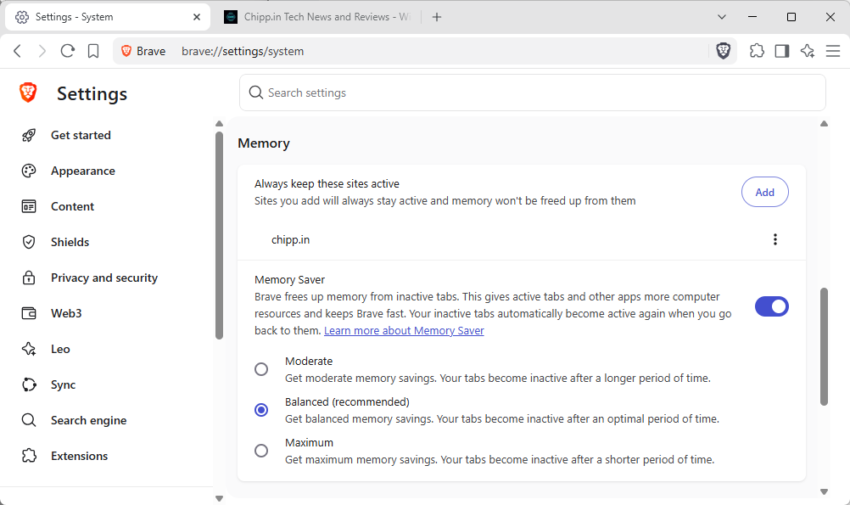
Most modern web browsers support memory automatization to reduce the memory consumption by changing the status of loaded websites to inactive, if they have not been used for a period of time.
The main idea is to make sure that the browser does not use an ever increasing amount of memory on a device.
Brave Browser calls this feature Memory Saver and it is set to balanced by default. Balanced means, that the browser balances memory saving and the time before websites are set to inactive. The browser reloads the inactive website when its tab is selected by the user.
While the feature is helpful in taming memory use, it may interfere with sites that require constant activity. Maybe it is a live ticker, an auction site, or a chat site.
The most recent version of Brave Browser introduces an exclude list. You may use it to add sites to a list of exemptions. Any site put here is never set to inactive in the browser.
Using it is simple:
- Load brave://settings/system in the browser’s address bar.
- Find “Always keep these sites active” on the page that opens.
- Click on the “add” button to add a new site.
- Select any current site or add a site manually instead.
- Confirm the change with a click on the “add” button in the add-sites-interface.
Once you have added at least one site, you see it listed under the menu item. You may edit or remove each individually with a click on the three-dots icon next to the site name.