Windows users have plenty of options to take a screenshot or capture the screen. From the ancient Print-key trick over using the built-in screenshot tool to using third-party solutions.
One of the options is PicPick, a free-for-personal use program that is well designed and updater regularly with new features.
The latest version, PicPick 7.7.0, introduces another new feature. It supports text extraction (OCR) now, which can be useful in some cases, for example when you want to edit text that is part of an image.
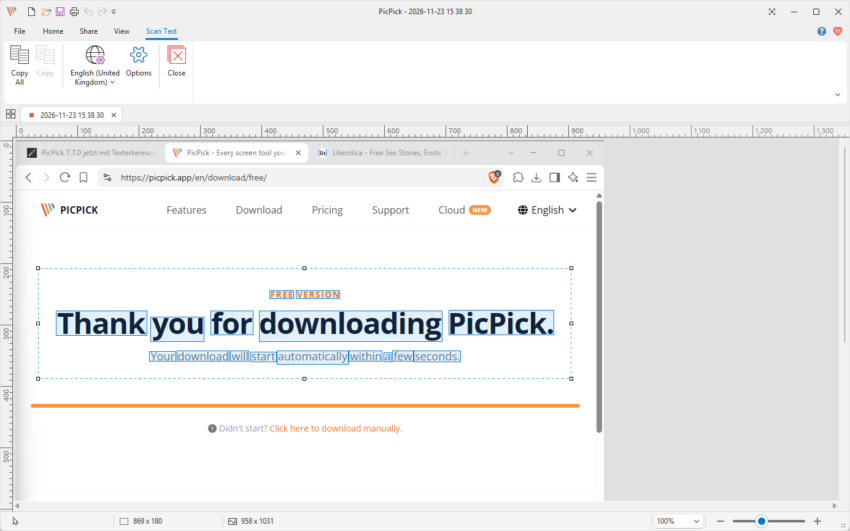
Here is how it works: you capture the screen, e.g., by using Ctrl-Print or any of the other shortcuts associated with PicPick. Once in the Editor, make a selection. The selection tab becomes available. Here you pick “Scan Text” and get the option to use the built-in Windows OCR feature or Google Cloud.
There are two main differentiating factors:
- Windows OCR supports only the languages installed. If you have English and German installed, you can only OCR these two languages and no other.
- Google Cloud supports all languages, but it submits the selection to Google.
The identified text becomes selectable as text after the operation. It should be quickly, and was during local tests. From here, you can copy the text to the Clipboard and paste it into any other app for further editing or saving.
The developers say that this also identifies QR Codes in an image. If you work with those regularly and need the functionality, this one is also integrated.
You can take a look at recent captures on the open page for easy access. Other than this main feature, there are a few useful minor ones. Another new feature detects the edges of screenshots automatically when you use the region capture feature. If you found it difficult to set the right dimensions, this may help you in that case.
Some of the options have been redesigned on top of that and you can now also include the file path when copying to the Clipboard. You can check out the full changelog here. There you also find the latest download, as a portable and setup file.