Mozilla releases a new stable version of its Firefox web browser every two weeks. One benefit of the accelerated release cycle is that new features are put into the hands of users much quicker than before.
While that is welcome to a degree, it remains to be seen if the accelerated pace affects the build quality.
Firefox 160 is a new major version that includes a few noteworthy changes, some of which were revealed by Mozilla last month already.
The standout feature is called Mini Window. It takes a book out of the Picture-in-Picture feature of the browser and generalizes the purpose. Instead of providing controls for media, Mini Window is a small overlay window that can display any web content.
Think of a currency converter tool, a translation tool, AI chat, or anything else that fits into a smaller window on the screen. Not every Firefox users needs it. If you have plenty of monitor space or even a multi-monitor setup, you probably don’t need the feature.
However, if you work on a small display at times, you may not be able to display multiple browser windows on the screen at the same time. That’s were Mini Window comes into play. It sits on top of a regular browser window acting completely independent of it.
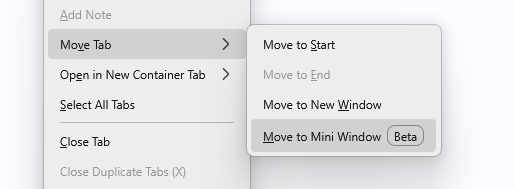
You launch a new Mini Window by right-clicking on an open tab in Firefox and selecting Move Tab > Move to Mini Window. The tab is loaded in a separate smaller window, which you can resize and move around as you see fit. Note that you need at least two open tabs in the browser and that there is no pin option at the time. In other words, you can’t move both windows together at the moment, which means that you may need to adjust their location manually when moving one of the windows.
The new stable version includes other changes. Here is an overview of important ones. You can check the release notes for the full list:
- Picture-in-Picture mode supports changing the playback speed now directly.
- Web pages saved to PDF make MathML content accessible to assistive technologies now.
- Websites that repeatedly prompt you to make them the default handler of email and other links can be blocked with a new “never allow” option.
- Firefox now plays Matroska (MKV) files with FLAC, MP3, or PCM audio.
- WebGL content on Apple devices may be rendered with improved performance.
- Security updates.