Most modern browsers install extension updates automatically. The developers claim that this improves security, and this is true to a degree. However, automatic extension updates do open a whole new can of worms, as problematic updates do get installed automatically as well.
Consider this: when an extension gets bought, the new owner may push updates and these will get installed on user systems, often without users knowing about the change in owner. The same is true for extensions that get hijacked or when a developer introduces features that are unwanted.
Firefox is the gold standard when it comes to controlling extensions. Users of the browser can block automatic updates for extensions entirely or for specific add-ons installed in the browser.
Chromium-based browsers do not have these native capabilities. The workaround until now was to install an extension through sideloading. These bypassed the entire updating mechanics, but it also meant that the browser might show a reminder that developer extensions are running.
The most recent update of Brave Browser introduces native support to it. This sets it apart from other Chromium-based browsers, which do not offer this feature.
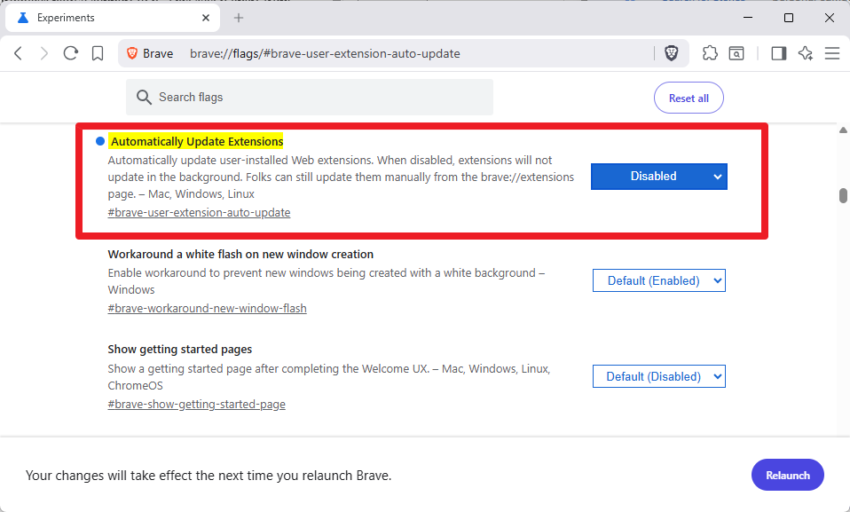
Here is what it does: Once enabled, Brave browser stops updating extensions in the background. You can run the update process at any time from the extensions page of the browser, which makes it comfortable compared to the sideloaded extensions bypass. The main downside is that it is an all or nothing approach, but there is a workaround.
To enable it, it is necessary to configure an experimental flag in the browser.
- Load chrome://flags/#brave-user-extension-auto-update in the address bar.
- Set the flag to Disabled.
- Restart the web browser.
To update all extensions, do the following:
- Open the Extensions page in Brave: brave://extensions/
- Check the Developer Mode toggle at the top right corner.
- Click on the update button that appears.
This runs the update check for all installed extensions and will download and install any update found during the process.
There is no direct option to run a check for individual extensions, it is an all-or-nothing approach. There is a workaround though, but it requires manual steps and it has disadavantages.
If you want to update a highly trusted tool (like a password manager) but want to keep a smaller utility frozen on its current version, you can manually force a single update by refreshing it.
- Go to brave://extensions.
- Click Remove on the specific extension you want to update.
- Head to the Chrome Web Store, search for it, and click Add to Brave.
This installs the latest version in the browser. Note that uninstalling an extension will remove its data. Any custom configurations or personal data is removed in the process. Works best for extensions that do not have any of that.
Brave has not revealed much about the feature at this stage. Since it is experimental, there is the possibility that it will get more comfortable in the future. For now, Firefox remains the gold standard for users who want to stay in full control over extension updates.
Automatic. Automatic contract renewals, automatic updates, automatic, automatic, automatic…
Be notified or otherwise get the automatism on your side with reminders. Stickies on the fridge, alarm clocks, remember, like in the good old days? In our digital era there is a plethora of reminders, used extensively like calendars, but seldom applied to topics we delegate to … automatism.
No automatic software, applications, browser, extension updates/upgrades here. We want to know what’s new, the history log before updating, and from there on we may happen to not update. It’s never been that because it’s new, it’s the latest that it’d be better, the best, especially nowadays.
So, Brave browser making its way to fundamentals such as the option to block automatic extension updates as Firefox does? It’s improving, took time, but better than never.
If Google browser is the browser for those who haven’t understood anything in terms of browsers, if Brave is the browser for those who have started wondering, Firefox is and has always the browser for those who have, understood.