The popular open source plain text editor has become the target of state-sponsored hackers, according to a blog post. The Notepad++ developer released a detailed post-mortem on a severe supply chain attack that occurred between June and December 2025.
By compromising the application’s hosting provider, state-sponsored hackers were able to redirect update traffic to serve malicious files to users of the text editor.
It all started in 2025
When the developer of Notepad++ put out a security warning in December 2025, it was immediately clear that something critical happened. The blog post confirmed that a vulnerability of the updating process had been exploited for some time. Traffic “was occasionally redirected to malicious servers”, which resulted “in the download of compromised executables” according to the message.
The developer released Notepad++ 8.8.9 to address the issue. That version had been hardened according to the report by adding verification steps to the update process. In other words, Notepad++ checks whether the signature and the certificate of the downloaded installer (the new version) check out. If they do not, updating is aborted.
New information comes to light
Today, a new blog post was published that provides detailed information on the incident. Here are the details:
- The Breach Method: The attack was not a vulnerability in the Notepad++ code itself, but a compromise of its hosting provider’s infrastructure.
- The Timeline: The hijacking occurred over a six-month period, starting in June 2025 and lasting until it was discovered and shut down on December 2, 2025.
- State-Sponsored Attribution: Security researchers (including those from HarfangLab and ESET) linked the activity to “Taidoor,” a malware strain associated with Chinese state-sponsored threat actors.
- Targeted Delivery: The attackers used a “Man-in-the-Middle” tactic via the WinGUp updater; however, they did not target every user, instead selectively delivering malicious updates to specific IP addresses or regions.
- Infrastructure Migration: In response, Notepad++ has completely abandoned its previous hosting provider and migrated all binaries and update manifests to a new, more secure infrastructure.
- Enhanced Security Measures: To prevent future incidents, new versions include mandatory signature verification and certificate pinning for all automated updates.
- User Action Required: Users are urged to ensure they are running the latest version of Notepad++ and to be wary of any version installed or updated between the June and December window.
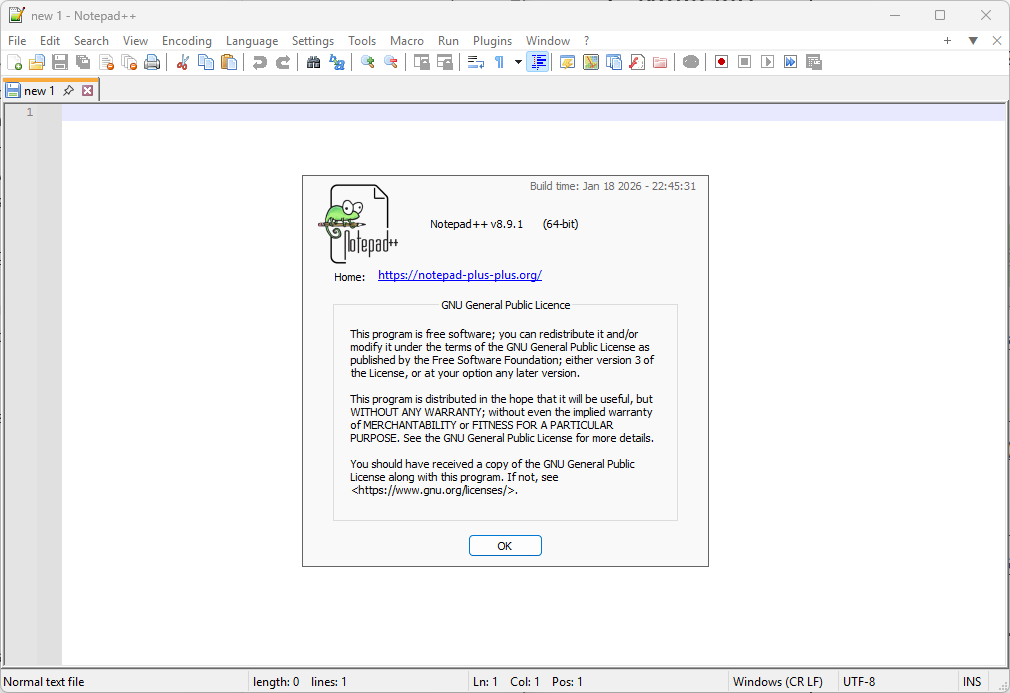
The latest version is Notepad 8.9.1. You can download it from the official website to make sure that a potentially compromised version is replaced.
You can check the installed version by opening Notepad++ and selecting ? > About Notepad++, or by pressing F1.
“The latest version is Notepad 8.9.1.” Already there–just checked. I don’t think it updated on its own. Hmmm . . . maybe one of the programs I use updated it. Either way, thanks.
PatchPC; WAU; UniGet.
Click on the ? mark; I guess that equals Help. Then, one can manually update or check version in About.
Wow that is crazy, so I wonder if this is one of those situations where they poisoned the supply chain and then targeted specific targets within that.
Just a question, Wouldnt running Notepad++ to see what version you have also execute the malicious payload if Notepad++ has already been compromised ?
BTW: A long standing Ghacks visitor who now visits ChippIn instead 🙂
No official comment but I believe that Ghacks is 100% AI written documents now and there are no original staff members writing at the Ghacks site or involved in any capacity there as of 2026.
My version of Notepad++ has a build date in 2023.
As a habit I disable “check for updates” on most everything and block everything in the firewall. I manually download and install new versions myself whenever possible.
Notepad++ has no reason to access the internet on my PC.
Am I paranoid? Perhaps. Did I avoid this issue? Completely 😁
If you’re paranoid then I am as well. And for software that checks for updates without an option to disable it, I add the update link to my system-wide block-list.
OMG!!
I mean, first Microsoft completely ruins the simple, no frills notepad. You remove that and install Notepad++ just to get some sense of normalcy and restore notepad to basic functionality again and then this happens! World? What the heck? How many people, prior to Microsoft making notepad a little “recall” pad and something to drop AI into, use it for more than just jotting down well, a few notes?
I have only ever used it to copy/paste a line of code, a confirmation number, an email address or maybe just a temporary password. Notepad imho is not supposed to be a place you’d store document style information or long lost secrets. Why so much interest?
Anyway, I use classic notepad and have done so for a long time. It truly restores the Windows XP/7 vibe and simple functionality with no fuss. I did find Notepad++ to be more than I wanted and Classic Notepad works just fine.
https://win7games.com/#notepad
Remove that ridiculous, AI infested, Win11 notepad first, then install this. It will want you to manually confirm that it (classic notepad), is going to be set for default but since you removed it prior to install, you won’t see the win11 version listed. Ignore and move on.
Thats it! Notepad like your Grandad used to use! LOL
Oh, Windows 11 does pop up now and then, informing you that there is an “upgrade” to your version of notepad. Thanks Microsoft! I decline your fine offer :/
@Martin
Windows Defender just flagged WinAeroTweaker Version 1.64.1 as a trojan after this mornings manual definition update.
I rolled it back to Version 1.62 and WinDef ignores it again.
Martin-this has nothing to do with Notepad++. I went to gHacks and wanted to search the archives, but the “search” function is disabled. That means all of your old tutorials, many of which are still relevant, are inaccessible. Was this planned? Part of the agreement with the transfer of ownership? Is there a way to restore search function?
Thanks!
That is unfortunate. I was not involved in the sale, had no say, was not asked. You could try the site: command in search engines to maybe find tutorials.
Oh! Thankful–site:ghacks.net and then insert term like
site:ghacks.net firefox profiles
site:ghacks.net best compression software
Never used the command; never knew about it.
Here’s Martin still teaching–!
Indeed, “Search” has disappeared on gHacks.
Remains what we all know, i.e. with noai.DuckDuckGo:
[https://noai.duckduckgo.com/?q=Notepad++ +site:ghacks.net]
Ghacks has but the name of what it was when managed by Martin, but fortunately his articles are accessible; and accessed as far as I and many others are concerned.
Martin:
Do you have backup copies of the work of you’ve done over the years? Maybe an SQL or other type of database? Backups in a different format?
If so, perhaps an archive page here for links to past articles. Happy to help out with database reconstruction, Standard SQL, php/MySql or whatever it was stored in.
I do not. Part of the deal. It is their property now, can do whatever they want with it. Thanks for the offer though. I plan to write a few tutorials that are still valid, some needed updating anyway.
I use the portable version of Notepad++, it includes the updater but does not work for updating a portable install. It wants to download the regular installer even in this version so I don’t use it.
When I want to update, I download the new portable compressed file from the official Notepad++ page.