Ah, notifications. The idea behind browser notifications is sound. It allows websites and services to notify you even if you don’t have them open at the time. However, notifications were turned into an abonimation quickly.
Seemingly every site wants you to turn on notifications for them, which is unpleasant enough. The main problem is spam and also malicious abuse of the system.
Whenever I check the browsers of my parents or other users who are not tech-savvy, I notice loads of notifications. It is easy enough to accept notifications, but not nearly as easy to turn them off again.
While you can disable all notifications, which I do on all of my systems, some may prefer to keep some notifications enabled.
Microsoft tests a new protective feature against abusive notifications in its Edge browser. The main idea behind the feature is to automatically unsubscribe Edge users if a notification was used to push scam, phishing, or malware pages.
When that happens, Edge will unsubscribe the user from receiving notifications to stop additional spam or malicious notifications from being received.
The feature is in beta currently and rolled out over time. It may take a while before it lands in stable Edge versions and even then, it may be on a slower rollout.
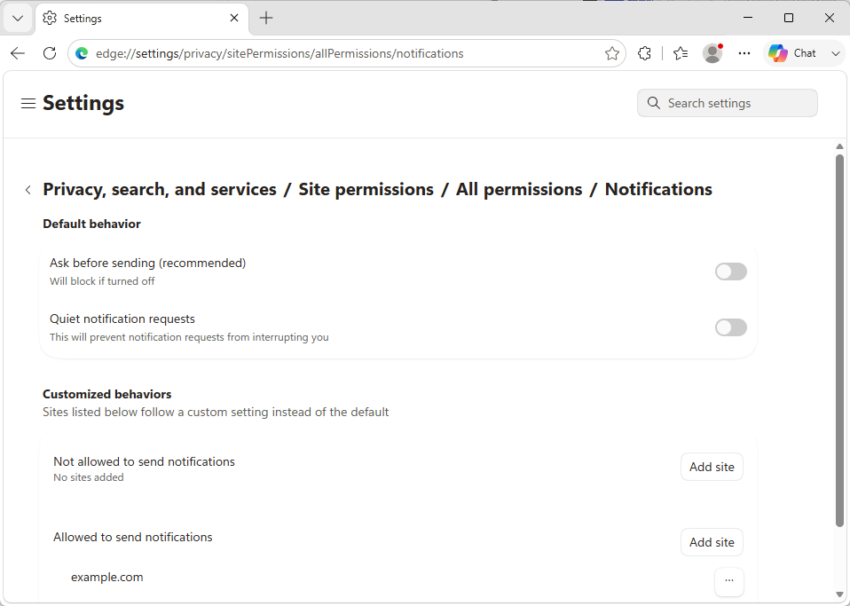
Microsoft says that users can check edge://settings/privacy/sitePermissions/allPermissions/notifications to see if sites have been blocked automatically by the security of the browser.
My suggestion? Turn them off entirely there right away and be done with them. You can still add some sites to the exceptions there, to allow them to send notifications while all other sites are blocked from even asking.
Notifications in my view/experience are to be blocked for two reasons:
1- Cross-site Privacy issues
2- Visual bother by their intrusions.
Firefox has two prefs to handle Notifications (you may know this or you may not).
// Set a default permission for NOTIFICATIONS — 0=always ask (default), 1=allow, 2=block
pref(“permissions.default.desktop-notification”, 2);
// Forbid the desktop notification permission prompt to be displayed again if the user has denied notifications previously. Setting this to **true** enables the prompt to be shown.
pref(“permissions.desktop-notification.postPrompt.enabled”, false); // DEFAULT=true
By the way, related, block access to 3rd-party cookies as well:
pref(“network.cookie.cookieBehavior”, 1);
Edge browser, always late to comply to good sense practiced on other browsers since practically always.
Another concise and well written article, Martin.
Thank you for creating this site and getting away from your, now AI infested, former site. You are appreciated.