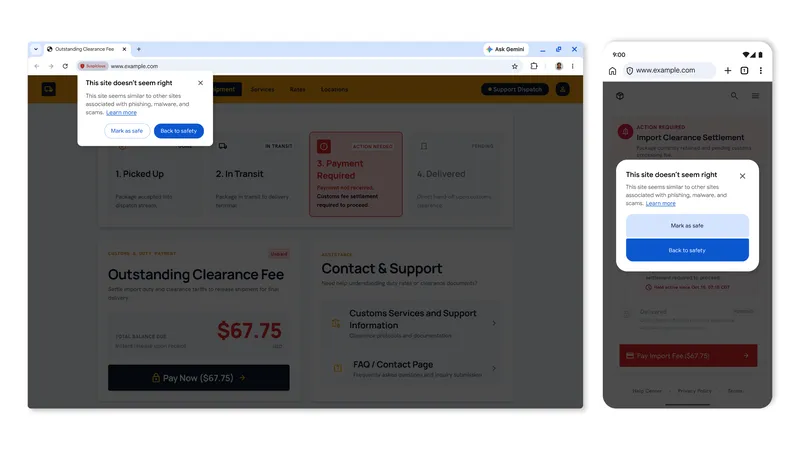
Google announced that it is improving Chrome’s Enhanced Protection feature. The new “suspicious” website warning may pop up on sites that exhibit “deceptive patterns commonly associated with known malicious sites” Google writes on its security blog.
The feature follows the downloads warning system that Google implemented in Chrome in 2024. It differentiated between suspicious and dangerous downloads.
A dangerous rating for a download is the result of a “high confidence verdict” and means that there is a high risk of harm.
Suspicious on the other hand means that Chrome’s security feature has a lower confidence in the verdict and that there is “unknown risk of user harm” associated with the download.
Translated for websites, a suspicious rating means that a site could contain harmful elements whereas a dangerous rating means that there is a higher risk of it containing harmful content.
When Enhanced Protection detects a suspicious website, it displays a prompt in the upper left corner of the browser window saying “this site doesn’t seem right”. The site is grayed out and users have several options to deal with the warning, including adding the site to an allow-list and going back to a safer location.
Dangerous sites, those that Chrome determines pose a high risk to users, show the usual “dangerous site” full screen warning instead.
Is it a useful feature? It depends on how well its rating system works and also on the experience level of the user. It may serve inexperienced users well while experienced users usually know what they are doing and have other protections, like content blockers, installed that improve security significantly.
How to enable this right now
Google is rolling out the feature over time to all Chrome users. If you do not want to wait, or prefer to disable the feature if it landed already, you can do so in the following way:
- Load chrome://flags/#suspicious-site-warnings in the browser’s address bar.
- Set the flag to True to enable suspicious site warnings or to False to disable the feature.
- Restart Google Chrome.
ClickFix Protection
Google is also rolling out another security improvement. ClickFix describes malicious attacks that try to get users to run commands on their computer, usually by pasting and running them.
Google says that Chrome is now detecting suspicious commands a user copies. The command is submitted to Safe Browsing for analysis and a warning is shown if the analysis concluded that the script is dangerous.
As always, I prefer to think for myself, not let corporations like Google make decisions for me and my family.
If they know a website is harmful, then they are witness to illegal activity and should notify the proper authorities.