Chipp.in Tech News and Reviews

Windows, Security & Privacy, Open Source and more

Menu
  • Home
  • Windows
  • Security & Privacy
  • Gaming
  • Guides
  • Windows 11 Book
  • Contact
  • RSS Feed
Menu

No More Free Background Play: Google Patches one of YouTube’s Biggest Mobile Loophole

Posted on February 3, 2026February 3, 2026 by Martin Brinkmann

Google is tightening its grip on one of YouTube Premium’s most coveted feature, officially patching a long-standing loophole that allowed Android users to enjoy background playback through third-party browsers without a subscription.

By implementing new technical restrictions, the search giant tries to neutralize workarounds in popular browsers like Brave and Vivaldi that previously bypassed the paywall by tricking the site into playing audio while the screen was off or the app minimized.

This latest crackdown draws a firm line in the sand: if you want to keep the music playing while you multitask on mobile, Google expects you to pay for the privilege. After trying to hinder content-blockers for years and blocking vital extensions in Chrome for Android, the company seems to have found another target for its thumbscrew tactics.

Google made several features exclusive to paying YouTube Premium subscribers when it launched the plan. Premium subscribers get several benefits, including an ad-free experience on the site. Another benefit is background playback on Android.

Google tries to block background play workarounds

Give it a try. Open YouTube in Chrome for Android, play any video, and switch to another app or turn off the screen. The effect? Video playback stops. Not great, considering that many devices turn off the display automatically after a short period of inactivity. Listening to a video while napping? Forget it.

That is where third-party browsers and other tools came into play. Fire up Brave, Vivaldi or several other browsers, and you will notice that video playback continued, even while the YouTube tab was in the background.

This loophole is reportedly being closed. I tested several browsers and found some to be working — Brave — and others not at the time — Vivaldi — but that does not mean that you will experience the same.

Google, clearly, is after Premium subscribers only. If your favorite way of listening to YouTube videos no longer works, you might buy Premium after all to regain the function. Some users might try and find other workarounds, like downloading videos first to play them locally. This works, but it requires more steps before a video can be played.

Google seems to have confirmed the change to various news outlets, including Android Authority. This is the statement from a Google spokesperson according to the site:

Background playback is a feature intended to be exclusive for YouTube Premium members. While some non-Premium users may have previously been able to access this through mobile web browsers in certain scenarios, we have updated the experience to ensure consistency across all our platforms.

There you go. If you can’t play YouTube videos in the background anymore on Android, it is Google that you need to blame. There is a good chance that this is the start of yet another cat-and-mouse game. Browsers and tools might find ways around this, which are then closed or torpedoed by Google again.

Why You Need to Update Notepad++ Immediately

Posted on February 2, 2026February 2, 2026 by Martin Brinkmann

The popular open source plain text editor has become the target of state-sponsored hackers, according to a blog post. The Notepad++ developer released a detailed post-mortem on a severe supply chain attack that occurred between June and December 2025.

By compromising the application’s hosting provider, state-sponsored hackers were able to redirect update traffic to serve malicious files to users of the text editor.

It all started in 2025

When the developer of Notepad++ put out a security warning in December 2025, it was immediately clear that something critical happened. The blog post confirmed that a vulnerability of the updating process had been exploited for some time. Traffic “was occasionally redirected to malicious servers”, which resulted “in the download of compromised executables” according to the message.

The developer released Notepad++ 8.8.9 to address the issue. That version had been hardened according to the report by adding verification steps to the update process. In other words, Notepad++ checks whether the signature and the certificate of the downloaded installer (the new version) check out. If they do not, updating is aborted.

New information comes to light

The latest version of Notepad++ is 8.9.1 at the time of writing.

Today, a new blog post was published that provides detailed information on the incident. Here are the details:

  • The Breach Method: The attack was not a vulnerability in the Notepad++ code itself, but a compromise of its hosting provider’s infrastructure.
  • The Timeline: The hijacking occurred over a six-month period, starting in June 2025 and lasting until it was discovered and shut down on December 2, 2025.
  • State-Sponsored Attribution: Security researchers (including those from HarfangLab and ESET) linked the activity to “Taidoor,” a malware strain associated with Chinese state-sponsored threat actors.
  • Targeted Delivery: The attackers used a “Man-in-the-Middle” tactic via the WinGUp updater; however, they did not target every user, instead selectively delivering malicious updates to specific IP addresses or regions.
  • Infrastructure Migration: In response, Notepad++ has completely abandoned its previous hosting provider and migrated all binaries and update manifests to a new, more secure infrastructure.
  • Enhanced Security Measures: To prevent future incidents, new versions include mandatory signature verification and certificate pinning for all automated updates.
  • User Action Required: Users are urged to ensure they are running the latest version of Notepad++ and to be wary of any version installed or updated between the June and December window.

The latest version is Notepad 8.9.1. You can download it from the official website to make sure that a potentially compromised version is replaced.

You can check the installed version by opening Notepad++ and selecting ? > About Notepad++, or by pressing F1.

It’s Change Your Password Day (again): Here is Why You Should Probably Do Nothing

Posted on February 1, 2026February 2, 2026 by Martin Brinkmann

Today is officially “Change Your Password Day”, a special day designed to put cybersecurity top of mind. But before you rush to update your logins, pause for a moment: experts now warn that changing your password simply for the sake of the calendar might actually hurt your security more than it helps.

The idea behind the day is simple: Every year, go through your list of accounts and passwords, and change them. Why? The original logic behind the day dates back to a time when modern threat detection and additional layers of account protections did not exist.

Changing passwords frequently could disrupt brute force attempts, silent breaches, or accidental leaks. While that did make sense in some cases back in the days, it is seen as hurting more than it helps in most cases today. Even back then, it caused all kinds of inconveniences, for instance, when on the next day of work, employees starting to make calls to the IT department, because they could not get into their accounts anymore.

In fact, experts suggest that password should only be changed in very specific circumstances, such as:

  • Re-use of passwords across multiple sites, as it goes against the “one site, one unique password” recommendation.
  • Weak passwords, as todays computers can break into these in seconds or minutes.
  • Breached passwords, which is self-explanatory
  • When someone else might have access.

However, it is recommended to act immediately instead of waiting for password-day to come along.

This day, at best, is a reminder for users to look at their passwords and start changing the weak, leaked, or re-used ones immediately. While at it, it is recommended to set up another layer of protection, for instance two-factor authentication, for important accounts.

Here is why most security experts advise against frequent password changes: In many cases users pick easy to remember passwords, especially in organizations. The reason is simple: lack of a password manager requires that users remember the passwords. With frequent changes, this becomes a nuisance. Employees started to iterate passwords to help their memory, while others wrote them down to avoid having to contact the IT department to get the password reset ever so often.

The Modern Security Checklist

  • Run a check for data breaches. Go to HaveIBeenPwned.com (or use your password manager’s security dashboard) to see if your email or passwords have appeared in a known data leak. Change only the compromised ones immediately, including on other sites if the password was re-used.
  • Audit your passwords: Check for the following:
    • Password length: Too short means weak. Aim for at least 16 characters.
    • Password re-use: All passwords should be unique. If one gets breached, hackers only gain access to one account, not several.
    • Remove the ghosts: If you do not use an account anymore, close it.
    • Second layer: Consider Adding two-factor authentication or other means of protection to important accounts.
    • Check recovery options: Make sure email addresses or phone numbers are set correctly, backup codes stored securely, in case of an emergency account recovery.

The era of Tr0ub4dor&3 is over. In 2026, the best gift you can give your digital self is length, uniqueness, and a second layer of defense. So, celebrate “Change Your Password Day” the modern way: upgrade your security once, do it right, and then go enjoy the rest of your Sunday knowing your digital life is locked tight.

Total Opt-Out: How to Use Firefox 148’s New Master Switch to Block All AI Features

Posted on January 31, 2026January 31, 2026 by Martin Brinkmann

In an era where tech giants are racing to weave artificial intelligence into every corner of the browsing experience, Mozilla is handing the controls back to the user.

In a few weeks, the organization plans to launch Firefox 148 to the stable channel. It will include the “AI kill switch” that Mozilla executives hinted at earlier. With it, users of Firefox may block existing and new AI features in the browser either entirely or selectively.

Support of AI features

Firefox supports several AI features at the time off writing. This includes the option to interact with AI chatbots in the sidebar, get link preview summaries and tab suggestions, or help with tab group labeling.

In summary (as of Firefox 147):

  • Translations
  • Image alt text in Nightly PDF viewer
  • Tab group suggestions
  • Key points in link previews
  • Chatbot providers in sidebar

Not all features are available for all Firefox users. Some are limited to users who use the open source browser in English.

A detailed look at Firefox’s AI Kill Switch

The new AI Controls page of the Firefox Settings.

Starting in Firefox 148, out next month and available as a preview already, Firefox will include the option to block AI functions.

Mozilla added an AI Controls section to the preferences of the browser. You can launch Menu > Settings > AI Controls, or load about:preferences#ai directly to manage AI features in the browser.

Note: The preference browser.preferences.aiControls controls the entry in the preferences. Toggle it to True to enable it, or to False to disable it. This impacts only the display in Settings.

Firefox includes an option to disable all AI features with a single preference.

How to disable all AI in Firefox? Just toggle “Block AI enhancements” to Off. You get a prompt that explains what is going to happen. Activate “block” here to disable all AI features in the browser.

Instead of blocking everything, Firefox users may also block specific features only.

The AI Controls page divides the functions into two sections: On-device AI and AI chatbot providers in sidebar.

Each AI feature is listed with its name, a short description, and an action button. You can switch a feature from “Available” or “Enabled” to “Blocked”.

  • Available means that it can be used, but has not been up until now.
  • Enabled means that the user opted-in to use the AI feature.
  • Blocked that it is not active in the Firefox browser.

Here are the features that you can manage individually right now:

  • Translations
  • Image alt text in Nightly PDF viewer
  • Tab group suggestions
  • Key points in link previews
  • Chatbot in sidebar

Closing Words

Ultimately, Mozilla’s introduction of a global block toggle for all AI features highlights the organization’s awareness of the deep-seated skepticism toward AI among its user base. With it, it is giving Firefox users control over AI. Those who do not want it can make sure that it is disabled entirely in the browser, while everyone else may keep some or even all AI features enabled to make use of them.

By providing a clear, centralized way to opt out of AI—and ensuring that local data is purged when those features are disabled—Firefox 148 sets a high standard for how browser developers should respect individual choice. (source: Sören Hentzschel)

The Road to Recovery: How Microsoft Plans to Make You Love Windows Again

Posted on January 30, 2026January 30, 2026 by Martin Brinkmann

For years, Windows has felt less like a trusted tool and more like a construction site that never quite cleared the rubble. Whether it’s the lingering inconsistency of the UI, the intrusion of unwanted ads, the performance hiccups, or that many users now expect to experience issues when Microsoft releases an update for the operating system.

Microsoft’s flagship OS has faced a widening trust gap with its most loyal users. Now, in a strategic pivot aimed at 2026, the tech giant is launching an internal “swarming” initiative to prioritize stability and refinement over flashy new AI features.

Swarming, in this context, refers to engineering teams working on core reliability issues, including performance lags, to address major pain points of Windows users.

This year you will see us focus on addressing pain points we hear consistently from customers: improving system performance, reliability, and the overall experience of Windows.

The quote comes from the president of Windows and devices at Microsoft, and it was published by Tom Warren at The Verge on January 29, 2026.

A bad start of the year for Windows users

If anyone needed a refresher of the challenges that Microsoft is facing, they do not need to look far. When Microsoft released the first update for Windows in 2026, it probably did not expect it to cause a considerable number of issues on user computers: from broken Remote Desktop Connections over a shutdown bug to a severe bug affecting Outlook that needed an out-of-band update for fixing.

While it is bad enough that users and organizations feel issues hitting them left and right at times, it is the image of Windows that seems to be starting to worry Microsoft. Up until now, Microsoft pushed what it thought served it best onto Windows. Ads, AI, limited user control, features that barely anyone asked for. Yes, there was the occasional feature that users liked, but most changes were met with a good portion of skepticism at best.

While Microsoft received criticism, most users did not seem to mind as long as the operating system worked. Most features could be turned off or disabled. Yes, some had the nasty habit of being turned on again at times, which was annoying.

Now it appears that Windows is at a critical junction, one that even Microsoft can’t ignore going forward.

The foundation needs to be stabilized before Microsoft can continue to use Windows as a vehicle for selling subscriptions and other products.

It remains to be seen how dedicated Microsoft will be and whether it manages to make a U-turn regarding stability of its operating system. With Linux gaining essential support for PC games, there is not really much that Windows has to offer that is not also possible on Linux.

Google Chrome Gets a Major Upgrade with Gemini 3 and Auto-Browse

Posted on January 30, 2026January 30, 2026 by Martin Brinkmann

Google is officially transforming the web browser from a static tool into an active personal agent with the launch of Gemini 3 and “Auto-Browse” in Chrome, and the push into a personalized AI experience.

Announced yesterday for desktop users, with the exception of Chrome for Linux, this major update integrates Google’s most advanced AI model directly into the browser to handle complex, multi-step tasks.

Google is pushing Gemini with the help of its Chrome browser

Lookout OpenAI, Gemini could get a massive user boost thanks to the integration in the world’s biggest browser.

Here is an overview of the features that Google announced:

Auto-Browse (Agentic Browsing): The flagship feature for AI Pro and Ultra subscribers in the U.S. that performs multi-step “chores” on your behalf. It can research travel costs across dates, fill out complex online forms, file expense reports, or add specific items to a shopping cart based on an image.

Gemini Side Panel: A persistent area in Chrome that supports interactions with the AI without losing focus. It supports the usual AI-features, such as summarizing a page, comparing features across several tabs, or finding time in your calendar.

Integrated “Nano Banana”: The latest version of Google’s image generator is integrated into the browser. Also accessible from the side panel, you can use text prompts for creative tasks, such as turning research data into infographics or manipulating images open in the browser.

Connected Apps Integration: Deeper connectivity with the Google ecosystem, allowing Gemini to pull information from Gmail, Calendar, Maps, and Google Flights to execute workflows (e.g., finding a flight based on an event invitation in your email).

Personal Intelligence: A proactive feature that remembers context from past conversations to provide tailored answers. It learns user preferences over time to transform the browser into a “trusted partner” rather than a general-purpose tool.

Universal Commerce Protocol (UCP) Support: Integration with a new open standard (co-developed with brands like Shopify and Wayfair) that allows AI agents to navigate checkout processes and take commercial actions across different retail sites securely.

Enhanced Security & “Pause and Confirm”: New defenses designed for agentic AI, including a safety mechanism where Auto-Browse must pause and ask for explicit user confirmation before completing sensitive actions.

Closing Words

It is clear that Gemini will get a huge user boost from this. Even if Google limits exposure to certain regions or subscription models at first, it is clear that it will expose as many users as possible to Gemini in Chrome in the long run.

Why? Because it is giving Google an edge over the competition. Plus, when users run into usage limits, they may become paying subscribers, which seems to be on the preferred options right now to increase revenue and compensate expenses.

The benefit for users invested in Google’s ecosystem is there, especially if you connect the AI to other Google services. Whether you really want that, an all-knowing AI that may know more about your desires, life and plans than your closest friends, is up for you to decide.

I see the benefits, but also the dangers. While I do use AI tools for some tasks, such as creating a teaser image for an article here or the weekly newsletter, I do not really see a benefit in letting AI do the shopping for me, even with all safeguards in place.

1 Billion and Counting: Windows 11 Reaches Massive User Milestone Faster Than Windows 10

Posted on January 29, 2026January 29, 2026 by Martin Brinkmann

Microsoft launched its newest operating system Windows 11 back in October 2021 to mixed reviews. Its predecessor, Windows 10, held the top spot firmly at the time while Windows 7 and Windows 8 were reaching the official end of life dates. While companies could extend support of Windows 7 by three years, Microsoft did not give home users such an option.

Microsoft CEO Satya Nadella announced during the company’s FY26 second-quarter earnings call that Windows 11 has officially surpassed one billion monthly active users.

Windows reached a big milestone: One billion Windows 11 users, up over 45% year-over-year.

In about four years, Windows 11 managed to reached the coveted one billion users mark. Windows 10, which was equally criticized when it launched in 2015, took longer to reach the important milestone.

How much longer? Not that much, it turns out. Let us take a look at the official dates that Microsoft provided for Windows 10 and Windows 11 first.

Windows 10Windows 11
Launch DateJuly 29, 2015October 5, 2021
1 Billion Users DateMarch 16, 2020January 2026

Windows 10 reached 1 billion monthly active users 1,706 days after it was released by Microsoft. Windows 11 managed to cross the one billion monthly active users mark in 1,576 days.

That is 130 days faster. While not impressively faster, it is important to note that Windows 11 had a handicap all along: new system requirements prevented a sizeable chunk of Windows 10’s userbase from upgrading directly to Windows 11.

While Microsoft never released numbers, estimates suggest that several hundred million devices can’t be upgraded directly. While a high percentage of these devices can be upgraded by skipping the requirements checks, the technical nature of the process likely prevents this on the vast majority of devices running Windows 10.

For users, it does not really matter how fast or slow an operating system growth, provided that it manages to reach a number of users that is sizeable enough to warrant continued support.

Windows 10 Home and Pro editions will reach end of servicing later this year. It will be interesting to see what the millions of home users will do when that time comes.

The Long Tail of CVE-2025-8088: How One WinRAR Flaw Outlived Its Patch

Posted on January 28, 2026January 28, 2026 by Martin Brinkmann

It has been over six months since Rarlab released a fix for the critical WinRAR vulnerability known as CVE-2025-8088, but attacks continue to target it as if the patch was released just days ago.

Despite a patch being available since August 2025, Google Threat Intelligence reports that state-sponsored actors and financially motivated hackers are still finding immense success targeting users who have neglected to hit the update button.

This “long tail” of exploitation serves as a stark reminder that a vulnerability doesn’t disappear just because a solution exists.

Key Information:

DetailUpdated Information
Vulnerability IDCVE-2025-8088
Patch StatusAvailable for 6+ months
Primary ThreatState-sponsored and financially motivated actors
Action RequiredEnsure WinRAR is updated to the latest version

When Rarlab released WinRar 7.13 to patch the security vulnerability back in July 2025, barely anyone thought that this security issue would remain a problem six months later.

A report by Google security researchers suggests that the issue is still exploited actively. It appears that a percentage of WinRar users have not patched the archiving software yet.

Google found out that attacks originate from several countries, including Russia and China. To exploit the issue, attackers need to create a specially prepared RAR archive. When a victim unpacks the archive, malicious files are moved to the autostart of the system for execution.

Google writes:

CVE-2025-8088 is a high-severity path traversal vulnerability in WinRAR that attackers exploit by leveraging Alternate Data Streams (ADS). Adversaries can craft malicious RAR archives which, when opened by a vulnerable version of WinRAR, can write files to arbitrary locations on the system.

The issue affects WinRar and also related apps and files, including unrar.dll. However, the issue affects RAR on Windows only. Other operating systems with RAR apps, including Linux and Android, are not affected by the issue.

How to protect your systems

It is necessary to update WinRar or any of the other Rar tools affected by the issue, to the latest version. Windows users need to install WinRar 7.13 to protect their devices. Downloads are provided on the official Rarlab website.

Just download the latest release and run the installer to update the application. Installation of WinRar 7.20 Beta will also resolve the issue, but since it is a beta release, it is not recommended to run it on most PCs.

The OLE Overlook: High-Stakes Security Bypass in Microsoft Office (CVE-2026-21509)

Posted on January 27, 2026January 27, 2026 by Martin Brinkmann

The “trust but verify” era of document security has been blindsided by a sophisticated new threat that turns Microsoft’s own integration features against the user.

This week, Microsoft disclosed a critical zero-day vulnerability, CVE-2026-21509, which allows attackers to bypass core Object Linking and Embedding (OLE) security mitigations within the Microsoft Office Suite.

The flaw is actively exploited in the wild, affects most versions of Office, and allows malicious actors to execute unauthorized code when a victim opens a compromised file.

The essentials

  • Name of vulnerability: Microsoft Office Security Feature Bypass Vulnerability
  • Severity: Important
  • ID: CVE-2026-21509
  • Affected Software: Office 2016, Office 2019, Office LTSC 2021, Office LTSC 2024, Microsoft 365 Apps for Enterprise

Microsoft has a solution for the issue that is applied automatically in some cases and requires an update in others.

In short: If Office 2016 or 2019 is used, an update is required to patch the vulnerability. All newer versions of Office do not require an update, as Microsoft is adding the protection using a service-side change. However, Office needs to be restarted before this protection is applied.

Downloads, if necessary, are provided on the official Update Guide website linked above (under ID).

Microsoft published mitigations as well, but these are not really required, unless updates can’t be installed immediately. The mitigations require Registry edits and as such a restart before they protect the application from potential exploits.

WhatsApp Premium? New Leak Reveals Meta’s Plan to Launch Ad-Free Subscriptions

Posted on January 26, 2026January 26, 2026 by Martin Brinkmann

Ever since its inception, the world’s most popular messaging app has retained the status of an ad-free, then almost ad-free experience, but that “free” ride is officially reaching a fork in the road. WhatsApp is reportedly preparing to launch a paid membership tier this year starting with users in Europe to allow them to bypass the advertisements currently rolling out across the platform.

As Meta looks to monetize the “Updates” tab, this new ad-free subscription marks the first time in history that users may have to pay to keep their messaging experience clean.

This move is not happening in a vacuum. WhatsApp, owned by Meta, is following the exact strategy that Meta deployed for Facebook and Instagram across Europe. Under the model, users are asked to make the following choice: either allow Meta to track their activity for personalized advertisement or pay a monthly fee to keep the feed clean.

While Meta is copying the base strategy directly from Facebook and Instagram, WhatsApp’s personal chats remain ad-free, at least for now. This means that users pay Meta to keep the Status and Channels sections ad-free and stop creating an advertising profile of users who pay the premium.

What happens if you don’t pay?

Personal chats remain free of advertisement, at least for now. This is something that Meta has shied away from as it would like drive users towards competitors like Signal or Telegram.

Users who do not subscribe will continue to see sponsored content in the “Updates” tab.

The Verdict: Is WhatsApp Premium Worth It?

ProsCons
Clean Interface: Removes intrusive banners and sponsored posts from the Status and Channels tabs.New Monthly Expense: Adds to “subscription fatigue” for an app that has been free for over a decade.
Data Privacy: Meta may not create a profile for advertising, since there are not any ads to show.Partial Solution: Early reports suggest ads remain in “Channels” you don’t follow, so it may not be 100% ad-free.
Early Access: Potential for premium-only features, such as larger file sharing or advanced chat organization.Limited: Meta may limit the ability to pay to avoid ads to certain countries, similarly to how it handles this on Facebook and Instagram.

As the line between personal messaging and social media continues to blur, WhatsApp’s transition into a “freemium” service feels like the end of an era. For now, the core of WhatsApp, private conversations between users, remains untouched and ad-free.

However, now that the infrastructure is in place, Meta might consider pushing ads more aggressively on WhatsApp.

  • Previous
  • 1
  • …
  • 4
  • 5
  • 6
  • 7
  • 8
  • 9
  • 10
  • …
  • 74
  • Next

Support This Site

If you like what I do please support me!

Any tip is appreciated. Thanks!
  • April 18, 2026 by Martin Brinkmann Google App for Desktop is now available and it is all about AI
  • April 16, 2026 by Martin Brinkmann Windows 11 Context Menu Manager: remove items with a click
  • April 15, 2026 by Martin Brinkmann One Exploited Zero-Day and Record Numbers: The April 2026 Windows Patch Tuesday Breakdown
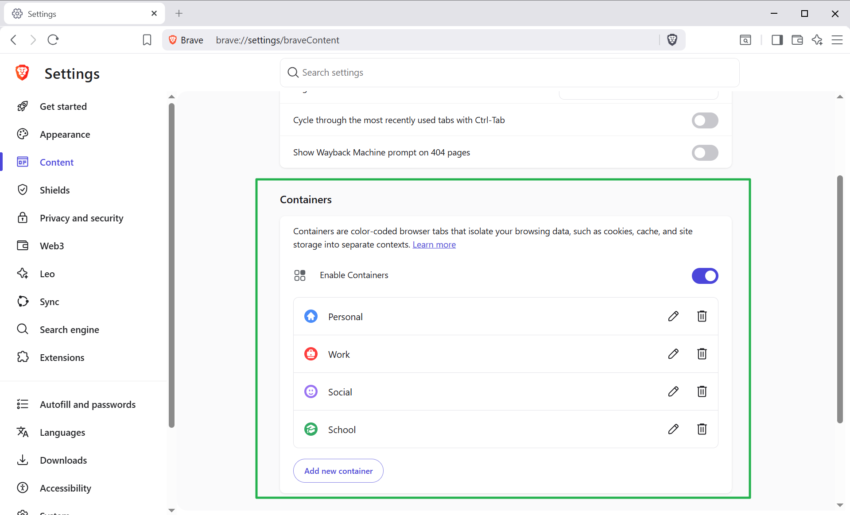
  • April 14, 2026 by Martin Brinkmann Brave is getting Container support and the feature has made a big jump recently
  • April 13, 2026 by Martin Brinkmann A More User-Friendly Way to Pause Windows 11 Updates is Coming

About

We talk, write and dream about Technology 24/7 here at Chipp.in. The site, created by Martin Brinkmann in 2023, focuses on well-researched tech news, reviews, guides, help and more.

Legal Notice

Our commitment

Many websites write about tech, but chipp.in is special in several ways. All of our guides are unique, and we will never just rehash news that you find elsewhere.

Read the About page for additional information on the site and its founder and author.

Support Us

We don't run advertisement on this site that tracks users. If you see ads, they are static links. Ads, including affiliate links, never affect our writing on this site.

Here is a link to our privacy policy

©2026 Chipp.in Tech News and Reviews