Google released Chrome 142 to the stable channel recently with just a few changes that it revealed publicly. Noteworthy is a new permission that regulates access to local resources. Basically, users will see a prompt going forward, if a website or application attempts to access a resource on the local network.
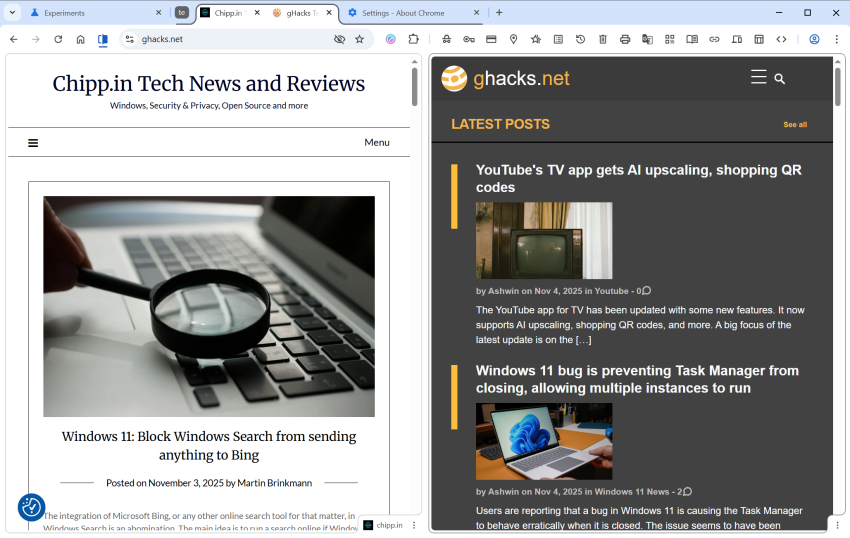
It turns out that Google is also rolling out a new tab feature gradually to all users. Split View allows users to display two websites or apps in Chrome side by side in the same browser window.
All you need to do for that is to right-click on the first tab and select the option “move tab into split view”. If you want, you can also select to move it to the left or right location in split view directly.
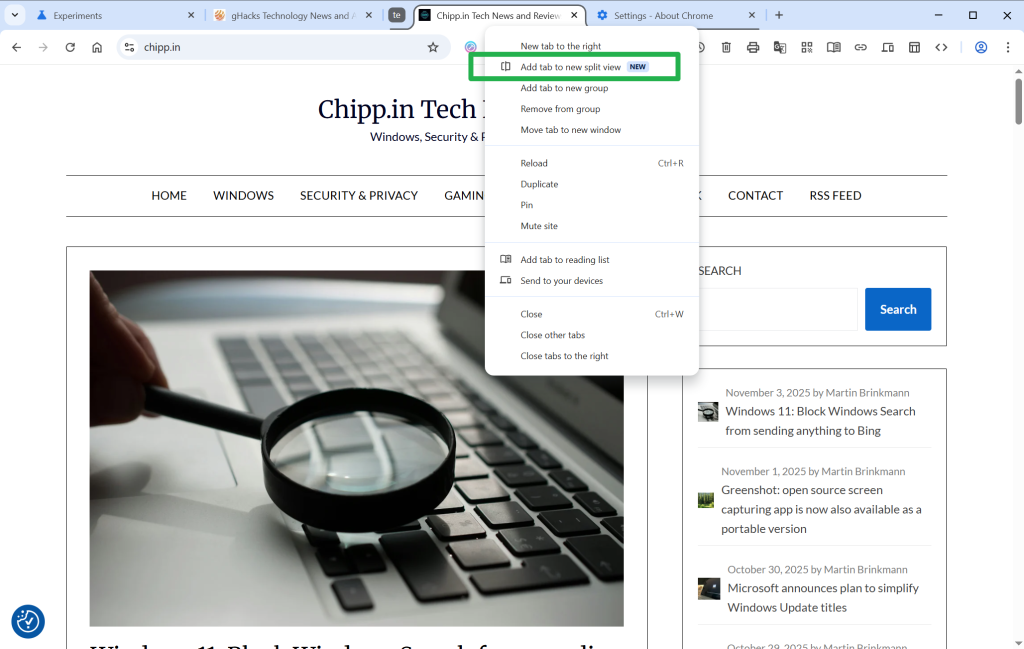
Google Chrome then displays the list of other tabs open in the browser, so that you can pick one for the other half.
Tip: You can enable the feature right away in Chrome, if you like. Just load chrome://flags/#side-by-side in the Chrome address bar and change the status of the feature to Enabled. Restart Chrome, and the new context menu option becomes available when you right-click on tabs.
Split View: pros and cons
So what is the advantage of Split View compared to using two browser windows? The main advantage is that both websites are displayed in a single browser. You can display, move, hide, or close them at once, while you would have to juggle with two windows if you’d display the two websites in two Chrome instances. You can be sure also that both windows are always visible, when the browser window is active.
However, there are also some disadvantages. You can only see one of the URLs at the same time in the Chrome window. It changes when you activate the website in the inactive half, but it is still worth considering that you don’t see the address all the time.
Google is late to the party
Split View is not a particularly new feature. Vivaldi, for instance, has supported it for years and even gives users multiple layout options that go beyond displaying two sites side-by-side or split horizontally.
Even Microsoft tested the Split View feature in Edge in 2023 already. Mozilla is also working on integrating a split view feature in its Firefox web browser.
Now You: do you use split view already or do you have no use for the feature? Feel free to leave a comment down below.
Split tabs was a thing many many years ago pre the trash known as web extensions and then that very same developer of said extension could no longer achieve what he was once able to do but decided to release a version for web extensions (Tile Tab WE) anyway to little fanfare as its nowhere near what it was before.
Typical Mozilla really. Chasing shadows of past greatness.
Either improve your web extensions like you promised or continue chasing shadows of your former self.
P.S. I have tested the split view on zen browser and even that is nowhere near as good as the tile’s tab extension’s capabilities of the long past.