Mozilla released Firefox 152 Stable a moment ago. The new version of the open source web browser includes security fixes as well as new features and changes. The two extended support versions, Firefox 140.12 ESR and 115.37.0 ESR for legacy systems have also been updated.
The big visual feature of Firefox 152 is the new Settings page. The goal of the redesign was to streamline the page, improve grouping and navigation. Mozilla says the change is visual only, meaning that user settings were not changed and that all settings remain available.
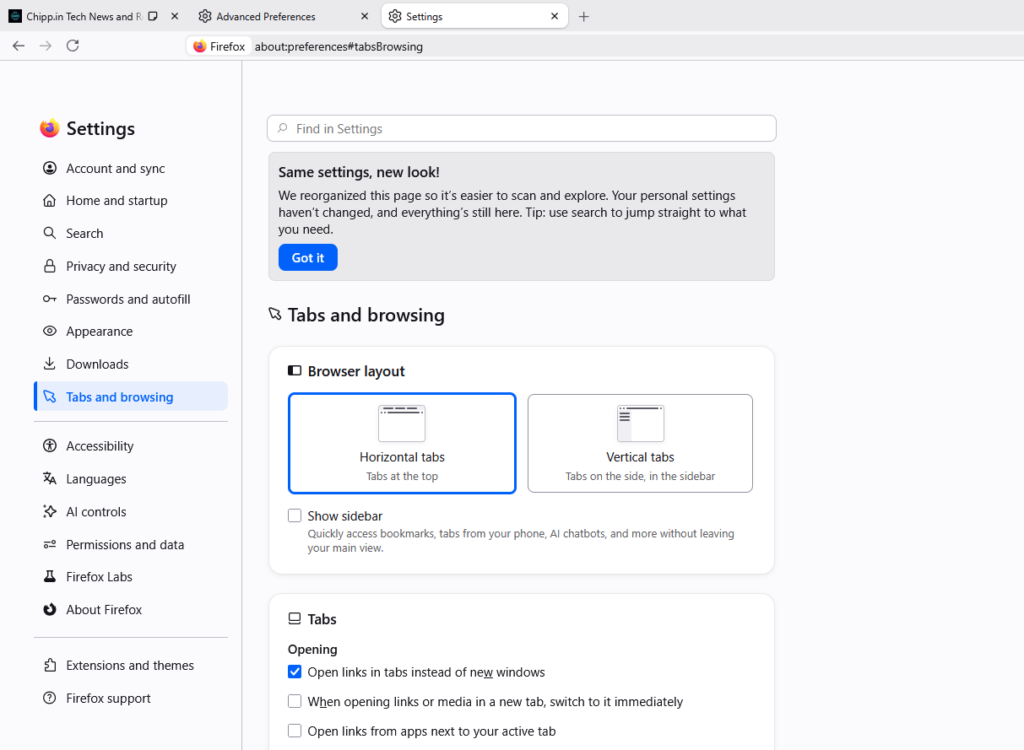
One effect that you may notice immediately is that the average number of preferences per page has been reduced. Means, less scrolling. You can still use the built-in search to find a preference quickly.
Here is an overview of other important features in the release:
- Firefox supports JPEG XL now. The image format is not enabled by default, but you can enable it under Settings > Firefox Labs > Webpage Display > Media: JPEG XL: This adds support for the image format, so that the browser can render it.
- Firefox Translations supports Basque and Galician now.
- The languages Croatian, English (UK), Georgian, Persian, Slovenian, Tajik, Tamil, Tibetan, Turkish, Welsh, and Xhosa now come with a built-in dictionary for the Firefox spellchecker.
- Context menu video controls are now available on sites like TikTok or Instagram. These were blocked on the sites previously.
- Private browsing now supports temporarily disabling the protection on a specific site. The idea is to use this to display sites correctly in Firefox which would otherwise be broken because of the protective features. Whether that is indeed a good idea or giving sites an incentive to break functionality accidently remains to be seen.
- Links can be copied via a right-click on a tab and the selection of Share > Copy Link on Linux and Windows now. This works, even when the site is not active. You can also copy multiple link paths when several sites are selected.
The official release notes list a few useful changes next to that:
- Zooming in Firefox via the keyboard or mouse now offers “more zoom levels in smaller increments”.
- Downloaded PDFs are opened in a background tab, if you close the original page or switched tabs.
Firefox 152 is a security update. Mozilla lists 40 fixed security issues on the security page. The severity is high, there is no critical fix and no 0-day issue that is already exploited in the wild. Still, it is highly recommended to upgrade as soon as possible to fix the security holes.
Most unmanaged Firefox installations will receive the new update automatically. You can download the update immediately either by opening Firefox and going to Menu > Help > About Firefox, or by downloading the latest version from the Mozilla website.
Updated Firefox 115.36.0 ESR to 115.37.0
The upgrade as always performed manually (download and install with ‘Upgrade’ option).
Oddity: at the end of the install/upgrade a message appeared stating that the install had not succeeded… though it had: running Firefox 115.37.0 ESR, no issues. No idea what happened.
To get the old setting page back:
browser.settings-redesign.enabled = false
Very BIG thanks for that! IMO, the new setting page is muddled.
Mozilla lists 40 fixed security issues–only forty, not bad; didn’t Chrome fix 400 on its recent update? Meaning either Chrome had more to fix, or FF caught only 10% of many more security issues buried deep in code.
Looking through Settings and reading the article, I don’t notice any improvement that would lead me to highly recommend a user switch to FF from another browser. FF still has issues with rendering certain sites; it’s still slow compared to Edge; it’s still baffling, but I still occasionally receive that silly notice: “Your browser may be insecure; we recommend switching.”
And because of two settings, I see the, “Your browser is being managed by your organization.”
I use Firefox on a fairly new laptop and I don’t have any noticeable performance issues. It is true that there are issues rendering certain sites although I think most of the rendering issues I see are related to extensions I use plus numerous about:config tweaks I have made for various purposes (mainly ad-blocking and privacy but also to fine tune the browser to work exactly as I prefer it to work). However, Firefox does have a very large and compelling advantage over Chrome or Edge or Vivaldi which can be summed up in two words: uBlock Origin. You know, the real version. And oh yes, unlike Edge, when you download an update Firefox does not behave like malware by deciding on its own to ‘update’ a number of other windows setting to provide you with things like websearch and telemetry. And it does that even you have specifically prohibited those things in the group policy editor.
You can find a very sneaky thing within the new settings layout in the list of search engines. You can’t remove the Firefox pre-installed search engines no more. You can fix it by rolling back the redesign with the config setting browser.settings-redesign.enabled = false (thanks @Anonymous).