Chipp.in Tech News and Reviews

Windows, Security & Privacy, Open Source and more

Menu
  • Home
  • Windows
  • Security & Privacy
  • Gaming
  • Guides
  • Windows 11 Book
  • Contact
  • RSS Feed
Menu

Author: Martin Brinkmann

When I was young, I studied German, History and English at Essen University in Germany. I worked in computer support for several years at the time to help other computer users when they ran into issues. Writing started out as a passion project, as I wanted to help more users and not just the ones that I handled in support. This lead to the founding of Ghacks Technology News in 2005. First, as a side-project, but shortly thereafter as a full-time project as the site's popularity exploded. I sold Ghacks to Softonic some years ago, but stayed on as Editor. You can still read my articles on the site. I do publish on Betanews as well. In recent years, I started to write and publish technology books, including my latest book "Windows 11 From Beginner to Advanced", which is available on Amazon. I'm also a freelance writer for the German publisher Gamestar. Chipp.in is my newest project. I want to use it to talk about my book projects, sell my books directly, and write about technology, as this is what interests me.
Windows 11

Dell: 500 million Windows 10 PCs can’t upgrade to Windows 11

Posted on November 27, 2025 by Martin Brinkmann

How is the last supported Windows operating system doing after Microsoft ended support for its predecessor Windows 10 a month ago? Not so good, at least according to Dell CEO Jeffrey Clarke.

Clarke revealed several information during the company’s latest earnings call. One of them being that Dell believes that there are 500 million Windows 10 PCs out there in the world that can’t be upgraded to Windows 11 officially. While most could be upgraded by bypassing Microsoft’s artificially introduced system requirements, only a small fraction will because of the technical process that is involved and the consequences.

Another 500 million PCs that run Windows 10 can be upgraded, but have not yet. That leaves about 500 million PCs that run Windows 11 already, according to Dell.

However, this is not the only bombshell that Clarke dropped during the call. He also revealed that the transition from Windows 10 to Windows 11 is much slower than the transition from Windows 8 to Windows 10.

The transition is lagging behind, which affects Dell’s growth in the sector. Dell reported a revenue of $12.1 billion for its Client Solutions Group, which bundles commercial client and consumer PC sales. Here, Dell reported a slight uptick in commercial client revenue to $10.1 billion and a declining revenue of $2 billion in consumer PCs.

The Infrastructure Solutions Group made more than up for that though. Its revenue was $14.1 billion, which is a 24 percent increase compared to the last year and the sevenths consecutive quarter with double-digit growth. AI is the main driver of the revenue increase of this group.

To sum it up: Windows 10 users seem to hold on to their PCs, even if they could upgrade them to Windows 10. For now, PCs remain supported with security updates if ESU is enabled for the device.

Now You: Windows 10 or Windows 11, what is your preference? Or something else? Maybe you made the switch to Linux already?

Amazon

Amazon may send you ads via WhatsApp: here is how to turn that off

Posted on November 26, 2025November 26, 2025 by Martin Brinkmann

WhatsApp is one of the most popular messaging apps out there. One reason why more and more businesses try to establish channels on WhatsApp. Most to reach customers and sell them something.

Amazon is no exception to that. Maybe you have noticed already that you are getting ads from Amazon in WhatsApp.

Even if not, you may want to make sure that you won’t in the future. Good news is that there is an option to turn that off. It appears, however, that the feature is turned on by default. I can’t remember allowing Amazon to use WhatsApp for communication.

Here is what you need to do:

  1. Load the Notifications website on the Amazon website of your choosing: https://www.amazon.com/preferences/cpc/homepage
  2. Check the “Turn on WhatsApp” or “Turn off WhatsApp” button on the page.
  3. Select “Turn off WhatsApp” to disable communication.

Note that the page may look different depending on your locale. In Germany, it was called Communication Preferences Center and it looked different from the page opened on Amazon.com.

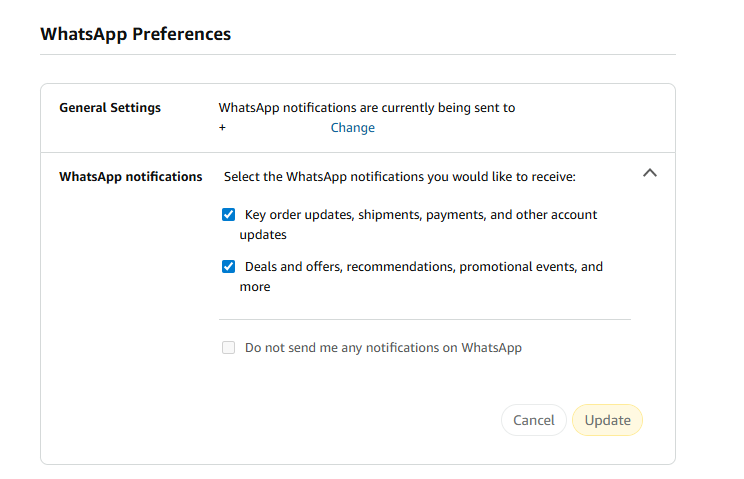
There, you an entire section dedicated to WhatsApp Preferences.

As you can see on the screenshot. the account was set up to receive WhatsApp notifications.

To change that here, you have to uncheck one or both of the options listed on the page:

  • Key order updates, shipments, payments, and other account updates.
  • Deals and offers, recommendations, promotional events, and more.

The second option sends ads to your WhatsApp account, while the first seems to be limited to Amazon notifications about orders and such. However, if you disable both, you can check “Do not send me any notifications on WhatsApp.

Don’t forget to hit the update button to save the change.

Now You: did you see the WhatsApp preferences when checking your Amazon account? Were the settings enabled? Feel free to leave a comment down below.

Windows 11 is removing an option to bypass Microsoft account and internet during setup

How Windows 11’s Point-in-time Restore feature differs from System Restore

Posted on November 25, 2025November 25, 2025 by Martin Brinkmann

You may have heard that Microsoft is working on a new restore feature for Windows 11 called Point-in-time Restore.

The backup feature in a sentence: It allows Windows admins to restore the exact previous state of a Windows PC.

The main focus is to offer fast restores to a previous system state to allow the quickest recovery possible using integrated options.

The biggest different to System Restore, therefore, is that it creates a snapshot of the entire Windows system and not just some files and setting, like System Restore.

While that sounds like a great addition to Windows and could make some backup apps unnecessary, this is not the case entirely, as there are downsides to this as well.

Probably the biggest letdown is that it is capped to 72 hours. Means, it won’t help if the issue occurred before that period and was not noticed until then. Microsoft says that this is the maximum and that restore states will be deleted after being kept for the maximum.

The restore points may also be deleted in other circumstances, mostly when storage that is reserved for the restoration feature is reaching the set maximum size or when the device itself is running low on disk space.

Windows 11 creates a restore point every 24 hours by default. Here is a table that shows the main differences between Point-in-time Restore and System Restore, according to Microsoft.

CriteriaPoint-in-time restoreSystem Restore
ConfigurationSystem settingsControl panel
Restore point triggerScheduled frequency (automatic only)Event-triggered or manual
RetentionMax 72 hours per restore pointIndefinite (subject to disk usage/cleanup)
Target scopeFull system stateSystem files and settings; app/user data coverage varies
ManagementWill support remote management*No modern management

Good news is that Point-in-time restore runs locally and while you do need to make sure that enough storage space is available, it could finally be a Windows feature that most Windows 11 users have nothing against.

However, it won’t replace traditional backup software, as these allow you to keep copies indefinitely, something that Point-in-time Restore does not seem to support and probably won’t ever.

Gemini in Gmail may have been enabled by default, and turning it off takes other features with it

Posted on November 22, 2025November 23, 2025 by Martin Brinkmann

If you are using Google’s Gmail email service, you may have stumbled upon Smart Features already, especially if you are using the web-version of the service. Up until recently, Smart Features did not include AI, but this changed in 2025.

Now, Google has baked its AI Gemini into the Smart Features of Gmail. Depending on where you live, Smart Features are enabled by default. Note that while Google claims that Smart Features are not turned on for user in the European Union (Japan, UK and Switzerland are the three other regions), they were in fact enabled in one of my accounts.

So, what do you get with Smart Features?

  • Automatic email filtering and categorisation.
  • Smart Compose.
  • Smart Reply.
  • Nudges (suggests emails to reply to or follow-up on)
  • Summary cards above emails.
  • Grammar, spelling, and auto-correction.

Some of these features are powered by AI nowadays and Gemini, Google’s AI, needs access to your data for the features to work. Google claims that personal data is not used for training and that everything is kept within the boundaries of the account.

However, if you prefer that Gemini does not access your emails at all, your only option is to turn of the Smart Features in Gmail.

Here is how that is done:

  1. Load https://mail.google.com/mail/u/0/#settings/general in a web browser.
  2. Scroll down to Smart Features in Settings under General.
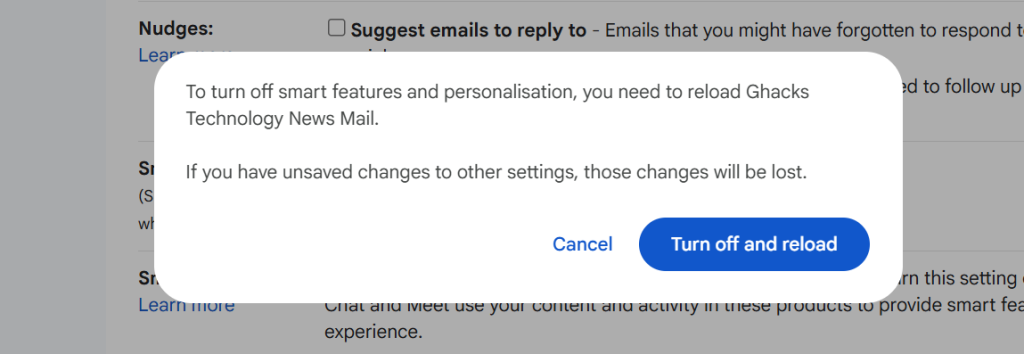
  3. Remove the checkmark of the Smart Features box.
  4. Confirm the removal.
  5. Gmail restarts.

Smart Features should be turned off now.

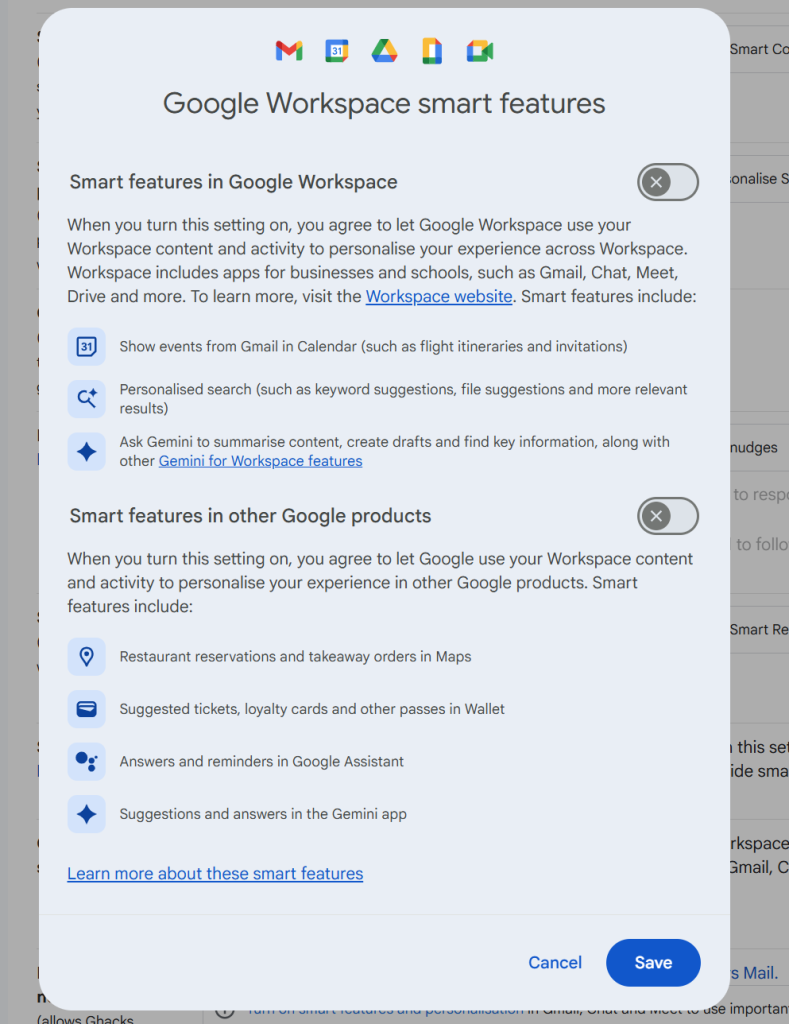
Note that you may also need to click on “Manage Workspace smart feature settings”, if the account is a Google Workspace account and not just a single Gmail account.

There you can turn off Smart Features for Gmail and other Google products.

Again, when you enable the feature you do not get any auto-corrections anymore as well. That is a trade-off for some, others may use the functionality that their browser provides for that anyway.

Now You: do you use Gmail as your mail provider or another service? Black Friday might be a good option to make a switch, as plenty of deals are live already or will be offered in the coming weeks.

Google Search

Google is starting to show ads in AI Mode

Posted on November 21, 2025November 21, 2025 by Martin Brinkmann

The number one advertisin company on the Internet seems to have found another place to show you ads. Reports are coming in that more and more users are starting to see ads in AI Mode.

AI Mode? It is a new option in Google Search that you may use to ask Google’s Gemini AI questions and get answers. The mode supports deep search functionality, which Google says is its “most advanced research tool in Google Search”.

Anyway, if you select the mode, you may now also get a good chunk of advertisement according to Bleeping Computer and several other sites and Internet users.

Earlier this year, Google started to show ads in AI Overviews. Unlike AI Mode, which users need to select actively, AI Overviews are attached to regular search results pages on Google Search.

Not all AI chats and modes show advertisement right now. However, there is a very good chance that many will in the not so distant future. These businesses can’t run on love alone and there does not seem to be enough money in selling paid memberships.

So, in the future, you will pay with your data and your eyes on ads when you use the majority of AI chats that will be still around in a year or two.

Speaking of which, if you are subscribed to a Gemini plan, you are still going to see ads in AI Mode and AI Overviews (of course), unless you use a content blocker.

Cloudflare Down

Cloudflare is down, and so are lots of websites

Posted on November 18, 2025November 18, 2025 by Martin Brinkmann

If your favorite website is not responding right now, it might be because of a major Cloudflare outage. Plenty of sites use Cloudflare, for instance as a CDN or a security layer to prevent attacks or fake traffic.

As it stands right now, Cloudflare states on its Status website that it continues to work on restoring its service for its customers.

The issue started at around 11:48 UTC today when Cloudflare added the first bit of information to the status page revealing that it was experiencing issues. Two hours later, the issue is ongoing.

You can check the link above to find out when the issue is resolved. Or, you can try visiting the affected websites at a later point to find out if it is resolved.

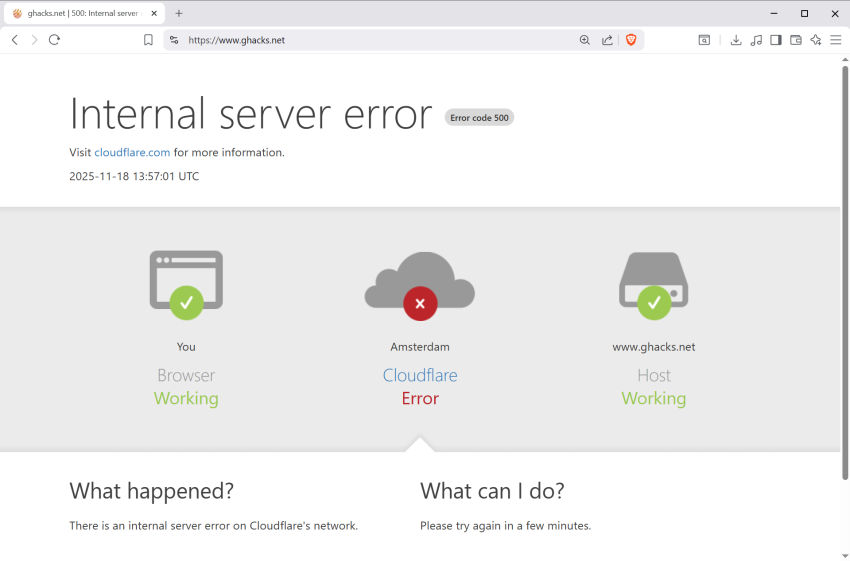
Most websites affected by the issue should show “Internal server error” with error code 500. The image should highlight that the browser and the host is working, but that Cloudflare is having an error.

Amazon Prime Video Recaps

Users of streaming services dislike ads, but subscriptions continue to grow

Posted on November 17, 2025November 17, 2025 by Martin Brinkmann

When asked about their preference regarding streaming media, with or without ads, most users would like pick the latter. I would go even so far to claim that many dislike ads with a passion. However, when you add a monetary component to the question, things get interesting.

Get the cheaper, but ad-powered streaming option, or pay more, but save up on time and get rid of the ads?

It appears that the strategy of companies like Disney, Amazon, or Netflix is paying them huge dividends already. Ad-powered streaming subscriptions are pushing to new highs every financial quarter, it appears, and there does not seem to be any slowing down either.

Introduced just a few years ago, ad-supported plans make up a sizeable portion of total subscribers for major streaming platforms.

  • Netflix: last figure is 190 million users who use an ad-powered plan, but uses new metric.
  • Disney: about 164 million, does include Disney+, Hulu, and ESPN+ however.
  • Amazon: 315 million

Netflix introduced a new metric for its ad-powered plan recently. Previously, the company counted subscriptions only, which, according to the last report for which the company used the metric, was 94 million. The new report looks at household numbers as well.

Regardless, about a third of Netflix subscriptions seem to be ad-powered. For Amazon, it is even more. The reason is simple: Amazon decided to make all Prime Video subscriptions ad-powered. If you do not want ads, you have to pay Amazon a few extra bucks to avoid them. Most users apparently don’t.

Even more interesting, Amazon boasted in its last earnings call that it managed to boost subscribers from 200 million in 2024 to the-now 315 million.

Four out of ten Netflix subscribers pick the ad-powered plan, according to Netflix. Disney is likely seeing signups in a similar range.

Why are ad-powered plans growing? The most likely, and simple, answer is: because they are cheaper. Much cheaper in fact. The Standard with Ads plan of Netflix USA costs subscribers around $8 per month. The cheapest ad-free plan costs more than double at around $18 per month. If you want 4K, it is thrice as much at around $25 per month.

While subscribers of the Premium plan get some benefits that the other two plans do not support, notably 4K, Spatial Audio and HDR support, the only differentiating factor that matters between Standard with Ads and Standard is the advertisement.

Disney pricing is very similar in this regard, albeit considerably below the twice as expensive mark. The Disney+, Hulu Bundle, both with ads, costs around $13 per month. Without ads, the price rises to around $20.

While the “with ads” plans will likely become more expensive as time passes, there does not seem to be an end to their growth yet.

Now You: Are you subscribed to an ad-powered plan? Or do you prefer plans without ads, or no plans at all? Feel free to leave a comment down below.

Google Drive is now available for Windows on ARM PCs

“We know we have work to do”: Microsoft posts apology, but gets destroyed in the responses

Posted on November 16, 2025November 16, 2025 by Martin Brinkmann

Microsoft’s plan to turn Windows into an agentic operating system has been met with massive backlash online. When the Microsoft President of the Windows and Devices division announced the next Microsoft Ignite developer and professionals conference, AI made up the cornerstone of the announcement.

Windows is evolving into an agentic OS, connecting devices, cloud, and AI to unlock intelligent productivity and secure work anywhere. Join us at #MSIgnite to see how frontier firms are transforming with Windows and what’s next for the platform. We can’t wait to show you!

Users responded in droves and the general tone was very negative. Many asked Microsoft to focus on the features and things that matter, like creating a stable operating system that offers top-tier performance.

The chief of Microsoft’s Windows division limited comments, which drove the discussion elsewhere, but did not seem to turn it down.

Then, after a few days, Davuluri published a reply on Twitter to one developer comment in particular. In the command, Gergely Orosz stated that he could not see any reason for software engineers to pick Windows “with this weird direction they are doubling down on” and an operating system that “doesn’t look like anything a builder who wants OS control could choose”.

In the reply, Davuluri claimed that Microsoft was being swarmed by feedback and that Microsoft was listening and that Microsoft cares deeply about developers.

We know we have work to do on the experience, both on the everyday usability, from inconsistent dialogs to power user experiences. When we meet as a team, we discuss these paint points and others in detail, because we want developers to choose Windows.

We know words aren’t enough, it’s on us to continue improving and shipping

This time, the comments were as brutal as the first time. X user JimBobSquarePant’s comment is representative for the general tone of replies.

It really is hard to believe that to be the case given the disconnect displayed in your previous post upon which you received overwhelmingly negative feedback.

I’ve been a Windows user since I was a small child, I’m a Microsoft MVP and develop almost exclusively on Windows but even I am considering Linux as an alternative. The quality of the software of the OS (and other Microsoft products) is in real, visible decline.

In short, commenters complained that the quality of the Windows operating system is deteriorating, and that Microsoft is not listening nor caring about developers or power users anymore.

Closing Words

Judging from the past ten or so years of Windows development, and especially the past couple of years, I’d be surprised if Microsoft would actually start listening and change course, or at least focus more development resources on improving the stability and performance of the Windows operating system.

What about you? Feel free to leave a comment below.

Hosting a web server on a disposable vape, which makes it a disposable web server of sorts

Posted on November 15, 2025 by Martin Brinkmann

Reportedly, someone managed to get a tiny web server running on one of those disposable vapes, electronic cigarettes that you see more and more people consuming, at least where I live.

Unlike regular cigarettes, which consist of non-electronic components, a filter, some paper and tobacco for the most part, vapes contain electronic components.

Our ingenious engineer dissected vapes that he received from friends and family for some time and discovered something peculiar in vapes from a specific brand.

He noticed that they included a micro processor, probably the cheapest micro-controller in existence. Further inspection revealed that it had the following characteristics:

  • 24 MHz Coretext M0+ processor.
  • 24 KiB of Flash Storage.
  • 3 KiB of Static Ram.

He realized that he could use it to run a web server, and that is exactly what he set out to do. You can check out the blog post to find out more about the process. In the end, he managed to get the web server, with a single page, running on the vape.

The post has a link to the website, but I could not get it to run. Not sure if it has been taken down, if it is overloaded, or caused by another issue.

It is a remarkable feat of engineering, very similar to getting Doom running on any device with a display and some form of micro-computer inside.

Android

Android is getting an option for experts for sideloading

Posted on November 13, 2025November 13, 2025 by Martin Brinkmann

Google announced plans earlier this year to change a fundamental cornerstone of the Android ecosystem: sideloading. The plan was to force all developers to verify their identity, even those who had no interest in publishing via the Google Play Store.

This was a stark change compared to the status quo. Currently, developers may choose to publish their apps outside Google Play, for instance only on F-Droid, and they can do so unhindered.

Under the new system, they would be forced to verify their identity. Google says that this is for improving security, while third-party stores like F-Droid claim that it is the end of sideloading as we know it.

The main issue, from F-Droid’s perspective, is that Google is dishonest when it states that sideloading is not going away on Android. The reasoning is simple: the definition of sideloading is “the transfer of apps form web sources that are not vendor-approved”. Under the new system, developers need to register an account with Google, pay a fee, provide verification, e.g. with government IDs, accept the terms and conditions, and more.

Google published an update to its plans today on the Android Developers Blog. There, Google explained why it is introducing verification in first place (to keep users safe).

However, Google says that it has listened to feedback and decided to integrate an option for experienced users, students, hobbyists and developers.

It says that it is building “a new advanced flow that allows experienced users to accept the risks of installing software that isn’t verified”. This new flow is designed to ensure that users cannot be forced to bypass the safety checks, even when under pressure from scammers.

Additionally, Google wants to display clear warnings to help users understand the risks involved.

How this is going to work is unclear at this point. Google says that it will share more details in the coming months about this new option.

Still, it could be a good compromise that allows developers and users to install apps from other sources, even if they are not verified by Google.

Now it is your turn. What is your take on this? Is it a good compromise or would you like to see something else entirely? Feel free to leave a comment down below.

  • Previous
  • 1
  • …
  • 6
  • 7
  • 8
  • 9
  • 10
  • 11
  • 12
  • …
  • 69
  • Next

Support This Site

If you like what I do please support me!

Any tip is appreciated. Thanks!
  • March 2, 2026 by Martin Brinkmann Don't Bother with Windows 11's new Speedtest feature
  • February 27, 2026 by Martin Brinkmann Warning! That laptop on Amazon? It comes with temporary storage
  • February 26, 2026 by Martin Brinkmann "If your printer works today, it will continue to work": Microsoft corrects previous announcement
  • February 25, 2026 by Martin Brinkmann YouTube Premium Lite subscribers get background playback and downloads with a big "but"
  • February 24, 2026 by Martin Brinkmann Firefox 148.0 is out with its AI kill switch and support for Windows 7 and 8.1 comes to an end

About

We talk, write and dream about Technology 24/7 here at Chipp.in. The site, created by Martin Brinkmann in 2023, focuses on well-researched tech news, reviews, guides, help and more.

Legal Notice

Our commitment

Many websites write about tech, but chipp.in is special in several ways. All of our guides are unique, and we will never just rehash news that you find elsewhere.

Read the About page for additional information on the site and its founder and author.

Support Us

We don't run advertisement on this site that tracks users. If you see ads, they are static links. Ads, including affiliate links, never affect our writing on this site.

Here is a link to our privacy policy

©2026 Chipp.in Tech News and Reviews