Chipp.in Tech News and Reviews

Windows, Security & Privacy, Open Source and more

Menu
  • Home
  • Windows
  • Security & Privacy
  • Gaming
  • Guides
  • Windows 11 Book
  • Contact
  • RSS Feed
Menu

Author: Martin Brinkmann

When I was young, I studied German, History and English at Essen University in Germany. I worked in computer support for several years at the time to help other computer users when they ran into issues. Writing started out as a passion project, as I wanted to help more users and not just the ones that I handled in support. This lead to the founding of Ghacks Technology News in 2005. First, as a side-project, but shortly thereafter as a full-time project as the site's popularity exploded. I sold Ghacks to Softonic some years ago, but stayed on as Editor. You can still read my articles on the site. I do publish on Betanews as well. In recent years, I started to write and publish technology books, including my latest book "Windows 11 From Beginner to Advanced", which is available on Amazon. I'm also a freelance writer for the German publisher Gamestar. Chipp.in is my newest project. I want to use it to talk about my book projects, sell my books directly, and write about technology, as this is what interests me.
Chrome

Ecosia latest to make an offer for Chrome, sort-of

Posted on August 22, 2025August 22, 2025 by Martin Brinkmann

Google is battling it out with the United States Department of Justice currently. If things go really bad for Google, the company could be forced to sell its web browser Google Chrome or make other changes to its business.

Plenty of companies announced interest in Google Chrome already. Perplexity made a bid, Yahoo is eying the acquisition, and now it is Ecosia that also made a suggestion, according to TechCrunch.

Ecosia is a non-profit organization that is probably best known for its search engine. It is free to use and will spend its earnings on planting trees.

Unlike Perplexity, which bid $34.5 billion in cash, Ecosia is suggesting that it is getting control of Google Chrome for free. Google would retain ownership and the rights to Chrome under the proposal. Google Search would remain the standard search engine and Google would keep all intellectual properties. Ecosia would gain operational control of Chrome and development of the browser in that time.

The non-profit suggests a revenue split furthermore, with 40% of the earnings going to Google. The remaining 60% would be spend on climate projects that align with Ecosia’s general mission.

While Ecosia’s proposal may be a long shot, it would ensure that Google retains all rights and gets constant revenue from the browser.

However, whether Google will indeed be forced to sell Chrome or split it in some way from the company remains to be seen. Until then, it seems highly unlikely that Google will react to any of the offers made or comment on the offers publicly.

Sony announces PS5 price increase by $50 in the US

Posted on August 21, 2025 by Martin Brinkmann

The price of gaming consoles used to go down the longer they were on the market. Now it seems that the opposite is happening. In early August, Nintendo announced a price increase for Switch hardware in the United States. In May, Microsoft announced price increases for Xbox hardware and games.

Now, Sony, maker of the PlayStation 5, is also announcing a price increase in the United States.

Gamespot reports that PS5 consoles will cost $50 more going forward in the United States.

  • PlayStation 5 Slim Digital Edition: now $500, previously $450
  • PlayStation 5 Slim: now $550, previously $500
  • PlayStation 5 Pro: now $750, previously $700

The systems are still available for the older prices at Amazon and other third-party retailers, according to the news outlet. So, if you always wanted to buy one, you may still be able to buy a PS5 for the lower price before retailers are adjusting it.

Sony is not changing the price of accessories at this point. The company announced price changes in other markets earlier this year.

In Europe, Sony increased the price of the digital edition by 50 Euros, but kept the price of the standard edition with disc drive.

Sony did not reveal why it is increasing the price in the United States, but tariffs may play a role in Sony’s decision. The United States have increased tariff rates on countries where the PlayStation 5 is produced.

Windows 11 is removing an option to bypass Microsoft account and internet during setup

Microsoft confirms reset and recovery issue in Windows 10 and 11

Posted on August 19, 2025August 19, 2025 by Martin Brinkmann

When Microsoft released the August 2025 security updates for Windows, it listed not a single known issue for any of the supported operating systems. Now, a week later, Microsoft had to confirm several issues already.

The latest to be added to the growing list is that reset and recovery operations may fail on some older versions of Windows.

Microsoft confirmed the issue for the latest version of Windows 10, which is version 22H2, and for Windows 11, version 23H2 and earlier. Only client operating systems are affected, according to Microsoft.

​Client: Windows 11, version 23H2; Windows 11, version 22H2; Windows 10, version 22H2; Windows 10 Enterprise LTSC 2021 and Windows 10 IoT Enterprise LTSC 2021; Windows 10 Enterprise LTSC 2019 and Windows 10 IoT Enterprise LTSC 2019

If you still run one of these and have the latest security updates installed for the operating systems, you may run into issues when you try to reset or recover the PC.

Microsoft says that three processes are affected by the issue:

  • System >Recovery > Reset my PC
  • System > Recovery > Fix problems using Windows Update
  • RemoteWipe CSP

Run any of those, and the reset or recovery operation may fail, provided that the most recent update is installed. To get around this, you could uninstall the security update before running reset or recovery actions on the Windows PC.

Microsoft confirmed that it is working on a resolution and that it plans to release an out-of-band patch for affected versions of Windows to address the issue. The company plans to release the update “in the coming days” according to the confirmation on the Release Health website for affected Windows editions.

Windows updates

Windows 10: script to join ESU (Extended Security Updates) without Microsoft account

Posted on August 18, 2025August 18, 2025 by Martin Brinkmann

If you still run Windows 10 on one or multiple of your PCs, you may be aware that Microsoft is ending support for the operating system in about two months.

Come October 2025, Microsoft won’t release updates for the consumer editions of Windows 10 anymore. Windows 10 users may join the Extended Security Updates program to receive another year of support, but this requires becoming active.

If you do not do anything, you won’t receive any updates anymore for the operating system after October 2025.

Joining ESU is a simple process, but you still need to pick one of the available “payment” options: pay with Microsoft Rewards points, enable cloud backups, or pay with money.

Consumer ESU Enrollment is a new script for Windows that simplifies the process. It does require an administrative account and Internet connectivity, but that is about it.

When you run it without parameters, it will enroll using the free backup option and use a Microsoft account or a local account for that, depending on which you used to sign in to the operating system.

Here is what the developer Abbodi says about the order on GitHub (via Deskmodder):

By default, the script will run in the following order, if a step failed, the next is executed:

  • Enroll using Microsoft account currently logged-in as Windows user.
  • Enroll using Microsoft account currently logged-in with Microsoft Store.
  • Enroll using current Local account.
  • Acquire Consumer ESU license manually as last resort.

You may run the script using optional parameters to force one of the available options. If you use a local account, you can run .\Consumer_ESU_Enrollment.ps1 -Local to make sure that you are enrolled using the local account and not a Microsoft account.

Note that you may need to run Set-ExecutionPolicy Bypass -Scope Process -Force prior to that to allow the execution of unsigned scripts temporarily.

While you may enroll manually as well, using the script may speed up things significantly, especially if you use a local account to sign in to Windows.

Now You: do you still run Windows 10 on a device that you use regularly? Did you join ESU? Feel free to leave a comment down below.

Microsoft changes popular option to block Microsoft Store application updates, makes it worse

Posted on August 17, 2025August 17, 2025 by Martin Brinkmann

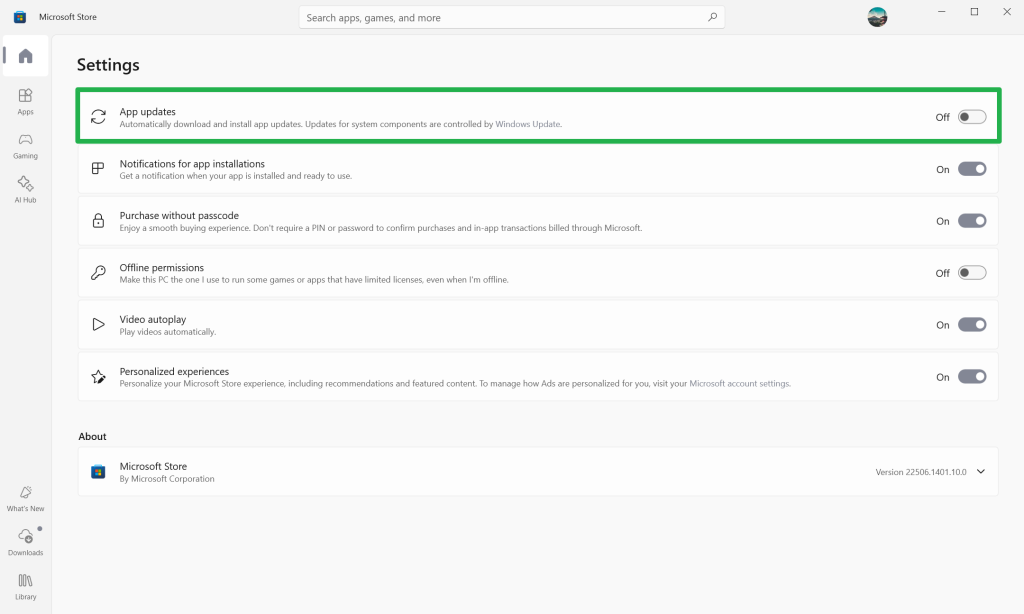
Up until now, if you did not want Microsoft to update the installed default apps of the Windows operating system via the Microsoft Store, you had to disable the “App Updates” option of the store. Once set, it would prevent the automatic updating of Microsoft Store applications on the system.

This option is being removed, according to tests conducted by Deskmodder. While the option is still there, flipping it to off displays a new prompt now that gives you the choice to block app updates for one to five weeks only.

Afterwards, application updates will get enabled again automatically. This option may remind you of the pause Windows updates functionality that Microsoft introduced a long time ago. It too does not let you disable updates indefinitely, but only for a certain period.

Here is how the screen looks like on Windows 10 currently.

To make matters worse, the corresponding Registry entry will also be temporary in nature according to Deskmodder.

This leaves the Group Policy option as the only one left for blocking automatic Microsoft Store updates.

Here is how it works:

  1. Open the Start menu.
  2. Type gpedit.msc and press the Enter-key.
  3. Navigate to Computer Configuration > Administrative Templates > Windows Components > Store
  4. Double-click on “Turn off Automatic Download and Install of updates”.
  5. Set the status to Enabled.
  6. Click on the ok-button.
  7. Restart the computer.

Now, if you do not have access to the Group Policy Editor, which means that you are running a Windows Home edition, then you may make the changes in the Registry directly.

  1. Open the Start menu.
  2. Type regedit.exe and press the Enter-key.
  3. Navigate to HKEY_LOCAL_MACHINE\SOFTWARE\Policies\Microsoft\WindowsStore
    • Note: If one of the keys do not exist, right-click on the previous one that still exists and select New > Key. Name it accordingly to create the structure.
  4. Right-click on WindowsStore and select New > Dword (32-bit) value.
  5. Name it AutoDownload.
  6. Double-click on AutoDownload and set its value to 2.
  7. Close the Registry Editor.
  8. Restart the PC.

Closing Words

Microsoft has not documented the change anywhere to my knowledge. It is unclear, therefore, why it is being made. Maybe Microsoft wants that most Windows users run the latest versions of the integrated applications on their devices.

However, considering that this is the default, Microsoft is taking away an option that Windows customers have set deliberately. Those who have set automatic updates to off have done so for a specific reason though.

Now You: What is your take on this? Good thing that the majority of users will run the latest version of the pre-installed apps on Windows soon? Feel free to leave a comment down below.

Google Search

Google Messages is checking any image for nudity to potentially blur it

Posted on August 16, 2025August 16, 2025 by Martin Brinkmann

Google Messages is a dominant messaging app on Android devices. Installed and enabled on many devices by default, it is used to send messages. It supports several message formats, including SMS, MMS and Rich Communication Services (RCS), with RCS being the default protocol.

Google is rolling out a new protective feature in Google Messages that is designed to detect and blur images of nudity. It is enabled by default for non-adult accounts, but can be enabled for adult accounts as well.

When you receive an image in Google Messages, it may be blurred if the processing determines that it contains nudity and if the feature is enabled on the device.

You have multiple options in that case:

  • Block the sender’s number.
  • Open the image and confirm that you want to view the image.
  • Open a resource page that offers information on “why nude images can be harmful”.
  • Go back.

Google says that the entire processing of images happens on the local device and that no personal or identifiable information is submitted to Google servers as part of the processing.

Here is how you control the feature on an unmanaged device:

  1. Open Google Messages.
  2. Click on the profile icon.
  3. Select Messages settings.
  4. Tap on Protection & Safety.
  5. Activate Manage sensitive content warnings.
  6. Toggle “Warning in Google Messages” to on or off.

If you set it to on, incoming photos with nudity are blurred. Furthermore, sending a photo with nudity requires an extra step as well.

Is it a useful protective feature? It may blur images with nudity and includes an option to block the sender from sending more. There is a chance for false positives, but it is easy enough to turn off the feature if that is the case.

What is your take on this? Should services like Google, Meta, or Microsoft scan user images to blur, block or report them? Feel free to leave a comment down below.

Spotify is raising prices outside the US

Posted on August 14, 2025August 14, 2025 by Martin Brinkmann

Ah, the wonderful world of streaming. Spotify just announced that it is raising the price of its subscriptions in many regions in the coming weeks. The increase affects Spotify customers in South Asia, the Middle East, Europe, Africa, Latin America and the Asia-Pacific region according to the announcement.

In Germany, Spotify is raising the price by €2 per month to 12.99 Euro. Student up 1€ Euro to 6.99 Euro, Duo by 3€ to 17.99 Euro and Family by 4€ to 21.99 Euro per month.

Mileage may differ depending on the region, but prices should go up across the board, except for North-America.

Spotify says that it is increasing the price so that it “can continue to innovate”. For subscribers, it means that they have to pay more to continue using the service. Spotify increased pricing in July 2024 the last time (in the U.S.), and before that in July 2023.

Other streaming services, including Netflix or Google, are also increasing pricing regularly. Subscriptions are becoming more expensive with each passing year and there seems no end to it.

What you can do about it? If you do not really need them, cancel your subscription. If you like them, try subscribing for a short period each year. This works really well with TV and movie streaming services, as they may not put out enough quality content to justify annual subscriptions anyway.

Other than that, you could go back to physical media. Yes, that requires a handpicking approach to music and media, but you get can play the media indefinitely and without any limitations after the purchase. The only problem that you may run into is that the discs may get corrupt over time. You could counter that by digitalizing the media.

However, not everything is put out on disc anymore and things may get worse in the coming years.

Add a streaming server to your entertainment setup, and you may play music, TV shows or movies without having to use physical media at all.

AOL discontinues Dial-Up Internet and software

Posted on August 12, 2025August 12, 2025 by Martin Brinkmann

AOL announced the discontinuation of its dial-up Internet plan, AOL Dialer software and AOL Shield browser, in a brief support page on its help website.

There, AOL writes:

AOL routinely evaluates its products and services and has decided to discontinue Dial-up Internet. This service will no longer be available in AOL plans. As a result, on September 30, 2025 this service and the associated software, the AOL Dialer software and AOL Shield browser, which are optimized for older operating systems and dial-up internet connections, will be discontinued.

From September 30, 2025 onward, AOL customers may no longer use dial-up Internet provided by the company. AOL is also discontinuing the accompanying applications, AOL Dialer and AOL Shield.

AOL says that the change does not impact any other benefits that users may have in their AOL plan, including AOL email. The company does not reveal the number of customers that are affected by the change.

Estimates suggest that about 150,000 US-Americans still use dial-up in 2025. Not all of them rely on AOL for Internet though, but those who do need to find a different dial-up Internet provider or different connection option, such as cable, fiber optic, wireless Internet, DSL, or Internet via satellite.

As for dial-up Internet, Microsoft still seems to offer dial-up access to the Internet. For about $180 per year, subscribers may sign up for MSN Dial-Up Internet access according to this page on the Microsoft website:

Subscribe to MSN Dial-up Internet Access and get Internet access and MSN Internet Software which includes: computer wide security software, advanced phishing filter technology, pop-up guard and multiple e-mail accounts.

Can you imagine using a connection that has a speed between 56 kbit/s and 128 kbit/s?

Firefox

Mozilla plans to drop support for very-old Android versions

Posted on August 11, 2025August 11, 2025 by Martin Brinkmann

Mozilla plans to drop support for Android versions older than Android 8. Android 8 was released in 2017, which means that the move will affect users who use Firefox on mobile phones that are nearly a decade old or older.

Current mobile versions of Firefox require at least Android 5.0, which was released in 2014.

Mozilla announced the intention to raise the system requirements for Firefox on Android on the organization’s bug tracking website. And the organization has good reasons for wanting to drop support.

It allows Mozilla to “implement newer technologies” and prevents engineers from “being burdened by fixing bugs that only emerge on a small population of people using old devices”.

Also worth noting is that libraries that Mozilla is using are dropping support for Android 5, which causes additional problems for Mozilla.

With Android 15 (API 35) official release last Oct 15, 2024 (for Pixel devices), we should be considering bumping up the min Android OS version of the Firefox Mobile Browser up to Android 8 (API 26). Doing so allows us to implement newer technologies, and prevents us from being burdened by fixing bugs that only emerge on a small population of people using old devices. By bumping the min Android OS version, users on those devices will no longer receive app updates.

Additionally, we are increasingly finding that libraries we use are dropping support for obsolete versions like Android 5. This causes us big problems for ongoing maintenance of our apps.

Mozilla is not the only browser maker that bumped Android version requirements recently. Google dropped support for Android 7 and 8 recently with the launch of Chrome 139 for Android. Most Chromium-based browsers for Android are likely affected by the change going forward.

So, if you are still using an Android device that is no longer supported, and has not been for a few years at least, you may find yourself without a supported browser as well.

Will there be browsers that continue to support Android 8 or earlier? That remains to be seen. For now, both Vivaldi and Opera support Android 8, as will Firefox going forward.

Microsoft is killing off a highly rated mobile app, wants users to use the Microsoft 365 Copilot app instead

Posted on August 9, 2025August 9, 2025 by Martin Brinkmann

Microsoft maintains a massive list of apps for the mobile operating systems Android and iOS. Microsoft Lens, one of the company’s highest-rated apps, is being discontinued. Microsoft announced the change in a message center note this week.

Microsoft Lens may be used to scan whiteboards and documents, including notes, receipts and more. It makes these readable digitally in PDF, Word, or Excel format, and supports printed and handwritten text.

The Android version has a rating of 4.8 out of 5.0 and more than 50 million downloads. The Apple version has also a 4.8 out of 5.0 rating, but less downloads and reviews.

The scanned data can be saved locally or uploaded to OneNote or OneDrive.

The timeline of the Microsoft Lens discontinuation:

  • Mid-September 2025: New installs on Google Play or the Apple App Store are no longer permitted.
  • Mid-November 2025: Microsoft will remove the apps from the respective stores.
  • Mid-December 2025: New scans can no longer be created.

Microsoft notes that existing scans will remain available in the MyScans folder that the application creates during installation.

The company recommends switching to the Microsoft 365 Copilot app, saying that it offers similar functionality. However, Microsoft Lens was free to use and without any ads. The Microsoft 365 Copilot app on the other hand may show ads, as revealed on the mobile stores.

Bleeping Computer reports that Microsoft plans to add some of the missing functionality to the Copilot app.

  • Previous
  • 1
  • …
  • 11
  • 12
  • 13
  • 14
  • 15
  • 16
  • 17
  • …
  • 69
  • Next

Support This Site

If you like what I do please support me!

Any tip is appreciated. Thanks!
  • March 3, 2026 by Martin Brinkmann Google to release two Chrome Stable releases per month
  • March 2, 2026 by Martin Brinkmann Don't Bother with Windows 11's new Speedtest feature
  • February 27, 2026 by Martin Brinkmann Warning! That laptop on Amazon? It comes with temporary storage
  • February 26, 2026 by Martin Brinkmann "If your printer works today, it will continue to work": Microsoft corrects previous announcement
  • February 25, 2026 by Martin Brinkmann YouTube Premium Lite subscribers get background playback and downloads with a big "but"

About

We talk, write and dream about Technology 24/7 here at Chipp.in. The site, created by Martin Brinkmann in 2023, focuses on well-researched tech news, reviews, guides, help and more.

Legal Notice

Our commitment

Many websites write about tech, but chipp.in is special in several ways. All of our guides are unique, and we will never just rehash news that you find elsewhere.

Read the About page for additional information on the site and its founder and author.

Support Us

We don't run advertisement on this site that tracks users. If you see ads, they are static links. Ads, including affiliate links, never affect our writing on this site.

Here is a link to our privacy policy

©2026 Chipp.in Tech News and Reviews