
For years, I asked myself why Mozilla did not add a good content blocker to Firefox. It would be a great fit. An organization that values privacy, an open source browser that blocks most tracking out of the box.
However, for Mozilla, integrating a content blocker would also mean torpedoing its main revenue stream coming from Google.
Mozilla never made the step and others, including Brave, led by Mozilla’s ex-CEO, stepped in to fill that gap.
This changed recently
Mozilla did integrate Brave’s Rust-based adblock engine into its Firefox browser. More precisely, it is part of Firefox 149 and Mozilla describes it as a prototype rich content blocking feature.
It is not yet available as an option in the user-facing interface, let alone as something similar to the Shield feature of Brave. Still, users who run Firefox 149 can enable the content blocker and make use of it right away for testing.
Here is how that works:
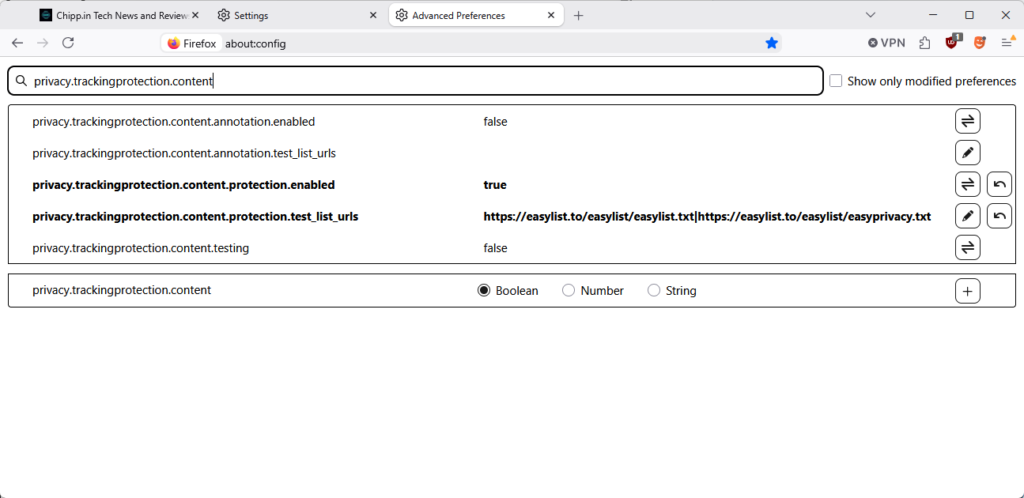
- Load about:config in the Firefox address bar.
- Search for privacy.trackingprotection.content.protection.enabled
- Set the value to True with a click on the toggle on its right.
- Search for privacy.trackingprotection.content.protection.test_list_urls.
- Paste https://easylist.to/easylist/easylist.txt|https://easylist.to/easylist/easyprivacy.txt as the value.
- Restart Firefox
This enables two EasyLists, but you can add any other list that uses the same format. Separate lists with the character |.
Clearly, this is done for testing purposes. Mozilla would very likely add controls to the preferences or another user facing interface to make this easier to configure and use.
For now, it is a work in progress implementation, but one that shows that Mozilla could finally integrate what many users of its browser have wanted (or did not know they wanted) for a long time.
So I went ahead and set this up just for the heck of it. But given that a great advantage of Firefox is that I can still use UBlock Origin while running it with these (and other) lists enabled, I can’t really imagine why I need the additional ‘protections’. But kudos to Mozilla for at least testing it even if they currently have it as well hidden as possible.
This is a fairly exciting change, if they can add UI features that allow individual blocking and unblocking of elements similar to uBo. That’s the one major downside to Brave’s blocking is that the UI does not allow for easy disabling/enabling of per-domain filtering.
Even far from, closer to uBlock Origin Lite (Manifest V3) than to uBlock Origin (Manifest V2), but interesting. If the feature happens to be opt-in (likely given the “privacy.trackingprotection.content.protection.test_list_urls” pref needs to be filled unless Mozilla plans to pre-fill it with basic filters), not sure that many will use it: IMO if you’re ad/tracking aware you search for powerful tools, not ersatz, not mild solutions. Remember the AdBlock extension (the original, very first and only at its launch) when it decided to add a “tolerance” for certain ads? The crowd yelled, anyway the crowd of true privacy aware users).
But, but, but how is Daddy Google going to take that given, as the article reminds it, “(…) for Mozilla, integrating a content blocker would also mean torpedoing its main revenue stream coming from Google.”?. Maybe not too bad given it accepts the ‘uBlock Origin Lite’ extension on its browser (which is really very far from ‘uBlock Origin’ capacities).
all they had to do was ask gorhill to join the team, he was RIGHT THERE, for years, doing the work he should have been paid mountains for.
But no, theyd rather use something attached to a shady perpetual crypto and ad machine.
140.10.0esr (64-bit)–also available on this version.
Mozilla and its financial woes! Could create a stripped down version for elite users who are willing to pay. Could charge for that 50GB of VPN traffic. Who knows–could block the use of ad-blockers–that’s original!
The premise and content in this article is false. Its source is a Brave dev’s blog where he intentionally misconstrued and misrepresented things as a means of self-promotion.
Mozilla has put out an official statement on their Reddit stating this is not an ablocker and they have no plans to integrate one. This is merely a test to see if the library is more efficient at processing lists used for the already-existing enhanced tracking protection feature. “We are not bundling Brave’s ad-blocking system, we’re testing one of their open source Rust components to improve how Firefox processes tracker lists.”
They will never “add controls to the preferences or another user facing interface,” as this article hopes, because it’s not something users are supposed to touch, and hopefully something that will go away completely in future versions.
Throwing things like easylist at this will not magically start blocking ads everywhere. There’s no component built in to the browser – no “secret ad blocker” – that blocks stuff based on ublock-like rules. All ETP does is read the domains from the disconnect lists and blackholes them when they’re called from third-party sites. So this will fail to catch anything on the lists that isn’t just a straight domain, and can never block Youtube ads and the like. In cases of simple banner ads called from a blocked domain, you’re still left with a big empty space on the page where the ad should be.
This is stupid. Just use uBlock Origin.