A new team at Microsoft plans to release 100 percent native apps for the Windows operating system. Announced by Rudy Huyn on X, the focus of the apps is a meaningful user experience.
I’m building a new team to work on Windows apps! You don’t need prior experience with the platform, what matters most is strong product thinking and a deep focus on the customer.⁰⁰If you’ve built great apps on any platform and care about crafting meaningful user experiences,…
Hyun does not mention whether the team will work on making existing apps 100 percent native or if it will work on new apps that may ship with the operating system at one point in time.
The development is a major shift from Microsoft’s recent heavy reliance on web-based wrappers and Progressive Web Apps (PWAs).
Here is why this is important:
For years, Microsoft has favored web-based apps over native code. These apps are often seen as slow, memory-hungry, and less-optimized than native apps.
It is another confirmation that Microsoft is trying to steer the wheel around. Apps are fundamental and attempts to make them better could improve the perception of the operating system.
Focus on quality. Hyun mentions that he is looking for developers with “strong product thinking”, regardless of platform that they have experience on. This could be an indicator that Microsoft might work on polishing the user experience.
While little is know about the project, apart from what Huyn mentioned on X, it could be another puzzle piece of Microsoft’s redemption attempt.
Since the information is scarce, pretty much everything surrounding this new project is unknown, including when we can expect the first releases and whether these will replace existing apps that may not be 100 percent native or be entirely new apps.
The distribution of KB5079391, released on March 26, had to be halted by Microsoft to investigate an installation error.
The company writes:
Some devices might encounter the following error while installing this update:
“Some update files are missing or have problems. We’ll try to download the update again later. Error code: (0x80073712)”
The availability of the optional update for Windows 11 has been limited by Microsoft as a consequence to investigate the underlying cause. Microsoft says that it will provide information about the issue once it has discovered the root cause of the error message.
Beta updates
The issue highlights the fragile nature of the operating system. Optional updates, which are beta releases of the following month’s cumulative update, should not be installed by the majority of Windows users.
In fact, there are only a few exceptions to the rule:
Major issues: When a major issue is fixed that affects users significantly.
Testing: When new features need to be evaluated.
Other than that, it is usually better to wait for the release of the cumulative updates, as these are the releases that are considered more stable. However, here, I also advice to wait with the installation, as bugs and issues are common and may affect operations.
In any event, creating a system backup before installing any updates is highly recocmmended.
If you’ve ever cursed at your monitor as a forced reboot hijacked your workday or at the massive integration of AI features into every nook and cranny of the Windows operating system, Microsoft finally have a message for you: they get it and want to do something about it.
Last week, the tech giant announced a fundamental pivot in its Windows 11 development strategy, promising to prioritize system stability and user control over flashy, unavoidable features.
Driven by months of user feedback and mounting community frustration, Windows and devices head Pavan Davuluri outlined a course correction that switches from aggressive AI integrations and a “Microsoft knows best” attitude towards restoring lost trust by focusing on restoring customizations and putting an end to deeply disruptive updates.
The main areas that Microsoft plans to improve
Here is a bulleted summary of the key changes that Microsoft announced on its Windows blog. They can be divided into the groups “user interface & customization”, “scaling back intrusive features”, “Windows updates & reliability”, and “performance upgrades”.
Windows Updates & Reliability
Control: Users will get more control over Windows updates, including the ability to skip updates during initial device setup, shutting down or restarting without installing updates, or pausing updates for longer periods.
Reboots: Microsoft is shifting towards a single reboot per month scheme to avoid too many disruptions.
Stability: Engineers will focus on reducing system-level crashes, improve driver quality, and improve connection stability of devices and connections.
Scaling back intrusive features
AI: Microsoft is reducing Copilot entry points in apps and plans to focus on useful integrations only.
Widgets: Quieter defaults and simpler settings to minimize distractions.
Notifications: System notifications will be reduced.
User interface & customizations
Taskbar: Microsoft plans to restore moving the taskbar to the top and sides of the screen. The compact taskbar is also making a comeback.
Start Menu: The recommended section will be more relevant and get clear options to customize or turn off.
Setup: Microsoft promises quieter and more streamlined initial setups that have fewer pages and require less reboots.
Core performance updates
File Explorer: Microsoft plans to improve File Explorer performance significantly, enable faster copying/moving of large files, improve search, and reduce screen flicker.
Responsiveness: Core apps, including the Start menu, move to WinUI3 to improve latency. Performance will be “more consistent”.
Efficiency: Baseline memory footprint will be reduced.
Closing Words
Ultimate, Microsoft’s announcement reads like a long due apology, without actually apologizing. The true test will lie in the execution. Windows Insiders will be among the first to see some of the quality-of-life improvements that Microsoft promised to deliver, while everyday users may have to wait until the end of year or even longer before the changes land on their systems.
If Pavan Davuluri and his engineering team can truly deliver on a faster, cleaner, and less intrusive operating system over the coming year, Microsoft could regain some of the trust that it lost.
Microsoft confirmed a new Windows issue on March 12th, 2026 that prevents access to files on the main c: drive of the system and blocks certain applications from launching.
The issue affects certain Samsung devices that run Windows and have installed the February 2026 security updates or newer updates for Windows 11, version 24H2 or 25H2 systems.
Here are the details:
Affected Windows versions: Windows 11, version 24H2 and 25H2
Affected users may get the error message “C:\ is not accessible – Access denied” after installation of the update on affected devices. This prevents access to files on the drive and will also block some applications from launching. Microsoft mentions Outlook, Office apps, web browsers and system utilities specifically.
The problems do not require specific user actions. They occur during common actions, such as trying to access files, starting programs, or performing administrative tasks. Furthermore, users may also be blocked from elevating privileges, uninstalling, updates, or collecting logs due to permission failures.
Microsoft says that it is investigating the issue and that it suspects that the Samsung Share application is causing the issue. There is no workaround at the time of writing, but uninstalling the update — if possible — may resolve the issue. However, this leaves the system open for potential attacks, as it won’t have the February and March 2026 security issues patched anymore.
Affected users and administrators may want to keep an eye on the Windows 11 release information page. Microsoft will update the page when it has a workaround or a solution.
If February 2026 was the sprint, March is a marathon of essential infrastructure updates.
Microsoft’s third Patch Tuesday of 2026 has arrived, addressing 84 vulnerabilities in total. While the total count is typical, the release demands close attention: it contains two publicly disclosed zero-day vulnerabilities and eight critical flaws affecting a wide range of enterprise products, including SQL Server, Office, and Azure components.
Here is the breakdown of what you need to know, what to patch first, and what might break.
Key Action Item: Administrators must prioritize database and application servers due to the SQL Server elevation of privilege flaw and the .NET denial of service vulnerability. Simultaneously, ensure Office updates are deployed to workstations to prevent potential zero-click remote code execution via the Preview Pane.
Important Patches
CVE-2026-21262 — Microsoft SQL Server Elevation of Privilege Vulnerability
Security updates. Includes a GPU stability fix and Secure Boot updates.
Deep Dive: The Critical Vulnerabilities
Microsoft confirmed two publicly disclosed zero-day vulnerabilities are fixed this month. Furthermore, Microsoft fixed several critical remote code execution (RCE) and elevation of privilege (EoP) flaws.
Attackers may exploit the issues on systems that have not been patched to bypass protections, elevate privileges, or execute malicious payloads remotely.
Here is the critical overview:
CVE-2026-21262 (Microsoft SQL Server Elevation of Privilege)
This publicly disclosed zero-day allows an authorized attacker to elevate privileges over a network. Due to improper access control, a logged-in user can quietly elevate to become a full database administrator (sysadmin). With that level of control, they can read, modify, or delete data without user interaction.
CVE-2026-26127 (.NET Denial of Service)
The second publicly disclosed zero-day is an out-of-bounds read flaw in the .NET platform (versions 9.0 and 10.0). It allows an unauthenticated remote attacker to crash .NET applications over the network, resulting in a denial of service for any app running on the affected runtime libraries.
CVE-2026-21536 (Microsoft Devices Pricing Program Remote Code Execution)
Scoring a critical 9.8 out of 10 on the CVSS scale, this is the most severe flaw of the month. It allows remote attackers to execute arbitrary code over the network without privileges or user interaction. Notably, this flaw was discovered by an autonomous AI penetration testing agent. Microsoft notes that the vulnerability has been fully mitigated on their end, requiring no direct action from users.
These type confusion and untrusted pointer dereference flaws in Microsoft Office enable remote code execution when malicious files are processed. They are particularly dangerous because they can potentially allow zero-click exploitation if a user simply views a booby-trapped document in the Outlook Preview Pane.
CVE-2026-25187 (Windows Winlogon Elevation of Privilege)
Discovered by Google Project Zero, this vulnerability leverages improper link resolution in the Winlogon process. A locally authenticated attacker with low privileges could exploit a link-following condition to effortlessly escalate to SYSTEM privileges.
Significant Changes in the March 2026 updates
Sysmon is now built-in: Previously a manual download from Sysinternals, Sysmon is now included as a native component in Windows 11 for better security auditing and monitoring of malicious activity.
Quick Machine Recovery (QMR) expansion: QMR is now turned on automatically on more hardware. This feature allows administrators to revert endpoints to a working state if a disastrous third-party update takes down the system.
RSAT on Arm64: Remote Server Administration Tools are finally supported on Windows 11 Arm64 devices, allowing administrators to manage Windows Server environments directly from Arm-powered PCs.
First Steps: Your Patch Tuesday Strategy
Prioritize the zero-days: Map your exposure and prioritize the two zero-day vulnerabilities, focusing heavily on SQL Server environments and .NET application servers.
Update Office installations: Deploy Microsoft Office updates to all workstations immediately to mitigate the risk of zero-click remote code execution via the Preview Pane.
Prepare for Secure Boot changes: Ensure your enterprise environment allows the new Secure Boot allowed Key Exchange Key (KEK) updates to install properly to avoid boot issues in the coming months.
How fast is the Internet connection of your Windows 11 PC? It may surprise you that you may give two answers to that question: the maximum speed of the line or the actual speed of the device.
Speedtests help test this. They are useful for troubleshooting connection-related issues, and may also help you get a partial refund from your Internet Service Provider, if the advertised speed does not match the actual speed you get.
Most Internet users run tests in browsers. Go to a site like speedtest.net, fast.com, or Cloudflare Speed, and you get information about the download and upload speed and the ping.
There are also some apps that you can run locally, which may offer better results as they eliminate the browser bottleneck. Lastly, there are also some command line solutions, but these may require the installation of extra packages.
For example, to install Speedtest CLI, which enables you to run tests from the command prompt, you would first install the module with the command winget install Ookla.Speedtest.CLI. Once done, you’d run a basic test from the command prompt with the command speedtest. You can also use parameters, which allow you to test the speed against specific servers or write the output to a json file.
The Windows 11 Speed test
Microsoft released preview updates for Windows 11 about a week ago. These add several new features, including a new speedtest.
Here is how Microsoft describes the feature:
A built‑in network speed test is now available from the taskbar. You can open it from the Wi‑Fi or Cellular Quick Settings, or by right-clicking the network icon in the system tray. The speed test opens in the default browser and measures Ethernet, Wi‑Fi, and cellular connections. This feature helps check network performance and troubleshoot issues.
This sounds like a useful addition to Windows. Instead of having to open a test in a browser, run an app or a command, you’d simply run the test from the taskbar.
However, when you test the feature, you may realize that this is not a fully integrated speedtest in Windows 11. When you select the option, for instance by right-clicking on a network icon on the Windows taskbar, you are taken to the speedtest.net website.
In other words, Microsoft has implemented a shortcut to the website instead of implementing its own solution.
Is it still useful? Well, it may save you a click or two and it may expose the option to some users who did not know such tests existed in first place.
However, if you have used a device with Internet connectivity for a while, you may not be that impressed by this new feature.
Now it is your turn: have you used speed tests in the past to test your Internet speed?
Last month, Microsoft made a statement regarding printer support on Windows that caused confusion. Back then, Microsoft wrote: “January 2026, Windows will no longer support V3 and V4 printer drivers. These older driver models were announced as deprecated in September 2023”.
Turns out, this was not really what the company meant. Windows Central claims to have received a statement by Microsoft that confirms that support for legacy printer drivers is not ending after all on Windows.
If that would be the case, millions of printers would stop working. Here is the full statement as reported by the site:
Windows has not ended support for legacy printer drivers. If your printer works with Windows today, it will continue to work, and no action is required [..] an update to the Windows Roadmap stated that Windows will no longer support V3 and V4 printer drivers—this update was inaccurate and has since been removed
Here is what Microsoft actually meant: new legacy printer drivers will only be accepted on a case-by-case basis. This does not affect existing printer drivers and users may still download and install the updates from third-party sources.
The core changes
The Microsoft IPP Class Driver: Instead of downloading a specific driver for every printer model (e.g., an HP driver, a Brother driver, a Canon driver), Windows 11 is shifting to the Internet Printing Protocol (IPP) and the Mopria standard. This allows Windows to use a single, built-in inbox driver that works seamlessly with almost any modern printer.
Windows Protected Print Mode (WPP): Introduced in the Windows 11 24H2 update, this is an optional security feature that entirely disables third-party printer drivers. When enabled, your PC only uses the Microsoft IPP Class Driver. While it’s currently turned off by default, Microsoft’s long-term goal is to make WPP the standard.
Print Support Apps (PSAs): Instead of bundling advanced features (like watermarks, stapling, or deep color management) into a heavy driver package, manufacturers are being pushed to offer these features through lightweight Print Support Apps downloaded directly from the Microsoft Store.
The official timeline
January 15, 2026: Microsoft officially stopped accepting new v3 and v4 printer drivers onto Windows Update. From this point forward, new printers are expected to be IPP/Mopria compliant, but exceptions may be made case-by-case.
July 1, 2026: Windows will change its internal ranking system. If you plug in a new printer, Windows will default to the Microsoft IPP class driver instead of hunting for a manufacturer-specific driver.
July 1, 2027: Windows Update will stop distributing non-security updates for third-party legacy drivers. Only critical security patches will be allowed through.
Have you ever heard of the Userchoice Protection Driver (UCPD.sys) that Microsoft added to its Windows 10 and Windows 11 operating systems in 2024? It is a protective driver designed to prevent third-party applications or scripts from making changes to Registry keys that fall into the UserChoice category. This includes system defaults, such as the web browser, PDF viewer, or widgets.
Before the introduction, apps or scripts could make changes to default settings on Windows by editing certain keys in the Registry directly. With UCPD active, Microsoft implemented a check that allows or disallows changes to these keys.
If the change comes from a legitimate Microsoft process, it is allowed. If the change comes from a non-Microsoft process,, it is not allowed.
So, using the Settings application works, while using a script to make the changes does not.
While Microsoft has not revealed much about the motivation behind the introduction of the driver, it was at least partially introduced to make hijacking of important user settings difficult.
Granted, this had the added effect that it would be harder for competitors to change the defaults, even when users wanted it to happen.
The Impact
Most users may never notice that Microsoft introduced the feature in the first place. Changing defaults via the Settings app is not prevented and so is not a direct edit to the Registry using the Registry Editor.
However, for system administrators and some advanced users, UCDP has been a major headache as it broke command line tools and scripts.
How to check if the driver is running
Here is one easy method to check if the driver is active on your Windows PC:
Open the Start menu.
Type cmd and press the Enter-key to load the Command Prompt.
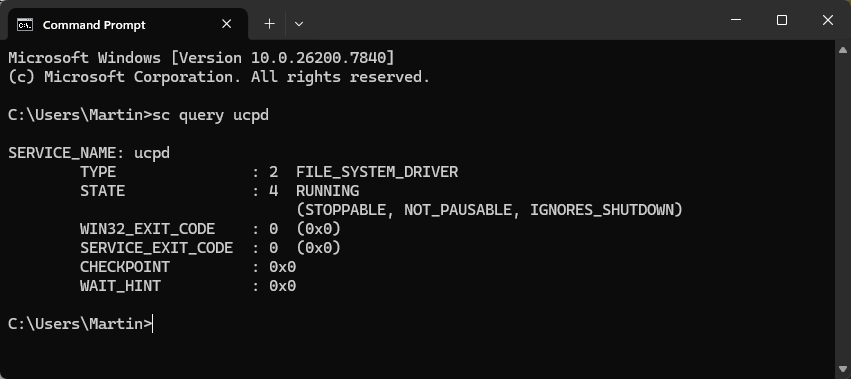
Type sc query ucpd.
If you see running next to state, then you have confirmation that the service is active.
Can you do something about it? (Should you?)
The short answer: yes, you can turn this off, but it is not as straightforward as you might want it to be.
Here are the required steps:
Run sc config UCPD start= disabled from an elevated command prompt window.
Open Task Scheduler, navigate to \Microsoft\Windows\AppxDeploymentClient, and disable the UCDP velocity task so that it does not turn the driver back on.
Reboot the system.
I suggest you check whether UCDP is running using the command prompt again to make sure.
Should you disable the feature? My advice: if you did not notice any issues so far, you might not need to disable it. If you have run into problems recently running scripts or apps, then you could consider it, especially if you run them regularly.
Keep in mind though that this is also blocking malicious scripts and apps from making those changes.
When Windows 11 launched in 2021, it was defined as much by what was missing as by what was new, with a redesign that inexplicably stripped away the deep customization options power users had relied on for decades.
Microsoft locked and limited the taskbar in Windows 11 to the bottom of the screen. A big downgrade to how things were on the predecessor Windows 10.
Now, nearly five years after that controversial debut, Microsoft is finally preparing to right that wrong. According to new internal reports, the company is actively developing a fully movable and resizable taskbar that will allow users to dock their start menu to the top, left, or right of the screen once again, with the feature slated to arrive in a major update later in 2026.
Windows Central reports that Microsoft is working on bringing the functionality back, citing sources familiar with Microsoft’s plans.
If that sounds familiar, you may think of Mozilla. The Firefox maker started to bring back features and introduce features that Firefox enthusiasts wanted for years recently.
It could reflect how serious the situation is for Microsoft. Mozilla faces a declining user base, as it tries to juggle a user-first approach with the necessity of having the world’s largest advertising company finance operations.
Microsoft’s situation is different. Windows is still the dominating desktop operating system. Yes, there is Apple with macOS, but it does not really seem to be a focus of the company. Linux is gaining, but recent gains come down to a large degree on Valve’s Steam Deck, which runs Linux.
Still, Microsoft’s bet on AI and the first rush of integrating AI into everything seems to have backfired somewhat. It did not help that features such as Recall were not designed properly and seen as threats by many users instead of useful tools to help them in their day-to-day activities when using Windows.
Whether it is able to regain the trust of Windows users remains to be seen. A very good start would be to deal with the looming Windows 10 end of support situation for home users. Come October 2026, millions of Windows 10 devices that can’t be upgraded to Windows 11 officially won’t get any updates anymore.
Extending this to the three years that corporate customers get would show plenty of good will and would certainly help paint Microsoft’s image in a better light.
If January was the warm-up, February is the sprint.
Microsoft’s second Patch Tuesday of 2026 has arrived with significant urgency, addressing 59 vulnerabilities in total. While the total count is manageable, the severity is high, as it contains six zero-day vulnerabilities that are currently being exploited in the wild.
Here is the breakdown of what you need to know, what to patch first, and what might break.
Key Action Item: Administrators must prioritize workstation patching immediately due to three “one-click” security bypasses (Shell, MSHTML, Word) that allow code execution without user confirmation. Simultaneously, restrict and patch RDP servers to prevent the active SYSTEM-level escalation exploit (CVE-2026-21533).
Important Patches
CVE-2026-21510 — Windows Shell Security Feature Bypass Vulnerability
Security updates and non-security changes. Adds “Cross-Device resume” and MIDI 2.0 support.
Deep Dive: The Critical Vulnerabilities
Microsoft confirmed that six already exploited zero-day vulnerabilities are fixed after installing the cumulative updates. Attackers may exploit the issues on unpatched systems to bypass protections and gain system-level access.
Allows attackers to craft malicious links or shortcut files to bypass Mark of the Web (MotW) and Windows SmartScreen prompts. As a result, malicious payloads may execute on unpatched systems without the usual “Are you sure” security warnings of SmartScreen.
Allows attackers to bypass security prompts using malicious HTML files, if the Internet Explorer engine (MSHTML) is used for rendering. The threat is similar to the Windows Shell issue described above, as it may be used to skip security screens to run malicious code on target systems.
CVE-2026-21514 (Microsoft Word Security Feature Bypass)
The third of the feature bypasses, this exploits an issue in Object Linking & Embedding (OLE) in Microsoft Office. Attackers may use it to run malicious Word documents and sidestep certain protections designed to block the execution of risky external content.
CVE-2026-21519 (Desktop Window Manager Elevation of Privilege)
The vulnerability is a type confusion flaw in the Desktop Windows Manager (DWM). Attackers need basic access for exploitation, but if they have, they may use the flaw to elevate their privileges to SYSTEM level, which allows them to take control of the system.
CVE-2026-21533 (Windows Remote Desktop Services Elevation of Privilege)
Describes an improper privilege management flaw in Remote Desktop Protocol. Exploitation opens another route to SYSTEM privileges on unpatched system. Especially problematic in Enterprise environments, which usually use RDP a lot.
CVE-2026-21525 (Windows Remote Access Connection Manager Denial of Service)
A null pointer dereference issue in the VPN / Dial-up manager. A local attacker, even with low privileges, may use the issue to crash the service repeatedly.
Significant Changes in the February 2026 updates
The Virtual Secure Mode (VSM) restart loop bug is fixed.
Cross-Device resume arrives in Windows 11. When a phone is paired with the Windows system, its recent activities are now displayed in Start. You can continue those. Requires the latest Link to Windows app.
Native MIDI 2.0 support. The new protocol is now supported, which creators and audio engineers may take advantage of.
The Secure Boot change is entering the targeting phase. In this phase, Windows can determine whether the device’s UEFI is compatible with the upcoming certificate rotation. If it is, it will be queued to receive the actual update in the coming months. No user action required.
First Steps: Your Patch Tuesday Strategy
Patch the six zero-day vulnerabilities immediately. Start with user workstations.
If you paused updates in January because of the VSM restart loop bug, deploy this month’s cumulative update to get it fixed.