Chipp.in Tech News and Reviews

Windows, Security & Privacy, Open Source and more

Menu
  • Home
  • Windows
  • Security & Privacy
  • Gaming
  • Guides
  • Windows 11 Book
  • Contact
  • RSS Feed
Menu

Tag: chrome

Chrome

Ecosia latest to make an offer for Chrome, sort-of

Posted on August 22, 2025August 22, 2025 by Martin Brinkmann

Google is battling it out with the United States Department of Justice currently. If things go really bad for Google, the company could be forced to sell its web browser Google Chrome or make other changes to its business.

Plenty of companies announced interest in Google Chrome already. Perplexity made a bid, Yahoo is eying the acquisition, and now it is Ecosia that also made a suggestion, according to TechCrunch.

Ecosia is a non-profit organization that is probably best known for its search engine. It is free to use and will spend its earnings on planting trees.

Unlike Perplexity, which bid $34.5 billion in cash, Ecosia is suggesting that it is getting control of Google Chrome for free. Google would retain ownership and the rights to Chrome under the proposal. Google Search would remain the standard search engine and Google would keep all intellectual properties. Ecosia would gain operational control of Chrome and development of the browser in that time.

The non-profit suggests a revenue split furthermore, with 40% of the earnings going to Google. The remaining 60% would be spend on climate projects that align with Ecosia’s general mission.

While Ecosia’s proposal may be a long shot, it would ensure that Google retains all rights and gets constant revenue from the browser.

However, whether Google will indeed be forced to sell Chrome or split it in some way from the company remains to be seen. Until then, it seems highly unlikely that Google will react to any of the offers made or comment on the offers publicly.

Chrome PlayReady DRM

Google Chrome is getting PlayReady DRM support in Windows 11

Posted on July 24, 2025July 24, 2025 by Martin Brinkmann

Most web browsers support some form of digital rights management (DRM), which is used to play DRM-protected content on the Internet. Services like Netflix, Disney+, and most paid ones use DRM,

The functionality provided by a service may depend on the DRM technology that is supported by the browser. Microsoft’s PlayReady DRM, for example, supports 4K playback at Netflix and other popular streaming services.

Google’s PlayReady DRM, on the other hand, does not. That’s probably the main reason why Google is working on adding support for PlayReady DRM to its Chrome web browser. With it, Chrome users can play up to 4K video streams at services such as Netflix or Disney+.

It may be a welcome addition for users who watch streaming services in the browser, use Windows 11 and have the device connected to a display that supports the higher resolution.

Good news is that you may enable the new feature already, provided that you run the latest stable version of the browser, Chrome 138.

Here is how you do it:

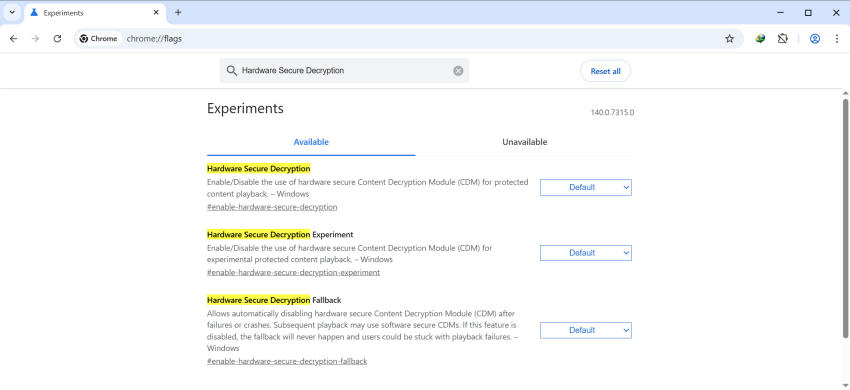
  • Load chrome://flags/#enable-hardware-secure-decryption in the Chrome address bar.
  • Set the flag to Enabled.
  • Restart Google Chrome.

The feature should be supported after the restart. Note that this is still in testing and that you may run into issues after enabling the feature. If you do, try disabling the flag again to resolve those issues. You could also disable it manually, if you do not want to make use of it.

This seems to be coming to Chromium-based browsers in general. If you use a different flavor of Chromium, you may also be getting this new feature, provided that the change is introduced.

Chrome

Security researchers discovered malicious Chrome extensions with more than 2.3 million combined installs

Posted on July 8, 2025July 8, 2025 by Martin Brinkmann

Browser extensions can be very useful. They may help you block ads and other unwanted content, download content from websites, enhance online services, or introduce AI features that you really want to use in the browser.

However, reports about malicious extensions for Google Chrome, and thus all other Chromium-based browsers, appear online in regular intervals. Security is not perfect and users may fall pray to malicious extensions not only on third-party sites but also when they browse the Chrome Web Store.

Security researchers at Koi Security discovered a coordinated malware campaign of 18 extensions for Google Chrome, Microsoft Edge, and other Chromium-based browsers that had over 2.3 million users.

The extensions, among them Color Picker, Eyedropper — Geco colorpick, Free Weather Forecast, or Unlock TikTok, were fully functional according to the developers. These were not “thrown together in a weekend” and obiously scam, but “carefully crafted trojan horses”.

Color Picker, for example, provided color picking functionality. It must have done an okay-job at that, as it had a rating of 4.2 of 5 on the Chrome Web Store, over 800 ratings, and more than 100,000 users.

Interestingly enough, several of the extensions were listed as “featured” on the store, which meant that Google promoted them to users who visited the Store. It is very likely that this gave the featured extensions a significant boost, more eyes on them, more downloads.

A Reddit developer observed an increase of impressions of almost 300 percent after the extension got the coveted featured badge on the Chrome Web Store. While the percentage may vary, it is without a doubt pushing installs.

Browser Hijacking

The extensions provide users with functionality that they claim, but they also run malicious tasks in the background according to Koi Security.

The malware monitors every page you visit, submits it to a remote server along with your unique tracking ID, and may receive redirect URLs from the server.

The malware group introduced the malicious code sometime after the extensions were launched on the Chrome Web Store. The fact that browser extensions are designed to update automatically most of the time helped them. Users did not have to click on anything or fall pray to a sophisticated phishing or social engineering attack to get the malware on their devices.

All they did in the beginning was install a perfectly harmless and working extension for the browser. The malware came later.

Koi Security reported the malware extensions to Google. At the time of writing, some are still available on the Store.

Here are the names and unique IDs, so that you can check them against the installed extensions:

Chrome:

kgmeffmlnkfnjpgmdndccklfigfhajen — [Emoji keyboard online — copy&past your emoji.]
dpdibkjjgbaadnnjhkmmnenkmbnhpobj — [Free Weather Forecast]
gaiceihehajjahakcglkhmdbbdclbnlf — [Video Speed Controller — Video manager]
mlgbkfnjdmaoldgagamcnommbbnhfnhf — [Unlock Discord — VPN Proxy to Unblock Discord Anywhere]
eckokfcjbjbgjifpcbdmengnabecdakp — [Dark Theme — Dark Reader for Chrome]
mgbhdehiapbjamfgekfpebmhmnmcmemg — [Volume Max — Ultimate Sound Booster]
cbajickflblmpjodnjoldpiicfmecmif — [Unblock TikTok — Seamless Access with One-Click Proxy]
pdbfcnhlobhoahcamoefbfodpmklgmjm — [Unlock YouTube VPN]
eokjikchkppnkdipbiggnmlkahcdkikp — [Color Picker, Eyedropper — Geco colorpick]
ihbiedpeaicgipncdnnkikeehnjiddck — [Weather]

Edge:

jjdajogomggcjifnjgkpghcijgkbcjdi — [Unlock TikTok]
mmcnmppeeghenglmidpmjkaiamcacmgm — [Volume Booster — Increase your sound]
ojdkklpgpacpicaobnhankbalkkgaafp — [Web Sound Equalizer]
lodeighbngipjjedfelnboplhgediclp — [Header Value]
hkjagicdaogfgdifaklcgajmgefjllmd — [Flash Player — games emulator]
gflkbgebojohihfnnplhbdakoipdbpdm — [Youtube Unblocked]
kpilmncnoafddjpnbhepaiilgkdcieaf — [SearchGPT — ChatGPT for Search Engine]
caibdnkmpnjhjdfnomfhijhmebigcelo — [Unlock Discord]

Google fixes another 0-day vulnerability in Chrome, advises to update asap

Posted on July 1, 2025July 1, 2025 by Martin Brinkmann

If you have installed Google Chrome on one of your devices, then you may want to start the browser’s update engine immediately to update it to the latest version.

Google released a new version of Chrome for desktop and Android to fix a 0-day vulnerability in the browser. This one is exploited in the wild, which means that there is a chance that the issue may be exploited when you run older versions of the Google browser.

The official release notes list CVE-2025-6554 as a type confusion issue in V8, the JavaScript engine that Google Chrome uses. A type confusion vulnerability exploits a flaw in software where a program mistakes a specific type of data for another. This can lead to unexpected behavior, which threat actors may exploit in attacks.

Google mentions that the issue was reported by Clément Lecigne of Google’s Threat Analysis Group on June 25th, 2025. Google says that it mitigated the issue a day later by pushing a configuration change to the stable channel of the browser across all platforms.

This suggests that most devices — all that received the configuration change — are protected from attacks targeting the vulnerability. Still, it is recommended to update the browser immediately.

Desktop users, those who run Google Chrome on Windows, Mac, or Linux devices may select Menu > Help > About Google Chrome to do so. Chrome runs a check for updates and will install the new version automatically. Note that a restart of the browser is necessary to complete the process.

Tip: Windows users may also run winget upgrade google.chrome.exe in Terminal to upgrade the browser to the new version without first starting it.

Android users are not so lucky. The update depends on Google Play in that case, and that may take a while. There is no option to speed up the installation of the mobile browser on Android, if installed via Google Play.

Windscribe: Google is blocking our extension update because of “too many privacy features”

Posted on June 30, 2025June 30, 2025 by Martin Brinkmann

Windscribe is a popular VPN solution thanks to its free version, privacy features, and interesting build a plan feature. Windscribe users may install the official extension to integrate the VPN better into Google Chrome and other Chromium-based browsers, and get several privacy features on top.

The extension adds features such as ad blocking, webRTC blocking, cookie-banner hiding, and much more.

This just happened: The developers confirmed on X that Google is blocking the latest extension update from its Chrome Web Store.

The provided screenshot shows that Google claims that the extension does not comply with the “Single Use” policy for Chrome extensions.

Good to know: The Single Purpose Policy requires that extensions focus on one specific function or theme. Google says that this improves the user experience.

The posted screenshot of the Google email shows that Google claims that the “extension is providing multiple unrelated functionalities”, such as “masking physical location”, “circumventing censorship”, and “blocking ads and trackers”.

Google is asking the developers of the extension to modify it, so that it offers a “narrowly-focused single functionality”.

Windscribe appealed Google’s objection to no avail. As it stands, Windscribe is blocked from updating its extension on the Chrome Web Store.

Tip: you can check out the Windscribe extension for Firefox, which does not have any of these issues.

This is not the first time that legitimate popular extensions have issues with the update process on the Chrome Web Store. Google’s Store is the default location for most Chromium-based browsers when it comes to extensions.

Several browsers, including Brave, do not operate their own extensions store. While some do, Microsoft with Edge or Opera with its Opera Web Browser, the majority relies on extensions from the Chrome Web Store. Even the two mentioned browsers have limited extensions listed in their respective stores.

As for Windscribe, it will be interesting to see how this works out for the company. Usually, public attention is required to get Google to look deeper into the matter and change its stance on a violation.

Use Split View in Chrome to view two websites side-by-side

Posted on June 25, 2025June 25, 2025 by Martin Brinkmann

Split View is quite the handy option. Supported by many browsers, such as Vivaldi or Brave, for some time, it allows you to display two websites next to each other in a single tab in the browser.

Quite handy for comparison, playing a game or watching a YouTube video, while doing something else.

It took a while, but Google is now offering Split View functionality in the desktop version of its Chrome web browser as well.

As is the case with features these days, they are rolled out gradually. This means that while your neighbor may have access to a feature already, that you have to wait until the mighty overlords over at Google decide that it is your time.

However, you can enable this feature in the experimental options right away, if you want to.

Split View in Chrome

Here is how that is done:

  1. Load chrome://flags/#side-by-side in the Chrome address bar.
  2. Change the value of Split View to Enabled.
  3. Restart the browser.

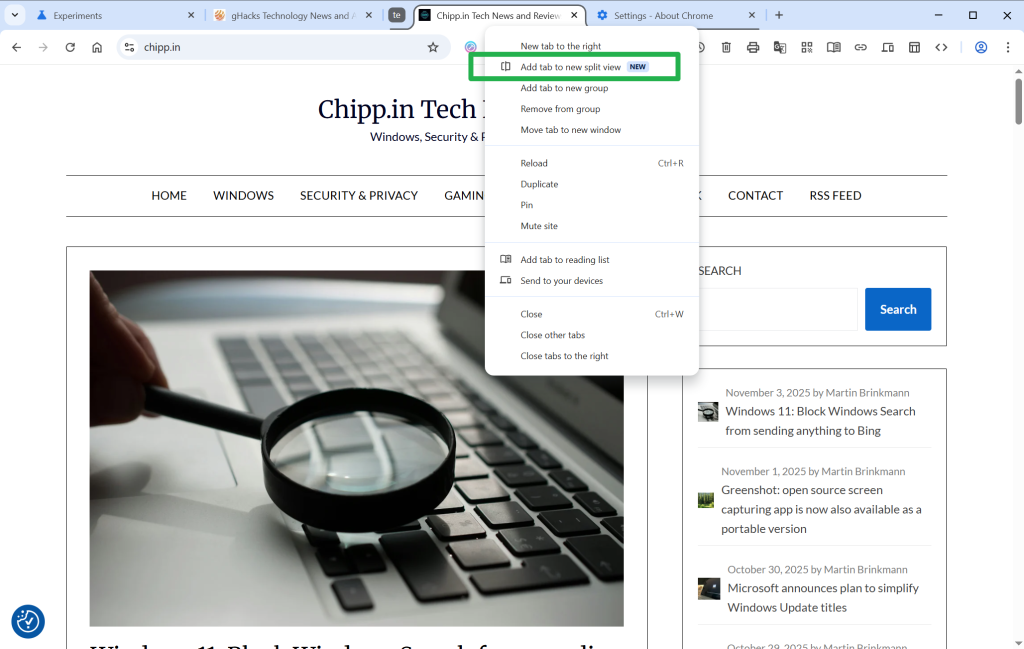
You should see the new Split View option when you right-click on an open tab in the browser after the restart.

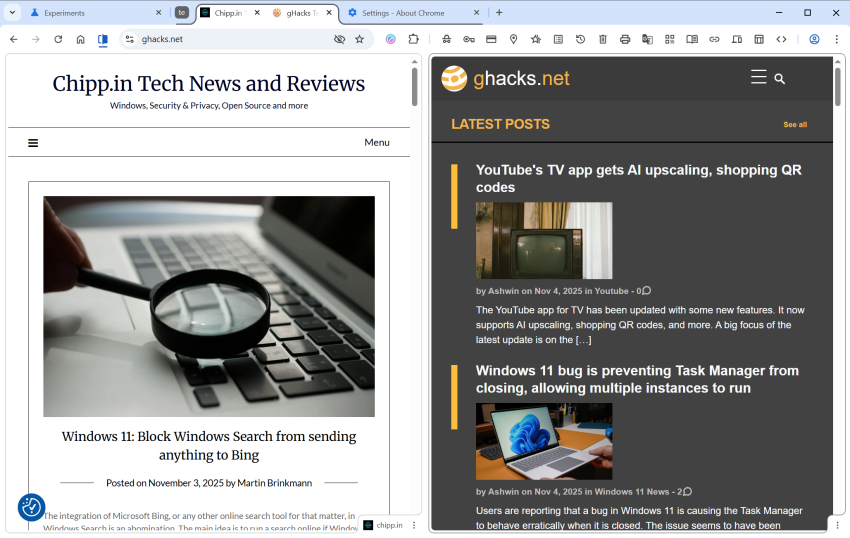
The selected tab and the next tab will be displayed next to each other. Google Chrome displays both titles in a single tab and you can switch between them easily. Doing so displays the address of the active website, which you can change to load a different site.

Google Chrome Split View example

You can also right-click on links to get an open in Split View option.

Note that Chrome does not retain the Split View when you restart the browser. It displays both websites in separate tabs in that case.

All in all, it is a handy feature, especially on smaller screens that do not have enough room for displaying two browser windows side-by-side.

Now You: does your favorite browser support Split View? If so, do you use that mode at all? Feel free to leave a comment down below.

Chrome

Windows 11 blocking Google Chrome? A security feature may be responsible

Posted on June 21, 2025June 21, 2025 by Martin Brinkmann

Reports about problems to run Google Chrome on Windows started to emerge in early June 2025 on the official Chrome forum. Users claimed that they could not run the Google browser anymore on their Windows devices. Chrome would not start or close itself immediately after start; attempts to fix the issue, e.g., by uninstalling and reinstalling the browser, were unsuccessful reportedly.

The issue affects Chrome on Windows 10 and Windows 11 devices according to the reports. While Microsoft has not published an official response to the claims yet, Google did.

A Google community manager confirmed the issue on the official support forum. According to the notice, Google’s support team investigated the issue and discovered that Microsoft Family Safety was responsible for the unintended behavior.

Microsoft Family Safety is a parental control software. Chrome may not start if the child safety software is enabled on the device.

Google provided a suggestion on resolving the issue. The company said that unblocking Chrome in Microsoft Family Safety would resolve it and allow affected users to run the browser again on the Windows machine.

Here is how that is done:

  1. Open the Microsoft Family Safety website, or the mobile app.
  2. Select the affected child.
  3. Go to Windows tabs > Apps & Games.
  4. Unblock Chrome there.

Chrome should run again on the Windows devices after the changes have been made. Note that a parent or legal guardian needs to make the change, as minors do not have access to the administrative options.

Microsoft did provide the same solution to Windows users who reported the issue to the company’s support team.

It is unclear why the parental controls software started to block Google Chrome for some Windows users. Microsoft has not confirmed the issue officially. It is likely caused by a false positive or a bug, one that has the pleasant side-effect of pushing Chrome users to other browsers, for instance Microsoft’s own, Microsoft Edge.

Google fixes a 0-day exploit in its Chrome browser that is exploited in the wild

Posted on June 3, 2025June 3, 2025 by Martin Brinkmann

Google released a new security update for its Chrome web browser that fixes three security issues, including one that is exploited in the wild.

The security issue affects the desktop versions of Google Chrome and the Android version. Desktop users may select Menu > Help > About Google Chrome to install the security update immediately. Google says that it may take days or even weeks before updates may be installed automatically on systems running Google Chrome.

Google reveals basic information about two of the three vulnerabilities. The vulnerability that is exploited in the wild is CVE-2025-5419. It is an out of bounds read and write vulnerability in Chrome’s JavaScript engine that is rated high.

Google reveals that it mitigated the issue on May 28th already. It released a configuration change on the day that it “pushed out to Stable across all Chrome platforms”. Many systems running Chrome should have received the update on that day or the following days already.

Google confirmed that the security issue is exploited in the wild, but did not reveal additional information at the time. The scope of the attack and the attack vector are unknown because of this. Google limits access to security information, including information about patched security issues, to avoid giving malware groups and developers additional hints about the issue.

Chrome users may display the current version of the web browser by loading chrome://settings/help on desktop systems. Google displays on the page if Chrome is up to date.

Chrome 137 Security update

The following versions should be displayed after installation of the update.

  • Chrome for Windows or Mac: 137.0.7151.68 or 137.0.7151.69
  • Chrome for Linux: 137.0.7151.68
  • Chrome for Android: 137.0.7151.72

Android users can’t speed up the installation of the update.

Now You: do you use Chrome or have the browser installed? Feel free to leave a comment down below.

Gemini Google Chrome

Gemini in Chrome: Google integrates AI directly into the browser

Posted on May 21, 2025May 21, 2025 by Martin Brinkmann

Google announced Gemini in Chrome yesterday. The integration of the AI into Google’s browser is the next step in Google’s masterplan to spice up its products using artificial intelligence.

Chrome users in the United States who are subscribed to Google AI Pro or the new Google AI Ultra plan, will be the first to gain access to the AI.

The initial version closes the gap to other browsers that use AI already to summarize webpages for users or allow users to ask questions about the content of a website.

Gemini for Chrome will do the same initially. You activate the AI tool with a click on its icon in Chrome. From there, you can ask questions or give it instructions. The first iteration is limited to the active webpage. You can, for instance, ask it to explain certain concepts to you or provide a summary of the key points.

Google included the following examples in a demo video:

  • Make a regular recipe gluten-free.
  • Helping a student understand the differences between chemical bonds.
  • Adding a reminder to calendar.
  • Asking Gemini which plant is best from a selection of plants in open tabs.
  • Asking Gemini which poses one should do for a racing podium.

Note: it is a good idea to verify information generated by AI to make sure it is accurate.

Gemini in Chrome: goal is full access to all tabs and agentic functionality

Google is working on improving this base functionality. The company plans to give Gemini access to all open tabs. This enables more features, including the ability to compare different webpages or products or taking everything into account when generating a response.

Gemini will also be able to open websites on behalf of the user, according to Google’s announcement. Google did not explain why users would want the AI to open webpages on their behalf.

Closing Words

Like it or not, AI is going to be integrated into the majority of web browsers. Not everyone will see the use of this, but this will surely expose AI tools to more users. This could change how users use web browsers, searches, and the Web significantly.

Now You: do you use AI features or tools in your browser of choice already? Let me know in the comments below.

Google Search

Chrome 136 update patches security issue that is exploited in the wild

Posted on May 15, 2025May 15, 2025 by Martin Brinkmann

Google released a security update for its Chrome web browser for the desktop and Android that fixes several security issue. One of the issues is rated high and already exploited on the Internet according to Google.

The details:

  • The update is available for Chrome on Windows, Linux, Mac, and Android.
  • It includes fixes for four security issues in total.
  • The update is a point update for Chrome 136.

The security update changes the version of the Chrome web browser to the following versions:

  • Windows and Mac: 136.0.7103.113 or 136.0.7103.114
  • Linux: 136.0.7103.113
  • Android: 136.0.7103.125

Google lists just two of the fixed security issues on the official Chrome Releases blog. One of them is CVE-2025-4664, which is rated high and described as a “insufficient policy enforcement in loader” security issue.

Malicious users may exploit the issue to “leak cross-origin data via a crafted HTML page”. Google notes that it is aware of exploits in the wild, but does not provide additional information on the scope of the attacks.

Chrome users are encouraged to update their browser immediately to protect their data against potential attacks targetting the vulnerability.

Desktop users may select Menu > Help > About Google Chrome to run a check for updates. This should pick up the latest version and install it on the device. Android users can’t speed up the installation of the update unfortunately.

It is possible that other Chromium-based browsers are also affected by the issue. Expect security updates for these browsers in the coming hours and days as well.

  • Previous
  • 1
  • 2
  • 3
  • 4
  • 5
  • 6
  • Next

Support This Site

If you like what I do please support me!

Any tip is appreciated. Thanks!
  • April 16, 2026 by Martin Brinkmann Windows 11 Context Menu Manager: remove items with a click
  • April 15, 2026 by Martin Brinkmann One Exploited Zero-Day and Record Numbers: The April 2026 Windows Patch Tuesday Breakdown
  • April 14, 2026 by Martin Brinkmann Brave is getting Container support and the feature has made a big jump recently
  • April 13, 2026 by Martin Brinkmann A More User-Friendly Way to Pause Windows 11 Updates is Coming
  • April 11, 2026 by Martin Brinkmann Microsoft is Radically Changing the Windows Insider Program

About

We talk, write and dream about Technology 24/7 here at Chipp.in. The site, created by Martin Brinkmann in 2023, focuses on well-researched tech news, reviews, guides, help and more.

Legal Notice

Our commitment

Many websites write about tech, but chipp.in is special in several ways. All of our guides are unique, and we will never just rehash news that you find elsewhere.

Read the About page for additional information on the site and its founder and author.

Support Us

We don't run advertisement on this site that tracks users. If you see ads, they are static links. Ads, including affiliate links, never affect our writing on this site.

Here is a link to our privacy policy

©2026 Chipp.in Tech News and Reviews