Most web browsers display warning messages when you attempt to load a website that does not use HTTPS, the secure version of the HTTP protocol, or when a site has misconfigured HTTPS.
Starting in October 2026, Chrome will make HTTPS the default for all connections in the browser. Means, whenever you visit a site that does not use it or has configuration issues, you will get a prompt.
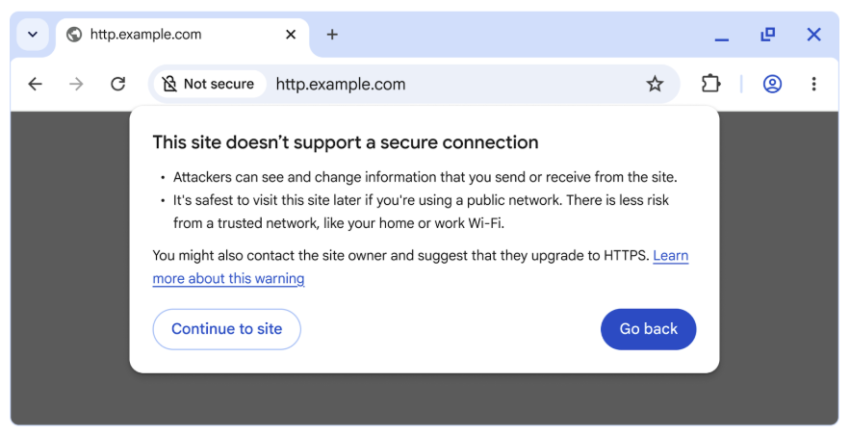
“This site doesn’t support a secure connection” is displayed in that case. The prompt includes quite a bit of text explaining why that is bad. However, Chrome displays two options to the user in that case.
The first, “go back” returns to the previous site or the new tab page, depending where you started your request. The second, “continue to site” still allows you to visit the site in question.
The planned change makes the optional feature “always use secure connections” mandatory once it lands next year. Since the feature is available already, albeit as an optional preference, it is possible to enable it right away to see what it does. Ideal for testing purposes.
Here is how you enable it (or disable it again):

- Load chrome://settings/security in the browser’s address bar. You can also select Menu > Settings > Privacy and Security manually, if you prefer that.
- Scroll down to the Secure connections section.
- Toggle “Always use secure connections” here to enable or disable the feature.
When you enforce HTTPS, you will receive security prompts whenever something is loaded in Chrome that does not use HTTPS.
Google says that non-HTTPS traffic has dropped significantly, but that HTTPS has plateaued at about 95% of all sites. The main driver for insecure traffic, according to Google, is navigations to private sites that are insecure. While less risky than navigations to insecure public sites, attackers may exploit them either way.
Google predicts that the actual warning volume in Chrome will get lower once it lands the change in the browser and sites start moving towards HTTPS even more than before.
It will certainly make it more difficult for users to access sites that do not use HTTPS and do not plan on migrating, for whatever reason.
Now You: have you visited sites that do not use HTTPS in the recent past, or have all of your sites that you visit switched to HTTPS already? Feel free to leave a comment down below.
I’ve had for some time maybe 10% of my bookmarks which where unsecured (http://)
At the time I used a Firefox extension named ‘httpz’ which would try to swap http:// to https: and if the site didn’t load, would switch back to http://, a bit like Firefox’s https only/first, but far better conceived.
Later on I decided to simply remove the remaining perhaps less than 1-2% of http:// bookmarks still in the browser and remove the ‘httpz’ extension.
Non secured urls are vanishing (I think less than 10%) but some are stubborn, not to mention pages and even search engines providing unsecured links to pages which are nevertheless secured. Some of such pages will redirect the quest to https:// automatically, others not.
It happens as well that a page forces http:// before redirecting to https:// …
For these reasons I believe it is wise to have whatever tool that handles https:/ at least first.
I’ve replaced the httpz extension with a redirecting extension not specifically dedicated to handling http but which does the job perfectly; ‘URLRedirector’.
I’ve instructed URLRedirector to redirect all http:// urls to https:// …. except for images & media.
If curious, interested, screenshot of the setting: [https://img.justpaste.me/i/20251029/vE9c1/1.png]
I’ve added very few, less than 10 exceptions for sites I really need and which are still unsecured.
Generally speaking many web radios still provide unsecured links; also a few Websites which seem to have the same layout as 30 years ago, apparently no longer managed, to be approached with caution. If you wish or need to find unsecured pages for testing, ask your search engine to look for ‘ayanamsa’ and you’ll discover some old, very old unsecured pages …
I “turn back”, I’m not risking it.
Just because its https only means the site you connect to is secure with a certifcate. The connection can be seen by third-parties such as your ISP, the browser maker, and most search engine you used to find the site. The actual traffic may or may not be seen. Due to other telemtry used by those same entities.