Chipp.in Tech News and Reviews

Windows, Security & Privacy, Open Source and more

Menu
  • Home
  • Windows
  • Security & Privacy
  • Gaming
  • Guides
  • Windows 11 Book
  • Contact
  • RSS Feed
Menu
Amazon

Amazon may send you ads via WhatsApp: here is how to turn that off

Posted on November 26, 2025November 26, 2025 by Martin Brinkmann

WhatsApp is one of the most popular messaging apps out there. One reason why more and more businesses try to establish channels on WhatsApp. Most to reach customers and sell them something.

Amazon is no exception to that. Maybe you have noticed already that you are getting ads from Amazon in WhatsApp.

Even if not, you may want to make sure that you won’t in the future. Good news is that there is an option to turn that off. It appears, however, that the feature is turned on by default. I can’t remember allowing Amazon to use WhatsApp for communication.

Here is what you need to do:

  1. Load the Notifications website on the Amazon website of your choosing: https://www.amazon.com/preferences/cpc/homepage
  2. Check the “Turn on WhatsApp” or “Turn off WhatsApp” button on the page.
  3. Select “Turn off WhatsApp” to disable communication.

Note that the page may look different depending on your locale. In Germany, it was called Communication Preferences Center and it looked different from the page opened on Amazon.com.

There, you an entire section dedicated to WhatsApp Preferences.
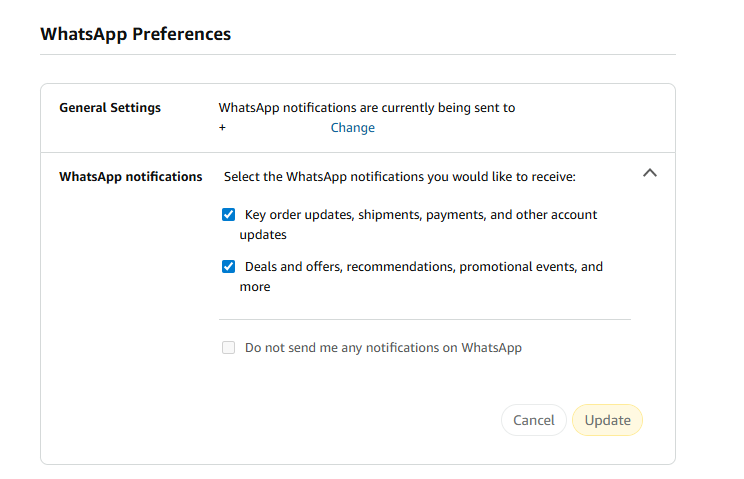
As you can see on the screenshot. the account was set up to receive WhatsApp notifications.

To change that here, you have to uncheck one or both of the options listed on the page:

  • Key order updates, shipments, payments, and other account updates.
  • Deals and offers, recommendations, promotional events, and more.

The second option sends ads to your WhatsApp account, while the first seems to be limited to Amazon notifications about orders and such. However, if you disable both, you can check “Do not send me any notifications on WhatsApp.

Don’t forget to hit the update button to save the change.

Now You: did you see the WhatsApp preferences when checking your Amazon account? Were the settings enabled? Feel free to leave a comment down below.

Tags: amazon
Category: News

Post navigation

← How Windows 11’s Point-in-time Restore feature differs from System Restore
Dell: 500 million Windows 10 PCs can’t upgrade to Windows 11 →

2 thoughts on “Amazon may send you ads via WhatsApp: here is how to turn that off”

  1. Bobo says:
    November 27, 2025 at 9:18 am

    Isn’t this useless for those of us who do not save any cookies ever?

    Reply
    1. Martin Brinkmann says:
      November 27, 2025 at 12:16 pm

      I do not think that this is saved as a cookie, as it should work for the entire Amazon account, regardless of device. Did not research, may be wrong though.

      Reply

Leave a Reply Cancel reply

Your email address will not be published. Required fields are marked *

Support This Site

If you like what I do please support me!

Any tip is appreciated. Thanks!
  • March 2, 2026 by Martin Brinkmann Don't Bother with Windows 11's new Speedtest feature
  • February 27, 2026 by Martin Brinkmann Warning! That laptop on Amazon? It comes with temporary storage
  • February 26, 2026 by Martin Brinkmann "If your printer works today, it will continue to work": Microsoft corrects previous announcement
  • February 25, 2026 by Martin Brinkmann YouTube Premium Lite subscribers get background playback and downloads with a big "but"
  • February 24, 2026 by Martin Brinkmann Firefox 148.0 is out with its AI kill switch and support for Windows 7 and 8.1 comes to an end

About

We talk, write and dream about Technology 24/7 here at Chipp.in. The site, created by Martin Brinkmann in 2023, focuses on well-researched tech news, reviews, guides, help and more.

Legal Notice

Our commitment

Many websites write about tech, but chipp.in is special in several ways. All of our guides are unique, and we will never just rehash news that you find elsewhere.

Read the About page for additional information on the site and its founder and author.

Support Us

We don't run advertisement on this site that tracks users. If you see ads, they are static links. Ads, including affiliate links, never affect our writing on this site.

Here is a link to our privacy policy

©2026 Chipp.in Tech News and Reviews