Chipp.in Tech News and Reviews

Windows, Security & Privacy, Open Source and more

Menu
  • Home
  • Windows
  • Security & Privacy
  • Gaming
  • Guides
  • Windows 11 Book
  • Contact
  • RSS Feed
Menu

Category: Security & Privacy

KeePass 2.59 Password Manager supports Arm64 on Windows now

Posted on July 10, 2025July 10, 2025 by Martin Brinkmann

KeePass is one password manager that I’m using regularly on Windows machines for password-related activities. It is a well-designed app that runs locally, but you can extend it with all kinds of plugins and install compatible programs and apps for other operating systems.

A new version of the password manager is now available. KeePass 2.59 is the second release of the year 2025 and it introduces quite a few welcome improvements and changes. First and foremost, if you run Windows on an ARM64 device, like the latest Microsoft Surface Pro devices, then you may install and use the password manager on that device now as well. KeePass 2.59 is therefore the first version of the password manager that supports all architectures that Windows supports.
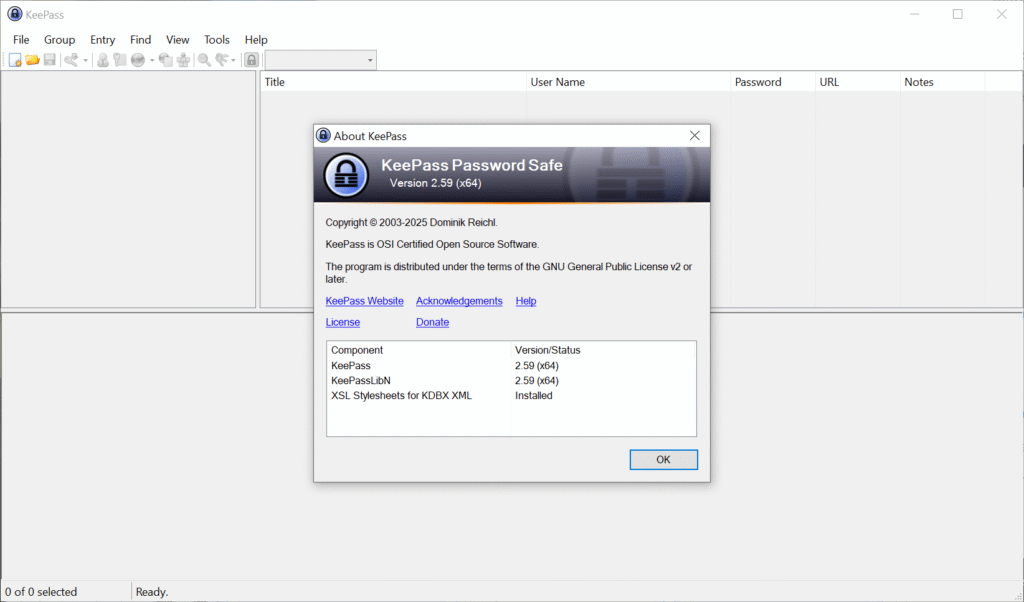
KeePass 2.59 interface

KeePass 2.59 introduces native implementations of AES-KDF and Argon2 on Windows systems, promising a breathtaking 30-50 times speed increase on systems on which the native support library was not available or disabled. Encrypting and decrypting databases that use the AES algorithm should now also be faster.

Another new feature is a new import and export module for the KeePass KDB-database on Arm64 and Unix-like systems. You find the new option under File > Export in the main KeePass interface. Exports support the default user name and database color now. The root group is now also exported, according to the release notes.

Other than that, support for opening URLs from within KeePass now supports the private modes of the browsers Maxton, SeaMonkey and Yandex, next to the already supported browsers. Also new is that some links are now clickable on Unix-like systems, which may improve handling of them, as you no longer have to use copy and paste for that anymore.

You can check out the remaining changes on the official website. They include several improvements and optimizations for the most part.

Existing users may run the installer to update KeePass to the latest version. A new KeePass 2.59 portable edition is also available for those who prefer it.

Now You: which password manager do you use and why? Feel free to share your thoughts on it in the comment section below.


Chrome

Security researchers discovered malicious Chrome extensions with more than 2.3 million combined installs

Posted on July 8, 2025July 8, 2025 by Martin Brinkmann

Browser extensions can be very useful. They may help you block ads and other unwanted content, download content from websites, enhance online services, or introduce AI features that you really want to use in the browser.

However, reports about malicious extensions for Google Chrome, and thus all other Chromium-based browsers, appear online in regular intervals. Security is not perfect and users may fall pray to malicious extensions not only on third-party sites but also when they browse the Chrome Web Store.

Security researchers at Koi Security discovered a coordinated malware campaign of 18 extensions for Google Chrome, Microsoft Edge, and other Chromium-based browsers that had over 2.3 million users.

The extensions, among them Color Picker, Eyedropper — Geco colorpick, Free Weather Forecast, or Unlock TikTok, were fully functional according to the developers. These were not “thrown together in a weekend” and obiously scam, but “carefully crafted trojan horses”.

Color Picker, for example, provided color picking functionality. It must have done an okay-job at that, as it had a rating of 4.2 of 5 on the Chrome Web Store, over 800 ratings, and more than 100,000 users.

Interestingly enough, several of the extensions were listed as “featured” on the store, which meant that Google promoted them to users who visited the Store. It is very likely that this gave the featured extensions a significant boost, more eyes on them, more downloads.

A Reddit developer observed an increase of impressions of almost 300 percent after the extension got the coveted featured badge on the Chrome Web Store. While the percentage may vary, it is without a doubt pushing installs.

Browser Hijacking

The extensions provide users with functionality that they claim, but they also run malicious tasks in the background according to Koi Security.

The malware monitors every page you visit, submits it to a remote server along with your unique tracking ID, and may receive redirect URLs from the server.

The malware group introduced the malicious code sometime after the extensions were launched on the Chrome Web Store. The fact that browser extensions are designed to update automatically most of the time helped them. Users did not have to click on anything or fall pray to a sophisticated phishing or social engineering attack to get the malware on their devices.

All they did in the beginning was install a perfectly harmless and working extension for the browser. The malware came later.

Koi Security reported the malware extensions to Google. At the time of writing, some are still available on the Store.

Here are the names and unique IDs, so that you can check them against the installed extensions:

Chrome:

kgmeffmlnkfnjpgmdndccklfigfhajen — [Emoji keyboard online — copy&past your emoji.]
dpdibkjjgbaadnnjhkmmnenkmbnhpobj — [Free Weather Forecast]
gaiceihehajjahakcglkhmdbbdclbnlf — [Video Speed Controller — Video manager]
mlgbkfnjdmaoldgagamcnommbbnhfnhf — [Unlock Discord — VPN Proxy to Unblock Discord Anywhere]
eckokfcjbjbgjifpcbdmengnabecdakp — [Dark Theme — Dark Reader for Chrome]
mgbhdehiapbjamfgekfpebmhmnmcmemg — [Volume Max — Ultimate Sound Booster]
cbajickflblmpjodnjoldpiicfmecmif — [Unblock TikTok — Seamless Access with One-Click Proxy]
pdbfcnhlobhoahcamoefbfodpmklgmjm — [Unlock YouTube VPN]
eokjikchkppnkdipbiggnmlkahcdkikp — [Color Picker, Eyedropper — Geco colorpick]
ihbiedpeaicgipncdnnkikeehnjiddck — [Weather]

Edge:

jjdajogomggcjifnjgkpghcijgkbcjdi — [Unlock TikTok]
mmcnmppeeghenglmidpmjkaiamcacmgm — [Volume Booster — Increase your sound]
ojdkklpgpacpicaobnhankbalkkgaafp — [Web Sound Equalizer]
lodeighbngipjjedfelnboplhgediclp — [Header Value]
hkjagicdaogfgdifaklcgajmgefjllmd — [Flash Player — games emulator]
gflkbgebojohihfnnplhbdakoipdbpdm — [Youtube Unblocked]
kpilmncnoafddjpnbhepaiilgkdcieaf — [SearchGPT — ChatGPT for Search Engine]
caibdnkmpnjhjdfnomfhijhmebigcelo — [Unlock Discord]

Google fixes another 0-day vulnerability in Chrome, advises to update asap

Posted on July 1, 2025July 1, 2025 by Martin Brinkmann

If you have installed Google Chrome on one of your devices, then you may want to start the browser’s update engine immediately to update it to the latest version.

Google released a new version of Chrome for desktop and Android to fix a 0-day vulnerability in the browser. This one is exploited in the wild, which means that there is a chance that the issue may be exploited when you run older versions of the Google browser.

The official release notes list CVE-2025-6554 as a type confusion issue in V8, the JavaScript engine that Google Chrome uses. A type confusion vulnerability exploits a flaw in software where a program mistakes a specific type of data for another. This can lead to unexpected behavior, which threat actors may exploit in attacks.

Google mentions that the issue was reported by Clément Lecigne of Google’s Threat Analysis Group on June 25th, 2025. Google says that it mitigated the issue a day later by pushing a configuration change to the stable channel of the browser across all platforms.

This suggests that most devices — all that received the configuration change — are protected from attacks targeting the vulnerability. Still, it is recommended to update the browser immediately.

Desktop users, those who run Google Chrome on Windows, Mac, or Linux devices may select Menu > Help > About Google Chrome to do so. Chrome runs a check for updates and will install the new version automatically. Note that a restart of the browser is necessary to complete the process.

Tip: Windows users may also run winget upgrade google.chrome.exe in Terminal to upgrade the browser to the new version without first starting it.

Android users are not so lucky. The update depends on Google Play in that case, and that may take a while. There is no option to speed up the installation of the mobile browser on Android, if installed via Google Play.

Windscribe: Google is blocking our extension update because of “too many privacy features”

Posted on June 30, 2025June 30, 2025 by Martin Brinkmann

Windscribe is a popular VPN solution thanks to its free version, privacy features, and interesting build a plan feature. Windscribe users may install the official extension to integrate the VPN better into Google Chrome and other Chromium-based browsers, and get several privacy features on top.

The extension adds features such as ad blocking, webRTC blocking, cookie-banner hiding, and much more.

This just happened: The developers confirmed on X that Google is blocking the latest extension update from its Chrome Web Store.

The provided screenshot shows that Google claims that the extension does not comply with the “Single Use” policy for Chrome extensions.

Good to know: The Single Purpose Policy requires that extensions focus on one specific function or theme. Google says that this improves the user experience.

The posted screenshot of the Google email shows that Google claims that the “extension is providing multiple unrelated functionalities”, such as “masking physical location”, “circumventing censorship”, and “blocking ads and trackers”.

Google is asking the developers of the extension to modify it, so that it offers a “narrowly-focused single functionality”.

Windscribe appealed Google’s objection to no avail. As it stands, Windscribe is blocked from updating its extension on the Chrome Web Store.

Tip: you can check out the Windscribe extension for Firefox, which does not have any of these issues.

This is not the first time that legitimate popular extensions have issues with the update process on the Chrome Web Store. Google’s Store is the default location for most Chromium-based browsers when it comes to extensions.

Several browsers, including Brave, do not operate their own extensions store. While some do, Microsoft with Edge or Opera with its Opera Web Browser, the majority relies on extensions from the Chrome Web Store. Even the two mentioned browsers have limited extensions listed in their respective stores.

As for Windscribe, it will be interesting to see how this works out for the company. Usually, public attention is required to get Google to look deeper into the matter and change its stance on a violation.

Firefox

Mozilla should test Firefox with best-in-class ad blocker and privacy

Posted on June 24, 2025June 24, 2025 by Martin Brinkmann

The future looks quite grim for Mozilla and its Firefox web browser. The average monthly user count continues to drop while the browser of its ex-CEO is reporting new heights regularly. Then there is the looming death of Google and its impact on Mozilla’s finances to consider.

Mozilla’s reaction came as a surprise. It started to add features that users requested for years. Firefox supports vertical tabs now, tab groups, and a lot more.

It also took a look at its assets to figure out what to keep and what to terminate. This resulted in the termination of recent acquisitions, such as Fakespot, and long-standing staples, such as Pocket.

While these help free up resources and reduce expenses, it is likely that they won’t prevent the Mozilla-ship from capsizing, if things take a turn for the worse.

What to do? Here is an idea!

Why is Brave gaining users and Firefox losing them? You could say that it is all because of the different underlying platforms that the browsers use. Brave, after all, uses the same core as Google Chrome. Firefox uses Mozilla’s own engine. It has advantages, as it gives Mozilla full control over the engine. However, all development weight is on Mozilla whereas Brave and others reap what (mostly) Google developers and others work on.

It would be shortsighted to focus solely on this. Brave includes a content blocker by default. It also includes lots of privacy enhancements. While some criticize the browser for its integration of crypto-stuff, the combination of Chromium with its integrated content blocker works really well most of the time.

Firefox users can install uBlock Origin or another content blocker, but they have to do so manually.

Why is not Mozilla integrating its own content blocker or establishing a partnership with Raymond Hill, the creator of uBlock Origin? Mozilla never revealed the answer, but the most likely answer is because of its search deal with Google.

An ad blocker would prevent Google ads from showing up. Google would rightfully so want to pay less to Mozilla, as it would not make enough revenue anymore to justify the price that it pays Mozilla each year.

But what about running a test? Create a special version of Firefox. Install an ad-blocker and enable it by default. Distribute it, maybe ask for donations in the same way that the Thunderbird team is asking for them.

See how it goes. Just make sure that privacy is excellent for users, that they won’t see any sponsored content or other paid content in Firefox, and that their privacy is always valued more than anything else.

It might work. Users might pick Firefox as it would keep them safe and private while using the browser. It might not work, but Mozilla would at least tried something.

Now You: do you use Firefox or another browser? Let me know in the comments below.

Reddit

Reddit is rolling out options to hide posts and comments on your profile page

Posted on June 10, 2025June 10, 2025 by Martin Brinkmann

Reddit users will soon have an option to keep their interactions on the social site private. The company is rolling out a new feature that enables users to hide posts and comments that they made on the site on their profile page.

Currently, all posts and comments show up when the page is opened. Anyone who opens the link to the profile, which always begins with https://www.reddit.com/user/ followed by the username, sees all posts and comments by that user in chronological order.

Some content on the page, including saved posts on Reddit or votes, are kept private.

Reddit users have the following options going forward:

  • Hide all posts and comments.
  • Hide posts and comments selectively per community.
  • Show all posts and comments (default).

Furthermore, there will be additional options. Users who interact with NSFW (Not Safe For Work) content on Reddit may block this content from showing up in their profile directly. Also, the follower count can be hidden as well.

This may look like a small change for Reddit users who do not post to the site. Those who do know that their profiles are in the open and so is their entire post and commenting history.

Giving users an option to lock this down is appreciated, as it blocks potential abuse, e.g., creation of profiles or harassment. It may be especially useful to users who interact with SFW (Safe For Work) and NSFW content on the site, and do not want the SFW crowd to know about their NSFW side, or the other way round.

Now You: do you have a Reddit account? What is your take on the direction the site is heading to since its IPO? Feel free to leave a comment down below.

New AI Tool creates dossiers of users based on YouTube comments

Posted on June 4, 2025June 4, 2025 by Martin Brinkmann

Many sites support comments. You can leave a comment under videos, articles, or in forums to add your take on something, add something that you think is missing, or, most likely, to correct the original author.

Using public comments or posts is not a new invention. In fact, it goes all the way back to the beginning days of the Internet.

Now, with the rise of new AI tools and capabilities, come tools that take this to a new level.

A report by 404 Media (paywalled) offers insights into YouTube-Tools, a new paid service that uses AI to create reports about any commenter on YouTube. The service is available for $20 per month according to the report.

Subscribers may then point the tool to the comment of any YouTuber on the site to order a detailed report about that user. The AI tool analyses the comment and other posts on the site to reveal information about the geographic location, political leanings or spoken languages.

The developer of the tool notes that it has access to a database containing information about 1.4 billion YouTube users and over 20 billion comments. While the total number of comments on YouTube is not public knowledge, YouTube has almost double the number of users according to 404 Media.

Regardless, advancements in AI pave the way for a new breed of tools that will be used for tracking and the invasion of privacy.

Internet users should be careful when they leave comments, messages or posts that are publicly accessible, especially when that comment might reveal something about them that they would not want to be linked back to them.

Google fixes a 0-day exploit in its Chrome browser that is exploited in the wild

Posted on June 3, 2025June 3, 2025 by Martin Brinkmann

Google released a new security update for its Chrome web browser that fixes three security issues, including one that is exploited in the wild.

The security issue affects the desktop versions of Google Chrome and the Android version. Desktop users may select Menu > Help > About Google Chrome to install the security update immediately. Google says that it may take days or even weeks before updates may be installed automatically on systems running Google Chrome.

Google reveals basic information about two of the three vulnerabilities. The vulnerability that is exploited in the wild is CVE-2025-5419. It is an out of bounds read and write vulnerability in Chrome’s JavaScript engine that is rated high.

Google reveals that it mitigated the issue on May 28th already. It released a configuration change on the day that it “pushed out to Stable across all Chrome platforms”. Many systems running Chrome should have received the update on that day or the following days already.

Google confirmed that the security issue is exploited in the wild, but did not reveal additional information at the time. The scope of the attack and the attack vector are unknown because of this. Google limits access to security information, including information about patched security issues, to avoid giving malware groups and developers additional hints about the issue.

Chrome users may display the current version of the web browser by loading chrome://settings/help on desktop systems. Google displays on the page if Chrome is up to date.

Chrome 137 Security update

The following versions should be displayed after installation of the update.

  • Chrome for Windows or Mac: 137.0.7151.68 or 137.0.7151.69
  • Chrome for Linux: 137.0.7151.68
  • Chrome for Android: 137.0.7151.72

Android users can’t speed up the installation of the update.

Now You: do you use Chrome or have the browser installed? Feel free to leave a comment down below.

Google Search

Chrome 136 update patches security issue that is exploited in the wild

Posted on May 15, 2025May 15, 2025 by Martin Brinkmann

Google released a security update for its Chrome web browser for the desktop and Android that fixes several security issue. One of the issues is rated high and already exploited on the Internet according to Google.

The details:

  • The update is available for Chrome on Windows, Linux, Mac, and Android.
  • It includes fixes for four security issues in total.
  • The update is a point update for Chrome 136.

The security update changes the version of the Chrome web browser to the following versions:

  • Windows and Mac: 136.0.7103.113 or 136.0.7103.114
  • Linux: 136.0.7103.113
  • Android: 136.0.7103.125

Google lists just two of the fixed security issues on the official Chrome Releases blog. One of them is CVE-2025-4664, which is rated high and described as a “insufficient policy enforcement in loader” security issue.

Malicious users may exploit the issue to “leak cross-origin data via a crafted HTML page”. Google notes that it is aware of exploits in the wild, but does not provide additional information on the scope of the attacks.

Chrome users are encouraged to update their browser immediately to protect their data against potential attacks targetting the vulnerability.

Desktop users may select Menu > Help > About Google Chrome to run a check for updates. This should pick up the latest version and install it on the device. Android users can’t speed up the installation of the update unfortunately.

It is possible that other Chromium-based browsers are also affected by the issue. Expect security updates for these browsers in the coming hours and days as well.

Malicious Captchas are on the rise

Posted on May 3, 2025May 3, 2025 by Martin Brinkmann

Captchas can be quite annoying, especially if your input is not accepted or if they do not work at all. You may now add malicious captchas to the list of annoyances.

Proton Mail published one example on X recently.

Fake CAPTCHA attacks are on the rise, causing many to fall prey to infostealers injecting malware onto their devices.

Here's how it works, and what you can do to stay safe

👇🧵 1/7 pic.twitter.com/gjwIf2YPnl

— Proton Mail (@ProtonMail) May 2, 2025

The malicious captcha tries to convince unsuspecting users to run a command on their Windows machines.

Here is how it works:

  1. The victim lands on a page with the fake captcha, for instance after clicking on a link in an email or chat.
  2. The captcha displays the usual “I’m not a robot” button.
  3. A click or tap on the button copies a PowerShell command to the operating system’s clipboard.
  4. Victim is instructed to use the shortcut Windows-R to open a run box.
  5. Asked to use Ctrl-V to paste the command and to press Enter to execute it.

Doing so downloads malware from a server on the Internet and runs it on the user’s system. This can be infostealers, malicious software that steals personal information, such as logins, financial documents, or photos.

While most, or even all, experienced users may never fall for that, it is almost a given that inexperienced users may. They may have difficulties getting the run box to open or paste the command, but they probably do not suspect foul play.

How to protect yourself

Protection is quite easy.

No legitimate captcha will ever ask you to execute a command on a local system, or to download a file and run it.

That is pretty much all that you need to protect yourself and your data against this type of attack.

Clearly, you may also want to ask yourself whether you trust the site you are on. Even if you conclude that you do, you should not run anything on the local computer when prompted to do so by a captcha.

Now You: how do you handle captchas on the Internet?

  • Previous
  • 1
  • 2
  • 3
  • 4
  • 5
  • 6
  • 7
  • …
  • 12
  • Next

Support This Site

If you like what I do please support me!

Any tip is appreciated. Thanks!
  • March 2, 2026 by Martin Brinkmann Don't Bother with Windows 11's new Speedtest feature
  • February 27, 2026 by Martin Brinkmann Warning! That laptop on Amazon? It comes with temporary storage
  • February 26, 2026 by Martin Brinkmann "If your printer works today, it will continue to work": Microsoft corrects previous announcement
  • February 25, 2026 by Martin Brinkmann YouTube Premium Lite subscribers get background playback and downloads with a big "but"
  • February 24, 2026 by Martin Brinkmann Firefox 148.0 is out with its AI kill switch and support for Windows 7 and 8.1 comes to an end

About

We talk, write and dream about Technology 24/7 here at Chipp.in. The site, created by Martin Brinkmann in 2023, focuses on well-researched tech news, reviews, guides, help and more.

Legal Notice

Our commitment

Many websites write about tech, but chipp.in is special in several ways. All of our guides are unique, and we will never just rehash news that you find elsewhere.

Read the About page for additional information on the site and its founder and author.

Support Us

We don't run advertisement on this site that tracks users. If you see ads, they are static links. Ads, including affiliate links, never affect our writing on this site.

Here is a link to our privacy policy

©2026 Chipp.in Tech News and Reviews