Chipp.in Tech News and Reviews

Windows, Security & Privacy, Open Source and more

Menu
  • Home
  • Windows
  • Security & Privacy
  • Gaming
  • Guides
  • Windows 11 Book
  • Contact
  • RSS Feed
Menu

Category: News

Firefox 148.0 is out with its AI kill switch and support for Windows 7 and 8.1 comes to an end

Posted on February 24, 2026February 24, 2026 by Martin Brinkmann

Mozilla has released several updates for its web browser Firefox, including version 148.0 Stable and also updates for the extended support release (ESR) versions. It is a special day, as Mozilla is ending support for older versions of Windows and macOS with the release of Firefox 115.33.0 ESR.

Firefox 148.0: The release highlights

  • The AI kill switch and AI controls make their debut, allowing users to control AI in Firefox.
  • Important security fixes.
  • Improved PDF screen reader support for math formulas.
  • Translation improvements.
  • Telemetry adjustments.

How to download and install Firefox 148

Most unmanaged Firefox installations will be updated automatically to the latest release once it has been released officially. This may take minutes, hours and sometimes even days. You can speed this up by selecting Menu > Settings > Help > About Firefox.

The new AI controls
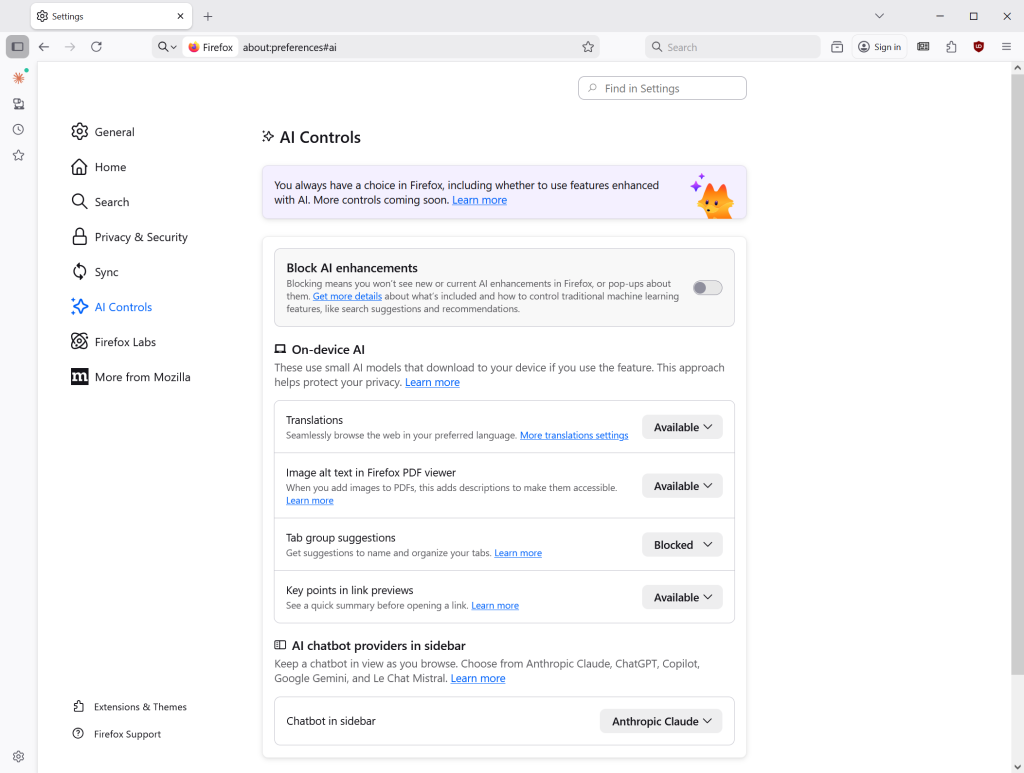
The new AI controls of the Firefox browser.

Probably the main feature of Firefox 148.0 is the new AI controls that Mozilla added to the browser. Load about:preferences#ai in the browser’s address bar or go to Menu > Settings > AI Controls to display all options.

The options are divided into two main sections: first a toggle to block all AI enhancements in Firefox with a single click or tap, and then individual controls for users who want to enable some but not other AI features.

So, if you want to block all AI, toggle “Block AI enhancements” and confirm the decision. This should take care of all current and future AI features in Firefox.

The second section is divided into two parts: On-device AI and AI chatbot providers in sidebar. Here you can enable or block the following features individually:

  • Translations.
  • Image alt text in Firefox PDF Viewer.
  • Tab group suggestions.
  • Key points in link previews.
  • Chatbot in sidebar.

When you see available, it means that the feature is not active. Blocked means that it is disabled and enabled means that it is active.

A word or two about Remote Improvements

Remote Improvements are small changes to Firefox that are delivered remotely. Previously, this required for Firefox to share “technical and interaction data”, short Telemetry, with Mozilla. Starting in Firefox 148, this is no longer the case.

In other words, you can receive the fixes without sharing the data or participating in experimental studies.

Opting-out
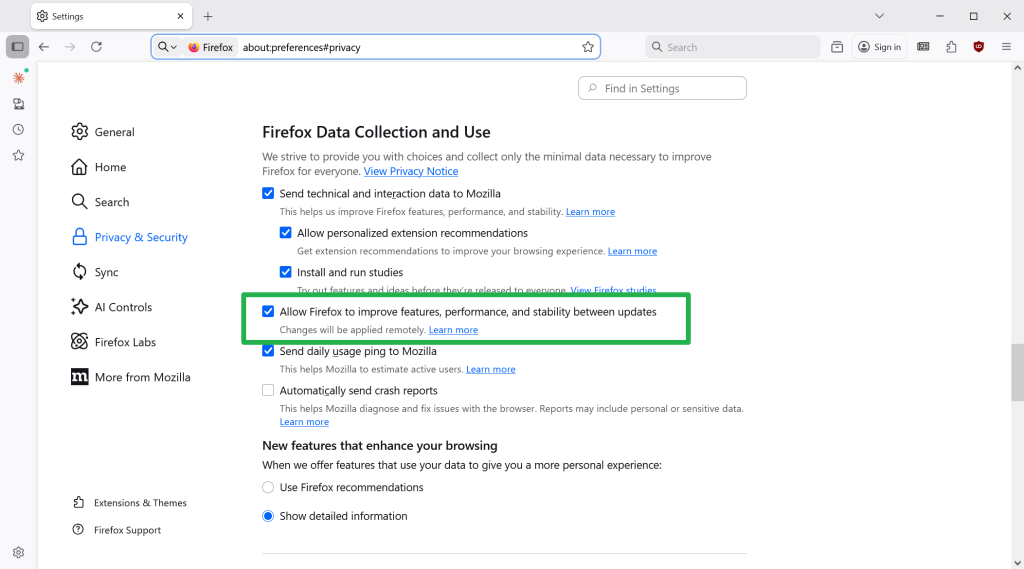
Uncheck the highlighted option to opt-out of remote updates.

The feature is on by default in Firefox 148, unless you have opted out of studies in the Settings prior to the release of Firefox 148.

To make sure that you are opted-out, do the following:

  • Load about:preferences#privacy in the address bar.
  • Scroll down to the Firefox Data Collection and Use section near the bottom.
  • Uncheck “Allow Firefox to improve features, performance, and stability between updates”.

Smaller changes in Firefox 148

  • Firefox now has improved support for screen readers accessing mathematical formulas embedded in PDFs.
  • Firefox Backup is now also available to Windows 10 users who set “Clear history when Firefox closes” to enabled. Backups will only include data that is not set to be cleared on exit in that case.
  • Translation into Vietnamese, and translation into and from Traditional Chinese is now supported.
  • New Tab wallpapers will show up on new container tabs also now.

The security updates

Firefox 148 fixes several security issues in previous versions. The severity is high and a massive 51 issues or potential issues are patched when the updated is installed.

The end of the road for old Windows and macOS versions

Mozilla is ending support for older operating systems with the release of Firefox 115.33.0 ESR. It is the last official release for systems that are no longer supported by their makers. Mozilla was the last major browser maker to support these operating systems, but this is coming to an end.

Firefox 115.33.0 continues to work on these systems, but updates won’t be released anymore. This means that security issues won’t get fixed anymore, which can be problematic as time passes by. Similarly, new web technology support is absent, which means that some sites or apps may not work correctly or at all.

Google teases three new Chrome features that sound familiar

Posted on February 20, 2026February 20, 2026 by Martin Brinkmann

Google announced three new features for its Chrome web browser on its official The Keyword blog recently. The new features — split view, save to Drive, and annotate — improve the productivity of Chrome users according to Google.

Users of several other browsers may not find the features as exciting as Google, as at least some of the features have been supported by other browsers for some time.

Split View is coming to Chrome

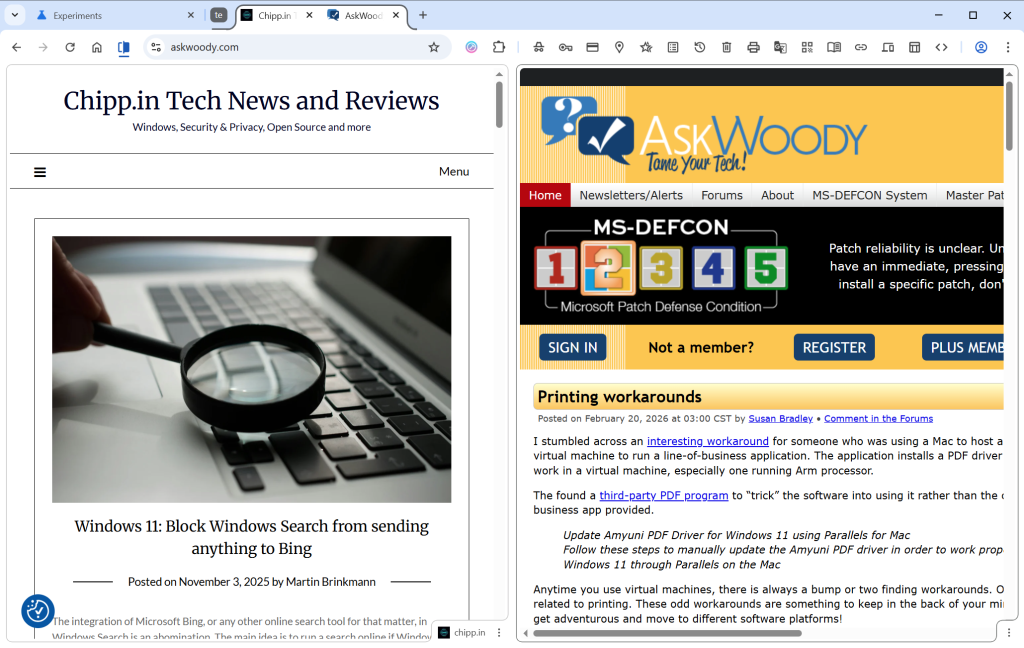
Split View is a typical example of such a feature. It allows you to display two websites next to each other in a single tab. Instead of displaying the two sites in two browser windows next to each other, you may display them in a single window.

This has some advantages, like easier handling as you interact with a single window only. However, there are also some disadvantages, including that only one address is shown in the address bar at a time.

Split View is not a new feature. In fact, Google is late to the party. Microsoft Edge, Vivaldi, Opera or Brave Browser support the mode already. Mozilla has also launched the feature in its Firefox web browser, but it is experimental at the time of writing.

How to use Split View in Chrome

Simply right-click on a tab in the web browser and select “Add tab to new Split View”. Chrome splits the space in half, with the right side empty in the beginning. Just select an open tab, which Chrome displays, type an address or pick a bookmark to load it in the second half.

Chrome displays both open websites in the same tab, but only the URL of the active tab in the address bar.

PDF annotations

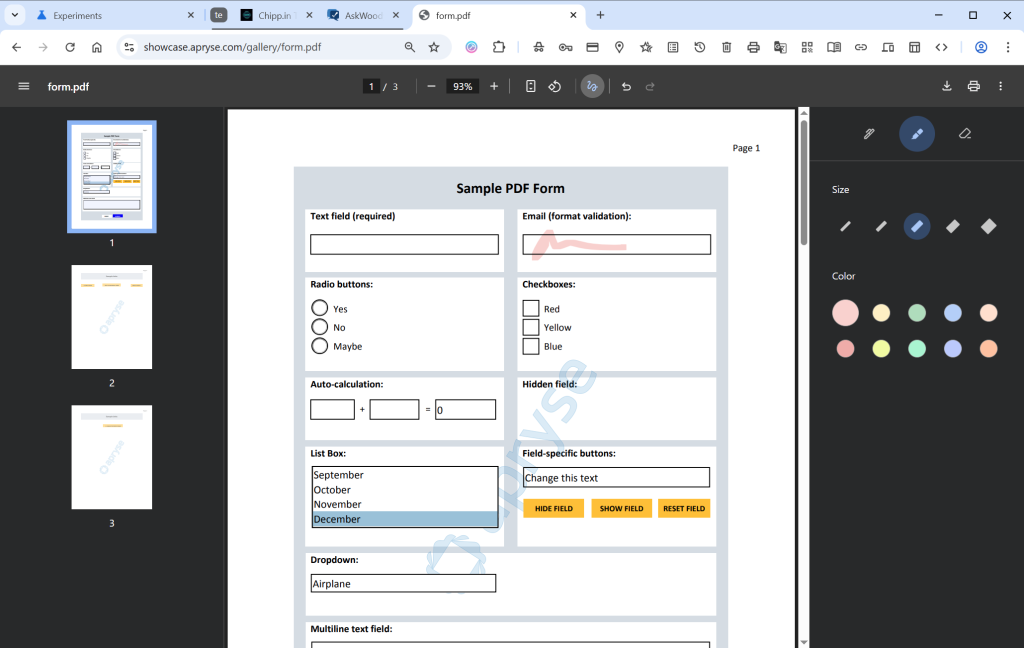
If you open PDF documents in Chrome, you can now “highlight text and add notes” to it right in the browser. Google says that this eliminates the need to use a separate application for that.

This is not exactly a new feature either, as both Microsoft Edge and Mozilla Firefox have supported the feature for quite some time.

To use it, open a PDF document in Chrome and click on the draw icon in the toolbar once it is displayed. Here you find the new options to annotate directly to the PDF file.

Save to Drive

This is probably the strangest edition in this feature update. Google is reaching feature parity with Split View and PDF annotations, which is a good reason to introduce the features.

However, Save to Drive is the outlier. It enables you to save PDF documents that you view in Chrome to Google Drive. Google says this keeps important documents backed up in the cloud.

It is not as if this was not possible before already, at least in many cases. If you run Google Drive on your system, you could simply put the file into the Drive folder to store it locally and online. I guess it helps if you do not run the software and want to save PDFs to Drive directly. Saves the step of saving the document locally first before uploading it.

Now You: what is your take on the new features? Something that would make you switch to Google’s browser?

LanguageTool blocks free user access to browser extension: here are the best alternatives

Posted on January 3, 2026January 3, 2026 by Martin Brinkmann

LanguageTool is a popular AI-based grammar checker. It is available as a free — limited — version and a premium version that offers more features for a price.

Free LanguageTool users were limited in several ways since the introduction of the service. It lacked the advanced spell, style and grammar checking capabilities of the premium version. However, up until now, free users could use LanguageTool browser add-ons for deeper integration in web browsers.

This integration is being taken away. When you open the comparison of the free and premium version on the official website, you will notice that Learneo, Inc, the owners of the service, have removed browser add-ons support for free users.

The only integration that remains available is for the open source email client Thunderbird. Support for every browser listed on the page requires a premium subscription now.

Why is LanguageTool making the change? The company does not say, but the main reason is likely to drive subscriptions. Free users who have come to rely on the tool may not want to lose access to it. The only option, if they want to continue using the add-ons, is to pay LanguageTool for the privilege.

LanguageTool users may use copy and paste for the checking of style, spelling, and grammar, but it is cumbersome in comparison.

LanguageTool alternatives

There are two groups that I would like to highlight.

  • The first offers capabilities that are very similar to LanguageTool. These tools rely on server-side checks, like LanguageTool, which makes them convenient to use but not-so-great for privacy.
  • The second group runs locally. This is much better for privacy, but features may be limited because of that or not as powerful.

Best privacy-friendly alternatives

Harper is a free locally-hosted open source grammar checker. That is great for privacy and it does come with browser and services integrations. Since it runs locally, its latency is much lower than that of cloud-based services.

However, the main downside is that Harper supports English only. The developers hinted in the past that other languages would be added in the future, but for now, English and some if its major dialects is all you get.

Self-hosted LanguageTool. It may come as a surprise, but you can actually host a LanguageTool server, if you have the technical know-how to get it up and running. This allows you to continue using the add-ons — I think — and you find starting instructions here. Could be an option for technical users who do not mind setting up their own server and fiddling around with configurations and such.

General alternatives

If you do not mind that your texts are transferred to cloud-based servers for checking, you may find the following tools or services useful.

QuillBot is an all-in-one writing assistant that offers a similar feature set. The free version checks spelling and grammar, comes with a few AI-based features, such as paraphrasing text (up to 125 words), browser extensions (no Firefox apparently), and some other applications and operating systems.

Windows users who use Edge may also check out the free Microsoft Editor of the browser. It offers limited grammar and spell-checking, but lacks deeper functionality.

Grammarly is another popular choice, but it has been criticized heavily in the past for its data collection practices.

Now You: do you use a grammar checker service or something else to make sure that mistakes are kept to a minimum? Feel free to post your suggestions and about your experience with these tools below.

How to stay relevant in a world filled with AI-generated content

Posted on December 30, 2025December 30, 2025 by Martin Brinkmann

AI content is on the rise. When you search for something on most search engines, you get AI overviews at the very top of the results. The AI takes that content from other sites and processes it for its responses.

While Google is vehemently rejecting the idea of sites getting less visitors from search engines, site owners seem to have a different view on the matter, for the most part at least.

Clearly, a percentage of search engine users won’t click on links that point to sites, if the search engine provided them with the answer to their request. This means, less visitors and the links that Google and others add do not account for the lost traffic, even if you take only the few sites into account that do get links. Additionally, more and more users use AI chats directly instead of search engines.

I do not really think that this trend is reversible, similarly to how other major changes were. As someone who creates content, you have but a few options left to keep doing what you love, provided that it is not just a hobby for you but a job.

It is all about trust

While you cannot really compete with the speed or reach of AI, or major sites out there that still seem to cover every topic imaginable, you have something that AI can’t replicate: the trust of your readers.

While AI can replicate any topic that you write about and provide answers or information, so that many Internet users do not even have to leave the search engine’s website, there can be a level of trust between human writers and their audience that AI can’t replicate.

Even if AI makers would be able to bring down fake answers — they call it hallucinations — to zero, it would still not be the same.

Take the review of a product. If you trust the review, for instance because you were never disappointed by previous reviews from a reviewer, then you may trust any review going forward, unless trust gets broken. With AI, there is no such level of trust. AI uses different sources for its takes on products and it is clear that the AI itself has never tested them.

Another example. Unless a human has reviewed and posted about a software, AI can’t provide you with its own review. It may copy content from the developer’s press release, if there is one, but it can’t review a software on its own.

While all of that may change in the future, it does not change the trust factor, at least not until AI evolves again to the next level.

What that means for this site

Well, it is quite easy. I do not chase search engine rankings anymore. Why should I. As a new and small site, you barely stand a chance anyway against the behemoths out there. Now with AI added as another roadblock, there is even a slimmer chance for driving much traffic from search engines to your site.

My hope, and this may come falling down on my head in the near future, is to focus on quality relationships. Ignore the masses, build a community of likeminded-people who enjoy my content and trust my writings and opinions. No need to always agree on things, but have a level of trust that AI or major sites can’t replicate.

Clearly, this is only sustainable if I find a way to earn enough money from this site to keep it going. I do not want ads and will shut the site down before I start showing generic ads here on this site or ads that track you. All part of the trust relationship.

My intention is to use a tip-system combined with a few carefully selected products that I get affiliate revenue from.

If this works, it would cut the reliance on search engines or any outside source. Grow by word of mouth or references on other likeminded sites or forums.

Well, that is the idea anyway. Would love to hear what you think of it. Feel free to leave a comment down below. Also, if you have an idea, let me know as well.

You may soon be able to change your Gmail address

Posted on December 25, 2025December 25, 2025 by Martin Brinkmann

Up until very recently, setting up a Gmail account meant that you’d be stuck with the selected email address. Google did not offer any option to change the address. In fact, the only option available was to create an entirely new account to pick a new email address.

This meant that you would lose access to preferences, emails, data and everything else associated with the account.

This seems to be changing, as Google revealed on a support page that address changing is coming to Gmail.

However, the news needs to be taken with a grain of salt. The help page is in Hindi only, which could mean that Google is making the change exclusive to a subset of users.

There, Google writes the following (auto-translated):

Changing the email address of your Google account

Your Google account email address is the address you use, lets you sign in to Google’s services. This email address lets you and others identify your account. If you prefer, your Google account’s email address whose last part is gmail.com can be changed. It could be replaced with a new email address with gmail.com last.

In other words, Google is rolling out a change that lets users change their Gmail address.

What about the old address then, you may ask? It is retained as well to avoid that someone else snags it up and gains access to your emails.

Google reveals that the process can be used once every 12 months at the most. Once a new email has been set, it, or the old, can be used to sign in to Google services.

When is it coming? The functionality is rolling out gradually, as usual. If this is indeed rolling out worldwide, expect weeks or even months before you see the functionality in your account.

Closing Words

The new process makes it easier to switch to a new email address by Gmail. Since you retain access to the old email, you effectively create a second account that you may use from that moment on, without losing access to the first.

Data seems to be shared though, so that your preferences and data are retained, regardless of the account that you use to sign-in.

Now You: do you have and use a Gmail account? Would you change its address name to a new one, if the feature lands? Feel free to leave a comment down below.

Here is what is happening at ghacks.net

Posted on December 19, 2025December 19, 2025 by Martin Brinkmann

If you have been to Ghacks lately you may have noticed that something is amiss. In short: Ashwin and I are no longer authors at the site.

The longer picture: Softonic decided to sell Ghacks to another company. We, the authors, have not been approached by the new owner and do not really know who bought the site. It did not help that I was on vacation when all of this happened.

I can’t get into any specifics, because I do not know more than I just told you. However I can tell you that you won’t find new articles by myself or Ashwin on the site going forward.

As far as plans are concerned, I plan to publish the usual articles and some more here on this site going forward. You can expect the usual coverage here, including about Windows security updates, Firefox and other browsers, AI, tweaks and tips, software, and more.

Think of it as the “new Ghacks”, but better 😉

There will be some changes coming in the next weeks. I plan to add a “support” option, which you can use to throw some dimes my way, as this site will remain free of traditional ads and tracking.

I may also promote certain services of products that I can recommend highly and use myself. If that happens, it will be marked clearly.

If things go really well, I have hopes that I could get Ashwin on board again. In the meantime, if you know of a tech site that is looking for a capable writer, feel free to let me know and I pass it on to Ashwin.

Microsoft Edge

Microsoft is moving features into Copilot to extract more money from its customers

Posted on December 6, 2025December 6, 2025 by Martin Brinkmann

Customers all over the world are used to frequent price increases of subscriptions by now. Many online services that require a subscription increase prices regularly, often once per year or every second year.

That is bad enough, especially if the service does not get any better because of it. While services argue that inflation and rising costs force them to increase the price of their product, it is getting harder and harder for them to convince customers to accept the price increase and continue their payments.

If only there would be something that would make it clearer for customers to pay more. Microsoft may have found a way, or so it believes: how about removing features from products to move them into another product, that costs extra?

As a Microsoft 365 subscriber, you pay Microsoft a monthly or yearly sum for access to the most recent version of Microsoft Office. You may also get some other features on top of that, including cloud storage space or access to Copilot, Microsoft’s AI.

However, some Copilot features are only for subscribers of plans that are more expensive. Home users, for instance, need a Premium subscription to gain access to otherwise restricted Copilot features.

Microsoft changed the tactic for business customers. Instead of limiting Copilot to a specific plan, Microsoft integrated Copilot AI features into the business plans and announced a price increase arguing that customers would get more out of their subscriptions because of that. Most plans increase by up to three Dollars per month because of that from 2026 onward.

To make Copilot look more valuable, Microsoft started to remove features from Office programs.

Martin Geuß, from the Geman website Dr. Windows, highlighted two recent examples on the site recently:

  • PowerPoint: The option to reuse slides is going to be removed from the presentation software. Users may ask Copilot to do that for them.
  • Excel: The function to extract data from images is being removed. Starting in July 2026, this option won’t be offered anymore. Microsoft says that it is working on a better function that will then be powered by Copilot.

There you have it. You just have to be inventive to justify price increases.

Amazon

Amazon may send you ads via WhatsApp: here is how to turn that off

Posted on November 26, 2025November 26, 2025 by Martin Brinkmann

WhatsApp is one of the most popular messaging apps out there. One reason why more and more businesses try to establish channels on WhatsApp. Most to reach customers and sell them something.

Amazon is no exception to that. Maybe you have noticed already that you are getting ads from Amazon in WhatsApp.

Even if not, you may want to make sure that you won’t in the future. Good news is that there is an option to turn that off. It appears, however, that the feature is turned on by default. I can’t remember allowing Amazon to use WhatsApp for communication.

Here is what you need to do:

  1. Load the Notifications website on the Amazon website of your choosing: https://www.amazon.com/preferences/cpc/homepage
  2. Check the “Turn on WhatsApp” or “Turn off WhatsApp” button on the page.
  3. Select “Turn off WhatsApp” to disable communication.

Note that the page may look different depending on your locale. In Germany, it was called Communication Preferences Center and it looked different from the page opened on Amazon.com.

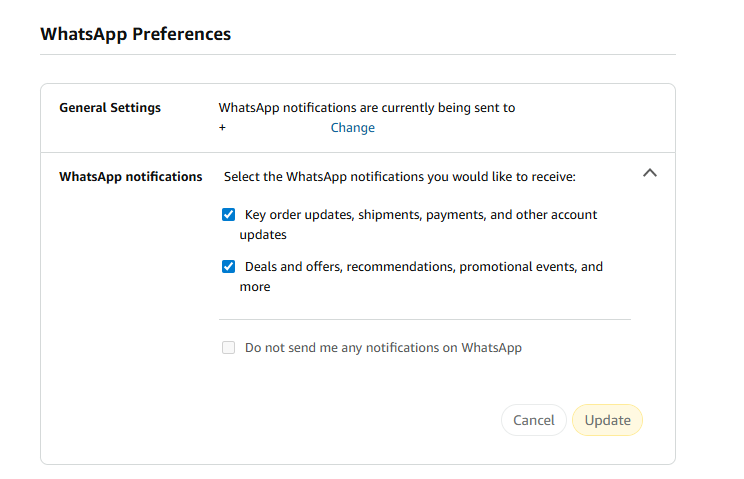
There, you an entire section dedicated to WhatsApp Preferences.

As you can see on the screenshot. the account was set up to receive WhatsApp notifications.

To change that here, you have to uncheck one or both of the options listed on the page:

  • Key order updates, shipments, payments, and other account updates.
  • Deals and offers, recommendations, promotional events, and more.

The second option sends ads to your WhatsApp account, while the first seems to be limited to Amazon notifications about orders and such. However, if you disable both, you can check “Do not send me any notifications on WhatsApp.

Don’t forget to hit the update button to save the change.

Now You: did you see the WhatsApp preferences when checking your Amazon account? Were the settings enabled? Feel free to leave a comment down below.

Cloudflare Down

Cloudflare is down, and so are lots of websites

Posted on November 18, 2025November 18, 2025 by Martin Brinkmann

If your favorite website is not responding right now, it might be because of a major Cloudflare outage. Plenty of sites use Cloudflare, for instance as a CDN or a security layer to prevent attacks or fake traffic.

As it stands right now, Cloudflare states on its Status website that it continues to work on restoring its service for its customers.

The issue started at around 11:48 UTC today when Cloudflare added the first bit of information to the status page revealing that it was experiencing issues. Two hours later, the issue is ongoing.

You can check the link above to find out when the issue is resolved. Or, you can try visiting the affected websites at a later point to find out if it is resolved.

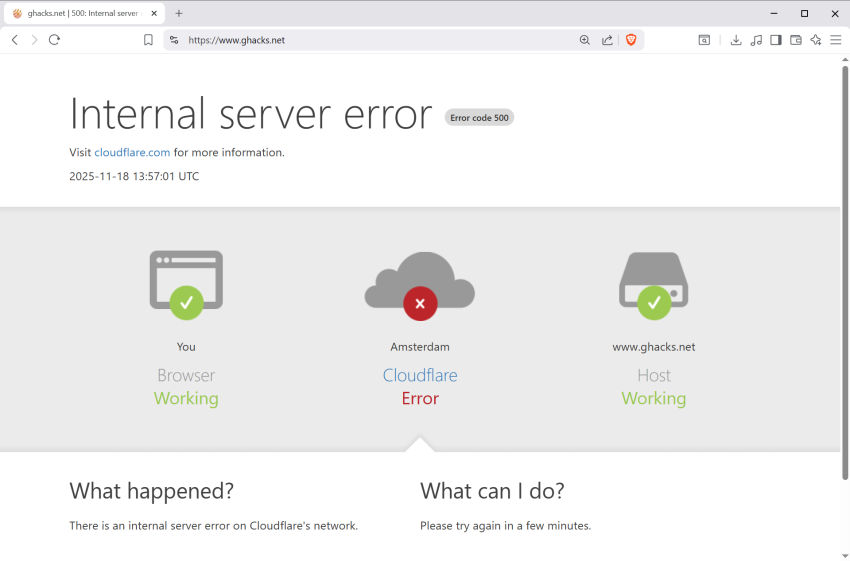
Most websites affected by the issue should show “Internal server error” with error code 500. The image should highlight that the browser and the host is working, but that Cloudflare is having an error.

Hosting a web server on a disposable vape, which makes it a disposable web server of sorts

Posted on November 15, 2025 by Martin Brinkmann

Reportedly, someone managed to get a tiny web server running on one of those disposable vapes, electronic cigarettes that you see more and more people consuming, at least where I live.

Unlike regular cigarettes, which consist of non-electronic components, a filter, some paper and tobacco for the most part, vapes contain electronic components.

Our ingenious engineer dissected vapes that he received from friends and family for some time and discovered something peculiar in vapes from a specific brand.

He noticed that they included a micro processor, probably the cheapest micro-controller in existence. Further inspection revealed that it had the following characteristics:

  • 24 MHz Coretext M0+ processor.
  • 24 KiB of Flash Storage.
  • 3 KiB of Static Ram.

He realized that he could use it to run a web server, and that is exactly what he set out to do. You can check out the blog post to find out more about the process. In the end, he managed to get the web server, with a single page, running on the vape.

The post has a link to the website, but I could not get it to run. Not sure if it has been taken down, if it is overloaded, or caused by another issue.

It is a remarkable feat of engineering, very similar to getting Doom running on any device with a display and some form of micro-computer inside.

  • 1
  • 2
  • 3
  • 4
  • …
  • 16
  • Next

Support This Site

If you like what I do please support me!

Any tip is appreciated. Thanks!
  • March 2, 2026 by Martin Brinkmann Don't Bother with Windows 11's new Speedtest feature
  • February 27, 2026 by Martin Brinkmann Warning! That laptop on Amazon? It comes with temporary storage
  • February 26, 2026 by Martin Brinkmann "If your printer works today, it will continue to work": Microsoft corrects previous announcement
  • February 25, 2026 by Martin Brinkmann YouTube Premium Lite subscribers get background playback and downloads with a big "but"
  • February 24, 2026 by Martin Brinkmann Firefox 148.0 is out with its AI kill switch and support for Windows 7 and 8.1 comes to an end

About

We talk, write and dream about Technology 24/7 here at Chipp.in. The site, created by Martin Brinkmann in 2023, focuses on well-researched tech news, reviews, guides, help and more.

Legal Notice

Our commitment

Many websites write about tech, but chipp.in is special in several ways. All of our guides are unique, and we will never just rehash news that you find elsewhere.

Read the About page for additional information on the site and its founder and author.

Support Us

We don't run advertisement on this site that tracks users. If you see ads, they are static links. Ads, including affiliate links, never affect our writing on this site.

Here is a link to our privacy policy

©2026 Chipp.in Tech News and Reviews