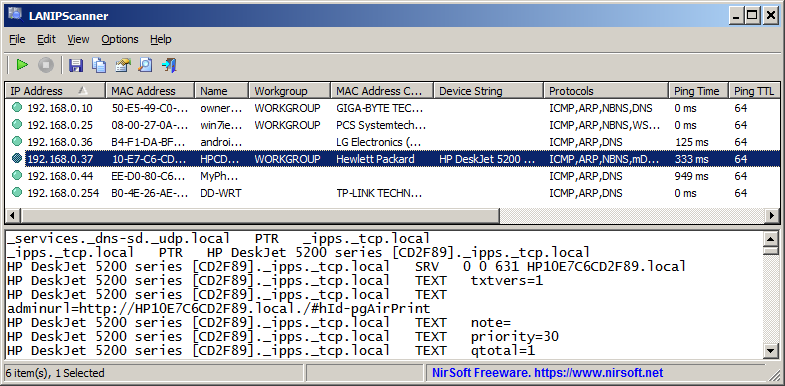
LANIPScanner is a new free and portable network scanner for Windows by one of my favorite developers NirSoft. The main idea is simple: quickly scan which devices are connected to the same network as the Windows PC that you run the program on.
As is the case with all Nirsoft apps, it is a portable program that you can run right after you have extracted its archive. Windows may object — as usual – with its SmartScreen warning, which you can safely bypass to run the app.
From there, it is just the matter of clicking on the scan button to get the list of connected computers and devices.
Each device is listed with its IP addres and other information, including, if available, workgroup, device string, supported protocols, ping time and more.
The application supports several network protocols, which makes it versatile. It supports ICMP (ping), ARP, mDNS, DNS, NBNS, SSDP, ensuring that it can pick up a wide range of different devices that are connected.
The raw data of devices that respond to SSDP or mDNS protocols are also displayed in the lower pane of the application.
LANIPScanner comes with the usual assortment of Nirsoft features, including the option to generate reports and save the data to various formats.
Support-wise, it will run on Windows XP and all newer versions of Windows, including the latest version of Windows, Windows 11.
The new tool may look similarly to Nirsoft’s Wireless Network Watcher application on first glance, but there are differences. Notable ones include support for several different network protocols, recognition of devices on another subnet, if they respond to ping queries, and less reliance on a device’s MAC address for identification and features.
Closing Words
LANIPScanner is a lightweight network scanner for Windows that is easy to use. It returns a list of devices connected currently, which you may find useful for a number of purposes, including spotting devices that should not be connected.
Think smart TVs or other gadgets that may be connected, even though you might prefer them not to.
Now You: do you scan your networks regularly for devices? If so, which program(s )do you use for that?
Nice, as always indeed with all Nirsoftt software.
I’ll wait for LANIPScanner to be included in next version of Nirlauncher (which includes all Nirsoft apps) given it doesn’t appear in latest version 1.30.20
Not much to see: just my router and my laptop. I do have a printer, but it’s not networked. So just two lines of text in the top pane.
Much more interesting is an old application called CrowdInspect by Crowdstrike Inc., which comes with the following description: “CrowdInspect is a free professional grade tool for Microsoft Windows systems from CrowdStrike aimed to help alert you to the presence of malware and in particular malware that communicates over the network that may exist on your computer. It is a host-based real-time monitoring and recording tool utilizing multiple sources of information to detect untrusted or malicious network-active processes.”
So I think I’ll dispense with Nirsoft’s tool in this particular case, but thanks for the info Martin.