Chipp.in Tech News and Reviews

Windows, Security & Privacy, Open Source and more

Menu
  • Home
  • Windows
  • Security & Privacy
  • Gaming
  • Guides
  • Windows 11 Book
  • Contact
  • RSS Feed
Menu

Tag: google

Google teases three new Chrome features that sound familiar

Posted on February 20, 2026February 20, 2026 by Martin Brinkmann

Google announced three new features for its Chrome web browser on its official The Keyword blog recently. The new features — split view, save to Drive, and annotate — improve the productivity of Chrome users according to Google.

Users of several other browsers may not find the features as exciting as Google, as at least some of the features have been supported by other browsers for some time.

Split View is coming to Chrome

Split View is a typical example of such a feature. It allows you to display two websites next to each other in a single tab. Instead of displaying the two sites in two browser windows next to each other, you may display them in a single window.

This has some advantages, like easier handling as you interact with a single window only. However, there are also some disadvantages, including that only one address is shown in the address bar at a time.

Split View is not a new feature. In fact, Google is late to the party. Microsoft Edge, Vivaldi, Opera or Brave Browser support the mode already. Mozilla has also launched the feature in its Firefox web browser, but it is experimental at the time of writing.

How to use Split View in Chrome
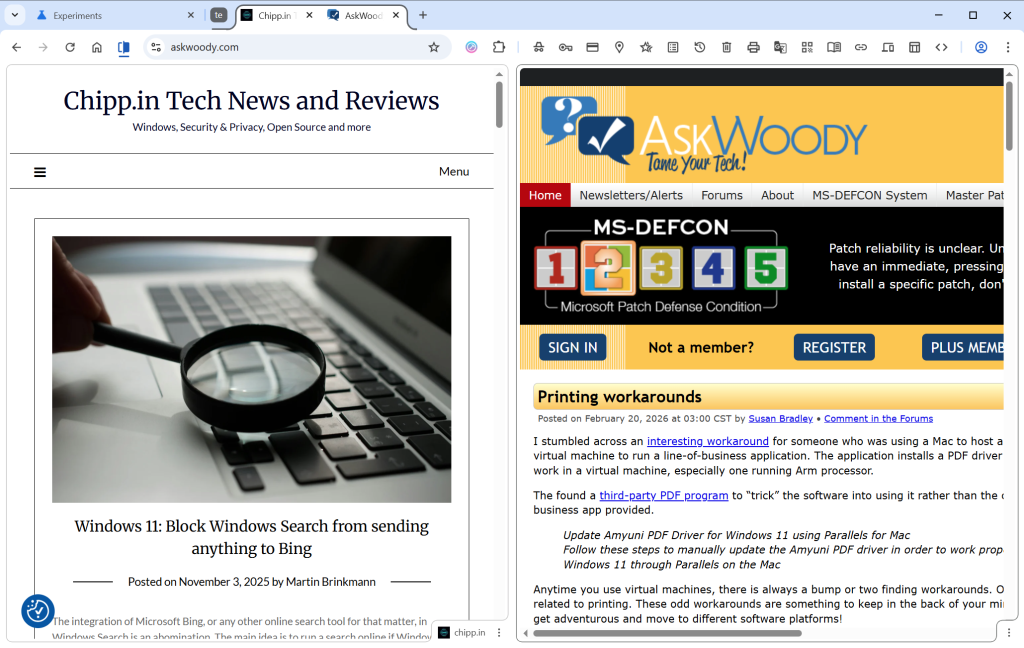
Simply right-click on a tab in the web browser and select “Add tab to new Split View”. Chrome splits the space in half, with the right side empty in the beginning. Just select an open tab, which Chrome displays, type an address or pick a bookmark to load it in the second half.

Chrome displays both open websites in the same tab, but only the URL of the active tab in the address bar.

PDF annotations
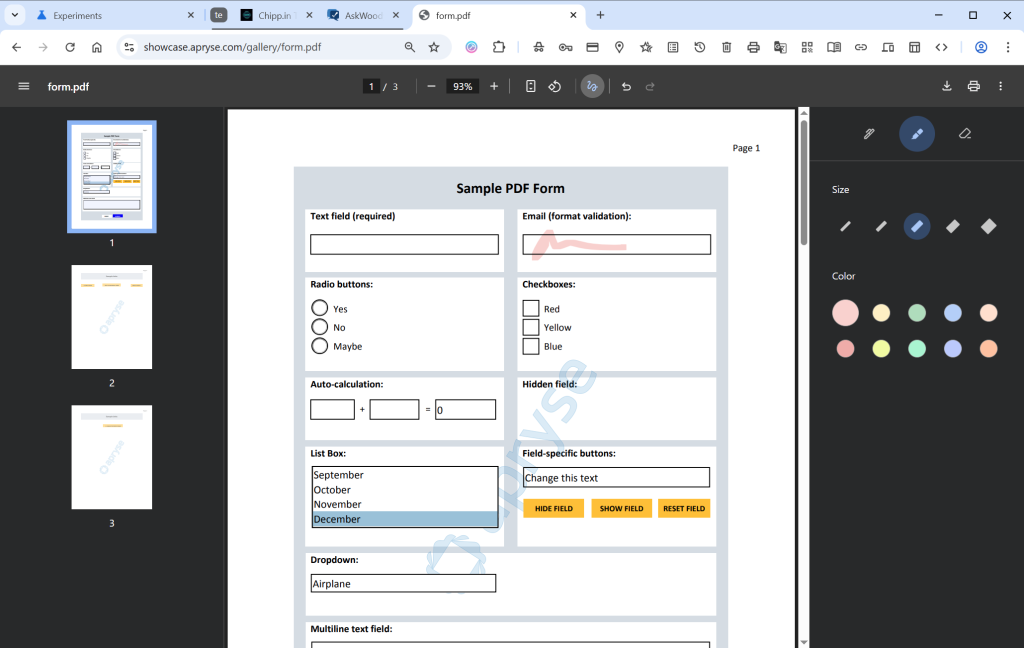
If you open PDF documents in Chrome, you can now “highlight text and add notes” to it right in the browser. Google says that this eliminates the need to use a separate application for that.

This is not exactly a new feature either, as both Microsoft Edge and Mozilla Firefox have supported the feature for quite some time.

To use it, open a PDF document in Chrome and click on the draw icon in the toolbar once it is displayed. Here you find the new options to annotate directly to the PDF file.

Save to Drive

This is probably the strangest edition in this feature update. Google is reaching feature parity with Split View and PDF annotations, which is a good reason to introduce the features.

However, Save to Drive is the outlier. It enables you to save PDF documents that you view in Chrome to Google Drive. Google says this keeps important documents backed up in the cloud.

It is not as if this was not possible before already, at least in many cases. If you run Google Drive on your system, you could simply put the file into the Drive folder to store it locally and online. I guess it helps if you do not run the software and want to save PDFs to Drive directly. Saves the step of saving the document locally first before uploading it.

Now You: what is your take on the new features? Something that would make you switch to Google’s browser?

No Login? No Problem: 5 Google Maps Alternatives That Respect Your Privacy

Posted on February 19, 2026February 19, 2026 by Martin Brinkmann

If you have used Google Maps until now without a Google account, then you may have noticed that something is off in the past couple of days.

When I launched Google Maps today in Firefox, I immediately noticed that Google was limiting information. Listings did not include user reviews anymore among other things, and Google displayed a disheartening “You’re seeing a limited view of Google Maps” and “Get the most out of Google Maps. Sign In” message at the bottom of each listing I opened.

It appears that Google is limited access for anonymous users. While you can still look up listings, use route planning, and get ads, you won’t get what some what say is the most vital information on Google Maps: user reviews.

Read Also: Google Maps is getting a new feature that you either love or dislike

Five Google Maps Alternatives

While you could sign-in to a Google account to restore full access, some may prefer switching to a different service entirely.

Here are five good alternatives that you could try:

  • Organic Maps — Organic Maps is widely considered the “gold standard” for privacy-conscious users. It is a fork of the original Maps.me, created by the original developers who wanted to strip out all the trackers and bloatware.
  • Magic Earth — If you miss Google Maps’ real-time traffic alerts and lane guidance, Magic Earth is your best bet. It manages to offer advanced “smart” features while remaining strictly no-profile.
  • OsmAnd — OsmAnd is the most feature-dense mapping app available. It’s not just a map; it’s a professional-grade geographic tool.
  • Apple Maps — In mid-2024, Apple finally brought Apple Maps to the web (currently in beta). Unlike Google, Apple’s web version actually functions better without a login, as it currently doesn’t even support signing in to an Apple ID on the browser.
  • DuckDuckGo Maps — If you are looking for the most seamless “Google Maps-like” experience in a web browser without ever being asked to sign in, DuckDuckGo is the winner. It uses Apple Maps’ MapKit JS framework, giving you high-quality visuals without the data-tracking baggage.

There are also regional apps and maps that sometimes offer better information and services than Google Maps. Kakaomap, for example, is seen as the superior app in almost any area, if you are in Korea.

Now You: do you use a map app or service? Any app that you can recommend?

Block Google “Continue As” prompts on third-party websites

Posted on February 7, 2026February 7, 2026 by Martin Brinkmann

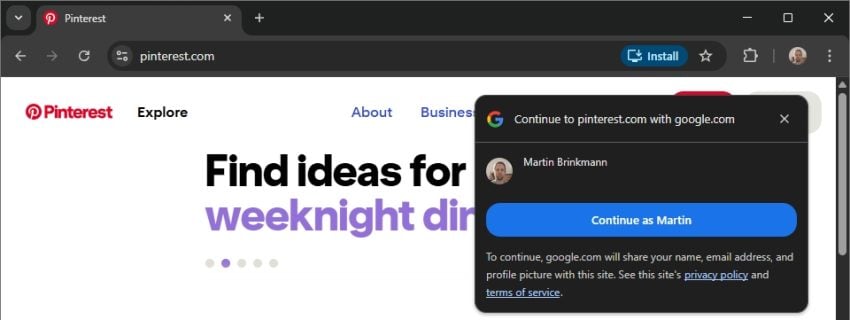
If you are using Chrome and are signed-in to a Google account, you may have received a fair share of requests to sign-in with your account on third-party websites, provided that you do not have an account there already.

The main idea is to make sign ups on third-party sites easier and more secure by using the Google account. Google provides the site with information to set up the account and you decide much of what you want to share and what not. The user password is never provided by Google, which is an advantage.

There are disadvantages: using one account for multiple sites and Google knowing which sites you create accounts on.

The prompts appear on site load and at least some users find them highly annoying. Not everyone wants to (or can) use Chrome without being signed in or switch to another browser. There is another option, but it is hidden deep in the Chrome settings.

How to stop Chrome from showing “Continue As” prompts

Here are the required steps for desktop Chrome:

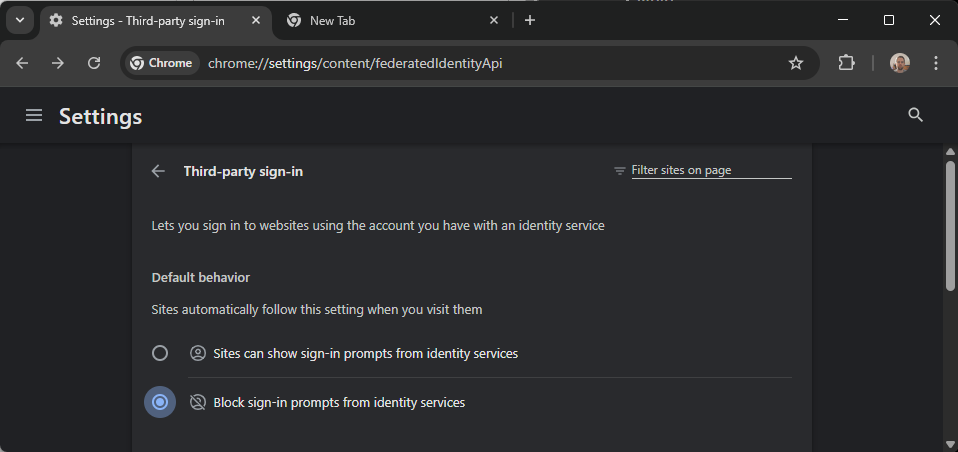
Enable the block option in the Settings to prevent continue-as-prompts in the future.
  1. Load chrome://settings/content/federatedIdentityApi in the browser’s address bar.
  2. Enable “Block sign-in prompts from identity services” under Default Behavior.

This takes care of the prompts. You can add sites to the allow-list, but this is only useful if you want to create an account on the website using your Google information.

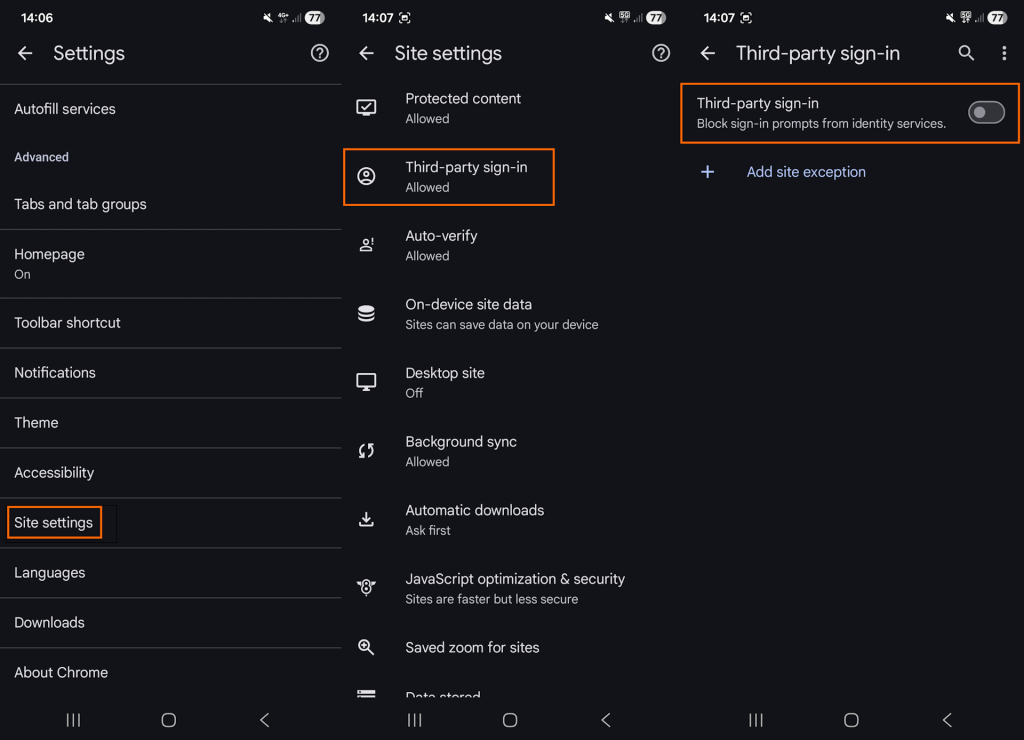
Here are the required steps for mobile Chrome:

In mobile Chrome, you need to open the setting manually.
  1. Open the Settings.
  2. Go to Site Settings.
  3. Tap on Third-party sign-in.
  4. Toggle “Third-party sign-in” so that it is off.

This blocks all future attempts in mobile versions of the Chrome web browser.

Manage existing connections

Google’s support page provides information on managing existing connections. You can review all connections on the third-party connections page on Google’s website.

Switch to the “Sign-In with Google” tab first. Google lists all connections and you may click on the “>” icon to display details. There you may remove it by selecting “Stop using Sign in with Google ” and confirm the decision.

Note that this severs the connection only, but it does not affect the data that the third-party site has accumulated.

What you may do instead

While the option to use your Google account on third-party sites may be convenient, most users may benefit from separating accounts.

Apart from providing Google and the third-party site with additional information, any successful account breach gives the attacker access to not only Google but all other sites with connections.

My suggestion: stick to the one site, one unique account rule, and turn off the prompts, if you do use Chrome and want to stay signed in. (source: Caschys Blog)

Google Chrome Gets a Major Upgrade with Gemini 3 and Auto-Browse

Posted on January 30, 2026January 30, 2026 by Martin Brinkmann

Google is officially transforming the web browser from a static tool into an active personal agent with the launch of Gemini 3 and “Auto-Browse” in Chrome, and the push into a personalized AI experience.

Announced yesterday for desktop users, with the exception of Chrome for Linux, this major update integrates Google’s most advanced AI model directly into the browser to handle complex, multi-step tasks.

Google is pushing Gemini with the help of its Chrome browser

Lookout OpenAI, Gemini could get a massive user boost thanks to the integration in the world’s biggest browser.

Here is an overview of the features that Google announced:

Auto-Browse (Agentic Browsing): The flagship feature for AI Pro and Ultra subscribers in the U.S. that performs multi-step “chores” on your behalf. It can research travel costs across dates, fill out complex online forms, file expense reports, or add specific items to a shopping cart based on an image.

Gemini Side Panel: A persistent area in Chrome that supports interactions with the AI without losing focus. It supports the usual AI-features, such as summarizing a page, comparing features across several tabs, or finding time in your calendar.

Integrated “Nano Banana”: The latest version of Google’s image generator is integrated into the browser. Also accessible from the side panel, you can use text prompts for creative tasks, such as turning research data into infographics or manipulating images open in the browser.

Connected Apps Integration: Deeper connectivity with the Google ecosystem, allowing Gemini to pull information from Gmail, Calendar, Maps, and Google Flights to execute workflows (e.g., finding a flight based on an event invitation in your email).

Personal Intelligence: A proactive feature that remembers context from past conversations to provide tailored answers. It learns user preferences over time to transform the browser into a “trusted partner” rather than a general-purpose tool.

Universal Commerce Protocol (UCP) Support: Integration with a new open standard (co-developed with brands like Shopify and Wayfair) that allows AI agents to navigate checkout processes and take commercial actions across different retail sites securely.

Enhanced Security & “Pause and Confirm”: New defenses designed for agentic AI, including a safety mechanism where Auto-Browse must pause and ask for explicit user confirmation before completing sensitive actions.

Closing Words

It is clear that Gemini will get a huge user boost from this. Even if Google limits exposure to certain regions or subscription models at first, it is clear that it will expose as many users as possible to Gemini in Chrome in the long run.

Why? Because it is giving Google an edge over the competition. Plus, when users run into usage limits, they may become paying subscribers, which seems to be on the preferred options right now to increase revenue and compensate expenses.

The benefit for users invested in Google’s ecosystem is there, especially if you connect the AI to other Google services. Whether you really want that, an all-knowing AI that may know more about your desires, life and plans than your closest friends, is up for you to decide.

I see the benefits, but also the dangers. While I do use AI tools for some tasks, such as creating a teaser image for an article here or the weekly newsletter, I do not really see a benefit in letting AI do the shopping for me, even with all safeguards in place.

Google wants to personalize your search experience even more, but needs your data for that

Posted on January 23, 2026January 23, 2026 by Martin Brinkmann

Imagine if Google Search didn’t just know the internet, but actually understood your context. Scary? Wonderful?

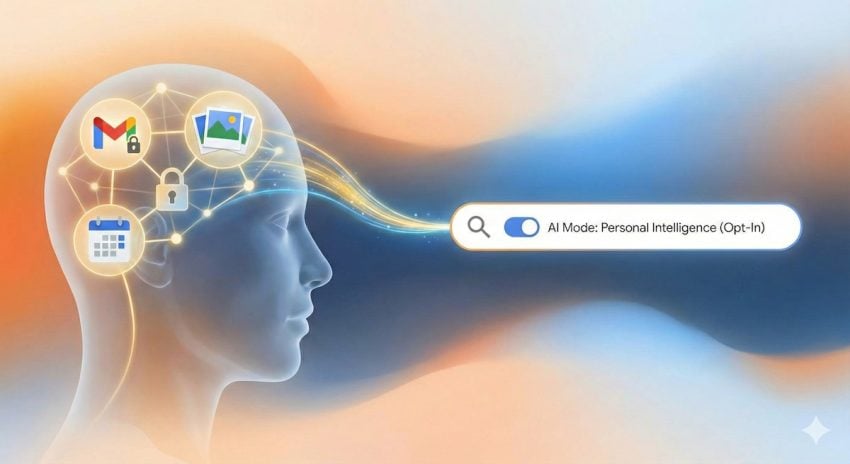
Google is making this a reality for AI Pro and Ultra subscribers with the launch of Personal Intelligence in AI Mode, a new feature that lets you securely connect Gmail and Google Photos directly to your search results.

This update is designed to save your time by transforming — often — generic search queries into personalized answers while ensuring your personal data remains private, opt-in, and strictly under your control, according to Google.

Announced yesterday, Google continues to push a personal angle into its products. Last week, Google introduced Personal Intelligence that connects its Gemini AI with Gmail, YouTube and some other company services.

This week’s announcement extends Personal Intelligence to Google Search. More precisely, to AI Mode of Google Search.

Personal Intelligence in AI Mode for Search

What it does: It connects Gmail and Google Photos to the AI Mode of Google Search. This allows Gemini to cross-reference information from emails or photos with general search information to provide answers that are specific to the user.

For example, if you ask for an itinerary, it may look up flight or accommodation information in Gmail as well as what you liked to do in past holidays on Google Photos to suggest an itinerary that is personalized.

Who gets it: The feature is rolling out as a Labs experiment. It is only available for Google AI Pro and AI Ultra subscribers in the United States who search in English.

What about privacy? The feature is strictly opt-in. Google claims that it is not using any personal data for training and users may disconnect the feature from Search at any time to end it.

Google’s ultimate goal is to bridge the gap between a search engine that knows “the world” and its users. For some, it is a new level of convenience that makes searching on Google better and faster. For others, it is a nightmare come true.

However, since the feature is opt-in and limited to Google AI Pro and Ultra subscribers, the latter camp is likely very small at this point. This could change with a general rollout to non-paying Google Search users.

The success of the feature will ultimately hinge on trust, not so much on the technology and its effectiveness. While Google implemented important guardrails, including making the feature opt-in and promising that personal emails or photos won’t be used for training, handing over the keys to private memories and information requires a huge leap of faith, especially considering that Google’s main line of business is advertisement.

Google tests Pixel Upgrade Program that always gives customers the newest Pixel

Posted on December 29, 2025December 29, 2025 by Martin Brinkmann

Ah, the yearly phone update. Manufacturers such as Google, Samsung, or Apple release new mobile phones each year. This means that the phone that you buy today is not the hottest piece of hardware after a (maximum) of one year of usage.

That is a problem for users who always want the latest mobile device in their hands.

Google is testing what it calls the Pixel Upgrade Program in India. Announced on the official Google India blog, it sounds like a good deal on first glance: buy a new Pixel device, meet some requirements, and get future Pixel devices automatically while sending back your old devices.

This ensures, according to Google, that you have the latest and greatest Pixel device in your possession at all times.

Is there a catch? Yes, there is one. Google explains how the program works, and here are the caveats:

  • It is only available for no-cost 24-month EMI (Equated Monthly Installments) plans.
  • You need to buy the phone using credit cards from Google’s official partners Bajaj Finance or HDFC Bank.
  • You start a new EMI plan for each new Pixel device you get.

Between the ninth and fifteenth EMI, Pixel-users become eligible to upgrade. They need to trade the current Pixel device through Google’s partner Cashify. Provided that it “powers on and is free of unauthorized repairs”, an amount equal to the remaining loan balance is credited to the user’s bank account. This can be used to close the original loan.

From there, users need to start a new 24-month plan for the brand-new Pixel device.

ProsCons
Always have the latest Pixel device.Long-term renting, owning only if you make all 24 payments.
Predictable costs.Paying premium for (potentially) underwhelming upgrades
Bonus, e.g., free periods for Google AI Pro or YouTube Premium, restart with each phone.Limited to EMI and two banks.

Whenever a customer trades the old device in, the cycle begins anew. It is identical to a never-ending rent, with the benefit of getting the newest Pixel device each year.

Would I use it, if it would be rolled out worldwide? No, I would not. I do not buy in installments or on credit, and do not need the latest device each year. It may be different for others, who want or need the latest all the time.

What about you? Would you be tempted to join such a program to get the latest Pixel device each year? Feel free to leave a comment down below.

Gemini in Gmail may have been enabled by default, and turning it off takes other features with it

Posted on November 22, 2025November 23, 2025 by Martin Brinkmann

If you are using Google’s Gmail email service, you may have stumbled upon Smart Features already, especially if you are using the web-version of the service. Up until recently, Smart Features did not include AI, but this changed in 2025.

Now, Google has baked its AI Gemini into the Smart Features of Gmail. Depending on where you live, Smart Features are enabled by default. Note that while Google claims that Smart Features are not turned on for user in the European Union (Japan, UK and Switzerland are the three other regions), they were in fact enabled in one of my accounts.

So, what do you get with Smart Features?

  • Automatic email filtering and categorisation.
  • Smart Compose.
  • Smart Reply.
  • Nudges (suggests emails to reply to or follow-up on)
  • Summary cards above emails.
  • Grammar, spelling, and auto-correction.

Some of these features are powered by AI nowadays and Gemini, Google’s AI, needs access to your data for the features to work. Google claims that personal data is not used for training and that everything is kept within the boundaries of the account.

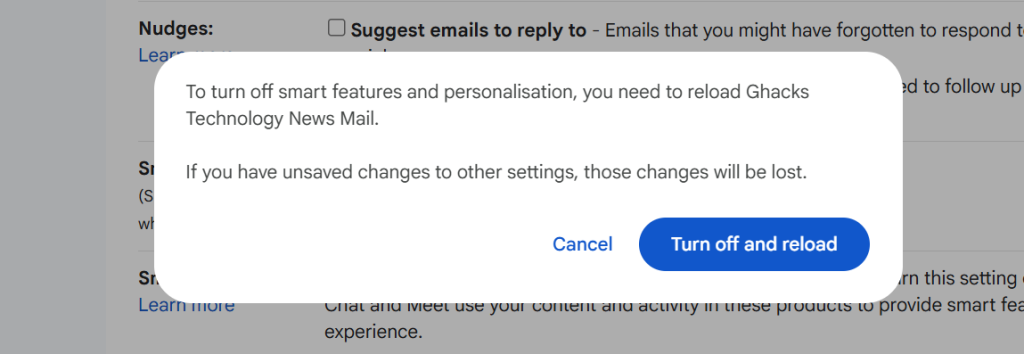
However, if you prefer that Gemini does not access your emails at all, your only option is to turn of the Smart Features in Gmail.

Here is how that is done:

  1. Load https://mail.google.com/mail/u/0/#settings/general in a web browser.
  2. Scroll down to Smart Features in Settings under General.
  3. Remove the checkmark of the Smart Features box.
  4. Confirm the removal.
  5. Gmail restarts.

Smart Features should be turned off now.

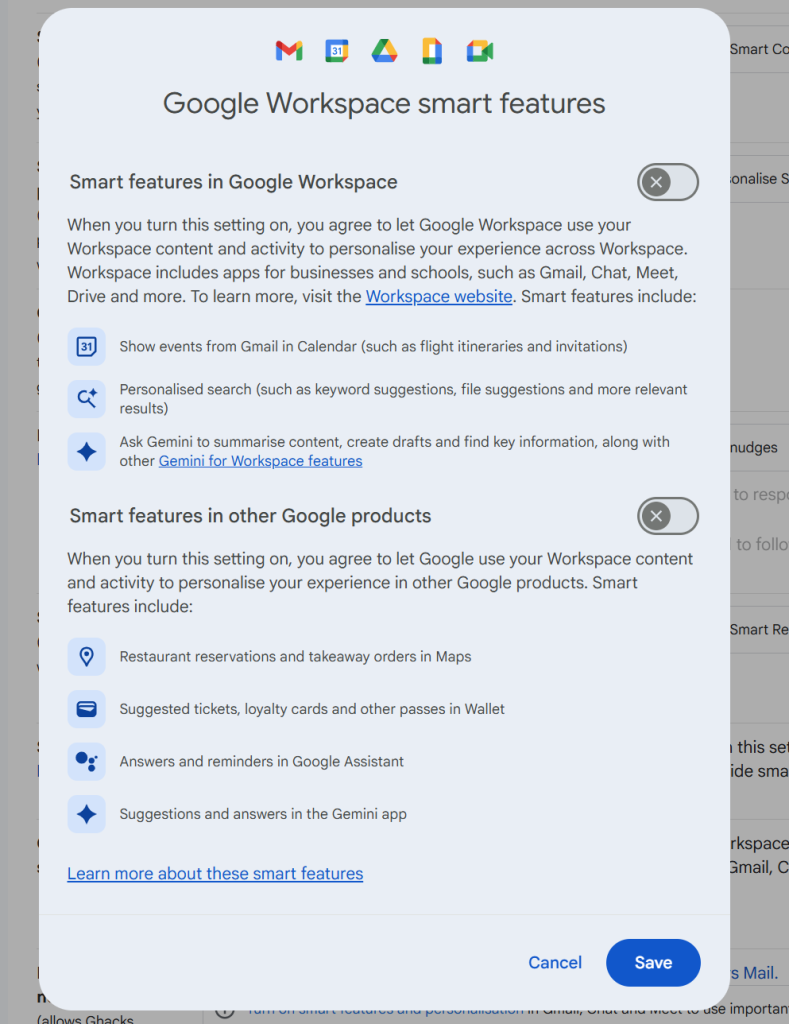
Note that you may also need to click on “Manage Workspace smart feature settings”, if the account is a Google Workspace account and not just a single Gmail account.

There you can turn off Smart Features for Gmail and other Google products.

Again, when you enable the feature you do not get any auto-corrections anymore as well. That is a trade-off for some, others may use the functionality that their browser provides for that anyway.

Now You: do you use Gmail as your mail provider or another service? Black Friday might be a good option to make a switch, as plenty of deals are live already or will be offered in the coming weeks.

Google Search

Google is starting to show ads in AI Mode

Posted on November 21, 2025November 21, 2025 by Martin Brinkmann

The number one advertisin company on the Internet seems to have found another place to show you ads. Reports are coming in that more and more users are starting to see ads in AI Mode.

AI Mode? It is a new option in Google Search that you may use to ask Google’s Gemini AI questions and get answers. The mode supports deep search functionality, which Google says is its “most advanced research tool in Google Search”.

Anyway, if you select the mode, you may now also get a good chunk of advertisement according to Bleeping Computer and several other sites and Internet users.

Earlier this year, Google started to show ads in AI Overviews. Unlike AI Mode, which users need to select actively, AI Overviews are attached to regular search results pages on Google Search.

Not all AI chats and modes show advertisement right now. However, there is a very good chance that many will in the not so distant future. These businesses can’t run on love alone and there does not seem to be enough money in selling paid memberships.

So, in the future, you will pay with your data and your eyes on ads when you use the majority of AI chats that will be still around in a year or two.

Speaking of which, if you are subscribed to a Gemini plan, you are still going to see ads in AI Mode and AI Overviews (of course), unless you use a content blocker.

Android

Android is getting an option for experts for sideloading

Posted on November 13, 2025November 13, 2025 by Martin Brinkmann

Google announced plans earlier this year to change a fundamental cornerstone of the Android ecosystem: sideloading. The plan was to force all developers to verify their identity, even those who had no interest in publishing via the Google Play Store.

This was a stark change compared to the status quo. Currently, developers may choose to publish their apps outside Google Play, for instance only on F-Droid, and they can do so unhindered.

Under the new system, they would be forced to verify their identity. Google says that this is for improving security, while third-party stores like F-Droid claim that it is the end of sideloading as we know it.

The main issue, from F-Droid’s perspective, is that Google is dishonest when it states that sideloading is not going away on Android. The reasoning is simple: the definition of sideloading is “the transfer of apps form web sources that are not vendor-approved”. Under the new system, developers need to register an account with Google, pay a fee, provide verification, e.g. with government IDs, accept the terms and conditions, and more.

Google published an update to its plans today on the Android Developers Blog. There, Google explained why it is introducing verification in first place (to keep users safe).

However, Google says that it has listened to feedback and decided to integrate an option for experienced users, students, hobbyists and developers.

It says that it is building “a new advanced flow that allows experienced users to accept the risks of installing software that isn’t verified”. This new flow is designed to ensure that users cannot be forced to bypass the safety checks, even when under pressure from scammers.

Additionally, Google wants to display clear warnings to help users understand the risks involved.

How this is going to work is unclear at this point. Google says that it will share more details in the coming months about this new option.

Still, it could be a good compromise that allows developers and users to install apps from other sources, even if they are not verified by Google.

Now it is your turn. What is your take on this? Is it a good compromise or would you like to see something else entirely? Feel free to leave a comment down below.

Android

Starting next year, all Android apps need to be registered by verified developers, even sideloaded ones

Posted on August 26, 2025August 26, 2025 by Martin Brinkmann

Android users have two main options to install apps on their devices. Through Google Play, if the marketplace for apps is installed, or through sideloading. Up until now, releasing apps through Google Play required a verified developer account. This meant that the developer had to verify their identity before apps could be published.

Starting in 2026, developers who do not publish their apps through Google Play will also be required to verify their identity, if they want their apps to be installed on certified Android devices. A certified Android device, in a nutshell is any device with installed Google services.

Google says that it won’t check apps that are registered through the new program but not made available through Google Play. However, developers are required to use a new special Android Developer Console for sideloading.

Furthermore, the verification process requires that developers provide Google with personal information, including their name, address, email, and phone number, and verification of their identity, for instance by providing Google with documentation that confirms the identity.

Google plans to invite select developers of applications from October 2025 onward and enable free registrations from March 2026 on.

The sideloading of apps by unverified developers will be blocked in the countries Brazil, Indonesia, Singapore, and Thailand from September 2026 on. More countries are added to the list starting in 2027.

Google claims that the new process is designed to “better protect users from repeat bad actors”, as it will make it harder for malware actors to quickly release new malicious apps after Google has taken down an app from a developer.

The change will make it difficult for malware creators, as they need a certificate to distribute their malicious apps outside of Google Play. However, it is also giving Google access to additional data and ends the anonymous development and distribution of apps.

Now You: what is your take on this? Good decision by Google to stop malware and threat actors in their tracks, or a move to gain access to even more data and control?

  • 1
  • 2
  • 3
  • 4
  • Next

Support This Site

If you like what I do please support me!

Any tip is appreciated. Thanks!
  • March 2, 2026 by Martin Brinkmann Don't Bother with Windows 11's new Speedtest feature
  • February 27, 2026 by Martin Brinkmann Warning! That laptop on Amazon? It comes with temporary storage
  • February 26, 2026 by Martin Brinkmann "If your printer works today, it will continue to work": Microsoft corrects previous announcement
  • February 25, 2026 by Martin Brinkmann YouTube Premium Lite subscribers get background playback and downloads with a big "but"
  • February 24, 2026 by Martin Brinkmann Firefox 148.0 is out with its AI kill switch and support for Windows 7 and 8.1 comes to an end

About

We talk, write and dream about Technology 24/7 here at Chipp.in. The site, created by Martin Brinkmann in 2023, focuses on well-researched tech news, reviews, guides, help and more.

Legal Notice

Our commitment

Many websites write about tech, but chipp.in is special in several ways. All of our guides are unique, and we will never just rehash news that you find elsewhere.

Read the About page for additional information on the site and its founder and author.

Support Us

We don't run advertisement on this site that tracks users. If you see ads, they are static links. Ads, including affiliate links, never affect our writing on this site.

Here is a link to our privacy policy

©2026 Chipp.in Tech News and Reviews