Chipp.in Tech News and Reviews

Windows, Security & Privacy, Open Source and more

Menu
  • Home
  • Windows
  • Security & Privacy
  • Gaming
  • Guides
  • Windows 11 Book
  • Contact
  • RSS Feed
Menu

Tag: firefox

Mozilla extends Firefox for Windows 7 support again and it may not be the last time either

Posted on September 6, 2025September 6, 2025 by Martin Brinkmann

Mozilla’s Firefox web browser continues to be supported on Windows 7 and older versions of Apple’s macOS operating systems, according to an update that Mozilla published on its website.

According to the update, Firefox ESR 115 support is extended until at least March 2026. Mozilla plans to evaluate the end of support again in March 2026 to determine whether it will extend support again.

Firefox is one of the few web browsers that continue to support Windows 7 and older macOS versions. Most browsers have ended support for the discontinued versions of Windows and macOS some time ago already.

Firefox ESR 115.33 will be released in February 2026. It could be the last version of that ESR branch, if Mozilla decides to end support then and there.

More than six percent of Firefox users use Windows 7. That is a large number, even with Firefox’s declining userbase.

Firefox 115 was released in 2023 initially. The Extended Support Release version of the browser is only supported with security and bug fix updates. New features are not introduced in the same ESR branch usually. The next major ESR release introduces the features that Mozilla released in stable Firefox in the meantime.

Since there is no upgrade for Firefox ESR 115 users, their version of the browser remains on the 2023 feature set. Means, features such as tab groups, vertical tabs and others are not available.

The consumer editions of Windows 7 are no longer supported by Microsoft. This means that the operating systems do not receive security updates anymore. Micro-patching service 0Patch continues to support the operating system, however.

Firefox

Mozilla plans to drop support for very-old Android versions

Posted on August 11, 2025August 11, 2025 by Martin Brinkmann

Mozilla plans to drop support for Android versions older than Android 8. Android 8 was released in 2017, which means that the move will affect users who use Firefox on mobile phones that are nearly a decade old or older.

Current mobile versions of Firefox require at least Android 5.0, which was released in 2014.

Mozilla announced the intention to raise the system requirements for Firefox on Android on the organization’s bug tracking website. And the organization has good reasons for wanting to drop support.

It allows Mozilla to “implement newer technologies” and prevents engineers from “being burdened by fixing bugs that only emerge on a small population of people using old devices”.

Also worth noting is that libraries that Mozilla is using are dropping support for Android 5, which causes additional problems for Mozilla.

With Android 15 (API 35) official release last Oct 15, 2024 (for Pixel devices), we should be considering bumping up the min Android OS version of the Firefox Mobile Browser up to Android 8 (API 26). Doing so allows us to implement newer technologies, and prevents us from being burdened by fixing bugs that only emerge on a small population of people using old devices. By bumping the min Android OS version, users on those devices will no longer receive app updates.

Additionally, we are increasingly finding that libraries we use are dropping support for obsolete versions like Android 5. This causes us big problems for ongoing maintenance of our apps.

Mozilla is not the only browser maker that bumped Android version requirements recently. Google dropped support for Android 7 and 8 recently with the launch of Chrome 139 for Android. Most Chromium-based browsers for Android are likely affected by the change going forward.

So, if you are still using an Android device that is no longer supported, and has not been for a few years at least, you may find yourself without a supported browser as well.

Will there be browsers that continue to support Android 8 or earlier? That remains to be seen. For now, both Vivaldi and Opera support Android 8, as will Firefox going forward.

How to enable the advanced configuration about:config in Firefox for Android

Posted on July 2, 2025July 2, 2025 by Martin Brinkmann

Mozilla has locked down Firefox for Android significantly. When it first launched the revamped version, it blocked access to what some Firefox users would call essential features: namely extensions support and access to the advanced configuration about:config.

It changes its stance on extensions support just recently, which is a step in the right direction and a main differentiating factor between Firefox and Google Chrome.

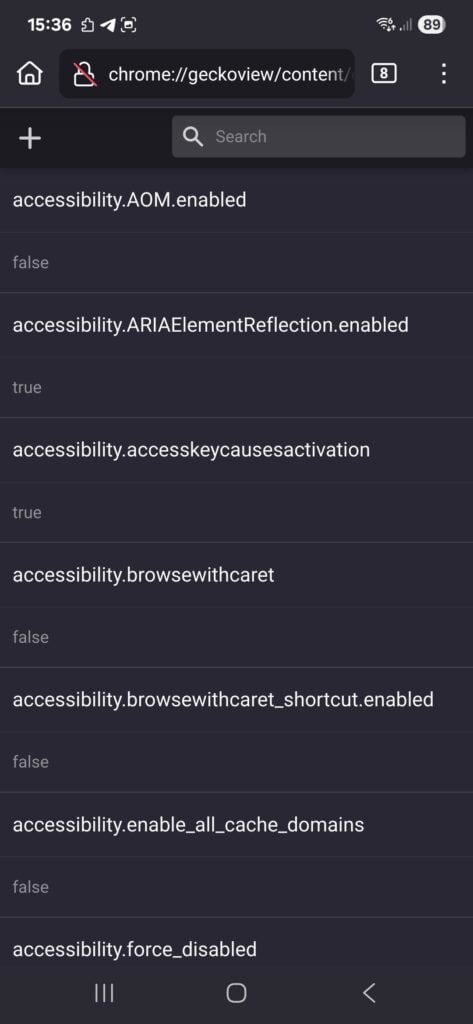
As for access to the advanced configuration, you may access it in all Firefox for Android versions. While you may get an error when you try to launch about:config in the address bar, you will get access to the configuration if you load chrome://geckoview/content/config.xhtml instead.

There you get the option to modify advanced configuration parameters. Also, if you want, you may switch the preference general.aboutConfig.enable to True to enable about:config. May be easier to access than the resource listed above.

It is a handy way to gain access to the advanced configuration of the browser on Android. Allows you to disable or enable certain features, and modify settings to your liking. (via AskVG)

Firefox 140.0.1 fixes a crash and a usability issue

Posted on June 27, 2025June 27, 2025 by Martin Brinkmann

Hot of the heels of the Firefox 140.0 Stable update, released earlier this week, is the first point update for the web browser. It addresses two non-security issues in the browser, one of them a crash at browser start.

The main issue fixed in the update is a startup crash that Mozilla says affected some users of the browser. It is caused by DLL injection. The bug report on Mozilla’s bug tracking website suggests that Mozilla reverted a change that it made in Firefox 140 to address the issue.

Mozilla lists Windows 10 specifically, which suggests that the bulk of users who experienced the crash use devices with Microsoft’s operating system.

The second fix resolves text contrast issues in the sidebar. They occurred if certain dark themes were used by the user. The text in the sidebar was barely readable in some instances. The update addresses the issue.

Firefox users who are affected by one or both of the issues may want to upgrade to the new version to resolve these issues. Just select Menu > Help > About Firefox to run a check for updates.

The browser should pick up the new version so that it gets downloaded and installed automatically. A restart is required to complete the upgrade process.

You find the original release notes for the Firefox 140.0.1 update here.

Firefox

Mozilla should test Firefox with best-in-class ad blocker and privacy

Posted on June 24, 2025June 24, 2025 by Martin Brinkmann

The future looks quite grim for Mozilla and its Firefox web browser. The average monthly user count continues to drop while the browser of its ex-CEO is reporting new heights regularly. Then there is the looming death of Google and its impact on Mozilla’s finances to consider.

Mozilla’s reaction came as a surprise. It started to add features that users requested for years. Firefox supports vertical tabs now, tab groups, and a lot more.

It also took a look at its assets to figure out what to keep and what to terminate. This resulted in the termination of recent acquisitions, such as Fakespot, and long-standing staples, such as Pocket.

While these help free up resources and reduce expenses, it is likely that they won’t prevent the Mozilla-ship from capsizing, if things take a turn for the worse.

What to do? Here is an idea!

Why is Brave gaining users and Firefox losing them? You could say that it is all because of the different underlying platforms that the browsers use. Brave, after all, uses the same core as Google Chrome. Firefox uses Mozilla’s own engine. It has advantages, as it gives Mozilla full control over the engine. However, all development weight is on Mozilla whereas Brave and others reap what (mostly) Google developers and others work on.

It would be shortsighted to focus solely on this. Brave includes a content blocker by default. It also includes lots of privacy enhancements. While some criticize the browser for its integration of crypto-stuff, the combination of Chromium with its integrated content blocker works really well most of the time.

Firefox users can install uBlock Origin or another content blocker, but they have to do so manually.

Why is not Mozilla integrating its own content blocker or establishing a partnership with Raymond Hill, the creator of uBlock Origin? Mozilla never revealed the answer, but the most likely answer is because of its search deal with Google.

An ad blocker would prevent Google ads from showing up. Google would rightfully so want to pay less to Mozilla, as it would not make enough revenue anymore to justify the price that it pays Mozilla each year.

But what about running a test? Create a special version of Firefox. Install an ad-blocker and enable it by default. Distribute it, maybe ask for donations in the same way that the Thunderbird team is asking for them.

See how it goes. Just make sure that privacy is excellent for users, that they won’t see any sponsored content or other paid content in Firefox, and that their privacy is always valued more than anything else.

It might work. Users might pick Firefox as it would keep them safe and private while using the browser. It might not work, but Mozilla would at least tried something.

Now You: do you use Firefox or another browser? Let me know in the comments below.

Firefox 139.0.4 fixes a freeze and security issues

Posted on June 11, 2025June 11, 2025 by Martin Brinkmann

Mozilla released a new version of its open source Firefox web browser today. Firefox 139.0.4 is a point update that addresses security issues and bugs in the browser.

The update is already live. Most Firefox installations should receive it automatically, but you can speed up the installation by going to Menu > Help > About Firefox.

The security fixes

Firefox 139.0.4 fixes two security issues in the browser. Both have a severity rating of high, which is second only to critical. Mozilla does not mention any exploits in the wild, which is good.

One issue fixes memory corruption in canvas surfaces, the other an Integer overflow in OrderedHashTable. You can check them out here if you want to take a look by yourself.

The non-security fixes

Mozilla lists four non-security issues on the official release notes website.

The big fix in the release addresses freezes in Firefox. Mozilla notes that these could happen when switching between apps or when certain panels were opened within the browser.

The linked bug reports reveal additional details. One report started that Firefox froze when the uBlock Origin icon or other icons were opened. A second report claimed that Firefox would freeze and crash when Alt-Tab was used on Windows while a full-screen game was being played.

The second and third bug fix address various selection issues in the web browser. Mozilla notes that one fix addressed an issue that made the selection of drop-down menu items when using the in-page search difficult. Another addressed selection issues when triple-clicking text “in some situations”.

The final bug addresses a filename issue. Firefox used an incorrect filename when an image is set as the desktop wallpaper on Windows.

Closing Words

Firefox users may want to update to the new browser version immediately to fix the security issues and prevent hypothetical attacks against them. Those affected by the non-security bugs may also want to update asap.

Now You: when do you update your browsers? Immediately after a patch is released or do you wait and see first? Feel free to leave a comment down below.

Mozilla finally makes it easier to add Search Engines to Firefox

Posted on May 29, 2025May 29, 2025 by Martin Brinkmann

Firefox users have a few options to add new search engines to the browser. The entire process is not as straightforward as it could be though, especially when you compare it to how search engines are added to Chromium-based browsers such as Google Chrome.

The two main options are to add the new search engine from the address bar or search bar of the browser, or by installing it. The settings, for instance, are a place that that you can’t add new search engines from.

With Firefox 140 comes a change that adds two new option to the process.

The first allows you you to right-click on any search field to add that search engine to Firefox. Some users may find this new option more natural, especially when compared to the current status quo regarding search engines in the open source browser.

Firefox's new "add search engine" option

So, simply right-click the search field and select “add search engine” . This opens a prompt that gives you the option to change the name of the search engine and assign a keyword to it. Activate the “add engine” button to add it to Firefox.

The search engine is available now in Firefox. You still need to go to the Settings to make it the default, but you can select it right away when running searches in the browser.

Search Engines in Settings

Firefox Add a new search engine in Settings

The second option is available right in Settings. Open the Settings in Firefox and switch to the Search group to get started.

There you find the new Add option to add a new search engine to Firefox. You do need the search URL for this one and use the %s placeholder for your search terms. The two other options let you pick a custom name for the search engine and add an optional keyword.

There you have it, two new options to add search engines to Firefox. This improves the feature significantly.

Now You: how do you add new search engines to your browser of choice? Feel free to leave a comment down below.

Firefox

Firefox’s address bar is getting a makeover: here is a first look

Posted on May 25, 2025May 25, 2025 by Martin Brinkmann

Mozilla’s Firefox web browser remains a popular choice, especially for open source enthusiasts and users who want as much customization options as possible.

While Mozilla is going through some form of decline, at least when Firefox’s usage share is concerned, it is still used by hundreds of millions of users each month.

Mozilla tried several strategies to turn the tide. It continues to reduce its reliance on Google money through new products, but most revenue still comes from that one search deal with Google.

Recently, Mozilla introduced much-requested features in Firefox. From tab groups to vertical tabs. an improved profile manager and the upcoming link previews feature.

Now, it is the address bar that is getting a makeover.

Tip: check out my guide on enabling compact mode in Firefox.

The improved Firefox address bar

Improved selection of search engines and search data

Image source: Mozilla

Click on the icon at the left side of the address bar to pick any search engine for search. You may also select internal options, such as bookmarks or the browsing history from the menu.

My take: Good addition, but nothing major.

Search term instead of search URL

Image source: Mozilla

A controversial change. When you run a search, Firefox displays the original search term in the address bar instead of the URL. Mozilla says that it is done to give users easier access to change the phrase and to run the search using a different search engine.

My take: Don’t like, as the URL should always be visible.

Search using keywords

This feature is not really new, as Firefox supported keyword-based searches for a long time.

Use @bookmarks or @tabs to limit searches

My take: not really new, but may expose the feature to more users.

Actions to take

Image source: Mozilla

Actions is a new feature. An action is a command that you want Firefox to execute. Options include printing the active page, opening the Settings, viewing the page source, or clearing the recent history.

My take: this one is handy for users who prefer the keyboard over mouse.

Contextual search suggestions

Firefox shows contextual options for some searches or prompts. It may show a shortcut to search the active site or to switch to a specific tab.

My take: sounds like a useful feature, not entirely new though.

No HTTPS:// anymore, but clear warnings for insecure sites

Since most sites use the secure HTTPS now, Mozilla decided to hide the protocol from Firefox. It continues to show warnings if a site uses HTTP or another insecure protocol or misconfigured protocol.

My take: I prefer to see all protocols all the time, so, not something that I like.

Good news is that you can make changes to Firefox’s configuration to alter the defaults. Check out Mozilla’s blog post for additional screenshots and information.

Now You: what is your take on these features? Something that you find interesting or superfluous? Feel free to leave a comment down below.

Security

Firefox 138.0.3 fixes two crashes and some other issues

Posted on May 13, 2025May 14, 2025 by Martin Brinkmann

Mozilla plans to release a new point update for its open source Firefox web browser later today. Firefox 138.0.3 is a non-security update that fixes three issues in earlier versions of the web browser, including one crash issue.

If you use Firefox on the desktop only, you may ask yourself if you missed the Firefox 138.0.2 release. You may have, as this special version was only released for Firefox on Android.

Firefox 138.0.3: the fixed issues

Firefox 138.0.3 fixes a WebGL-related crash. Mozilla notes that Firefox could crash when websites that use WebGL were opened. WebGL, which stands for Web Graphics Library, is used to render 2D and 3D graphics using JavaScript.

Web games and other interactive or animated content may make use of WebGL. So, if you ran into crashes while running the recent version of Firefox, there is a good chance that this was caused by the WebGL bug.

The update fixes a second crash. This one occurred on websites where certain SVG effects were applied to very small areas.

Firefox 138.0.3 fixes two additional issues:

  • Videos looked washed out on Linux under Wayland, if HDR was not supported on the system.
  • The keyboard shortcut Alt-C did not work as expected in the sidebar search.

Mozilla has not published the official release notes at this time. The release notes will be published shortly after the Firefox 138.0.3. You can access them here afterwards to check them out.

The new update is only available for the desktop versions of the Firefox web browser. Furthermore, Firefox ESR are not updated, as they appear to be unaffected by the issues.

Mozilla plans to release the next major version of Firefox and Firefox ESR on May 29th, 2025. The following versions will be released on the day:

  • Firefox 139
  • Firefox 115.24 ESR
  • Firefox 128.11 ESR

Now you: where you affected by one or several of the fixed bugs? How do you handle point updates usually? Do you install them right away, postpone their installation, or skip them? Feel free to leave a comment down below.

How to enable Compact Mode in Firefox

Posted on April 29, 2025April 27, 2025 by Martin Brinkmann

Mozilla’s Firefox web browser supports two display densities by default. These determine the size of the toolbar and the elements that are displayed on it.

The two options are normal and touch. Normal is the default value, unless Firefox is used on a touch display.

Firefox supported a third for a very long time officially. Called compact, it reduced the size of the main toolbar to free up room for the display of websites in the browser.

While the mode is not shown anymore by default to users of the web browser, it is still available, albeit officially as “not supported”.

Still, if you are like me, you prefer your browser’s interface as tidy as possible to give website content more room.

Here is a step-by-step guide to enabling compact mode in the Firefox web browser.

Note: This works only in Firefox for the desktop. Also, since the feature is not supported officially, there is a theoretical chance that Mozilla is going to remove it at one time. The interface would revert to the default density in that case though.

Enable Compact Mode in Mozilla Firefox

Firefox Compact Mode

The first step enables the Compact Mode option in the interface, the second sets the interface to the mode.

  1. Load about:config in the address bar.
  2. Confirm the warning page to continue.
  3. Search for browser.compactmode.show.
  4. Click on the toggle icon to set the value of the preference to true.
  5. Select Menu > More Tools > Customize Toolbar.
  6. Locate the “Density” menu at the bottom and click on it to display its options.
  7. Choose “Compact (not supported)” from the available options.

Firefox changes the density of the toolbar and its elements immediately. The toolbar’s height should be a bit smaller than the height of the normal or touch toolbar.

Note that you may undo the change at any time starting at 5) above and switching to Normal or Touch under 7).

Now You: What is your preferred display mode? Smaller, with more space for websites and content, or larger?

  • Previous
  • 1
  • 2
  • 3
  • 4
  • 5
  • …
  • 7
  • Next

Support This Site

If you like what I do please support me!

Any tip is appreciated. Thanks!
  • March 2, 2026 by Martin Brinkmann Don't Bother with Windows 11's new Speedtest feature
  • February 27, 2026 by Martin Brinkmann Warning! That laptop on Amazon? It comes with temporary storage
  • February 26, 2026 by Martin Brinkmann "If your printer works today, it will continue to work": Microsoft corrects previous announcement
  • February 25, 2026 by Martin Brinkmann YouTube Premium Lite subscribers get background playback and downloads with a big "but"
  • February 24, 2026 by Martin Brinkmann Firefox 148.0 is out with its AI kill switch and support for Windows 7 and 8.1 comes to an end

About

We talk, write and dream about Technology 24/7 here at Chipp.in. The site, created by Martin Brinkmann in 2023, focuses on well-researched tech news, reviews, guides, help and more.

Legal Notice

Our commitment

Many websites write about tech, but chipp.in is special in several ways. All of our guides are unique, and we will never just rehash news that you find elsewhere.

Read the About page for additional information on the site and its founder and author.

Support Us

We don't run advertisement on this site that tracks users. If you see ads, they are static links. Ads, including affiliate links, never affect our writing on this site.

Here is a link to our privacy policy

©2026 Chipp.in Tech News and Reviews