Chipp.in Tech News and Reviews

Windows, Security & Privacy, Open Source and more

Menu
  • Home
  • Windows
  • Security & Privacy
  • Gaming
  • Guides
  • Windows 11 Book
  • Contact
  • RSS Feed
Menu

Tag: ai

Total Opt-Out: How to Use Firefox 148’s New Master Switch to Block All AI Features

Posted on January 31, 2026January 31, 2026 by Martin Brinkmann

In an era where tech giants are racing to weave artificial intelligence into every corner of the browsing experience, Mozilla is handing the controls back to the user.

In a few weeks, the organization plans to launch Firefox 148 to the stable channel. It will include the “AI kill switch” that Mozilla executives hinted at earlier. With it, users of Firefox may block existing and new AI features in the browser either entirely or selectively.

Support of AI features

Firefox supports several AI features at the time off writing. This includes the option to interact with AI chatbots in the sidebar, get link preview summaries and tab suggestions, or help with tab group labeling.

In summary (as of Firefox 147):

  • Translations
  • Image alt text in Nightly PDF viewer
  • Tab group suggestions
  • Key points in link previews
  • Chatbot providers in sidebar

Not all features are available for all Firefox users. Some are limited to users who use the open source browser in English.

A detailed look at Firefox’s AI Kill Switch
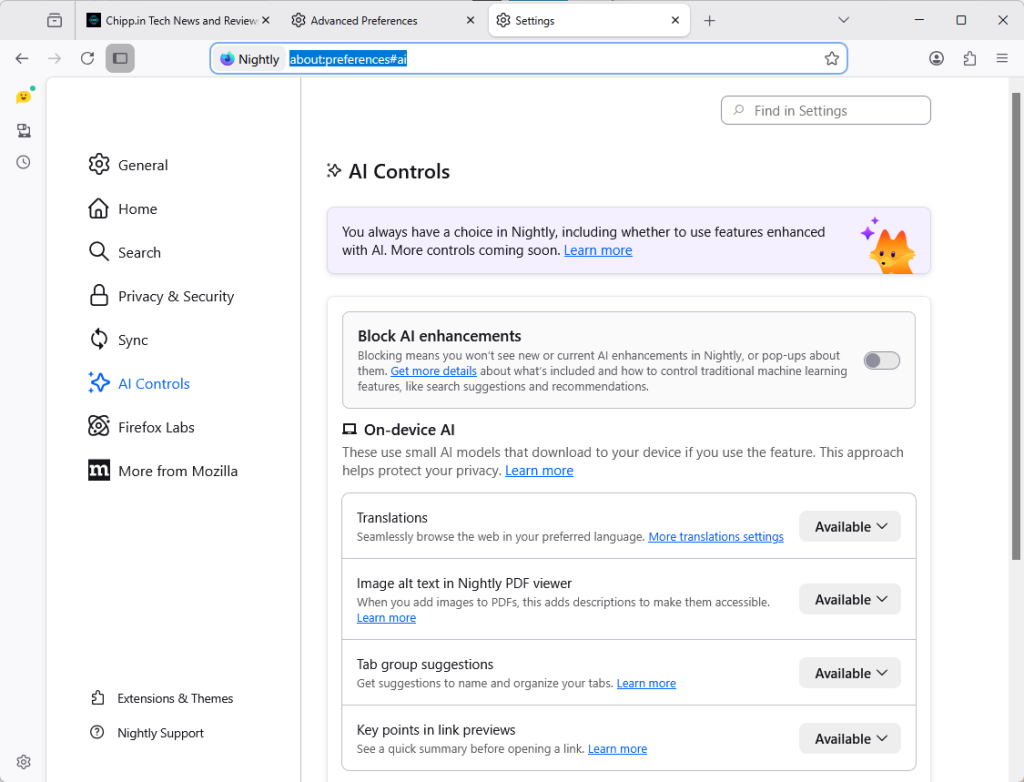
The new AI Controls page of the Firefox Settings.

Starting in Firefox 148, out next month and available as a preview already, Firefox will include the option to block AI functions.

Mozilla added an AI Controls section to the preferences of the browser. You can launch Menu > Settings > AI Controls, or load about:preferences#ai directly to manage AI features in the browser.

Note: The preference browser.preferences.aiControls controls the entry in the preferences. Toggle it to True to enable it, or to False to disable it. This impacts only the display in Settings.
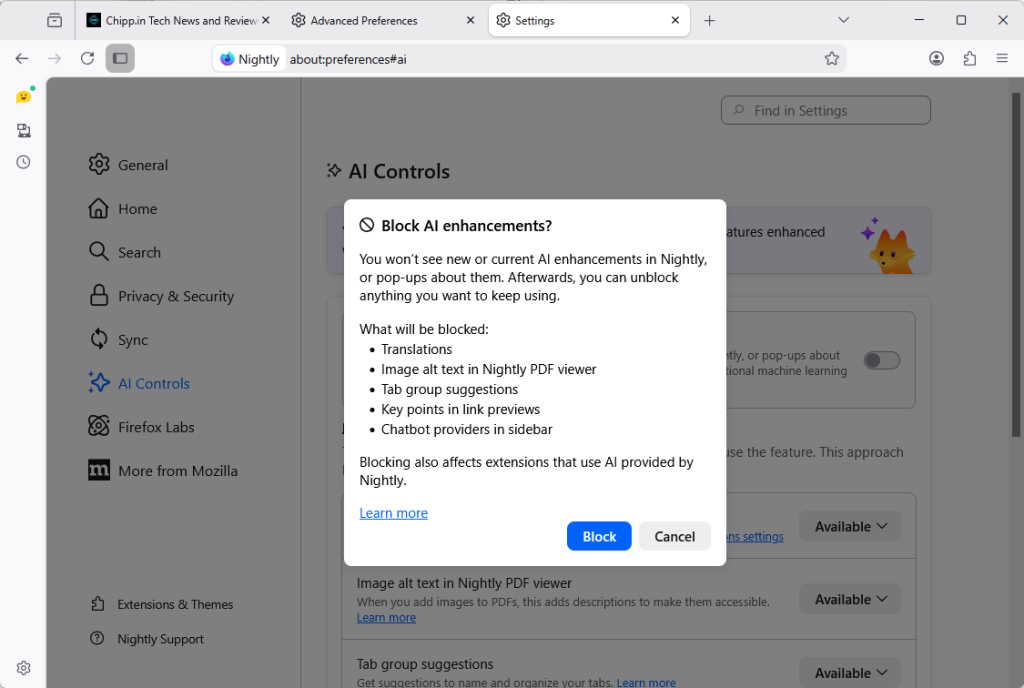
Firefox includes an option to disable all AI features with a single preference.

How to disable all AI in Firefox? Just toggle “Block AI enhancements” to Off. You get a prompt that explains what is going to happen. Activate “block” here to disable all AI features in the browser.

Instead of blocking everything, Firefox users may also block specific features only.

The AI Controls page divides the functions into two sections: On-device AI and AI chatbot providers in sidebar.

Each AI feature is listed with its name, a short description, and an action button. You can switch a feature from “Available” or “Enabled” to “Blocked”.

  • Available means that it can be used, but has not been up until now.
  • Enabled means that the user opted-in to use the AI feature.
  • Blocked that it is not active in the Firefox browser.

Here are the features that you can manage individually right now:

  • Translations
  • Image alt text in Nightly PDF viewer
  • Tab group suggestions
  • Key points in link previews
  • Chatbot in sidebar

Closing Words

Ultimately, Mozilla’s introduction of a global block toggle for all AI features highlights the organization’s awareness of the deep-seated skepticism toward AI among its user base. With it, it is giving Firefox users control over AI. Those who do not want it can make sure that it is disabled entirely in the browser, while everyone else may keep some or even all AI features enabled to make use of them.

By providing a clear, centralized way to opt out of AI—and ensuring that local data is purged when those features are disabled—Firefox 148 sets a high standard for how browser developers should respect individual choice. (source: Sören Hentzschel)
Google Chrome Gets a Major Upgrade with Gemini 3 and Auto-Browse

Posted on January 30, 2026January 30, 2026 by Martin Brinkmann

Google is officially transforming the web browser from a static tool into an active personal agent with the launch of Gemini 3 and “Auto-Browse” in Chrome, and the push into a personalized AI experience.

Announced yesterday for desktop users, with the exception of Chrome for Linux, this major update integrates Google’s most advanced AI model directly into the browser to handle complex, multi-step tasks.

Google is pushing Gemini with the help of its Chrome browser

Lookout OpenAI, Gemini could get a massive user boost thanks to the integration in the world’s biggest browser.

Here is an overview of the features that Google announced:

Auto-Browse (Agentic Browsing): The flagship feature for AI Pro and Ultra subscribers in the U.S. that performs multi-step “chores” on your behalf. It can research travel costs across dates, fill out complex online forms, file expense reports, or add specific items to a shopping cart based on an image.

Gemini Side Panel: A persistent area in Chrome that supports interactions with the AI without losing focus. It supports the usual AI-features, such as summarizing a page, comparing features across several tabs, or finding time in your calendar.

Integrated “Nano Banana”: The latest version of Google’s image generator is integrated into the browser. Also accessible from the side panel, you can use text prompts for creative tasks, such as turning research data into infographics or manipulating images open in the browser.

Connected Apps Integration: Deeper connectivity with the Google ecosystem, allowing Gemini to pull information from Gmail, Calendar, Maps, and Google Flights to execute workflows (e.g., finding a flight based on an event invitation in your email).

Personal Intelligence: A proactive feature that remembers context from past conversations to provide tailored answers. It learns user preferences over time to transform the browser into a “trusted partner” rather than a general-purpose tool.

Universal Commerce Protocol (UCP) Support: Integration with a new open standard (co-developed with brands like Shopify and Wayfair) that allows AI agents to navigate checkout processes and take commercial actions across different retail sites securely.

Enhanced Security & “Pause and Confirm”: New defenses designed for agentic AI, including a safety mechanism where Auto-Browse must pause and ask for explicit user confirmation before completing sensitive actions.

Closing Words

It is clear that Gemini will get a huge user boost from this. Even if Google limits exposure to certain regions or subscription models at first, it is clear that it will expose as many users as possible to Gemini in Chrome in the long run.

Why? Because it is giving Google an edge over the competition. Plus, when users run into usage limits, they may become paying subscribers, which seems to be on the preferred options right now to increase revenue and compensate expenses.

The benefit for users invested in Google’s ecosystem is there, especially if you connect the AI to other Google services. Whether you really want that, an all-knowing AI that may know more about your desires, life and plans than your closest friends, is up for you to decide.

I see the benefits, but also the dangers. While I do use AI tools for some tasks, such as creating a teaser image for an article here or the weekly newsletter, I do not really see a benefit in letting AI do the shopping for me, even with all safeguards in place.

Google wants to personalize your search experience even more, but needs your data for that

Posted on January 23, 2026January 23, 2026 by Martin Brinkmann

Imagine if Google Search didn’t just know the internet, but actually understood your context. Scary? Wonderful?

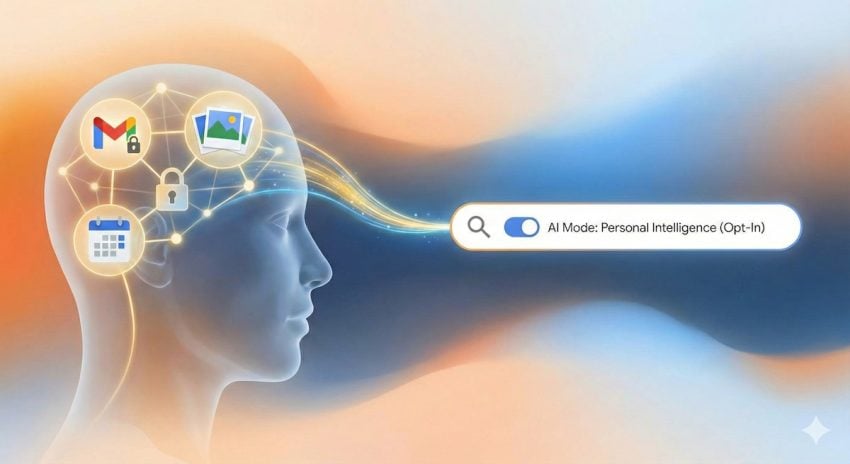
Google is making this a reality for AI Pro and Ultra subscribers with the launch of Personal Intelligence in AI Mode, a new feature that lets you securely connect Gmail and Google Photos directly to your search results.

This update is designed to save your time by transforming — often — generic search queries into personalized answers while ensuring your personal data remains private, opt-in, and strictly under your control, according to Google.

Announced yesterday, Google continues to push a personal angle into its products. Last week, Google introduced Personal Intelligence that connects its Gemini AI with Gmail, YouTube and some other company services.

This week’s announcement extends Personal Intelligence to Google Search. More precisely, to AI Mode of Google Search.

Personal Intelligence in AI Mode for Search

What it does: It connects Gmail and Google Photos to the AI Mode of Google Search. This allows Gemini to cross-reference information from emails or photos with general search information to provide answers that are specific to the user.

For example, if you ask for an itinerary, it may look up flight or accommodation information in Gmail as well as what you liked to do in past holidays on Google Photos to suggest an itinerary that is personalized.

Who gets it: The feature is rolling out as a Labs experiment. It is only available for Google AI Pro and AI Ultra subscribers in the United States who search in English.

What about privacy? The feature is strictly opt-in. Google claims that it is not using any personal data for training and users may disconnect the feature from Search at any time to end it.

Google’s ultimate goal is to bridge the gap between a search engine that knows “the world” and its users. For some, it is a new level of convenience that makes searching on Google better and faster. For others, it is a nightmare come true.

However, since the feature is opt-in and limited to Google AI Pro and Ultra subscribers, the latter camp is likely very small at this point. This could change with a general rollout to non-paying Google Search users.

The success of the feature will ultimately hinge on trust, not so much on the technology and its effectiveness. While Google implemented important guardrails, including making the feature opt-in and promising that personal emails or photos won’t be used for training, handing over the keys to private memories and information requires a huge leap of faith, especially considering that Google’s main line of business is advertisement.

Personal Intelligence: Google pivots Gemini towards an all-seeing AI

Posted on January 15, 2026January 16, 2026 by Martin Brinkmann

Artificial Intelligence (AI) has been mostly reactionary up to this point: a user initiates a conversation or asks the AI to do something, and the AI reacts to the input.

AI agents will change that, but they too have limited knowledge. All of this is going to change with Google’s announcement of Personal Intelligence, which sounds like Microsoft’s Recall feature, but on steroids.

It marks a shift towards a deeply integrated AI, including into Android and ChromeOS. Unlike the Gemini app, which is mostly there to provide the user with information or create something for the user, Personal Intelligence is designed to know the user fully to provide a deeply personal experience.

  • When does it start? It is rolling out for Google AI subscribers in the United States already.
  • Opt-in or Opt-out? Personal Intelligence is opt-int.
  • Where can you use it? Across Web, Android, and iOS.
  • How does it work? The AI creates a local database of a user’s life that is based on emails, photos, calendar entries, messages, and application usage. It pulls data from various sources to know as much as possible about a particular user.

Google reveals that Personal Intelligence runs on Gemini Nano v3, which is optimized heavily for running on the neural processing units of Pixel 9 and Pixel 10 series devices. This allows it to process sensitive data on the device without the data leaving it at any stage of the process.

Unlike Gemini App, which is just a chat window for the most part, Personal Intelligence sees what the user sees on the screen. Furthermore, the AI may act on the user’s behalf with other apps.

Potential benefits for users

  • The AI you interact with knows as much about your life as you do, at least when it comes to online activity. You can ask it vague questions using natural language.
  • Personal Intelligence has capabilities to act on information. It can not only retrieve information, but also use information for actions.
  • A proactive context that anticipates needs. It may recommend to leave early if it notices that traffic is heavier than usually, knowing where you will be based on calendar entries.

Potential points of criticism

  • While Google emphasizes that sensitive data remains on the device, giving an AI full access to every pixel on the screen and your entire digital life is problematic, especially considering that Google is an advertising company first and foremost.
  • It remains to be seen how an all-seeing AI impacts a device’s battery life.
  • Even with access to personal data, AI may hallucinate, which means that it may return information that does not exist or run the wrong actions on the user’s behalf.
  • Personal Intelligence is also locked into Google’s ecosystem of apps and services for the most part, as functionality with third-party apps is limited at this point.

Closing Words

With Personal Intelligence, Google is offering an interesting and at the same time frightening proposition: a life that is more and more controlled and managed by AI, and in exchange for that, total access to the life of the user.

For now, users have the key in hand. They do not have to enable Personal Intelligence and when they do not, nothing changes. However, when they do, they will effectively allow Google access to their life, connect the dots, and know more about the user than their closest friends or family members.

I want to hear from you: Is on-device processing enough to earn your trust, or does the idea of Google ‘reading’ your screen still feel like a step too far? Let’s discuss in the comments.

Microsoft 365 Premium: here is what the new plan is all about

Posted on December 23, 2025December 23, 2025 by Martin Brinkmann

Up until very recently, home users had two options when it came to Microsoft 365, Microsoft’s cloud-based Office and storage offering: get the personal plan, for a single user, or the family plan, which allowed up to six users to use the service.

Personal, the cheaper option, gave users several benefits, including access to all Office apps on up to five devices, one terabyte of online space, access to Microsoft Copilot, and more. Family increased the user limit to six, and allowed every user to install the apps on up to five devices. Also, each user got 1 terabyte of cloud data for their files.

Now, Microsoft introduced Microsoft 365 Premium. It is a brand new plan for individuals that costs more than twice as much as the personal plan.

For around $200 per year, with an introductory offer of paying just $100 for the first year, home users gain every benefit of the family plan, plus two additional features exclusive to the premium plan:

  • Highest usage limits for select Copilot features
  • Access to Copilot features currently exclusive to Premium

As you can see, premium is all about Microsoft’s Copilot AI. The two main benefits are increased limits and access to features that the cheaper Microsoft 365 plans do not support at all.

In short, Microsoft is combining Microsoft 365 Family with Copilot Pro to form a single subscription: Microsoft 365 Premium.

Here is an overview of what premium plan users get regarding limits and features:

Copilot AI featureMicrosoft 365 PersonalMicrosoft 365 FamilyMicrosoft 365 Premium
Agents15 Deep Research tasks15 Deep Research tasks25 tasks divided between Analyst, Researcher, and Deep Research
Actions (automate tasks)NoneNone10 tasks per month
Audio overview in Notebooks, Podcasts6 users per dayExtensive use Extensive use
Copilot in Microsoft 365 apps (Draft, Rewrite, Summarize, Analyze data (Excel)), Image generation and more60 credits per month60 credits per monthExtensive usage beyond standard credit limits.
Photos AgentNoneNoneExtensive use
Vision10 minutes per day10 minutes per day15 minutes per day
Voice30 minutes per day30 minutes per day60 minutes per day
Exclusive access to Advanced AI featuresNoNoYes

Some notes:

Certain AI features are only available for the account holder. That is bad news for Family plan or Premium plan users who are not, as they may not access these AI features.

Microsoft uses the term “extensive use” several times, but fails to provide specifics. It does not reveal what extensive use means in minutes or tasks.

In another overview, Microsoft reveals that premium plan subscribers gain the highest usage in certain features, including AI image generation. It is again unclear how this differentiates from the limited usage of personal and family plans.

Is Microsoft 365 Premium the right account? It might be, but only if you are heavily interested in AI features, have run into usage limits with a free account or the other two plans, or want access to exclusive features, which gives users access to Copilot Pro and Microsoft 365.

So, if you are subscribed to Copilot Pro already and use Microsoft 365 Personal or Family, you may take advantage of the introductory offer of around $100 for the first year. Note though that this advantage is lost in the second year when the price jumps to $200.

Remove Windows AI takes care of all AI features in Windows 11

Posted on December 21, 2025December 21, 2025 by Martin Brinkmann

Microsoft continues to increase the number of AI-related features in its Windows 11 operating system. The evolution into an agentic operating system has been announced, which means that the next feature update for Windows 11 will surely introduce more AI-related features.

Not all Windows users welcome the change with open arms. While there are not any meaningful polls out there, many appear indifferent to the changes while some oppose them openly.

If you fall into the category, you may have discovered switches and tweaks here and there that deal with certain AI features. Or, you may have used a program like DoNotSpy11 that handles them.

Remove Windows AI is an open source script that promises to disable all AI features in Windows 11.

The script removes the following features

Note that the script is in constant development. The developer reacts to new features and changes that Microsoft makes and introduces. As such, it is recommended that you check out the homepage over on GitHub for an updated listing.

  • Disable Registry Keys
    • Disable Copilot
    • Disable Recall
    • Disable Input Insights and typing data harvesting
    • Copilot in Edge
    • Image Creator in Paint
    • Remove AI Fabric Service
    • Disable AI Actions
    • Disable AI in Paint
    • Disable Voice Access
    • Disable AI Voice Effects
    • Disable AI in Settings Search
  • Prevent Reinstall of AI Packages
    • Installs custom Windows Update package to prevent reinstall of AI packages in the CBS (Component-Based Servicing) store
  • Disable Copilot policies
    • Disables policies related to Copilot and Recall in IntegratedServicesRegionPolicySet.json
  • Remove AI Appx Packages
    • Removes all AI appx packages including Nonremovable packages and WindowsWorkload
  • Remove Recall Optional Feature
  • Remove AI Packages in CBS
    • This will remove hidden and locked AI packages in the CBS (Component-Based Servicing) store
  • Remove AI Files
    • This will do a full system cleanup removing all remaining AI installers, registry keys, and package files
  • Hide AI Components
    • This will hide the settings page AI Components
  • Disable Rewrite AI Feature in Notepad
  • Remove Recall Tasks
    • Forceably removes all instances of Recall’s scheduled tasks

How to use the script on a Windows 11 machine

The Remove Windows AI user interface.
Check or uncheck options in the user interface to customize the output. All AI removal options are enabled by default.

Since this is a PowerShell script, it is necessary to run a command on the Windows machine. Good news is that it will show a user interface with options. This allows you to enable or disable certain features individually.

Recommendation: Create a system backup before you run the script. While I did not run into any issues during testing, it is better to be safe than sorry. Use any Windows backup tool that supports full system backups. My preferred tool is Paragon Backup & Recovery, which is free and excellent, but any other utility will do.

  1. Open the Start menu.
  2. Type PowerShell.
  3. Select “run as administrator” to launch an elevated PowerShell command prompt.
  4. Paste the following line: & ([scriptblock]::Create((irm “https://raw.githubusercontent.com/zoicware/RemoveWindowsAI/main/RemoveWindowsAi.ps1”)))
  5. Press the Enter-key to execute it.

This should launch the user interface. All options are enabled by default, but you can uncheck any that you want to skip. Click on the question mark icon next to an option to get an explanation.

It is recommended to enable backup mode, which is not enabled by default. The developer notes on GitHub that backup mode is the only way to full revert the changes using the script, if the need arises.

Clearly, as is the case with any of these tools that automate the tweaking, you have to trust the developer to a) include all relevant AI bits and b) that the solution is stable. Cautious users may check and edit the script, or turn off AI features in Windows manually instead.

Expect a guide in the near future here on this site.

Now You: have you used AI features in Windows? If so, which and how did it go? Or are you in the disable-camp instead? Feel free to leave a comment down below.

Brace yourself, OpenAI to introduce ads into its apps

Posted on December 1, 2025December 2, 2025 by Martin Brinkmann

The free AI ride is as good as over. Free meaning no ads in this case. The writing was on the wall: AI processing, infrastructure and upkeep are expensive and companies can only burn through a specific amount of money before investors demand a return on their investment or they run into payment issues.

ChatGPT is probably the most used AI out there. You can use it in apps or on the official website, and it is also found in many third-party apps.

Soon, ChatGPT may introduce advertisement into its Android application, reports Tibor Blaho on X. Hhe user found references to ads in the last Android beta.

Strings, such as AdTarget, SearchAd, or ApiSearchAd were discovered in the beta. While version 1.2025.329 of ChatGPT did not include any ads during tests, the existence of the strings suggests that ads are coming.

It is likely that OpenAI will limit ads to free users, which make the bulk of users right now. Turning on ads could boost the company into the upper-elite of advertising, rivaling the likes of Meta (not Google, for obvious reasons).

It is unclear how ads will look like and if they will be easily distinguishable from the AI’s output to the user’s request.

The question is, what will users do when they encounter ads in ChatGPT? Will they keep on using the software or switch to another, one that does not have ads yet? It will be interesting to see.

Ads may also lead to a credibility problem, especially if the ad highlights a product that the AI also recommended in the answer to the user.

Now You: Do you use an AI right now? If so, which and how is your experience so far? If not, why not? Feel free to leave a comment down below.

Gemini in Gmail may have been enabled by default, and turning it off takes other features with it

Posted on November 22, 2025November 23, 2025 by Martin Brinkmann

If you are using Google’s Gmail email service, you may have stumbled upon Smart Features already, especially if you are using the web-version of the service. Up until recently, Smart Features did not include AI, but this changed in 2025.

Now, Google has baked its AI Gemini into the Smart Features of Gmail. Depending on where you live, Smart Features are enabled by default. Note that while Google claims that Smart Features are not turned on for user in the European Union (Japan, UK and Switzerland are the three other regions), they were in fact enabled in one of my accounts.

So, what do you get with Smart Features?

  • Automatic email filtering and categorisation.
  • Smart Compose.
  • Smart Reply.
  • Nudges (suggests emails to reply to or follow-up on)
  • Summary cards above emails.
  • Grammar, spelling, and auto-correction.

Some of these features are powered by AI nowadays and Gemini, Google’s AI, needs access to your data for the features to work. Google claims that personal data is not used for training and that everything is kept within the boundaries of the account.

However, if you prefer that Gemini does not access your emails at all, your only option is to turn of the Smart Features in Gmail.

Here is how that is done:

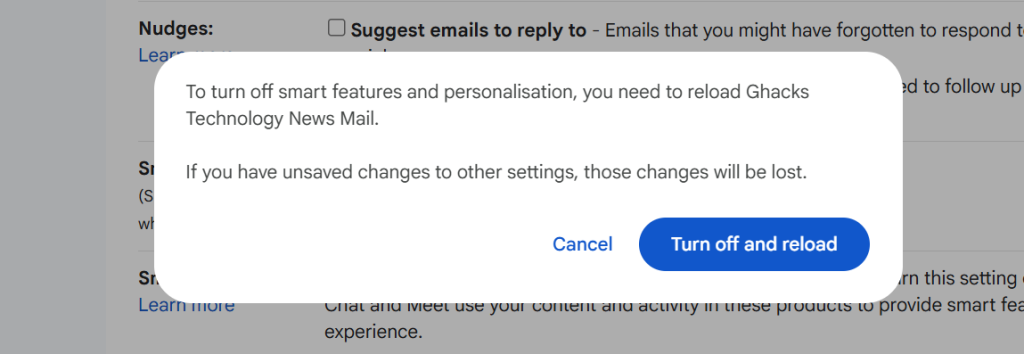
  1. Load https://mail.google.com/mail/u/0/#settings/general in a web browser.
  2. Scroll down to Smart Features in Settings under General.
  3. Remove the checkmark of the Smart Features box.
  4. Confirm the removal.
  5. Gmail restarts.

Smart Features should be turned off now.

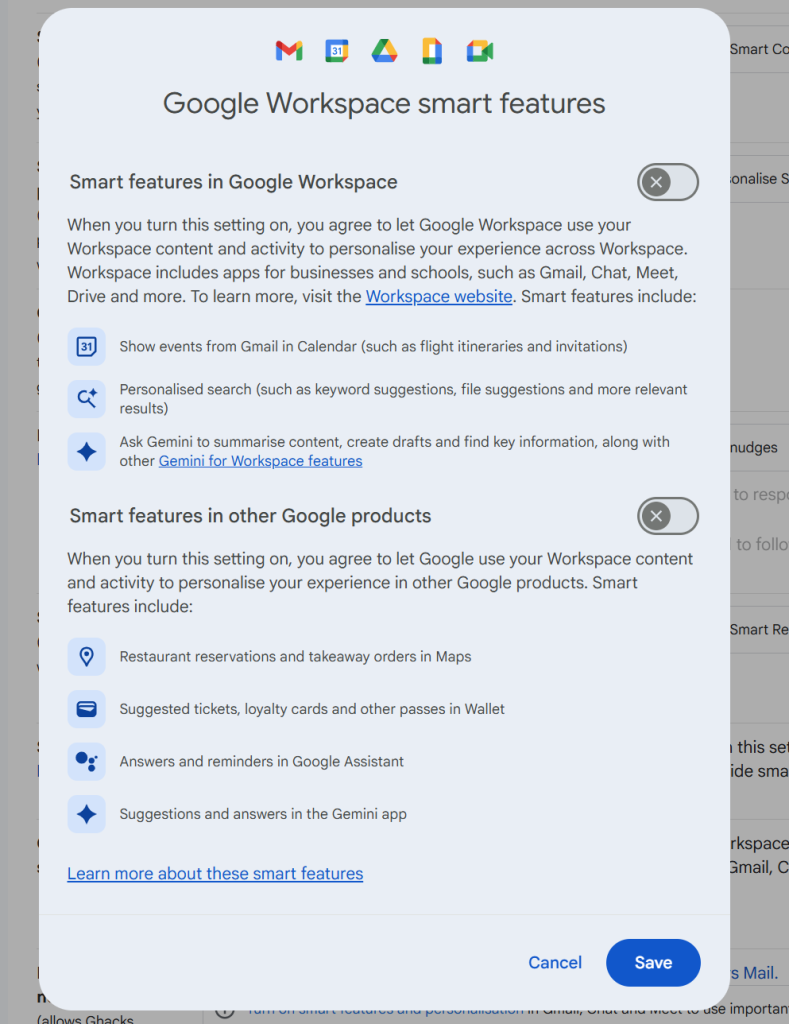
Note that you may also need to click on “Manage Workspace smart feature settings”, if the account is a Google Workspace account and not just a single Gmail account.

There you can turn off Smart Features for Gmail and other Google products.

Again, when you enable the feature you do not get any auto-corrections anymore as well. That is a trade-off for some, others may use the functionality that their browser provides for that anyway.

Now You: do you use Gmail as your mail provider or another service? Black Friday might be a good option to make a switch, as plenty of deals are live already or will be offered in the coming weeks.

You can now try Perplexity’s Comet AI browser for free

Posted on October 3, 2025 by Martin Brinkmann

After launching its Comet AI web browser exclusively for paying subscribers, Perplexity has now made it downloadable for everyone. You can download the browser from the official website for testing, even if you do not have a Perplexity account.

However, Perplexity limits functionality of the browser in that case. First, Comet is a Chromium-based browser. That is good on the one hand, as it offers similar performance and compatibility as Google Chrome. It also means that you can install browser extensions that are compatible with Chrome in the desktop version.

You can import your last browsing session from most other browsers on first start, but can skip it as well. Afterwards, Perplexity displays a few options to you, which most users may want to disable. This includes autostarting the browser with the operating system, making it the default browser, or sending telemetry data to Perplexity.

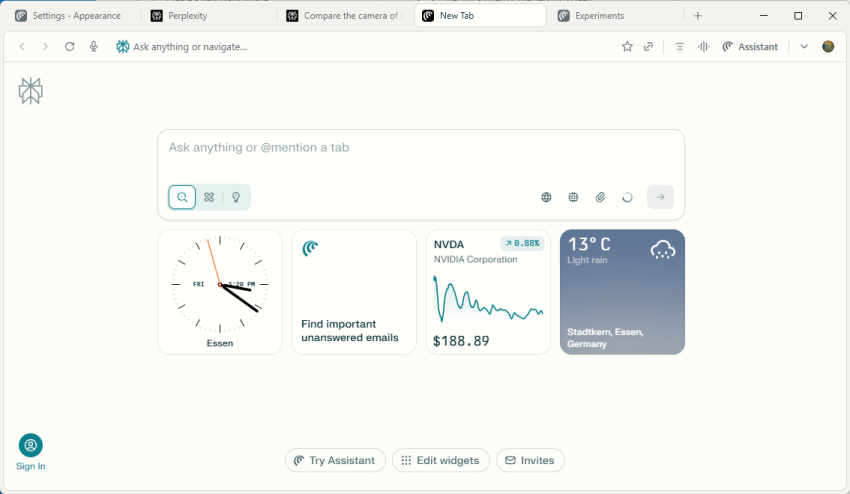
The browser opens and it looks like Chrome for the most part. That is to be expected, as all Chromium-based browsers look pretty much the same. The new tab page displays a few widgets, like the time or Nvidia’s stock price. The star of the show is the text prompt at the top. You may use it to interact with Perplexity’s AI.

Comet Assistant displays a few suggestions when you activate the text field, such as “Find emails from the last 7 days that require replies and draft responses”, or “find top rated noise-cancelling headphones under $300 and open product pages from three major retailers with the lowest prices”.

So, it is basically an AI chat, but this AI has agentic capabilities. It is rather limited for free users, as pro searches and several other features are not available in that case.

The browser displays its results on Perplexity’s website. In fact, you may get similar results when you use the company’s website directly to interact with the AI.

You may also notice that you get constant requests to sign in, if you do not. Open a new tab page, get a request. Similarly, prompts may be displayed on the results page.

If you do not sign-in, you get access to base AI features only. You can’t, for example, change the AI model that the browser uses to process queries. There is also no option to upload files or photos for processing, or run deeper queries.

However, results looked fine in quick tests, even non-Pro searches. Whether the information is accurate is another topic. As is the case with all AI, you should verify important information before you act on it.

Perplexity is Chromium-based. Which is good. You can open chrome://flags to tinker with advanced preferences, and get most of the settings of the browser as well.

Now the big question that I still have regarding all these AI browsers is about the “why” and whether that why warrants paying a monthly subscription fee. Why should I use such a browser? I do not really see the killer-application for it right now. Yes, it can run deep research tasks for you or perform some tasks for you, but how useful is that really, especially if you prefer to stay in control the whole time?

Anyway, you can give Perplexity a try, if you want.

Would you pay $20 per month to use a browser, or more?

Posted on August 8, 2025August 8, 2025 by Martin Brinkmann

When the Browser Company launched its Arc web browser, it was heralded by part of the media as the evolution that browsers needed. Then, the Browser Company announced that it would discontinue its browser to focus on another. This new browser, called Dia, would be an AI-browser first and foremost.

It was not really clear why, but the recent announcement of a Pro subscription plan could shed some light into the plans.

Dia, which is available in early testing for certain Mac devices only, is free to use. The AI parts have limits, however, and the newly announced Pro subscription unlocks unlimited access to the AI.

For $20 per month, users gain unlimited access. The first commercial subscription plan is just the beginning, as The Browser company plans to introduce additional plans that may cost between $5 and several hundred Dollars per month.

The price of a Pro subscription is just shy of the price of a ChatGPT Plus or Google AI Pro subscription. Granted, Dia appears to offer tighter integration in a browser.

Dia offers integration of a chatbot, but one feature that sets it apart from competing browsers currently is skills. These are shortcuts for repetitive tasks. It also supports cross-tab analysis and content synthesis. Is that enough to warrant a subscription? Only time will tell, but my initial take is that it will be very difficult for the company to turn a profit, unless it bakes something into the browser that is truly useful.

Now You: would you pay for a browser? What is your take on the $20 per month price of a subscription? Feel free to leave a comment down below.

  • 1
  • 2
  • 3
  • 4
  • 5
  • Next

Support This Site

If you like what I do please support me!

Any tip is appreciated. Thanks!
  • March 2, 2026 by Martin Brinkmann Don't Bother with Windows 11's new Speedtest feature
  • February 27, 2026 by Martin Brinkmann Warning! That laptop on Amazon? It comes with temporary storage
  • February 26, 2026 by Martin Brinkmann "If your printer works today, it will continue to work": Microsoft corrects previous announcement
  • February 25, 2026 by Martin Brinkmann YouTube Premium Lite subscribers get background playback and downloads with a big "but"
  • February 24, 2026 by Martin Brinkmann Firefox 148.0 is out with its AI kill switch and support for Windows 7 and 8.1 comes to an end

About

We talk, write and dream about Technology 24/7 here at Chipp.in. The site, created by Martin Brinkmann in 2023, focuses on well-researched tech news, reviews, guides, help and more.

Legal Notice

Our commitment

Many websites write about tech, but chipp.in is special in several ways. All of our guides are unique, and we will never just rehash news that you find elsewhere.

Read the About page for additional information on the site and its founder and author.

Support Us

We don't run advertisement on this site that tracks users. If you see ads, they are static links. Ads, including affiliate links, never affect our writing on this site.

Here is a link to our privacy policy

©2026 Chipp.in Tech News and Reviews