
If you have installed the preview update (KB5074105) for Windows 11’s February update, you may have noticed that something is amiss. Opening the Storage part in the Settings app fires an UAC prompt now and some options seem to have been removed.
Microsoft says the security prompt is introduced to “ensure that only authorized Windows users can access system files”. An unelevated process scans and displays only the folders that the current user account has permission to see.
The move has four objectives for Microsoft:
- Preventing the unauthorized enumeration of system files.
- Reducing accidental system damage, for instance when a user deletes the previous Windows installation, as Windows can’t be rolled back anymore in that case.
- Reducing local attack vectors.
- Alignment with the least privilege security model.
Some cleanup options are AWOL
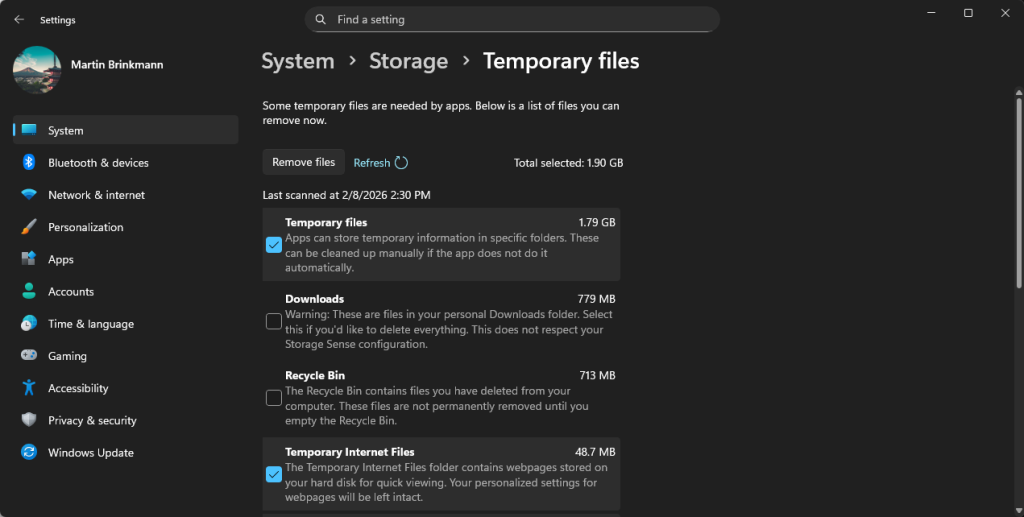
Is it a bug or a feature? While the newly introduced UAC prompt for the Storage part of the Settings app seems to work just fine, users noted that some cleanup options were missing.
Options such as Windows Update Cleanup or Device Driver Packages do not appear anymore when you select the Temporary files option on the Storage page.
Microsoft has not confirmed this as an issue and at this moment, it is unclear whether this is intentional or a bug that will get fixed eventually.
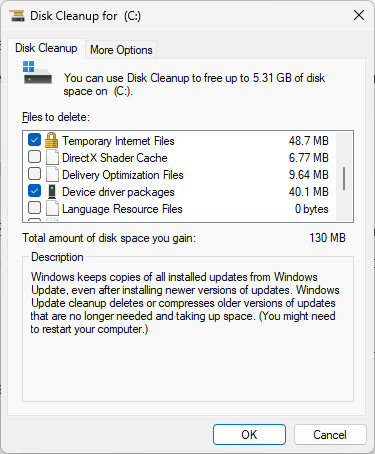
The solution: While Storage in Settings fails to provide users with elevated rights with the proper cleanup options, the legacy Disk Cleanup tool continues to show these options.
Just open the run box with the shortcut Windows-R, type cleanmgr.exe, and press the Enter-key to get started. Make sure you select “clean up system files” after the initial scan to see all options.
Alternatively, you could give third-party programs like BleachBit a try, which support extensive cleanups of temporary files.
Summary: The update didn’t just add a security prompt; it seemingly broke the logic that populates the list in the modern Settings app, forcing users to go back to the old Windows 98-era “Disk Cleanup” tool to do a proper system scrub.
It remains to be seen whether the cumulative updates for Windows 11, which Microsoft will release on February 10, 2026, will correct the issue.