
Brave Browser is one of the few major web browsers that supports native content blocking on all supported platforms that is enabled by default. It should not come as a surprise that the browser is on an upwards trajectory when it comes to users and popularity.
While Brave is not without controversy, it is clear that Brave Software has made several meaningful strategic decisions in the past that has benefitted the business immensely.
Quick Tip: do this, if websites do not react anymore in Brave on first load.
Content blocker improvements
Brave announced today that it has improved the memory usage of its internal content blocker significantly. The company claims that it has reduce memory usage by about 75 percent, which equates to a reduction of about 45 megabytes on all supported platforms.
Brave says that users who have enabled additional filters will see an even larger reduction in memory usage going forward.
How it managed to do that? Brave explains:
..we achieved this major memory milestone by iteratively refactoring the adblock-rust engine to use FlatBuffers, a compact and efficient storage format. This architectural transition allowed us to move the roughly 100,000 adblock filters shipped by default from standard, heap-allocated Rust data structures (such as Vecs, HashMaps, and structs) into a specialized, zero-copy binary format.
Brave notes that it has implemented several optimizations in addition). These are:
- Memory management: Used stack-allocated vectors to reduce memory allocations by 19% and improved building time by ~15%.
- Matching speed: Improved filter matching performance by 13% by tokenizing common regex patterns.
- Sharing resources: Resources are shared between instantiations of adblock engines, saving ~2 MB of memory on desktop.
- Storage efficiency: Optimized internal resource storage memory by 30%.
The main memory reduction and optimizations landed in Brave 1.85 while additional optimizations will be included in the next release of the browser.
It will be interesting to see how users who have enabled additional filters in Brave benefit from the change.
Adding extra filters in Brave
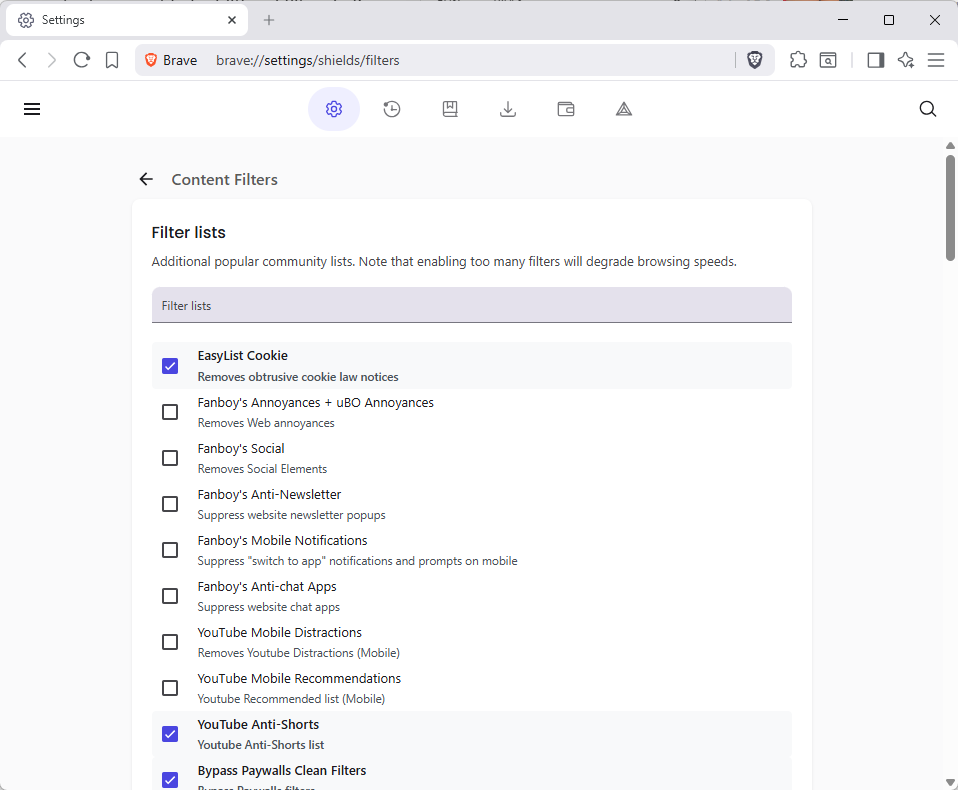
It is quite easy to add more filters to Brave to extend the content blocking functionality.
Note: Each list that Brave supports natively offers a short description of what it does. Fanboy’s Anti-Newsletter list, for instance, blocks newsletter popups on websites.
- Select Menu > Settings, or load brave://settings/ directly in the address bar.
- Go to Shields > Content filtering.
- Click on “show full list” to display all included filter lists.
- Check the lists that you want to enable in Brave.
Note that adding lists will increase the memory usage of the content blocker and thus Brave. It is recommended to keep the list as short as possible.
As for recommendations, it depends largely on your Internet browsing and which annoyances you encounter regularly. YouTuber regulars, for instance, could enable filters for mobile distractions and recommendations, if they use Brave on their mobile devices.
There are also language-specific block lists, which are useful if you visit websites regularly in a specific language.
If memory usage is an issue, I wonder if it’s worth using one of Rizonesoft’s tools–Chromin or Edgemin. I know there’s a tradeoff somewhere when using them, but I forgot or never really understood the issues involved.